Chapter 5: Computer Vision & AI-Generated Content
How Machines See the World and Create Visual Content
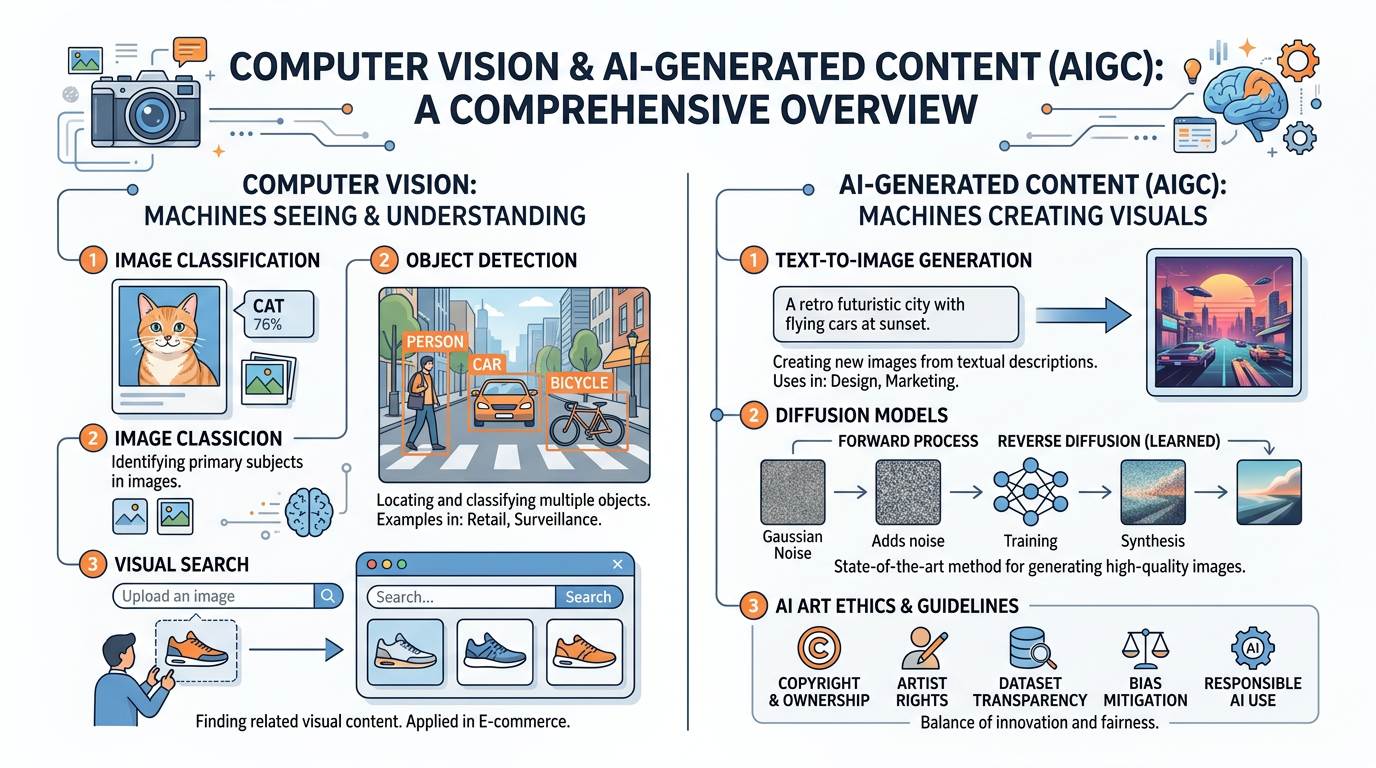
Figure 1:An illustrated overview of the key concepts in computer vision and AI-generated content — from how machines interpret visual data to the creative and ethical frontiers of AI art.
“The heavens declare the glory of God; the skies proclaim the work of his hands. Day after day they pour forth speech; night after night they reveal knowledge.”
Psalm 19:1–2 (NIV)
God’s creation is overwhelmingly visual. From the fractal patterns of a snowflake to the swirling grandeur of a galaxy, the world we inhabit is a masterwork of visual information — and for millennia, only biological eyes could appreciate it. Today, we stand at a remarkable inflection point in human history: machines can now see. Not merely capture light on a sensor, as cameras have done for nearly two centuries, but interpret what they see — recognizing faces, reading text, detecting tumors in medical scans, navigating autonomous vehicles through rush-hour traffic, and even generating entirely new images that never existed before.
Computer vision, the field of AI devoted to enabling machines to understand and interpret visual information, has become one of the most commercially significant branches of artificial intelligence. Combined with the explosive rise of generative AI, which can create photorealistic images, illustrations, and artwork from simple text descriptions, visual AI is transforming industries from healthcare and retail to marketing, entertainment, and education.
For business students, this chapter addresses critical questions: How do computer vision systems work? What business problems do they solve? How are companies like Adobe, OpenAI, and Google deploying AI image generation tools? What are the legal and ethical implications of AI-created content? And as Christians committed to truth and integrity, how do we navigate a world where seeing is no longer believing?
1How Machines See: The Fundamentals of Computer Vision
1.1From Pixels to Understanding
At its most basic level, a digital image is nothing more than a grid of numbers. Each pixel in a photograph is represented by numerical values — typically three numbers representing red, green, and blue (RGB) intensity on a scale from 0 to 255. A standard 1080p image contains over two million pixels, each with three color values, resulting in more than six million individual numbers. A 4K image has over 24 million numbers.
The challenge of computer vision is bridging the gap between these raw numbers and meaningful understanding. When you look at a photograph of a dog sitting on a couch, you instantly recognize the dog, the couch, the room, and the spatial relationships between them. You can infer the dog’s breed, estimate its size, guess whether it is happy or anxious, and predict what might happen if someone rings the doorbell. This effortless visual understanding is actually one of the most complex cognitive feats performed by the human brain — and replicating it in machines has been one of AI’s greatest challenges.
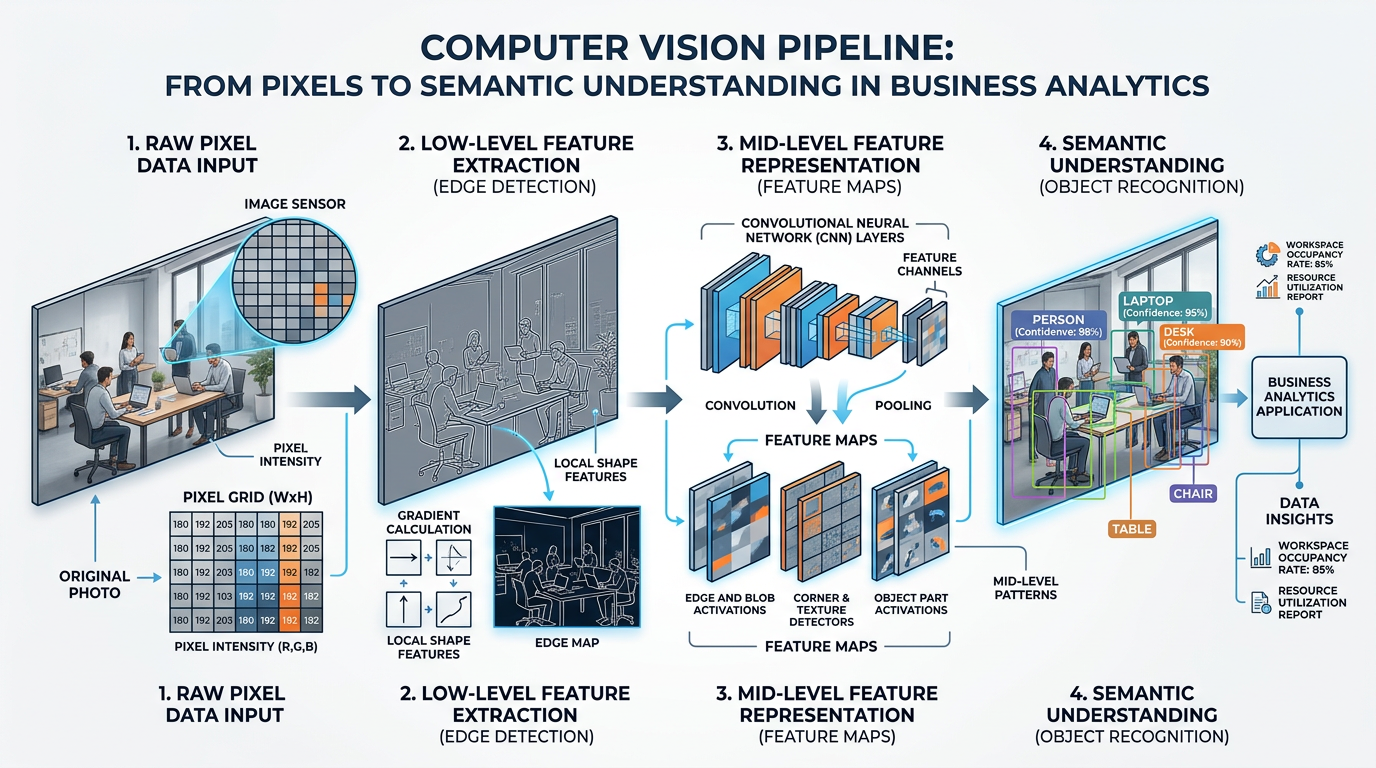
Figure 2:The computer vision pipeline: from raw pixel values through feature extraction to high-level semantic understanding. Each stage adds layers of meaning to the visual data.
1.2The Role of Convolutional Neural Networks (CNNs)
The breakthrough that made modern computer vision possible came from Convolutional Neural Networks (CNNs), a specialized type of deep learning architecture designed specifically for processing visual data. As we discussed in Chapter 2: Evolution of AI & Deep Learning, deep learning models learn hierarchical representations of data — and CNNs are the visual specialists of the deep learning family.
A CNN processes an image through a series of layers, each detecting increasingly complex features:
The first convolutional layers detect simple features — edges, lines, corners, and color gradients. These are the visual building blocks, similar to how your eye first perceives basic shapes and contrasts.
Middle layers combine edges into textures and patterns — fur, fabric, wood grain, brick walls. The network begins recognizing recurring visual motifs that characterize different materials and surfaces.
Deeper layers identify object parts — wheels, windows, eyes, leaves. These are composed of the textures and patterns from earlier layers, assembled into recognizable components.
The deepest layers recognize complete objects and scenes — a car, a face, a kitchen, a beach at sunset. This is where the network achieves something approaching human-like visual understanding.
1.3Key Computer Vision Tasks
Computer vision encompasses a wide range of tasks, each with distinct business applications. Understanding these categories is essential for evaluating AI tools and identifying opportunities.
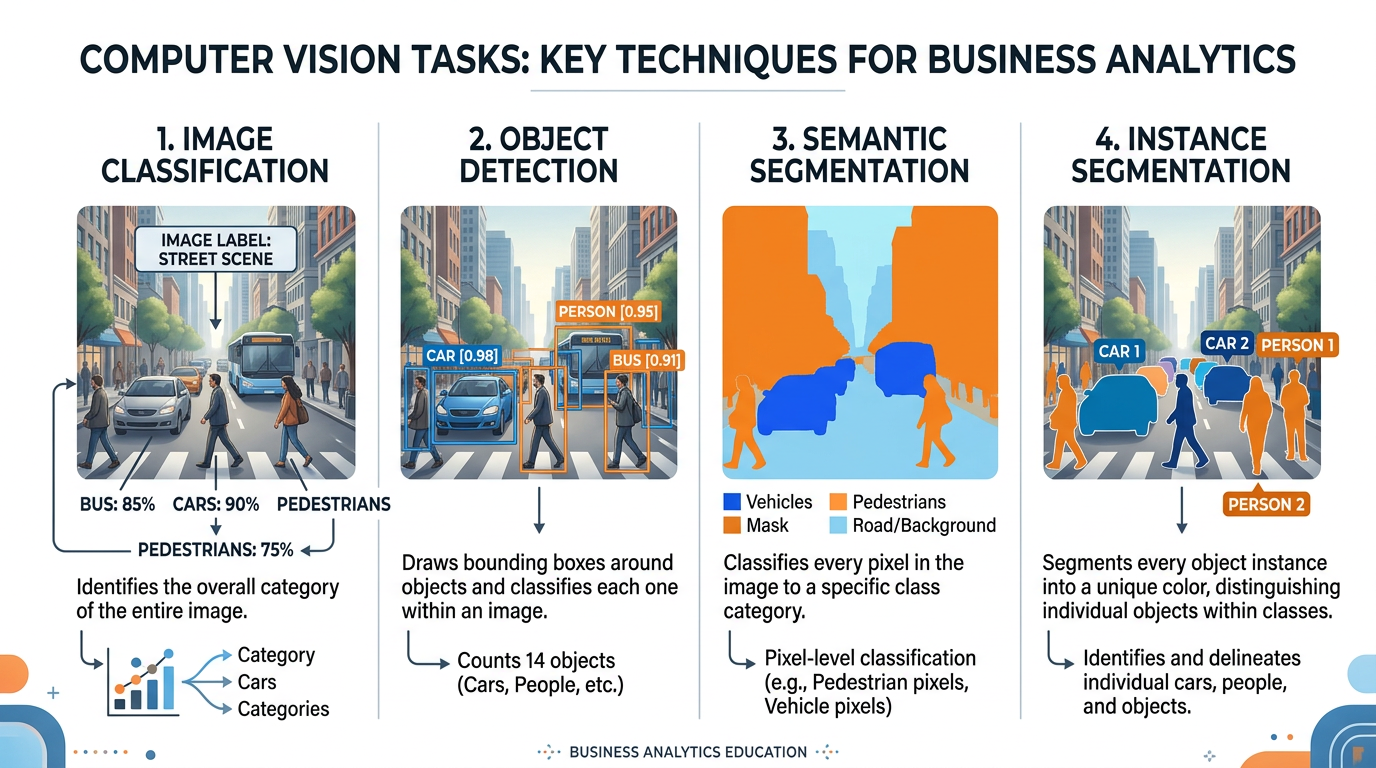
Figure 3:The four primary computer vision tasks, illustrated with the same street scene: classification identifies what’s in the image, detection locates objects, semantic segmentation labels every pixel, and instance segmentation distinguishes individual objects.
What it does: Assigns a label to an entire image (e.g., “cat,” “invoice,” “defective product”).
Business applications:
Product categorization in e-commerce
Medical image diagnosis (X-ray, MRI)
Quality inspection in manufacturing
Document classification in insurance
What it does: Identifies and locates multiple objects within an image, drawing bounding boxes around each.
Business applications:
Retail inventory counting
Autonomous vehicle navigation
Security surveillance
Warehouse automation
What it does: Classifies every pixel in an image into a category (e.g., road, sidewalk, sky, building).
Business applications:
Autonomous driving scene understanding
Medical image analysis (tumor boundaries)
Precision agriculture (crop vs. weed)
Satellite imagery analysis
What it does: Combines object detection and segmentation — identifies each individual object and its precise pixel boundaries.
Business applications:
Robotics (grasping specific objects)
Augmented reality (virtual try-on)
Detailed inventory analysis
Sports analytics (player tracking)
1.4Scene Understanding and Visual Context
Beyond simply recognizing objects, advanced computer vision systems can understand entire scenes — inferring relationships between objects, interpreting activities, and even predicting what might happen next.
For example, a scene understanding system looking at a photograph of a restaurant can not only identify “table,” “chair,” “plate,” and “person” but can also infer that people are dining, that the setting is formal or casual, that the restaurant appears busy or empty, and that a waiter is serving food to a particular table. This level of understanding requires integrating visual perception with world knowledge — understanding not just what things look like, but how the world works.
2Computer Vision in Business: Real-World Applications
2.1Retail and E-Commerce
The retail industry has been one of the earliest and most enthusiastic adopters of computer vision technology. Visual AI is transforming virtually every aspect of the retail experience.
Visual Search and Product Discovery
Amazon Lens, Google Lens, and Pinterest Lens allow consumers to search for products using images instead of text. Point your phone camera at a pair of shoes you admire on a stranger, and the system identifies similar products available for purchase. This technology uses a combination of image classification, feature extraction, and similarity matching to bridge the gap between visual desire and commercial transaction.
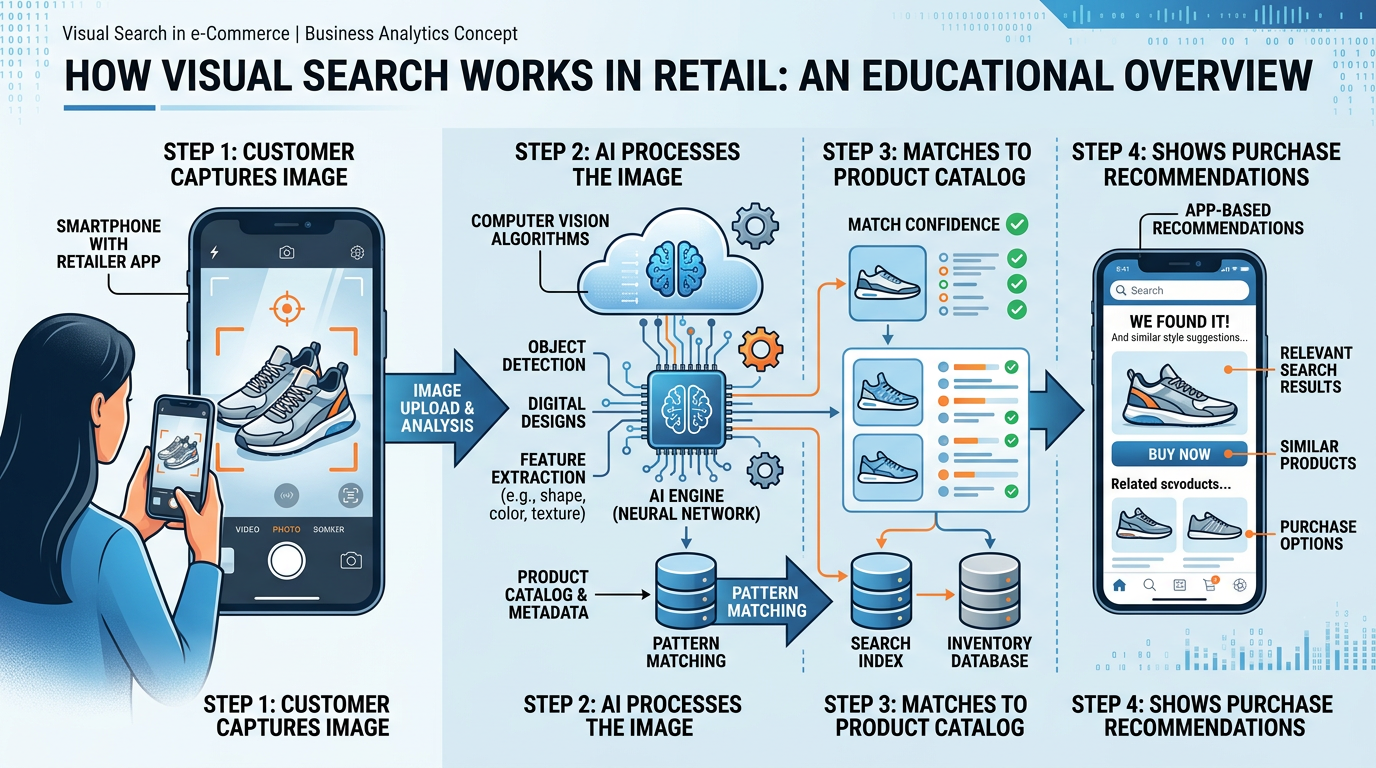
Figure 4:Visual search in retail: a customer photographs a product in the real world, and AI matches it to similar items available for purchase online, transforming visual inspiration into commercial opportunity.
Case Study: Wayfair’s Visual Search Revolution
Wayfair, the online furniture retailer, implemented visual search technology that allows customers to upload photos of furniture they like — from magazines, social media, or real life — and find similar items in Wayfair’s catalog. The system uses deep learning to extract style attributes (modern vs. traditional, color palette, material, shape) and match them against millions of products.
Results:
Visual search users showed 50% higher engagement rates
Conversion rates increased by 20% for visual search sessions
Average order value increased by 15% among visual search users
Customer satisfaction scores improved as shoppers found products that matched their aesthetic vision more precisely than text searches allowed
The theological parallel is worth noting: God designed humans as visual creatures. Genesis 3:6 describes Eve seeing that the fruit was “pleasing to the eye” — visual attraction is deeply wired into human nature. Businesses that understand and serve this visual orientation through tools like visual search are aligning their strategies with fundamental human design.
Inventory Management and Loss Prevention
Computer vision systems mounted on ceiling cameras or robotic shelf scanners can track inventory in real-time, identifying out-of-stock items, misplaced products, and pricing errors without requiring manual shelf audits. Retailers like Walmart and Kroger deploy shelf-scanning robots that use computer vision to audit thousands of SKUs per hour.
Loss prevention systems use computer vision to detect suspicious behavior — unusual loitering patterns, concealment of merchandise, or unauthorized access to restricted areas — while respecting customer privacy through anonymized behavior analysis rather than facial recognition.
2.2Healthcare and Medical Imaging
Computer vision’s impact on healthcare is nothing short of revolutionary. AI systems can now analyze medical images with accuracy that matches or exceeds that of trained specialists in certain domains.
AI systems analyze X-rays, CT scans, and MRIs to detect fractures, tumors, pneumonia, and other conditions. Studies show AI can detect certain conditions 30-50% faster than human radiologists, enabling earlier diagnosis and treatment.
Digital pathology uses computer vision to analyze tissue samples at the cellular level. AI can identify cancerous cells, grade tumors, and even predict treatment outcomes by detecting patterns invisible to the human eye.
Smartphone-based AI tools allow patients to photograph skin lesions and receive preliminary assessments. Stanford researchers developed a CNN that matched dermatologists’ accuracy in classifying skin cancer from clinical images.
Google’s DeepMind developed an AI system that can detect over 50 eye diseases from retinal scans, often before symptoms appear. Diabetic retinopathy screening, which previously required a specialist visit, can now be automated at primary care clinics.
2.3Manufacturing and Quality Control
Computer vision has transformed manufacturing quality control from a sampling-based process to comprehensive, real-time inspection. AI systems can inspect every single product on an assembly line, detecting defects invisible to the naked eye.
Table 1:Computer Vision Quality Inspection: Before and After
| Metric | Traditional Inspection | AI-Powered Inspection |
|---|---|---|
| Inspection rate | 100-200 items/hour (human) | 1,000-10,000 items/hour |
| Defect detection rate | 80-90% (human fatigue) | 98-99.5% |
| False positive rate | 15-25% | 2-5% |
| Consistency | Varies with fatigue/shift | Constant 24/7 |
| Cost per inspection | 2.00 | 0.05 |
| Data generated | None | Full defect database |
Case Study: BMW’s AI Quality Vision
BMW has deployed over 100 AI-powered camera systems across its manufacturing plants. These systems inspect painted surfaces for microscopic defects, verify that components are correctly assembled, and ensure that interior trim pieces match color and texture specifications.
One particularly impressive application: AI cameras at BMW’s paint shops can detect paint defects as small as 0.1mm — literally invisible to the human eye — by analyzing how light reflects off the surface at different angles. Defective vehicles are automatically flagged and routed for correction before they leave the factory.
Impact:
95% reduction in paint defects reaching customers
$12 million annual savings in warranty claims
Real-time quality data enables continuous process improvement
Human inspectors freed to focus on complex judgment calls
2.4Agriculture and Environmental Monitoring
Precision agriculture uses computer vision-equipped drones, satellites, and ground sensors to monitor crop health, detect pest infestations, assess soil conditions, and optimize irrigation.
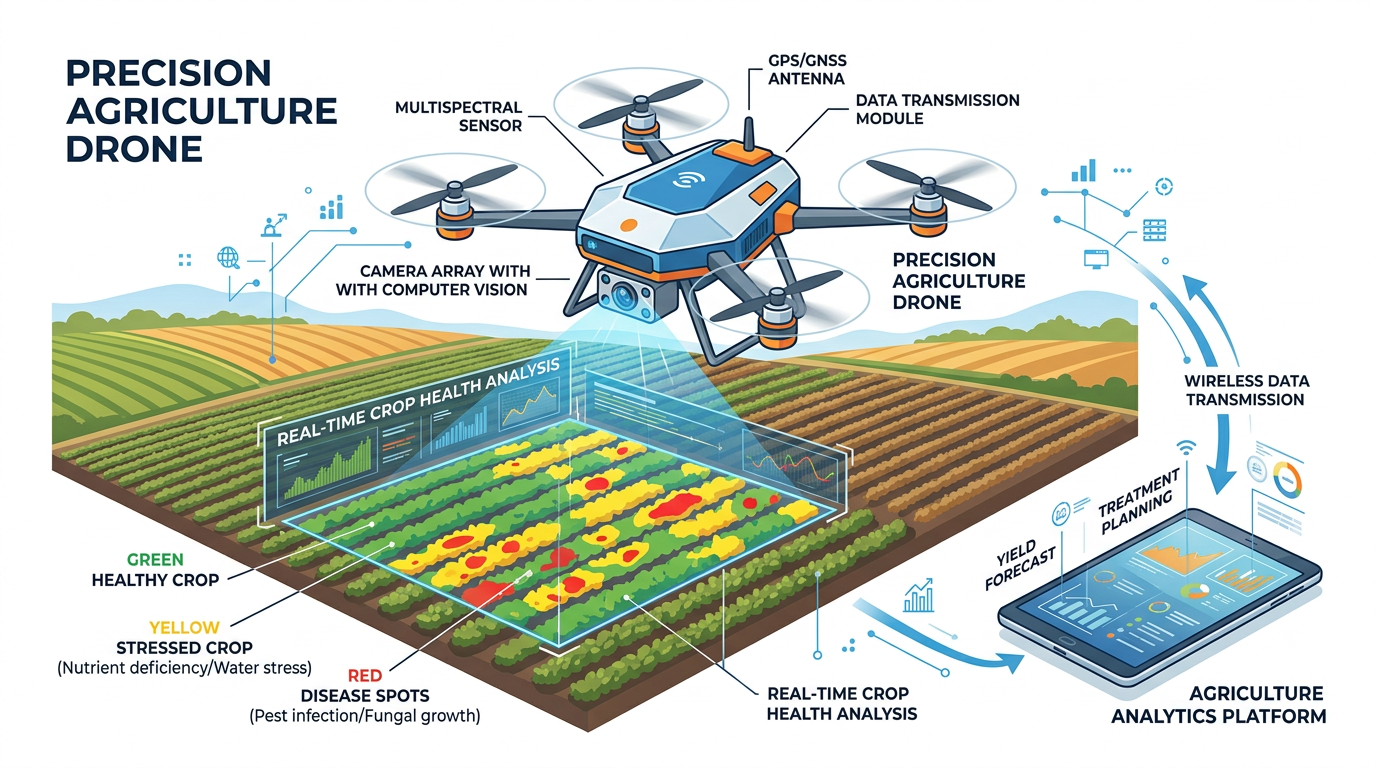
Figure 5:Precision agriculture: drones equipped with computer vision cameras survey farmland, identifying crop stress, disease, pest damage, and irrigation needs at a scale impossible for human observation alone.
3The Rise of AI Image Generation
3.1From Understanding to Creating: A Paradigm Shift
While traditional computer vision focuses on interpreting existing images, a revolutionary new category of AI has emerged: systems that create images. Text-to-image generation models like DALL-E, Midjourney, Adobe Firefly, and Stable Diffusion have transformed the creative landscape by enabling anyone to generate professional-quality visual content from simple text descriptions.
This represents a fundamental paradigm shift. For the first time in history, visual creation is no longer limited to those with artistic talent, technical training, or expensive tools. A marketing intern can now generate photorealistic product imagery. A small business owner can create professional advertising visuals. A student can illustrate a presentation with custom artwork. The democratization of visual creation has profound implications for business, creativity, and ethics.
3.2How Text-to-Image Models Work: Diffusion Models
The dominant approach behind modern AI image generation is the diffusion model — an elegant concept inspired by thermodynamics.
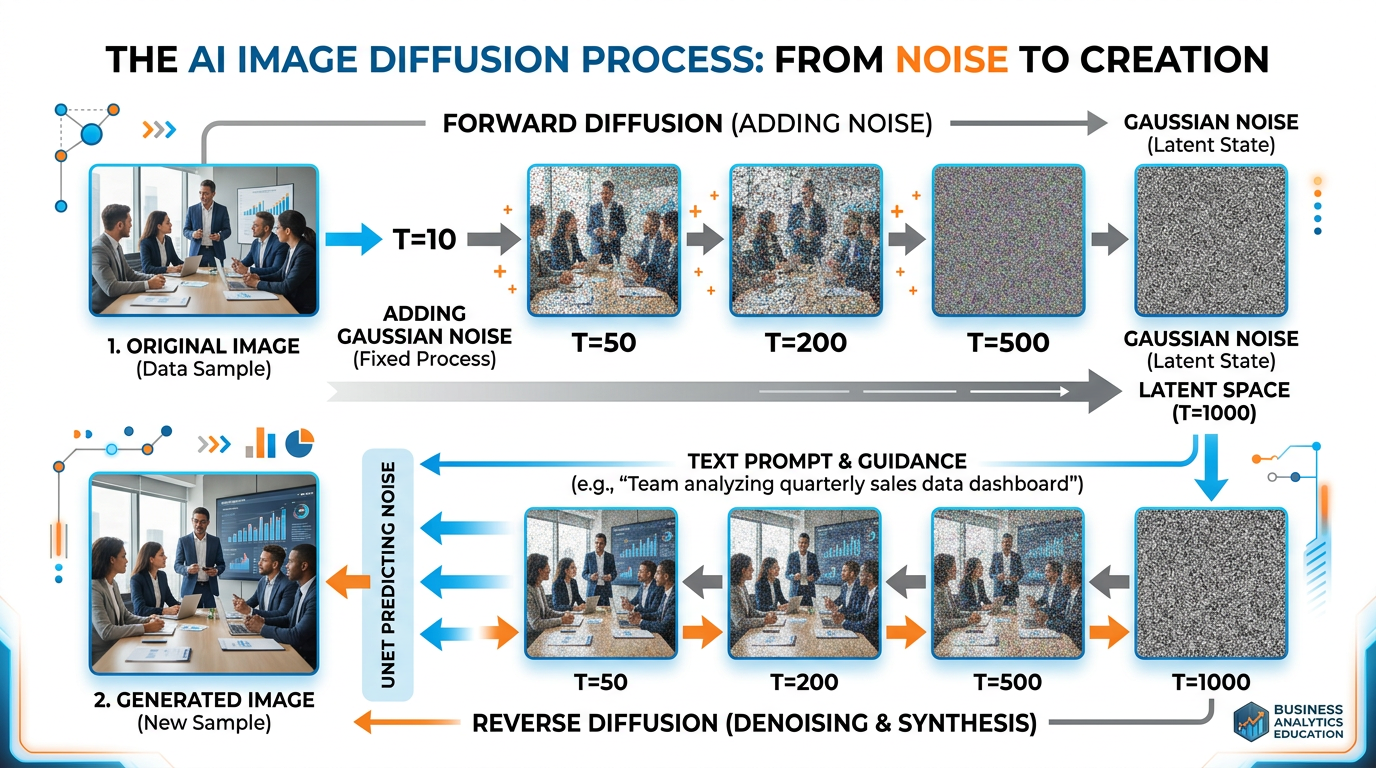
Figure 6:The diffusion process: during training, the model learns to reverse the process of adding noise to images. During generation, it starts with pure noise and progressively removes it, guided by the text prompt, until a coherent image emerges.
The training process works in two phases:
Forward Diffusion (Training): Take a real image and gradually add random noise over many steps until it becomes pure static — like slowly turning up the static on an old television until the picture disappears entirely.
Reverse Diffusion (Generation): Train the neural network to reverse this process — to look at a noisy image and predict what the slightly less noisy version should look like. After thousands of training examples, the network learns to “denoise” images step by step.
During image generation, the model starts with pure random noise and applies the learned denoising process repeatedly, guided by the text prompt, until a coherent image emerges from the chaos. It is remarkably similar to how Michelangelo described sculpture: “I saw the angel in the marble and carved until I set him free.”
3.3Major AI Image Generation Platforms
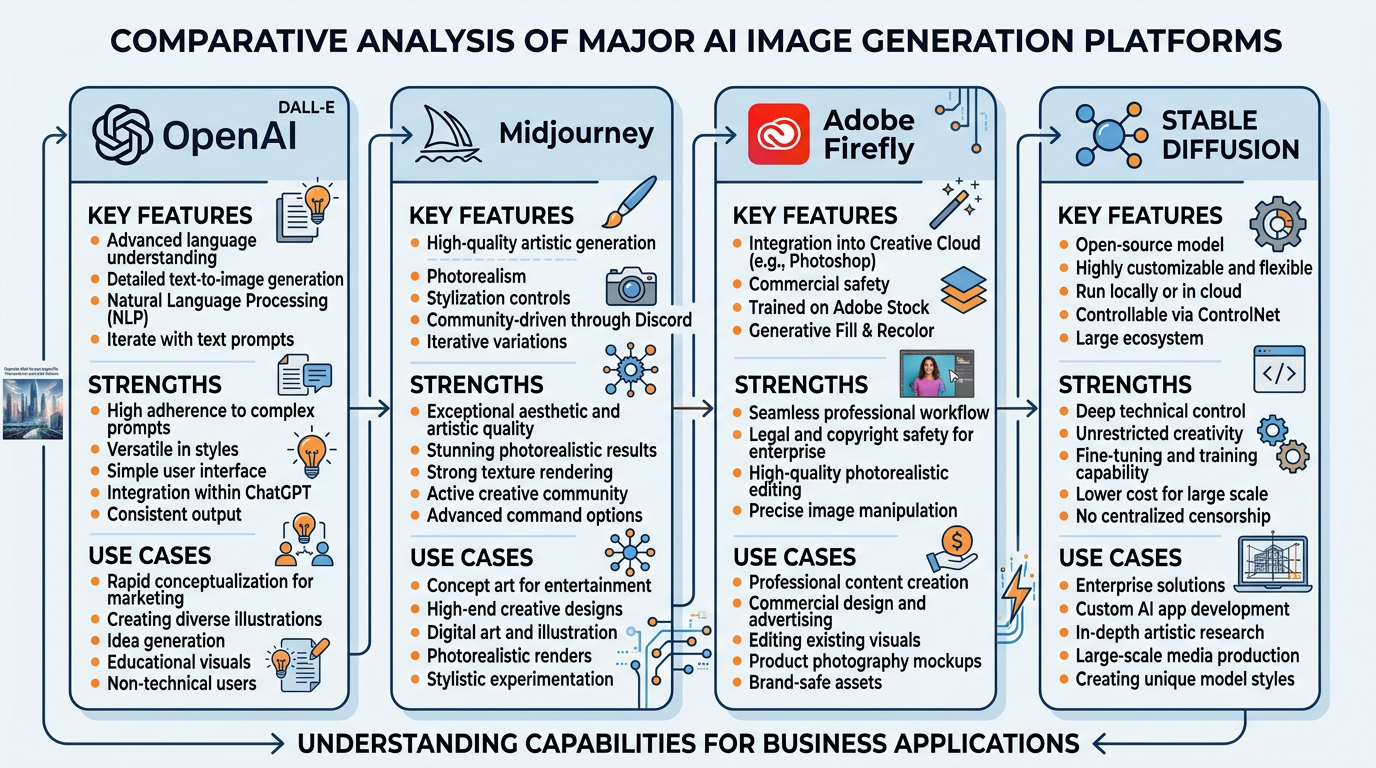
Figure 7:A comparison of the four dominant AI image generation platforms, each with distinct strengths, training data approaches, and ideal business use cases.
Key features:
Integrated directly into ChatGPT
Excellent at following complex prompts
Strong text rendering capabilities
Built-in safety filters and content policies
Best for: General-purpose image creation, content with text overlays, detailed scene composition
Pricing: Included with ChatGPT Plus ($20/month) or via API
Key features:
Exceptional aesthetic quality
Strong at artistic and stylized images
Community-driven through Discord
Powerful style controls and variations
Best for: Marketing visuals, artistic content, brand imagery, concept art
Pricing: Subscription tiers from 120/month
Key features:
Trained exclusively on Adobe Stock, licensed content, and public domain
Integrated into Creative Cloud (Photoshop, Illustrator)
Commercially safe — designed to avoid copyright issues
Professional editing tools alongside generation
Best for: Commercial projects requiring legal safety, professional design workflows, brand-safe content
Pricing: Included with Creative Cloud; generative credits system
Key features:
Open-source and freely available
Highly customizable and extensible
Can run locally on personal hardware
Massive community of model fine-tuners
Best for: Custom applications, privacy-sensitive use cases, experimentation, specialized domains
Pricing: Free (open-source); cloud hosting varies
3.4Prompt Engineering for Visual AI
Just as we discussed prompt engineering for text AI in Chapter 1: Introduction to AI in Business, crafting effective prompts for image generation is a skill with significant business value. The quality of AI-generated images depends enormously on the specificity and clarity of the prompt.
Table 2:Image Prompt Engineering: From Weak to Strong
| Prompt Quality | Example Prompt | Result Quality |
|---|---|---|
| Weak | “a dog” | Generic, low-quality image |
| Basic | “a golden retriever sitting in a park” | Decent but generic |
| Good | “a golden retriever sitting in Central Park on an autumn day, fallen leaves on the ground, warm sunlight, shallow depth of field” | Strong composition and mood |
| Professional | “a golden retriever sitting in Central Park on an autumn day, golden hour lighting, fallen maple leaves, shallow depth of field, shot on Canon EOS R5 with 85mm f/1.4 lens, National Geographic style photography” | Near-photographic quality |
Key elements of effective visual prompts include:
Subject: What is the main focus? Be specific about characteristics.
Setting/Environment: Where is the scene? What surrounds the subject?
Lighting: What type of lighting? Golden hour, studio, dramatic, flat?
Style: Photography, illustration, watercolor, 3D render, vintage?
Composition: Close-up, wide angle, aerial view, rule of thirds?
Technical details: Camera type, lens, resolution, aspect ratio
Mood/Atmosphere: Warm, cold, mysterious, joyful, professional?
4Object Detection and Visual Search in Business
4.1How Object Detection Works
Object detection combines image classification with spatial localization — it not only identifies what objects are in an image but also where they are. Modern object detection systems use architectures like YOLO (You Only Look Once), SSD (Single Shot Detection), and Faster R-CNN to process images in real-time.
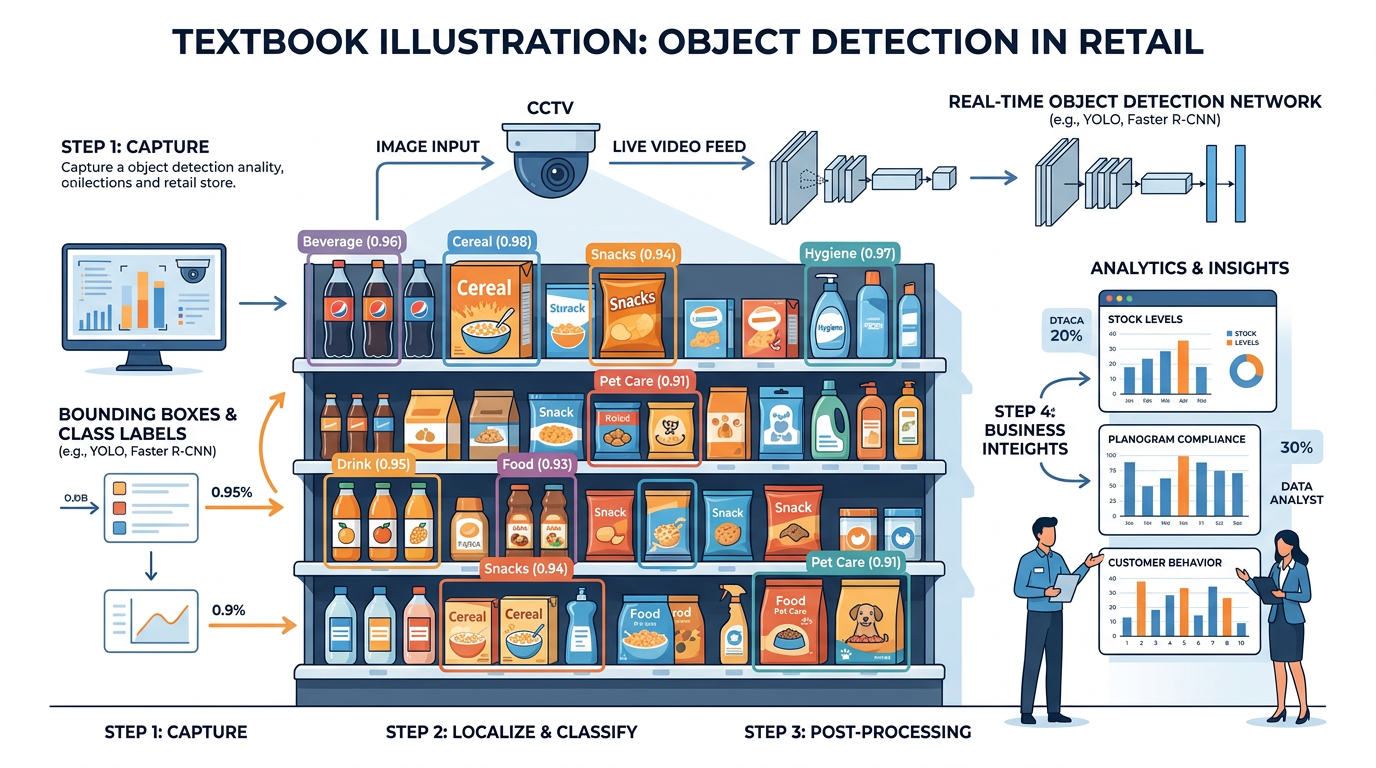
Figure 8:Object detection in a retail environment: AI identifies and locates products on shelves with bounding boxes, enabling automated inventory tracking, planogram compliance checking, and out-of-stock detection.
4.2Visual Search Technologies
Visual search represents one of the most commercially significant applications of computer vision. Unlike traditional text-based search, visual search allows users to find information using images as queries.
Google Lens can identify plants, animals, landmarks, products, and text from camera images. It has been used over 12 billion times and supports 100+ languages for text translation from images. For businesses, Google Lens integration means products that are visually distinctive are more discoverable.
Amazon’s visual search allows shoppers to photograph any product and find similar items available on Amazon. The system uses deep learning to match visual features — shape, color, texture, style — against Amazon’s catalog of hundreds of millions of products. This technology has significantly reduced the friction between visual inspiration and purchase.
Pinterest’s visual search technology lets users tap on any element within a Pin (image) to find visually similar items. The platform processes over 600 million visual searches per month. For brands, Pinterest Lens represents a powerful discovery channel where visual appeal directly drives commercial interest.
Reverse image search allows users to upload an image and find where it appears online, identify its source, or find similar images. This technology is invaluable for verifying image authenticity, detecting copyright infringement, and investigating the provenance of visual content — critical skills in an age of AI-generated imagery and deepfakes.
4.3The Business Impact of Visual AI
The commercial impact of computer vision is substantial and growing rapidly. Consider these market projections:
Table 3:Computer Vision Market Growth
| Sector | 2023 Market Size | Projected 2028 | Growth Driver |
|---|---|---|---|
| Healthcare imaging | $1.5B | $5.2B | Diagnostic AI, surgical robots |
| Retail visual AI | $2.1B | $8.5B | Visual search, inventory automation |
| Autonomous vehicles | $4.5B | $15.8B | Self-driving technology |
| Manufacturing inspection | $1.2B | $4.8B | Quality automation |
| Agriculture | $0.8B | $3.2B | Precision farming, drones |
| Total CV Market | $17.4B | $50.2B | All sectors combined |
5Copyright, Ethics, and the AI Art Debate
5.1The Copyright Question
The rise of AI image generation has ignited one of the most contentious legal and ethical debates in the technology world: Who owns AI-generated art? Can AI models legally train on copyrighted images? And what rights do human artists have when AI can replicate their distinctive styles?
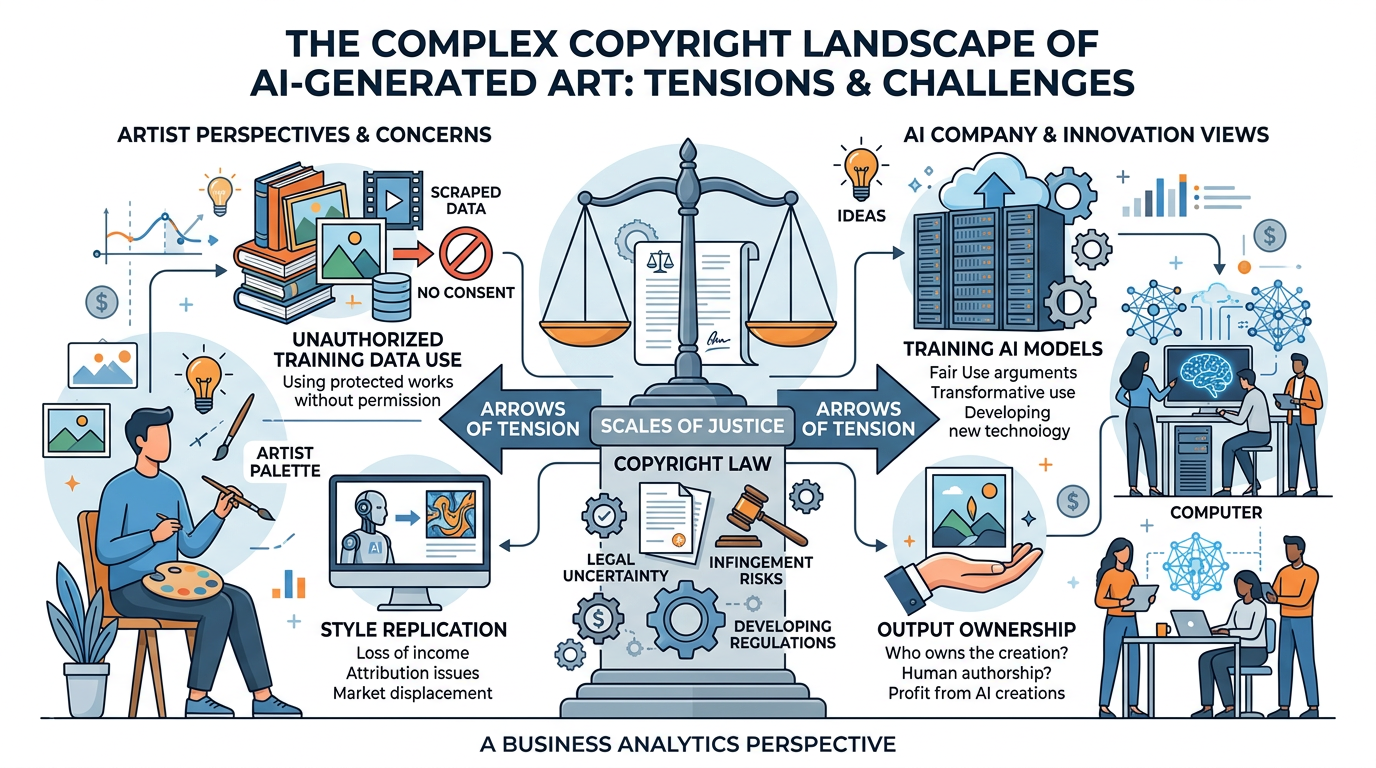
Figure 9:The AI art copyright landscape: a complex web of competing interests between AI companies, human artists, content creators, and evolving legal frameworks.
Key Legal Issues:
Training Data Rights: Most AI image generators were trained on datasets containing billions of images scraped from the internet — including copyrighted artwork, photographs, and illustrations — often without the knowledge or consent of the original creators. Multiple class-action lawsuits (including cases by Getty Images and individual artists against Stability AI, Midjourney, and DeviantArt) argue this constitutes copyright infringement.
Output Ownership: The U.S. Copyright Office has ruled that images generated entirely by AI cannot be copyrighted because copyright requires human authorship. However, images where a human provides substantial creative direction — through detailed prompting, curation, and editing — may qualify for some copyright protection. This area of law is rapidly evolving.
Style Replication: AI models can generate images “in the style of” specific living artists, effectively replicating their distinctive visual signatures. While artistic style itself cannot be copyrighted, the ease with which AI can imitate an artist’s life work raises profound ethical questions about creative labor, attribution, and fair compensation.
5.2The Human Artist Perspective
The art community has responded to AI image generation with a mixture of outrage, fear, and reluctant adaptation. Understanding the artists’ perspective is essential for ethical business leadership.
Artists’ Concerns: In Their Own Words
Economic displacement: “I spent 15 years developing my illustration style. Now someone can type my name into Midjourney and generate images that look like my work in seconds. My commissions have dropped 40% since these tools launched.” — Freelance illustrator (anonymous survey, 2024)
Consent and data rights: “Nobody asked me if my artwork could be used to train an AI model. Billions of images were scraped from the internet without permission. That’s not fair use — that’s theft at scale.” — Concept artist and plaintiff in class-action suit
Devaluation of craft: “The message these tools send is clear: artistic skill doesn’t matter anymore. Anyone with a text box can ‘create’ what used to require years of training and practice.” — Art educator
Adaptation and opportunity: “I’ve started using AI as a brainstorming tool — generating rough concepts that I then refine and develop with my skills. It hasn’t replaced me; it’s accelerated my process. But I understand why many artists are terrified.” — Digital artist and early AI adopter
5.3Navigating AI Art Ethically in Business
For business professionals, navigating the AI art landscape requires balancing innovation with integrity. Here are practical guidelines:
Use commercially licensed platforms (Adobe Firefly)
Credit AI as a tool when images are AI-generated
Support human artists for distinctive, brand-defining work
Verify generated images don’t closely replicate existing works
Maintain transparency with clients about AI use
Pay for proper licensing when using AI tools
Claiming AI-generated images as human-created art
Generating images “in the style of” specific living artists
Using AI art to undercut human artists’ pricing
Assuming all AI-generated content is free of copyright risk
Hiding AI use from clients or customers
Using AI images for deceptive purposes (fake reviews, false testimonials)
6Multimodal AI: When Vision Meets Language
6.1The Convergence of Visual and Language AI
One of the most exciting developments in AI is the emergence of multimodal models — systems that can process and reason about multiple types of data simultaneously, including text, images, audio, and video. Google’s Gemini, OpenAI’s GPT-4 with vision, and Anthropic’s Claude represent the cutting edge of this convergence.
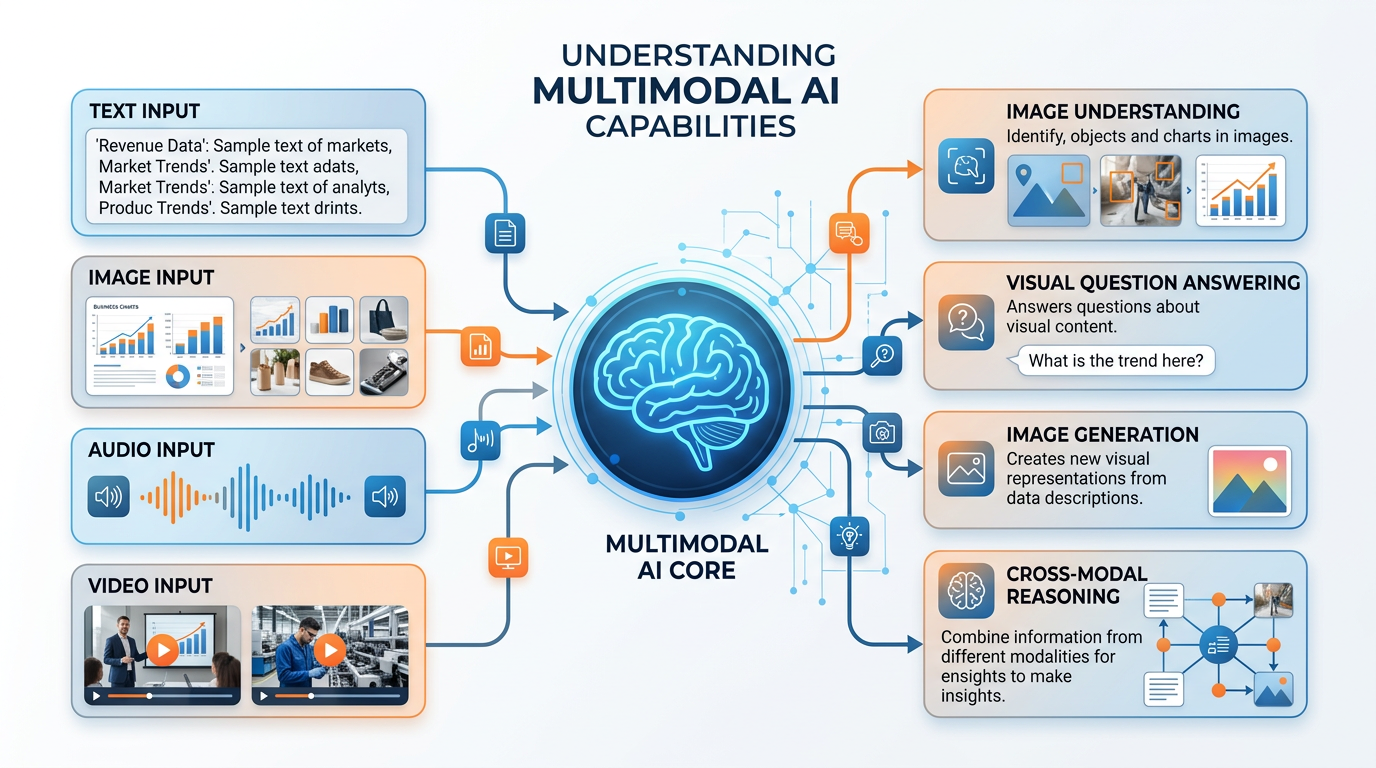
Figure 10:Multimodal AI capabilities: modern systems can understand images, answer questions about visual content, generate images from text, and reason across different types of information simultaneously.
6.2Business Applications of Multimodal AI
Multimodal AI opens up business applications that were impossible when vision and language were separate capabilities:
Visual Customer Service: Upload a photo of a broken product, and the AI diagnoses the issue and recommends solutions — no technical vocabulary needed.
Automated Document Processing: AI reads scanned documents, extracts information from tables, charts, and handwritten notes, and structures it into databases — transforming unstructured visual information into actionable data.
Brand Monitoring: AI analyzes images on social media to detect unauthorized logo usage, counterfeit products, or brand sentiment expressed through visual content — not just text.
Accessibility: Multimodal AI can describe images for visually impaired users, generate captions for video content, and translate visual information into text or audio — making the visual world accessible to everyone.
Real Estate and Insurance: AI analyzes property photos to estimate values, detect damage, or verify claims — reducing the need for in-person inspections.
7The Future of Visual AI
7.1Emerging Trends
The field of computer vision and AI-generated content is evolving at a breathtaking pace. Several trends will shape the next decade of visual AI:
AI systems like OpenAI’s Sora can now generate photorealistic video from text descriptions. While still in early stages, this technology will revolutionize advertising, entertainment, education, and training. Imagine generating a product demo video from a text brief, or creating personalized training videos for each employee.
AI models are beginning to generate 3D objects and scenes from text or 2D images. This technology will transform e-commerce (virtual product viewing), real estate (AI-generated virtual staging), gaming, and industrial design.
Edge computing enables computer vision to run on devices like smartphones, drones, and IoT sensors with minimal latency. This enables real-time applications: instant translation of foreign text through your camera, real-time quality inspection on production lines, and augmented reality overlays that respond instantly to visual input.
Robots with advanced computer vision can navigate complex environments, manipulate objects, and interact naturally with humans. This convergence of vision, language, and physical action will transform warehousing, healthcare, and service industries.
7.2Preparing for a Visual AI Future
For business students, the rise of visual AI demands several new competencies:
Visual Literacy: Understanding what AI can and cannot see, and how visual AI systems make decisions.
Prompt Engineering for Images: Crafting effective prompts for image generation tools.
Ethical Reasoning: Navigating copyright, consent, and attribution in AI-generated content.
Strategic Thinking: Identifying where visual AI creates business value versus where it creates risk.
Technical Fluency: Understanding enough about CNNs, diffusion models, and multimodal AI to evaluate vendor claims and make informed decisions.
8Module 5 Activities
8.1Discussion: The Future of Visual Content Creation
8.2Written Analysis: Computer Vision ROI Analysis
8.3Reflection: Created in the Image of God — What Does AI Art Mean?
8.4Hands-On Activity 1: Multimodal AI with Gemini Vision
8.5Hands-On Activity 2: Building a Visual Brand Analysis Assistant (NotebookLM + Gemini)
9Chapter Summary
Computer vision and AI-generated content represent two of the most transformative and commercially significant branches of artificial intelligence. In this chapter, we explored:
How machines process visual information (pixels → features → understanding)
CNNs as the backbone of modern computer vision
Key tasks: classification, object detection, segmentation, scene understanding
Retail: visual search, inventory management, loss prevention
Healthcare: medical imaging, diagnosis assistance
Manufacturing: quality inspection, defect detection
Agriculture: precision farming, crop monitoring
Diffusion models: how AI creates images from text
Major platforms: DALL-E, Midjourney, Adobe Firefly, Stable Diffusion
Prompt engineering for visual AI
Multimodal AI: when vision meets language
Training data rights and ongoing litigation
Copyright status of AI-generated images
Artist displacement and creative labor
Ethical guidelines for business use
10Key Terms
Computer Vision A field of AI that enables computers to interpret and understand visual information from images, videos, and camera feeds.
Convolutional Neural Network (CNN) A deep learning architecture specifically designed for processing visual data through hierarchical feature extraction layers.
Image Classification A computer vision task that assigns a categorical label to an entire image.
Object Detection A computer vision task that identifies and locates multiple objects within an image using bounding boxes and class labels.
Semantic Segmentation A computer vision task that classifies every pixel in an image into a predefined category.
Instance Segmentation A computer vision task that identifies individual objects and their precise pixel boundaries.
Scene Understanding A computer vision system’s ability to comprehend the overall context of a visual scene, including object relationships and activities.
Diffusion Model A generative AI architecture that creates images by learning to reverse the process of adding noise to images.
Text-to-Image Generation AI technology that creates visual content from natural language descriptions using deep learning models.
Visual Search Technology that allows users to search for information using images as queries rather than text.
Multimodal AI AI systems capable of processing and reasoning about multiple data types (text, images, audio, video) simultaneously.
Prompt Engineering (Visual) The practice of crafting detailed, specific text descriptions to guide AI image generation systems toward desired outputs.
Reverse Image Search Technology that allows users to upload an image to find its source, similar images, or verify its authenticity online.
Adobe Firefly An AI image generation platform trained on licensed content, designed for commercial safety.
DALL-E OpenAI’s text-to-image generation model, integrated into ChatGPT.
Bounding Box A rectangular outline drawn around a detected object in computer vision, indicating its location within an image.