“The wolf that only knows one terrain is brittle. The pack that can hunt anywhere is dangerous.”
You have spent thirteen chapters mastering one of the most powerful AI ecosystems on the planet. You can run a Gemini Gem, build a NotebookLM corpus, deploy a Vertex pipeline, and orchestrate a four-agent wolfpack through Antigravity. You are, by any fair measure, a Google AI power user.
This chapter is going to tell you that isn’t enough.
Not because Google’s stack is inadequate. It isn’t. But because professional maturity in federal contracting has always required the same discipline: never run a single-vendor anything. That rule didn’t start with AI. It applies to cloud providers, to prime contractors, to tool ecosystems. It applies here too.
By the end of this chapter, you will have:
The case — made clearly and fairly — for why multi-vendor AI fluency is professional insurance
A field guide to the Claude model family: what’s current, what it costs, when to reach for it
Hands-on fluency with claude.ai, Claude Desktop, Claude Cowork, and Claude Code
Claude’s federal deployment path: Vertex Model Garden and AWS Bedrock
An updated Lukos Decision Matrix that gives every tool its honest column
The intuition that separates a practitioner from a user
Let’s bring the other wolf into the pack.
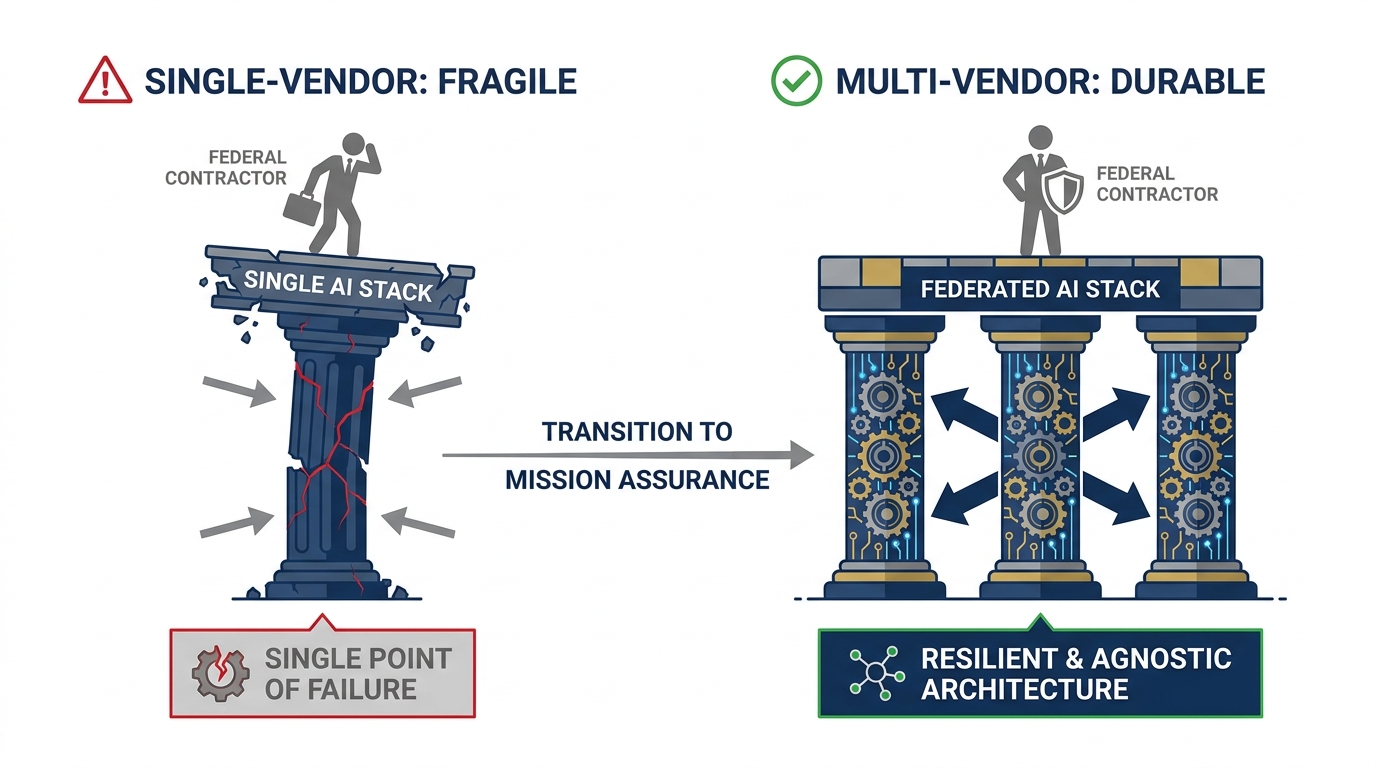
Figure 1:The multi-vendor argument. A single-vendor stack is a single point of failure — in procurement, in capability, in professional positioning. The Lukos analyst who can operate across stacks is the one who doesn’t get stuck when the customer changes the contract.
114.1 The Honest Disclosure
Let’s be transparent about something.
Every book has a perspective. This one opened in the Google ecosystem because the depth and integration of Google’s AI stack is genuinely unmatched for the federal services context. Gemini’s multimodal breadth, NotebookLM’s citation discipline, Vertex’s governance architecture, Antigravity’s agentic framework — these tools were chosen deliberately, not arbitrarily. If you have been following this curriculum, you are working with a world-class set of instruments.
But here is the honest disclosure: brand loyalty is a liability in federal contracting.
Consider how federal procurement actually works. Contracts go to vendors who can demonstrate tool-agnostic problem-solving capability. Customers don’t want to hear “we use Google for everything.” They want to hear “we evaluated the full landscape, selected the best tool for your specific requirement, and here’s how we made that call.” That’s the answer that wins evaluations. That’s the answer that builds trust.
The analyst who has only ever used one AI vendor can’t give that answer credibly. The one with hands-on experience across multiple stacks can.
This is not anti-Google advocacy. It is pro-Lukos advocacy. And right now, the most important second stack for a Lukos professional to build fluency in is Claude by Anthropic.
Why Anthropic Is on the Short List
Anthropic is not a startup experiment. As of April 2026, it is one of the two or three frontier AI labs producing models that consistently appear at the top of academic and industry benchmarks. The company’s approach to AI safety — built into the model itself through a methodology called Constitutional AI — has made it a preferred vendor for several federal contexts where trust and predictability matter as much as capability.
The federal path is real: Claude runs on AWS Bedrock (Amazon’s managed AI service with FedRAMP infrastructure) and on Google Vertex AI Model Garden (the same governed environment you learned in Chapter 9). This is not a consumer toy. This is enterprise AI with a credible deployment path into sensitive environments.
And the models themselves are genuinely excellent — not as a replacement for Gemini, but as a complement. Every frontier model has what practitioners call a temperament: a characteristic style, a set of task types where it naturally excels, a way of handling ambiguity that either matches your work or doesn’t. Learning Claude’s temperament is not about picking a favorite. It’s about knowing which wolf to send first.
214.2 Why Claude Is on the Short List Right Now
Before we get to the field guide, let’s be precise about the case.
Claude’s current generation models (the Claude 4.x series) have demonstrated consistent strengths in specific task categories that matter to Lukos analysts:
Precise instruction-following under structural constraints. Claude tends to stay inside formatting boundaries with fewer drift behaviors than some other models. When you give it a strict BLUF format with three supporting observations and a word limit, it tends to respect all three constraints simultaneously. This matters when your deliverable has a fixed template.
Long-chain analytical reasoning. The current Opus model, in particular, produces reasoning traces that are detailed, internally consistent, and easier to audit. For a senior analyst who needs to verify the logic, not just the conclusion, this is operationally significant.
Code analysis and structured data tasks. Claude’s ability to read, analyze, and produce structured outputs — JSON, tables, formatted reports — is consistently strong. Claude Code (covered in Section 14.6) extends this into an agentic terminal environment.
Careful handling of ambiguity. Claude’s Constitutional AI training tends to produce a model that flags its own uncertainty rather than papering over it. For federal work where a confident wrong answer is worse than a cautious qualified one, this error mode is preferable.
The honest comparison framing:
This is not “Claude is better than Gemini.” The accurate framing is: Claude handles X differently, and for certain Lukos task types, that difference produces better outcomes. The analyst who has experienced both, in practice, on real tasks, can make that call in real time. The analyst who has only used one can’t.
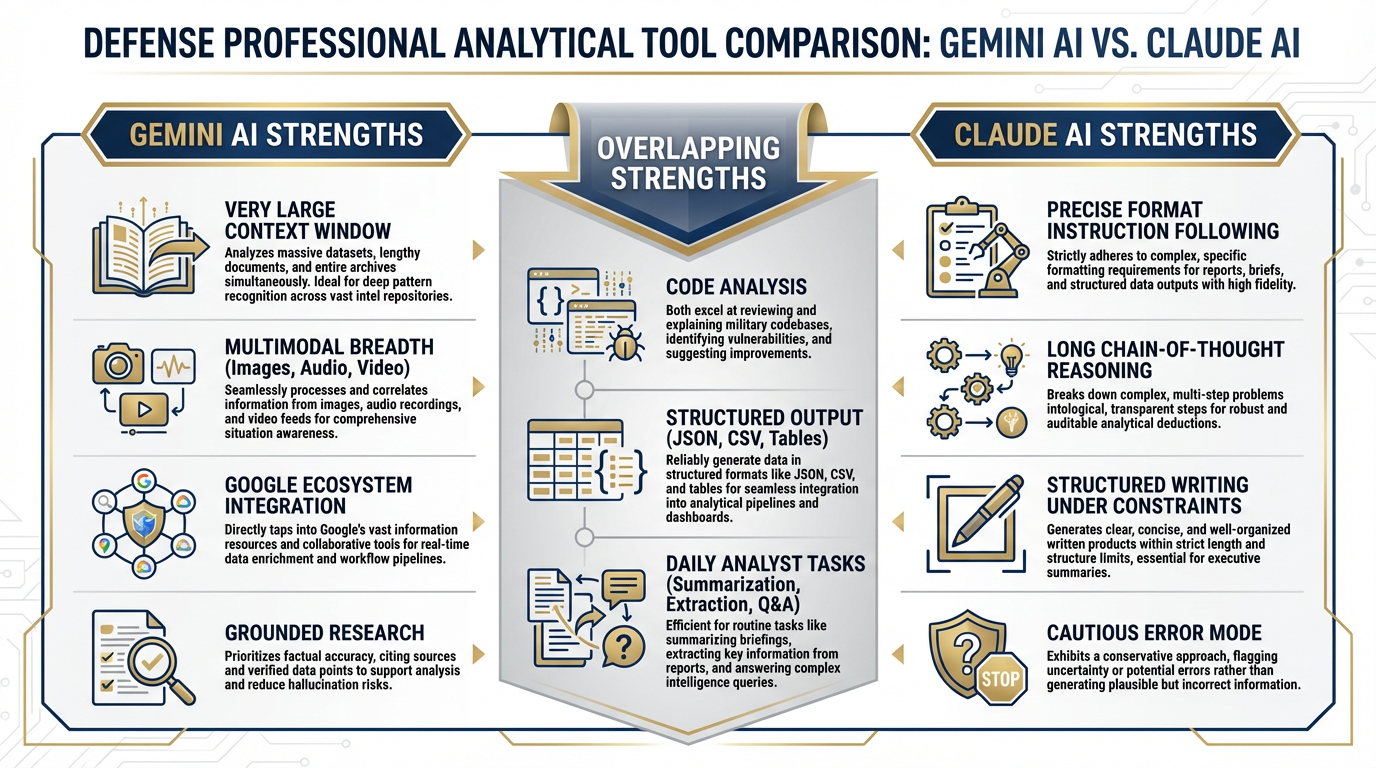
Figure 2:Model temperaments compared. Neither model wins across every category. The practitioner advantage is knowing which temperament matches which task — and routing accordingly.
314.3 The Claude Model Family
Verified from docs
Anthropic currently offers three production models in the Claude 4.x generation. Here is what’s current, what it costs, and when a Lukos analyst should reach for each one.
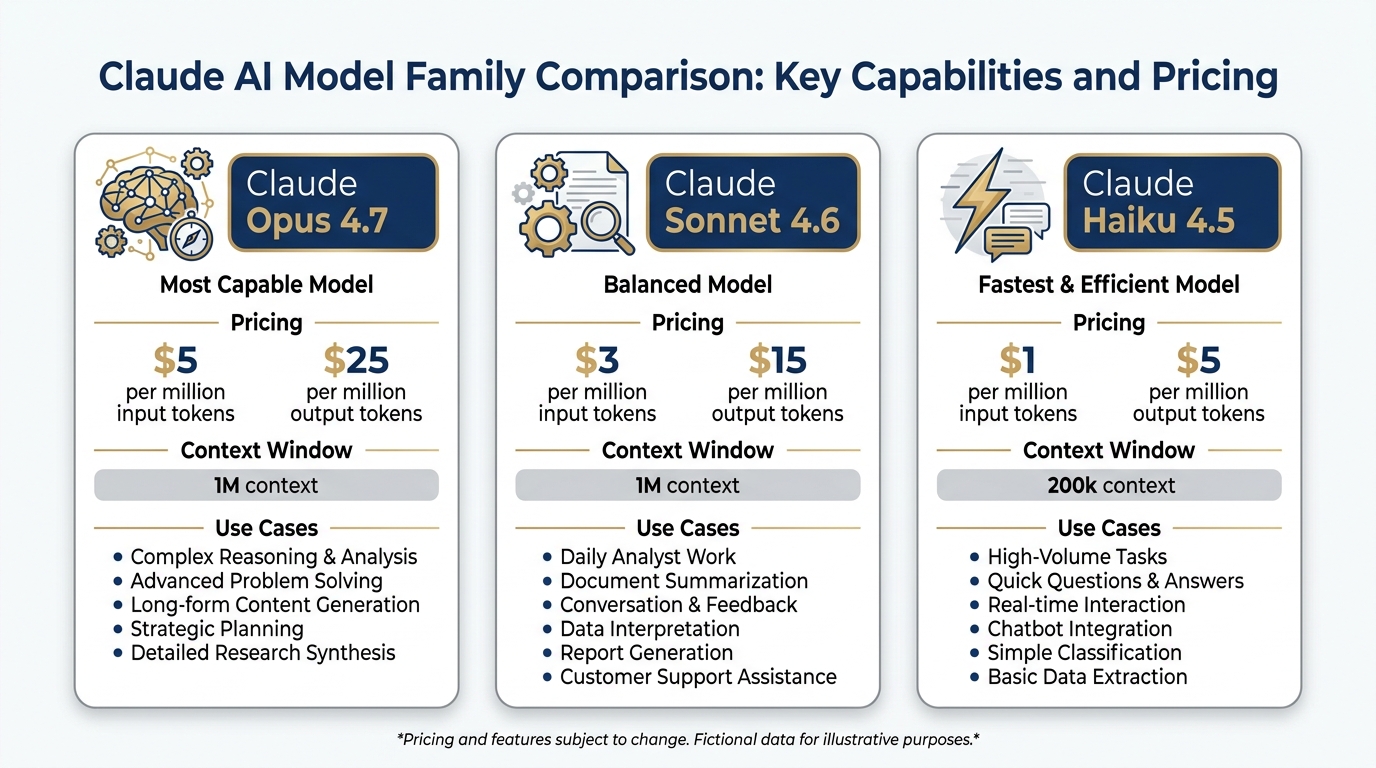
Figure 3:The current Claude model family. Three tiers, one architecture generation. Pricing is per million tokens (MTok) via the API. Claude.ai plans (Free, Pro, Max) give access to all three through the interface.
Claude Opus 4.7 — The Complex Reasoning Engine
API ID: claude-opus-4-7
Pricing: 25 / output MTok
Context window: 1M tokens
Max output: 128k tokens
Opus 4.7 is Anthropic’s most capable generally available model. Anthropic describes it as delivering “a step-change improvement in agentic coding over Claude Opus 4.6” — but its strengths extend well beyond code. Opus 4.7 supports Adaptive Thinking, Anthropic’s framework for extended chain-of-thought reasoning that the model applies when the problem warrants it.
When a Lukos analyst reaches for Opus 4.7:
A complex multi-document analytical task where you need the reasoning trace, not just the answer
Long-form structured writing with multiple interdependent constraints (format + length + classification + BLUF)
Any task where you would previously have spent 45 minutes doing it yourself and need the output to be defensible
Gemini equivalent: Gemini 3.1 Pro is the comparable tier. For tasks involving very large document corpora (Gemini has a larger context window) or multimodal inputs, Gemini 3.1 Pro maintains the edge. For pure text reasoning with tight format constraints, Opus 4.7 is worth testing.
API note: Opus 4.7 does not support Extended Thinking (the explicit scratchpad mode) — that’s handled by Adaptive Thinking, which the model applies internally. Extended Thinking is available on Sonnet 4.6 and Haiku 4.5.
Claude Sonnet 4.6 — The Daily Driver
API ID: claude-sonnet-4-6
Pricing: 15 / output MTok
Context window: 1M tokens
Max output: 64k tokens
Sonnet 4.6 is the model Anthropic describes as “the best combination of speed and intelligence.” It supports both Extended Thinking and Adaptive Thinking — making it unusually flexible across task types. For most Lukos work, Sonnet 4.6 is where you start.
When a Lukos analyst reaches for Sonnet 4.6:
Daily analyst work: brief writing, report structuring, partner communications
Code review and script analysis
Iterative document drafting where you’re working back and forth with the model
High-stakes outputs where you want Extended Thinking available as a verification mode
Gemini equivalent: Gemini 3 Flash for speed; Gemini 3.1 Pro for depth. Sonnet 4.6 sits between them — faster than Pro, more capable than Flash. At 15 per MTok, the price point is competitive.
Claude Haiku 4.5 — The High-Volume Workhorse
API ID: claude-haiku-4-5
Pricing: 5 / output MTok
Context window: 200k tokens
Max output: 64k tokens
Haiku 4.5 is Anthropic’s fastest model with “near-frontier intelligence.” It supports Extended Thinking — a notable capability at this price point. For classification tasks, structured extraction, and any workflow where you’re processing many inputs at low latency, Haiku 4.5 is the right tool.
When a Lukos analyst reaches for Haiku 4.5:
Classification pipelines (categorize these 200 lessons learned by theme)
Structured data extraction from forms or documents
High-volume summarization where Opus-level reasoning is not required
Any task where cost efficiency matters and the outputs are well-defined
Gemini equivalent: Gemini 3 Flash. Comparable tier, different pricing model. Build your personal preference data by running the same structured task through both.
The Model Family at a Glance
Claude Model Comparison — April 2026
Model | Context | Input Price | Output Price | Best For |
|---|---|---|---|---|
Claude Opus 4.7 | 1M tokens | $5/MTok | $25/MTok | Complex reasoning, agentic tasks, long chain-of-thought |
Claude Sonnet 4.6 | 1M tokens | $3/MTok | $15/MTok | Daily analyst work, code review, structured writing |
Claude Haiku 4.5 | 200k tokens | $1/MTok | $5/MTok | High-volume classification, fast structured extraction |
414.4 Claude.ai — The Interface
The primary interface for Claude is claude.ai — the web, desktop, and mobile application. Just as you’ve been working through gemini.google.com and Google AI Studio, claude.ai is where most practitioners start.
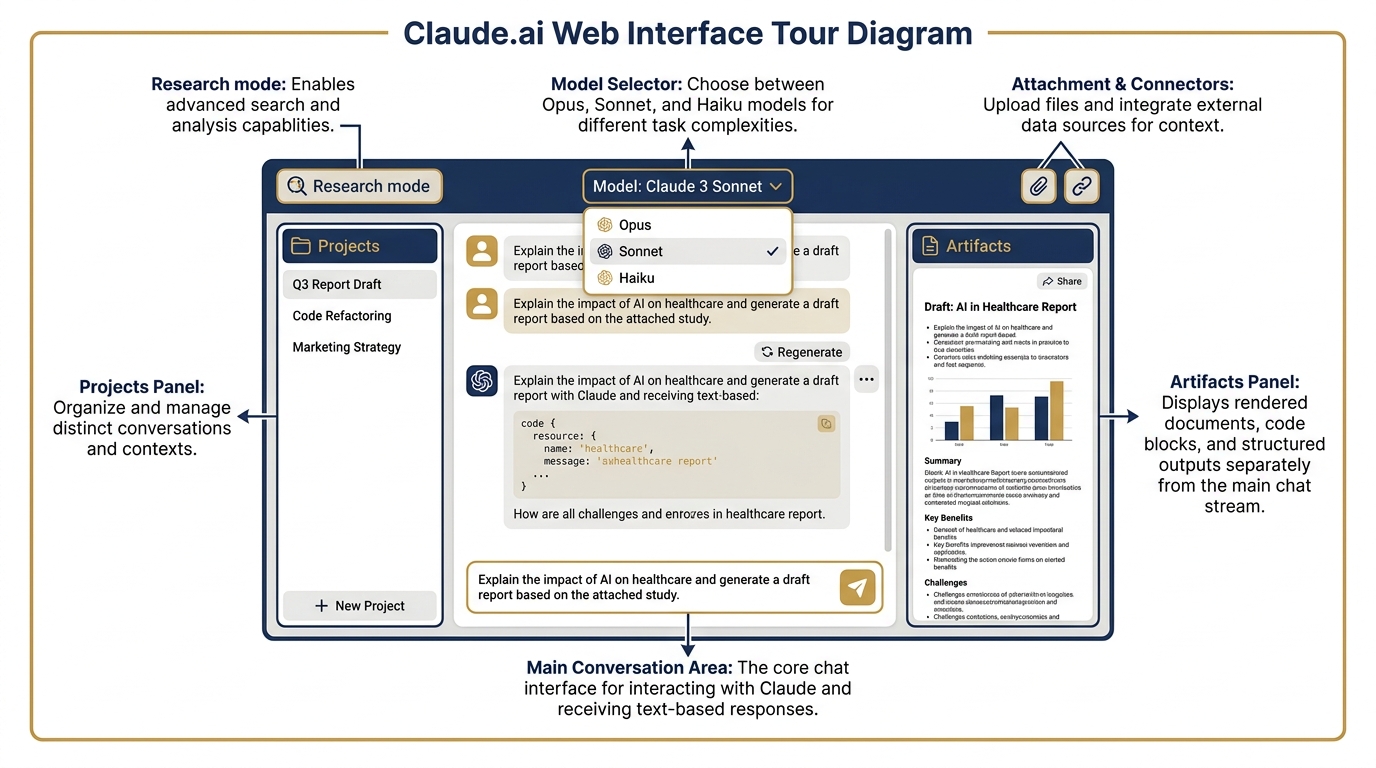
Figure 4:The claude.ai interface. The layout will be familiar to anyone who has used Gemini — but the feature set has distinct differences worth knowing.
Plan Structure (Verified April 2026)
Free ($0/month)
Chat on web, iOS, Android, and desktop
Web search, memory across conversations
Artifacts (document and code generation)
Desktop extensions and MCP connectors
Extended thinking for complex tasks
Google Workspace and Slack connectors
Pro (20/month)
Everything in Free, plus:
More usage allowance
Claude Code included
Claude Cowork included
Unlimited Projects
Research mode
Access to Opus, Sonnet, and Haiku models
Claude for Excel, PowerPoint, Word (beta)
Max (from $100/month)
Everything in Pro, plus:
5x or 20x more usage than Pro
Higher output limits
Early access to advanced features
Priority access during high traffic
Team ($20/seat annual for teams of 5–150)
Claude Code and Claude Cowork included
Microsoft 365, Slack, enterprise search
Central billing and administration
The Free plan is a legitimate starting point. Unlike some AI free tiers that severely limit capability, Claude’s free tier includes extended thinking, MCP connectors, and desktop extensions. A Lukos analyst can build real skill on the free tier before deciding whether to upgrade.
Artifacts — Claude’s Equivalent of Canvas
When you produce a document in Gemini, you’ve been using Canvas: a side-by-side editor that lets you refine and export. Claude’s equivalent is Artifacts.
Artifacts renders the output — a formatted document, a code file, a data visualization, a slide draft — in a dedicated panel alongside the conversation. You can iterate on it directly, ask Claude to revise specific sections, and export the result. The workflow is nearly identical to Canvas; the outputs have a different stylistic character.
For Lukos analysts, Artifacts is most useful for:
Structured report generation with formatted sections
Code that needs to be previewed and tested
Slide outlines that feed into PowerPoint via the Claude for PowerPoint connector
Projects — Claude’s Equivalent of Gems
Gemini Gems let you configure a persistent specialist persona with system instructions, grounding documents, and a locked configuration. Claude’s equivalent is Projects.
A Project in Claude is a persistent workspace where you can:
Set a system prompt that applies to every conversation in the Project
Upload documents that serve as the context base
Maintain conversation history across sessions
Collaborate with team members on shared Projects (Team and Enterprise plans)
A senior J7 Lessons Learned analyst might build a Project with:
System prompt: “You are a Lessons Learned analyst for a special operations organization. Apply AAR methodology. Format outputs as BLUF with supporting observations.”
Grounding documents: the unit’s lessons learned database, relevant doctrine, exercise reports
Persistent context: the model remembers what you’ve been working on
This is functionally equivalent to a Gemini Gem — same concept, different ecosystem. Building your equivalent Project in Claude is part of the multi-stack practice.
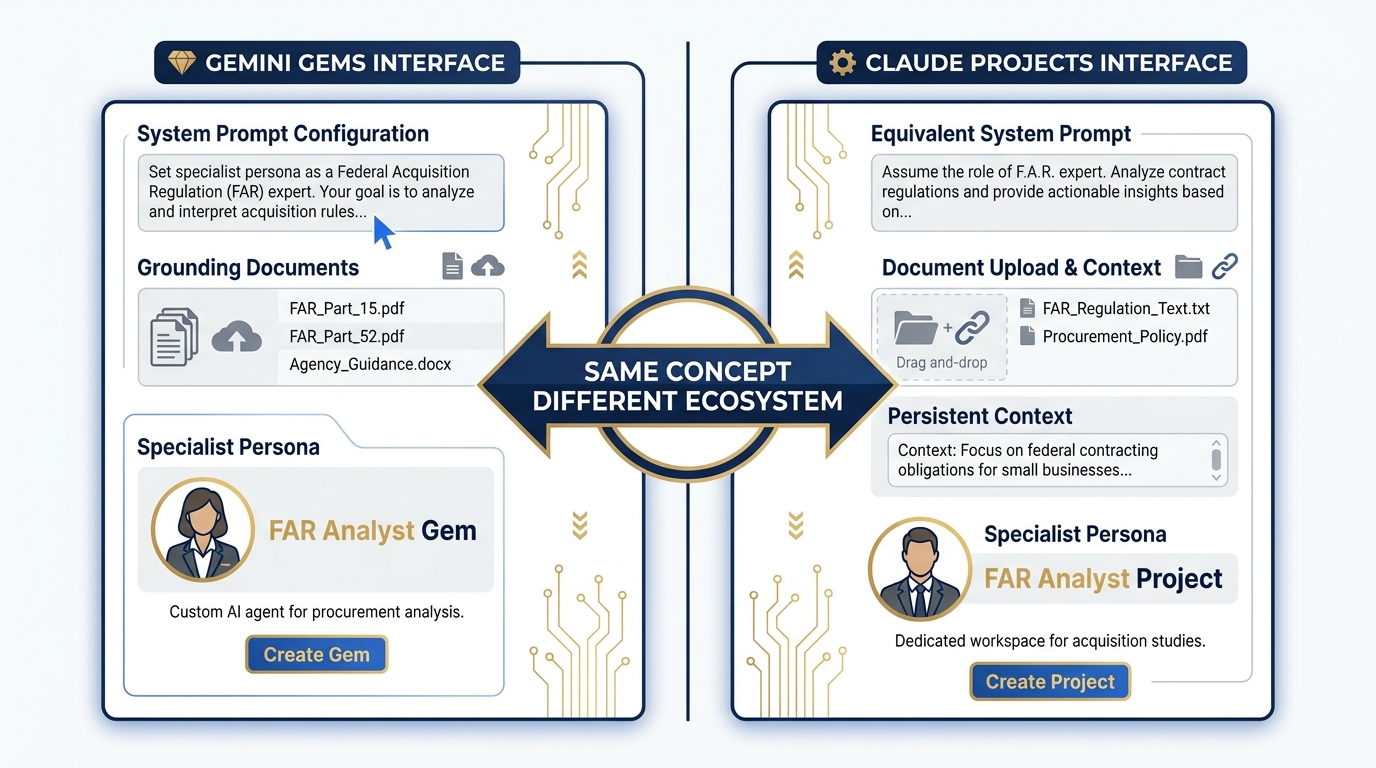
Figure 5:Projects vs Gems. Both solve the same problem: persistent specialist personas with configured context. The interface differs; the workflow concept is identical. Every Gem you’ve built in this course has a direct analogue in Claude Projects.
514.5 Claude Desktop and the MCP Ecosystem
This is where Claude’s approach to the desktop diverges most significantly from Google’s — and where the capability comparison gets genuinely interesting.
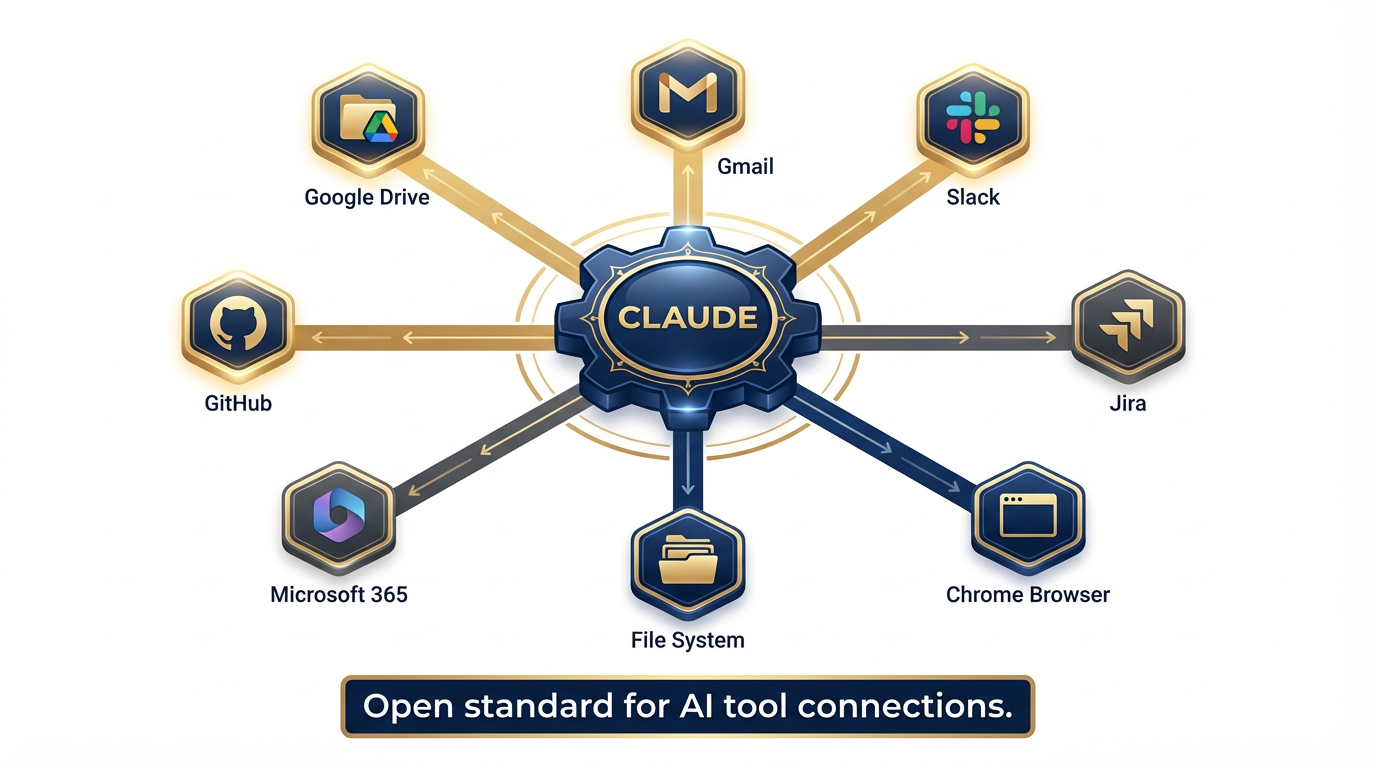
Figure 6:The MCP connector ecosystem. MCP (Model Context Protocol) is the open standard that lets Claude connect to external tools and data sources — web-based connectors like Google Drive and Slack, and desktop extensions that reach into your local file system.
What Is MCP?
MCP — Model Context Protocol — is an open standard that Anthropic helped pioneer and that has since been adopted across the industry. It defines how an AI model connects to external tools, data sources, and services in a standardized, interoperable way.
Think of MCP as the USB standard for AI tool connections. Instead of every vendor building proprietary integrations, MCP provides a common plug-and-socket interface. A tool that speaks MCP can connect to any model that supports it.
Claude was among the first models to build native MCP support — and the ecosystem has grown rapidly. Current Claude connectors include:
Web-based connectors (work on web, desktop, and mobile):
Google Drive
Gmail
Slack
Google Workspace services
Desktop extensions (locally installed, for Claude Desktop app):
File System — read and write files on your local machine
Chrome — navigate, click, and fill forms in your browser
Additional native application connectors
Remote MCP connectors:
GitHub, Jira, and other enterprise tools via remote MCP endpoints
Claude Desktop — Available Now
Claude Desktop is available for macOS, Windows, and Windows ARM64 (Android and iOS mobile also available). Installation is at anthropic
The desktop app is the hub for the full Claude experience:
All conversation modes: chat, Projects, Research
Claude Cowork (covered below)
Claude Code (covered in Section 14.6)
Desktop extensions: file system access, browser control
Cross-device sync: conversations continue from phone to desktop
The Free plan gives you access to the desktop app. Cowork and Code require Pro or above.
The “Desktop as RAG” Concept
Here is the capability that distinguishes Claude Desktop from NotebookLM in a way that matters for practice:
NotebookLM: You upload specific documents. The model reasons over those documents. The corpus is static — it reflects the state of the files at upload time.
Claude Desktop + File System Extension: Claude reads your actual files, on your actual machine, in real time. When you ask it to summarize your project folder, it reads the current state of that folder. When you ask it to find all documents mentioning a specific contract number, it searches your local drive.
This is not better or worse than NotebookLM — it’s a different capability. NotebookLM excels at citation-disciplined grounded research over a curated, stable corpus. Claude Desktop + extensions excels at working with your live file environment, the way a very capable analyst sitting at your desk would work.
For a Lukos analyst managing an active engagement:
NotebookLM is your research corpus — structured, citable, governed
Claude Desktop is your working partner — reaching into your files, your email, your current state
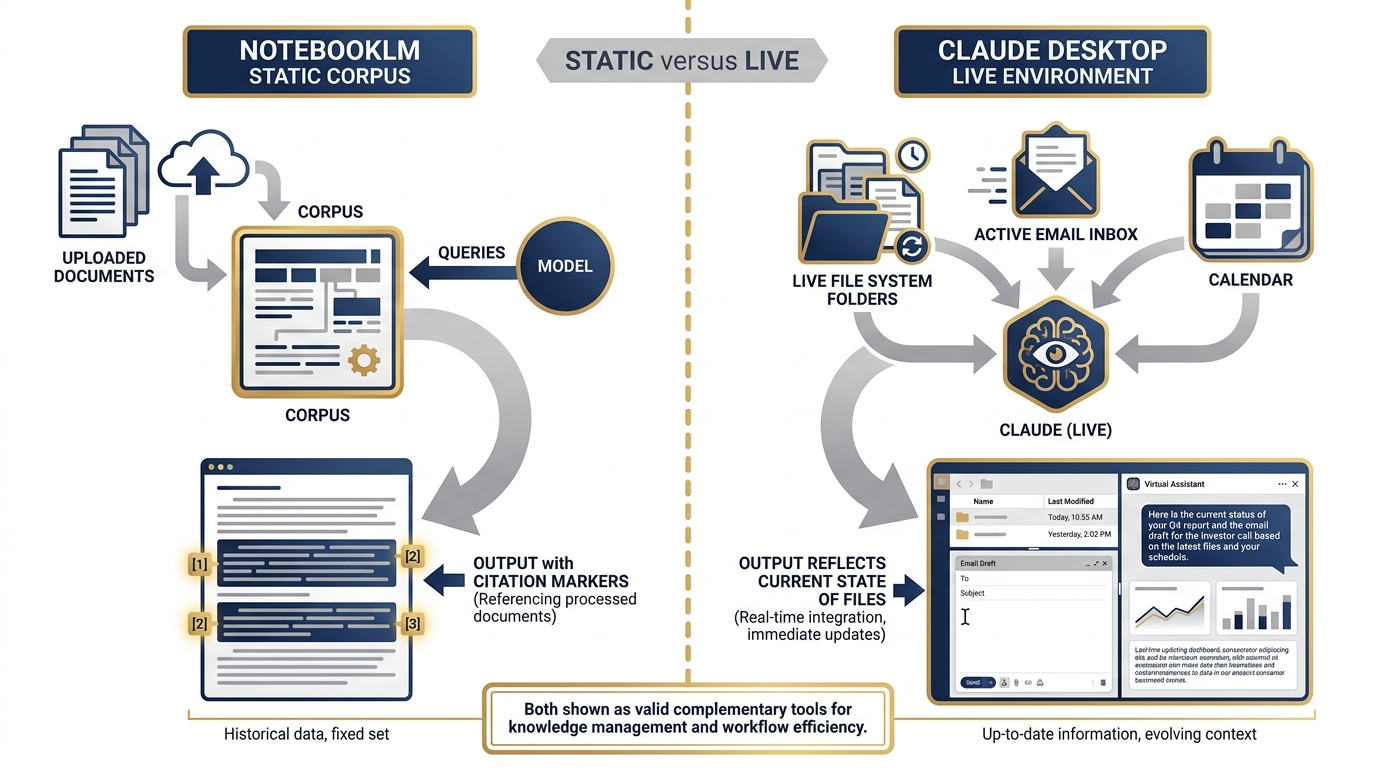
Figure 7:Desktop as RAG vs static corpus. NotebookLM (left) operates over uploaded, stable documents — excellent for citation-grounded research. Claude Desktop (right) reaches into your live file system, email, and apps — excellent for working with your current state. Both belong in the Lukos toolkit.
OPSEC Note on MCP Connectors
The MCP connectors that expose your live files and accounts to the model carry the same OPSEC discipline requirements as any other tool in this stack. When you enable the Gmail connector, Claude can read your email. When you enable the File System extension, Claude can read your local files. Apply the same principle from Chapter 5 (the FireCrawl authenticated session discussion): the model has access to what you give it access to. Configure connectors deliberately. Understand what’s in scope. Treat this the same way you’d treat giving a cleared contractor access to a shared drive — it’s a trust relationship with explicit scope.
614.6 Claude Code — The Terminal Power User
If you have been using Antigravity as your agentic AI environment, Claude Code is the Anthropic equivalent — with a different design philosophy and a different primary user profile.
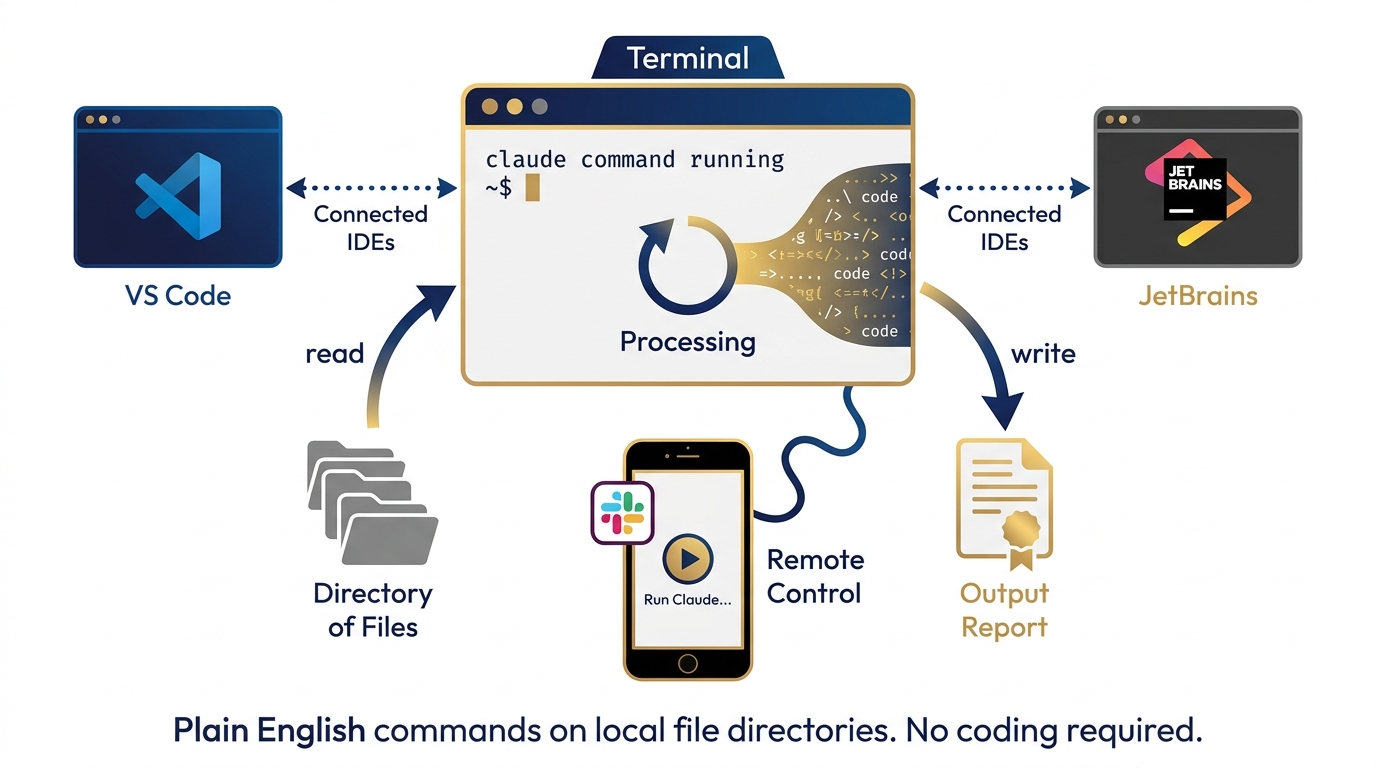
Figure 8:Claude Code. A terminal-first AI agent that reads your codebase, writes and edits files, runs commands, and works through complex multi-step tasks with minimal handholding. Available in the terminal, VS Code, JetBrains, and Slack.
What Is Claude Code?
Claude Code is an agentic AI system that operates in your development environment. It is available:
As a terminal CLI (
claudecommand)Inside VS Code and JetBrains IDEs
Inside the Claude Desktop app
Via Slack (for team-level task delegation)
Claude Code can:
Read your entire codebase or file directory
Write and edit files directly
Run shell commands and tests
Fix bugs and build features via plain English instruction
Work through multi-step tasks autonomously, checking in at decision points
Included in Pro plan ($17/month) and above.
Claude Code vs. Antigravity — The Honest Comparison
Antigravity is a workflow orchestration environment. You build agents with named skills, give them tool access, and orchestrate them through defined workflows. It is Google’s answer to the “AI that does things in the world” problem.
Claude Code is a terminal-first AI agent. It doesn’t have a workflow builder UI. It operates through a command line interface and integrates natively into coding environments.
The distinction matters for Lukos practitioners:
| Dimension | Antigravity | Claude Code |
|---|---|---|
| Interface | Visual workflow builder | Terminal / IDE |
| Primary strength | Multi-agent orchestration, named skills | Deep code reasoning, file operations |
| Best for | Defined recurring workflows with multiple agents | Exploratory analysis, codebase work, file pipelines |
| Learning curve | Moderate (skill building required) | Low if comfortable with terminal |
| Data analyst use case | Build the JLLA agent, run it repeatedly | Process a directory of Excel files via plain English |
The Non-Developer Use Case
You do not need to be a software developer to get value from Claude Code. The use case that matters most for Lukos analysts is this:
You have a folder with 150 files. You need to extract specific fields from each one, cross-reference against a list, and produce a formatted report.
With Antigravity, you’d build an agent pipeline — well-suited if this is a recurring workflow.
With Claude Code in the terminal, you’d say: “In the /data/exercises folder, find all After Action Reports from 2025, extract the lessons learned section from each one, categorize by theme, and write a summary report to output/2025-ll-summary.md.” Claude Code reads the files, does the work, and writes the output.
This is the non-developer analyst superpower: using plain English to operate on local file directories the way a script would, without writing the script.
714.7 The Multi-Stack Practice
Let’s talk about the actual discipline that separates practitioners from users.
The minimum bar for a Lukos decision-maker, starting today:
30 minutes per week in each major stack. Not reading about them. Not watching demos. Using them on actual work. One session per week in Claude.ai on a real task you would otherwise do in Gemini.
Run the same prompt through both. Build personal preference data. The benchmarks are useful starting points. Your own performance data on your own task types is what actually guides you at 2:00 PM on a Tuesday when a deliverable is due in four hours.
The intuition you develop over 90 days of this practice is worth more than any benchmark. Benchmarks measure what researchers decided to measure. Your 90-day preference profile measures what matters for your work.
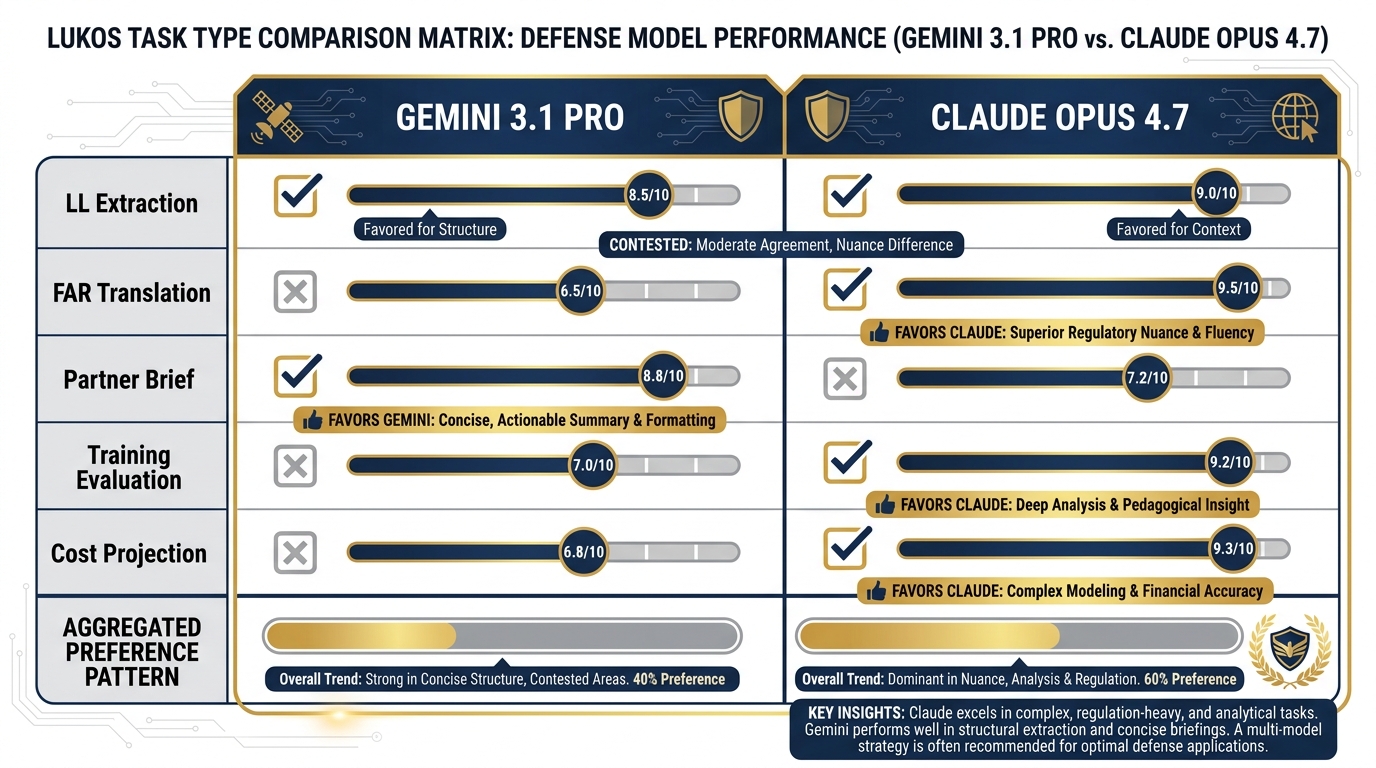
Figure 9:The five-prompt comparison. The same five Lukos-relevant prompts, run through both models. The goal is not to declare a winner — it’s to build personal preference data that you’ll actually use.
The Five-Prompt Exercise
Here are the five prompts. Run each one through Gemini 3.1 Pro (aistudio.google.com) and Claude Opus 4.7 (claude.ai). Document which output you would rather edit, and why.
Prompt 1 — Lessons Learned Extraction: “You are a senior J7 Lessons Learned analyst. A special operations unit just completed Exercise IRON WOLF. Key observations include: communications were degraded for the first 6 hours due to equipment incompatibility; logistics resupply ran 4 hours behind schedule; partner nation liaison officers were not integrated into the command post until Day 2. Extract three lessons learned, assign an AAR category to each (Training, Doctrine, Organization, Materiel, Leadership, Personnel, Facilities, Policy), and format as a BLUF with three supporting observations. Maximum 250 words.”
Prompt 2 — FAR Translation: “Translate FAR 52.219-14 (Limitations on Subcontracting) into plain English that a small business owner with no legal background can understand. Use no jargon. Maximum 150 words.”
Prompt 3 — Partner Nation Brief: “Write an unclassified one-page brief introducing U.S. special operations AI-enabled training methods to a partner nation liaison team from a country with limited AI exposure. Tone: professional and respectful of capability gaps. Format: BLUF, four bullet points, one recommended next step.”
Prompt 4 — Training Evaluation: “A J7 training officer needs to evaluate whether a 3-day AI literacy course met its learning objectives. The objectives were: (1) participants can operate at least two frontier AI models, (2) participants can construct a basic agentic workflow, (3) participants understand federal data governance constraints for AI tools. Write five evaluation questions for each objective — one per proficiency level (awareness, understanding, application, analysis, synthesis).”
Prompt 5 — Cost Projection: “A Lukos program manager needs a rough cost estimate for deploying an AI-enabled lessons learned processing system for a 500-person command. Assume: Google Vertex AI for hosting, 10,000 documents processed per month, two analyst users, 6-month initial contract period. What cost categories should be included? What are the key unknowns? Format as a cost category breakdown with a section on assumptions and risks.”
Run all five. Fill in the table below.
Personal Model Preference Profile — Build Your Own
Task Type | Gemini 3.1 Pro | Claude Opus 4.7 | Why / What Was Different |
|---|---|---|---|
LL Extraction (Prompt 1) | □ Preferred | □ Preferred | |
FAR Translation (Prompt 2) | □ Preferred | □ Preferred | |
Partner Brief (Prompt 3) | □ Preferred | □ Preferred | |
Training Evaluation (Prompt 4) | □ Preferred | □ Preferred | |
Cost Projection (Prompt 5) | □ Preferred | □ Preferred |
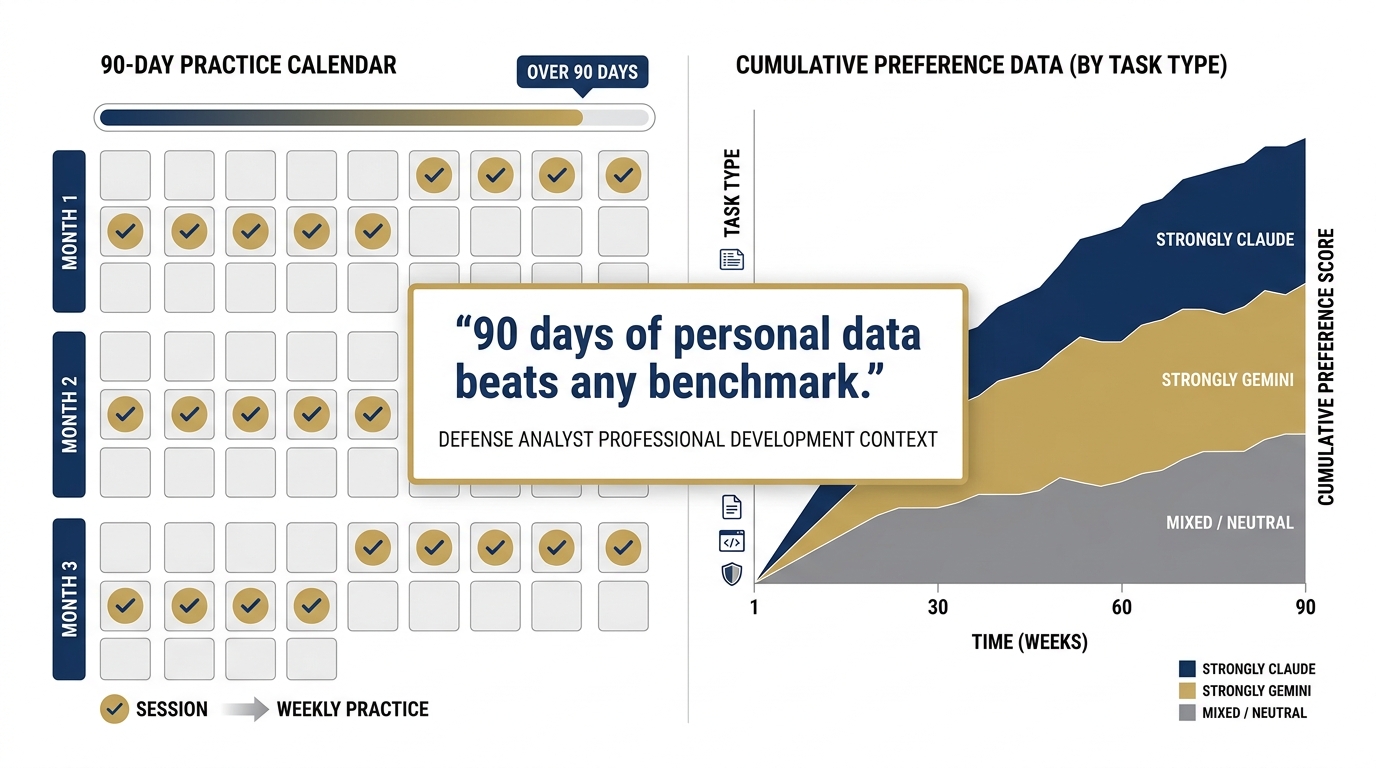
Figure 10:The personal preference profile. This table is your actual deliverable from this chapter — a data-driven reference you’ll use to pick the right model for the right task. Update it as the models evolve.
This profile is not static. Models improve. Your work changes. Revisit it every quarter.
814.8 Claude in the Federal Context
Now we get to the question that matters most for Lukos engagements: can Claude be deployed in a federal context?
The answer is yes — through two paths that Lukos already knows.
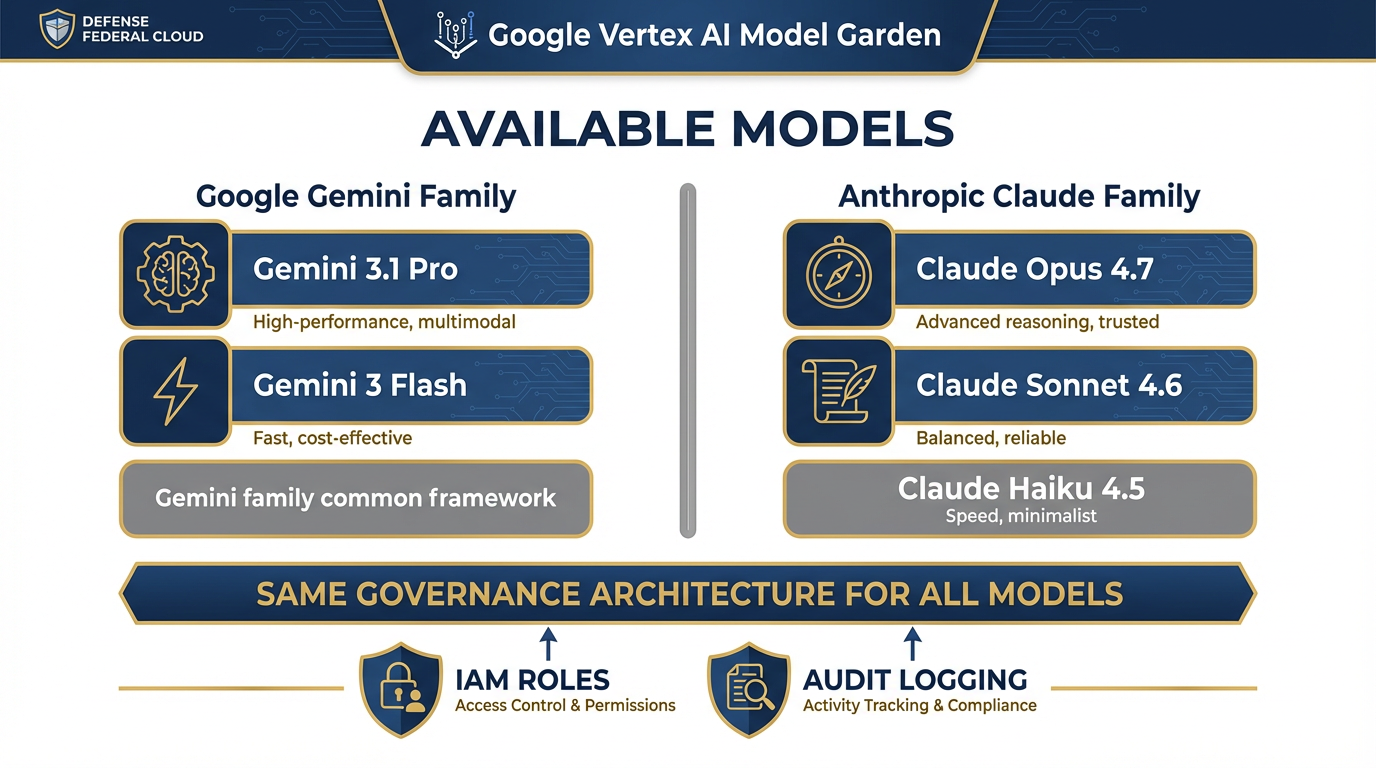
Figure 11:Claude on Vertex AI. All three current Claude models are available in the Vertex AI Model Garden — the same governed, audited, identity-managed environment from Chapter 9. A Lukos deployment using Vertex for Gemini can add Claude without changing its governance architecture.
Path 1: Google Vertex AI Model Garden
All three current Claude models are available in the Vertex AI Model Garden:
claude-opus-4-7(Vertex AI)claude-sonnet-4-6(Vertex AI)claude-haiku-4-5@20251001(Vertex AI)
This is the most significant fact in this section for Lukos practitioners. It means:
You access Claude through the same Vertex infrastructure you learned in Chapter 9
You get the same identity and access management (IAM roles, service accounts)
You get the same audit logging and governance controls
You can run Gemini and Claude side by side in the same Vertex environment
For a program that has already gone through the Vertex authorization process, adding Claude is a configuration change — not a new procurement. You’re adding a model to a governed environment you already operate.
Path 2: AWS Bedrock
Claude is also available through Amazon Bedrock, Amazon’s managed AI service. AWS Bedrock provides:
A managed API for Claude models
AWS’s native security and compliance controls
Regional deployment options for data residency requirements
Bedrock operates within AWS’s FedRAMP-authorized infrastructure. Claude Opus 4.7 on AWS uses a specialized endpoint (Claude in Amazon Bedrock via the Messages-API Bedrock endpoint).
The FedRAMP Verification Protocol
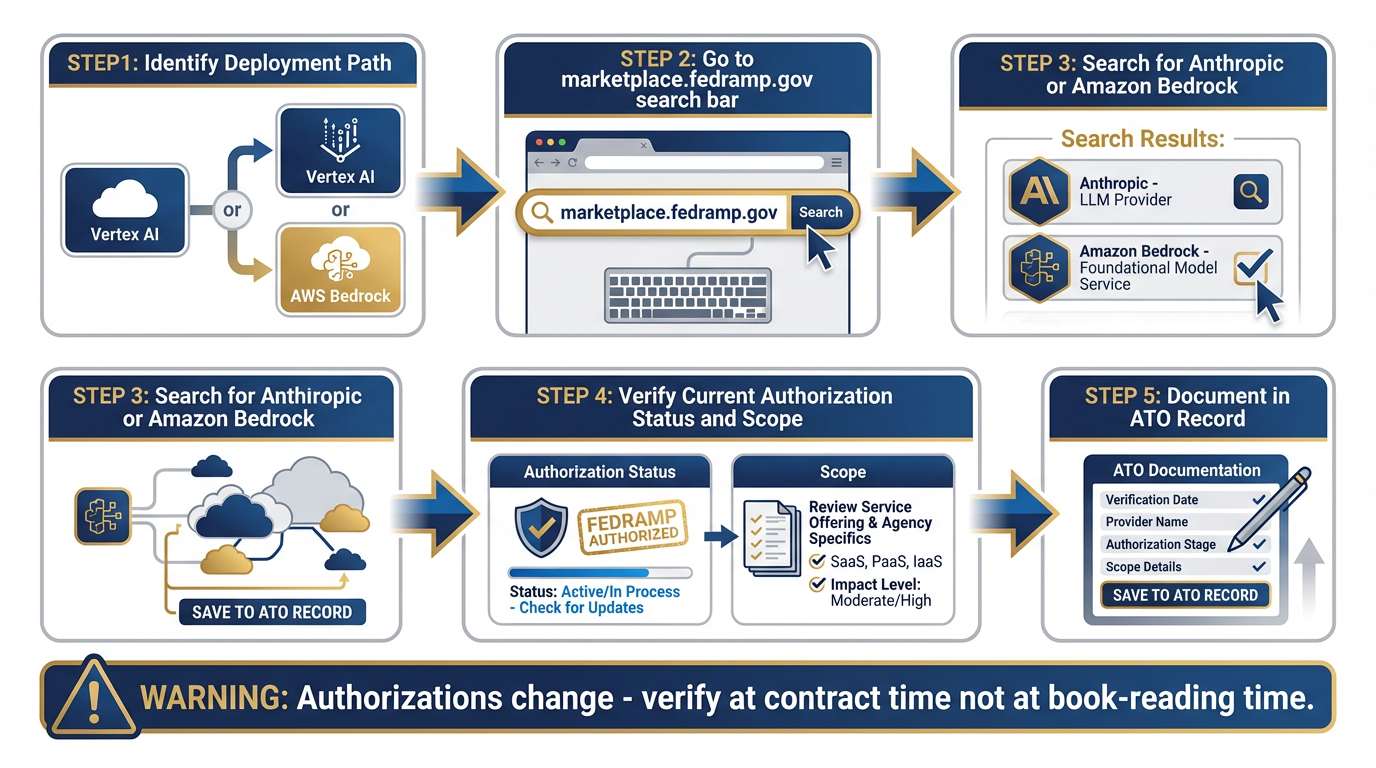
Figure 12:The FedRAMP verification path. Before deploying any AI model in a sensitive federal context, verify current authorization status at marketplace
This is the same discipline from Chapter 5: verify before you deploy, not before you read.
Federal authorizations change. A FedRAMP authorization that was current when this book was written may have expanded, changed scope, or been superseded by the time you’re working a contract. The verification step is:
Go to marketplace
.fedramp .gov Search for “Anthropic” or “Amazon Bedrock” (the infrastructure provider)
Verify current authorization status and scope
Document the verification in your program’s authority-to-operate (ATO) record
This is not a Claude-specific requirement. This is standard practice for any AI tool in a federal context. Apply it uniformly.
Constitutional AI — The Brief Explanation
Anthropic’s approach to AI safety is built into the model through a methodology called Constitutional AI (CAI). The concept: instead of relying solely on human feedback to shape model behavior, Anthropic trains models against a written set of principles (a “constitution”) that guides how the model evaluates and corrects its own outputs.
In practice, this means Claude tends to:
Flag its own uncertainty rather than paper over it
Decline requests in a more predictable and documented way
Produce errors that are more consistently in the “cautious” direction rather than the “confidently wrong” direction
For federal work, the “cautious error” tendency is preferable. A model that says “I’m not certain about this — here’s what I can verify” is more useful than one that produces a confident but wrong answer.
Constitutional AI doesn’t eliminate hallucination. No current model does. Apply the same verification discipline to Claude outputs that you apply to everything else in this stack.
914.9 The Updated Decision Matrix
Chapter 11 gave you the Lukos AI Decision Matrix. Claude belongs in it now. Here is the updated version.
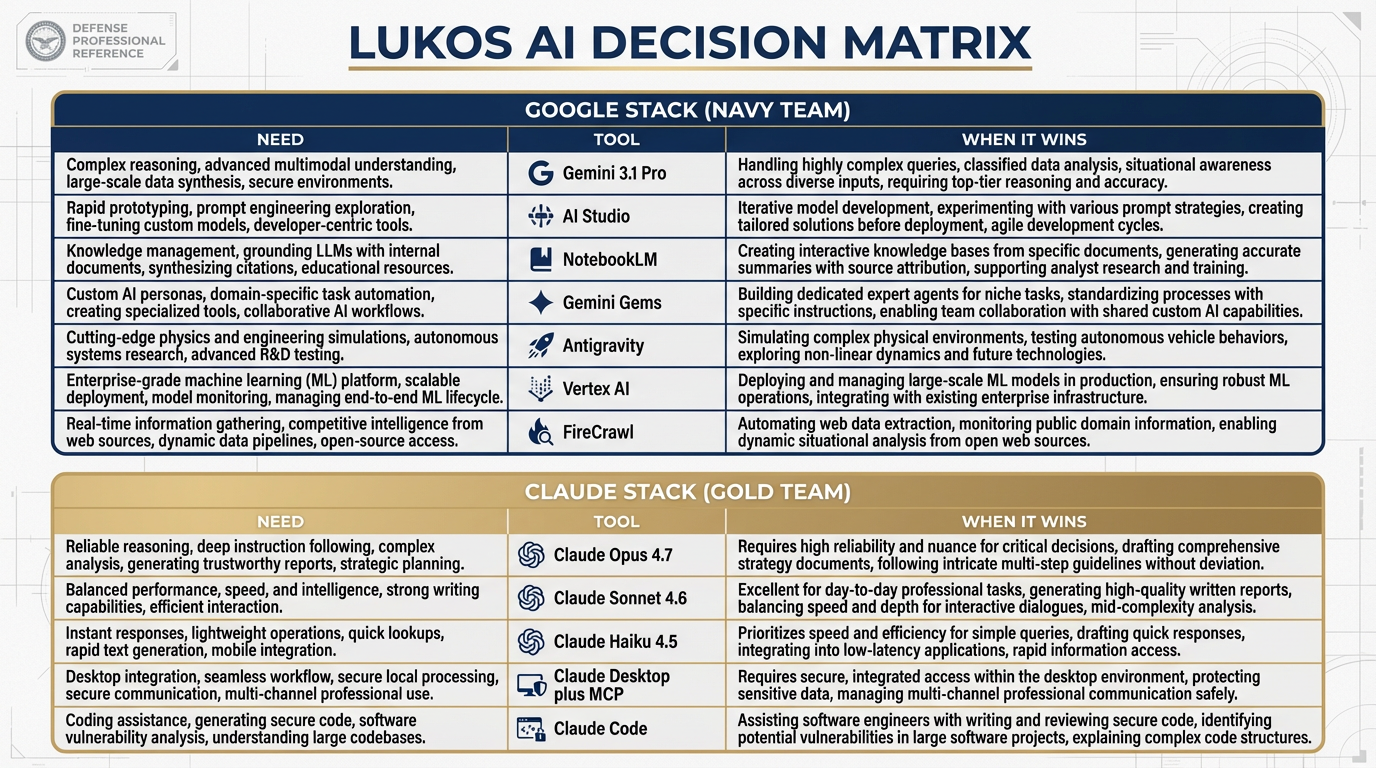
Figure 13:The updated decision matrix. Claude Opus 4.7, Sonnet 4.6, Haiku 4.5, Claude Desktop, and Claude Code now have their columns. This is the laminate card you carry into every engagement.
The Updated Lukos AI Decision Matrix — Including Claude
Need | Tool | When Claude Wins | When Gemini Wins |
|---|---|---|---|
Complex analytical reasoning, defensible logic chain | Claude Opus 4.7 | Long chain-of-thought, precise format constraints, auditable reasoning | Very large document corpora (>1M tokens), multimodal inputs |
Daily analyst work: briefs, structured writing, code review | Claude Sonnet 4.6 | Structured writing with tight constraints, iterative document drafting | Tasks requiring Google Workspace integration, broader tool ecosystem |
High-volume classification and extraction | Claude Haiku 4.5 | Fast, cheap, accurate on well-defined structured tasks | When Gemini 3 Flash’s pricing or latency profile fits better |
Working with your live desktop file environment | Claude Desktop + MCP | Reading your actual files, email, calendar in real time | NotebookLM wins for citation-grounded research over stable corpus |
Agentic terminal and IDE work | Claude Code | Terminal-first, deep code reasoning, file pipeline operations | Antigravity wins for multi-agent orchestration with named skills |
Very large context window, multimodal breadth | Gemini 3.1 Pro | Wins on context window depth, image/audio/video input | Not applicable — Gemini’s home turf |
Citation-grounded research with document corpus | NotebookLM | Wins on citation discipline, hallucination resistance over known sources | Not applicable — NotebookLM’s specific strength |
Production federal deployment with governance | Vertex AI (Gemini or Claude via Model Garden) | Same Vertex environment works for both — governance is the constant | Not applicable — governance is platform-level, not model-level |
1014.10 The Pack Position
We have covered a lot of ground in this chapter. Let’s land the argument.
This book has been building toward one central claim: Lukos’s edge is the pack. Not the individual. Not the single best tool. The coordinated set of capabilities that can address any terrain the customer puts in front of them.
That argument has been about your agents — the JLLA, the FET, the AQR, the TAC. But it applies to your AI stack too.
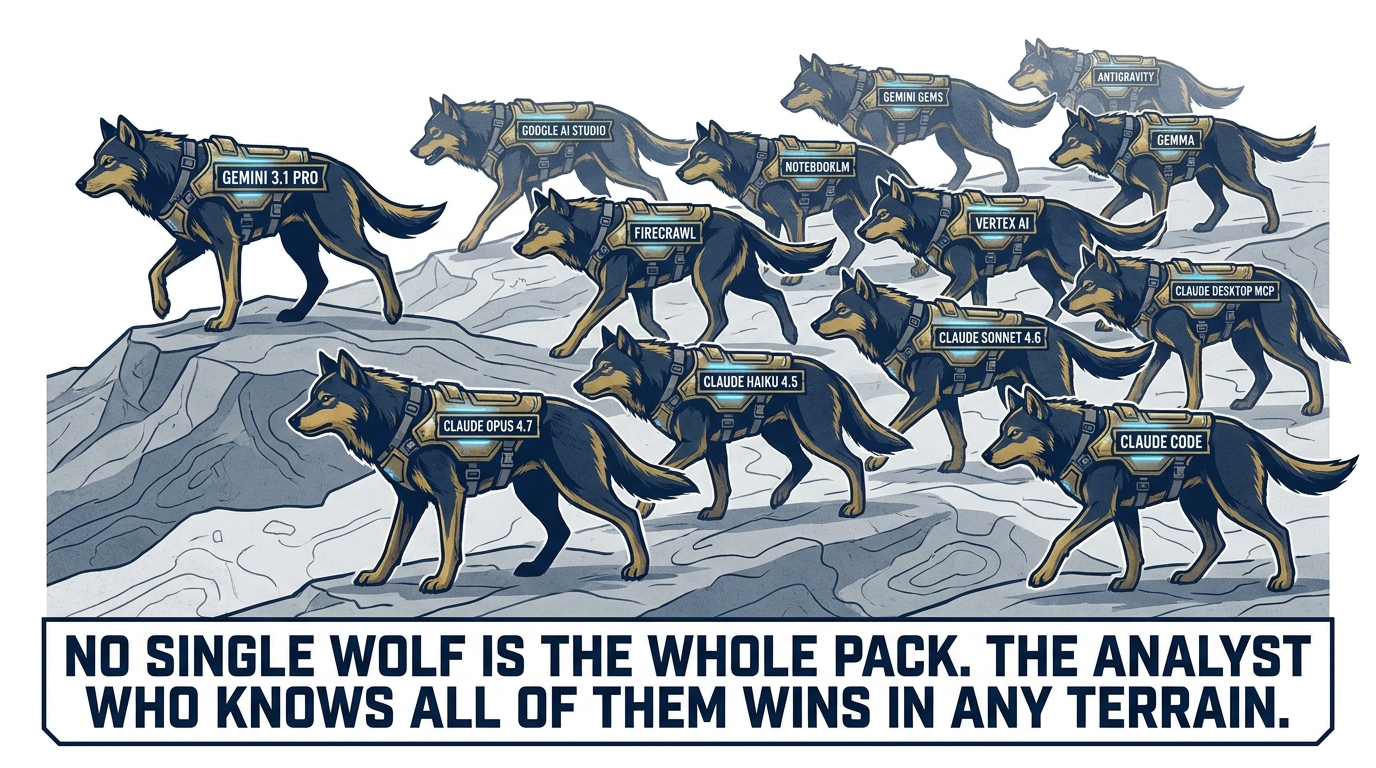
Figure 14:The full Lukos pack. Every tool has a role. No single tool is the whole pack. The analyst who knows all of them and routes correctly is the one who wins in any engagement terrain.
Here is the full pack as it stands at the end of this course:
Gemini 3.1 Pro — the primary reasoning engine, unmatched on context and multimodal
Google AI Studio — the configuration and prototyping surface
NotebookLM — citation-grounded research over stable document corpora
Gemini Gems — persistent specialist personas with locked configurations
Antigravity — multi-agent orchestration with named skills and tool access
FireCrawl — live web data ingestion for agents
Vertex AI — production deployment, governance, audit, FedRAMP path
Gemma — local model deployment for offline and sensitive environments
Claude Opus 4.7 — complex reasoning, tight format constraints, long chain-of-thought
Claude Sonnet 4.6 — daily driver for analyst work across the Anthropic stack
Claude Haiku 4.5 — high-volume, low-latency structured tasks
Claude Desktop + MCP — live desktop environment, file system access
Claude Code — terminal-first agentic file and code operations
Gemini is one wolf. Antigravity is one wolf. NotebookLM is one wolf. Claude is one wolf. Gemma is one wolf. No single one of them is the whole pack.
The analyst who knows all of them — and knows when to send which one — is the one who hunts in any terrain the customer puts in front of them. The one who only knows one vendor is brittle.
This is not about having more tools. It’s about having the right answer to the customer’s question: “Why should we trust you to evaluate our AI strategy when all you’ve ever used is one vendor?”
You now have a different answer.
11Three-Tier Hands-On Labs
Group Lab: The Model Temperament Comparison
Time: 55 minutes | Format: Group of 5–10 | Materials: Laptops, claude.ai access, aistudio.google.com access
Tier 1 — The On-Ramp (5 min)
Go to claude.ai. Sign in with an existing account or create a free account (no credit card required).
In a new chat, type this exact prompt:
“You are a senior J7 Lessons Learned analyst. Summarize the key themes from a recent special operations exercise, focusing on logistics, communications, and interoperability. Format as a BLUF with three supporting observations.”
Read the output. Don’t analyze it yet — just read it. Note the tone, the format, the word choices.
✅ Success looks like: A Claude output for a Lukos-relevant prompt. This is your baseline for comparison.
Tier 2 — The Core Rep (20 min)
Now go to aistudio.google.com. Run the exact same prompt through Gemini 3.1 Pro. Use the same system instruction if you set one.
Compare the two outputs across four dimensions:
| Dimension | Claude | Gemini | Notes |
|---|---|---|---|
| Precision of language | /5 | /5 | |
| Format adherence | /5 | /5 | |
| BLUF quality | /5 | /5 | |
| Which would I rather edit? | □ | □ |
Do not declare a winner. The goal is to articulate the difference — not which model is better in the abstract, but how each one handled this specific task.
✅ Success looks like: A completed four-dimension comparison table. One sentence explaining the most meaningful difference you observed.
Tier 3 — The Wow Moment (30 min)
Run all five prompts from Section 14.7 through both models. For each prompt:
Note which output you’d rather edit
Write one sentence explaining the difference
By the end, you have a personal preference profile across five Lukos task types. This is the intuition that separates a multi-stack practitioner from a single-vendor user.
Debrief as a group: which task types showed the most consistent model preference across the room? Where was the room split? That split is operationally meaningful — it means the task type is genuinely ambiguous, and personal style matters.
✅ Success looks like: A personal model preference profile for five Lukos task types — a reference you’ll actually consult when picking a model next week.
Individual Lab: Stand Up the Second Stack
Time: 45 min | Format: Individual | Materials: Laptop with internet access
Tier 1 (5 min) — First Contact
Download Claude Desktop from anthropic
.com /claude → Download Sign in with your claude.ai account
Ask it one question about your current work
Compare to the Gemini answer on the same question
Note what’s different. Don’t over-index on one interaction — this is just first contact.
✅ Success looks like: Claude Desktop installed and running. One answer reviewed.
Tier 2 (15 min) — The Desktop as RAG
In Claude Desktop, open Settings → Connectors (or Extensions)
Enable the Google Drive connector (if you have Drive) or the File System extension
Ask Claude to read a specific document — a report, a brief, a meeting summary — and summarize it
Note: Claude is reading your actual file, in its current state. This is different from uploading to NotebookLM.
For the File System extension: specify the path. For Google Drive: reference the file by name.
✅ Success looks like: Claude Desktop accessing one live document and producing a useful summary.
Tier 3 (25 min) — Building the Profile
Run the same five Lukos prompts from the Group Lab individually. Add your results to your personal preference profile.
After this session, the group collectively has a large pool of data points across five prompt types, two models, and multiple practitioners. In the debrief, aggregate the preferences and identify which task types have clear model winners vs. which are genuinely contested.
Field note on Claude Code: If you have the Pro plan, open a terminal and type claude — Claude Code CLI launches. Ask it to list and describe the files in a specific folder. Observe how it handles the request without any configuration. This is the capability that makes it useful for non-developers operating on local file directories.
✅ Success looks like: Claude Desktop installed, one MCP connector active, personal preference profile populated with real task data from five prompts.
12Field Notes
13Pack Debrief (BLUF)
Chapter 14 complete. The pack is assembled.
Next: Appendices and reference materials.
AI for Lukos Professionals — The Wolfpack’s Edge
Dr. Ernesto Lee and Professor Carlos Marquez
Miami Dade College