Chapter 12: Build the Lessons Learned Co-Pilot — Capstone
The mission is live. The pack builds together. Something real leaves this room.
“You came in as individual practitioners. You leave as a pack that built something together that will outlive this classroom.”
Dr. Ernesto Lee & Professor Carlos Marquez, Miami Dade College
This is the final chapter. Which means it is not a lecture.
Every chapter before this one taught you something. Chapter 1 taught you how the wolf sees — how to read a situation through an AI lens and decide whether to engage. Chapter 2 gave you the Field Operative Framework — the prompting discipline that separates analysts who get results from analysts who get noise. Chapter 3 put you in AI Studio and made you build prompts under time pressure. Chapter 4 introduced NotebookLM and the discipline of grounded retrieval — answers with citations, not answers with confidence. Chapter 5 took you to the Gemini Enterprise Agent Platform (formerly Vertex AI), Google’s production-grade infrastructure for agents that work at scale. Chapters 6, 7, and 8 gave you the wolfpack — Antigravity, skills, synthetic teammates with names and roles and scope-of-authority documents.
Chapter 9 gave your agents eyes on the live web via FireCrawl. Chapter 10 gave them a heartbeat without a network — LM Studio and Gemma 4 for the disconnected environment. Chapter 11 handed you the laminate card: the Lukos AI Decision Matrix that tells you, in under 30 seconds, exactly which tool to reach for and why.
This chapter gives you the mission.
Every tool. Every surface. Every discipline. One integrated build.
You have four phases, approximately six hours, and a pack of analysts who are now, collectively, more dangerous than any individual in this room.
Let’s execute.
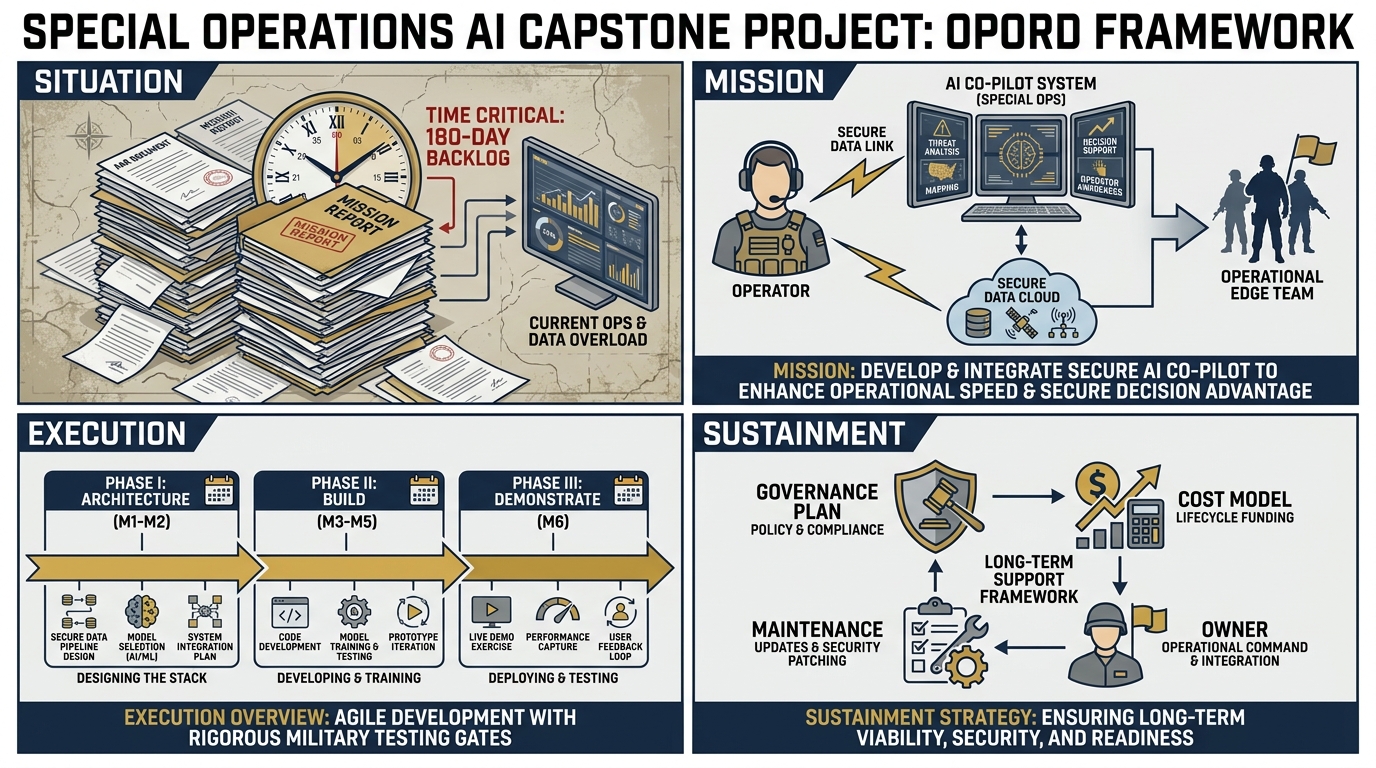
Figure 1:The Lessons Learned Co-Pilot capstone is structured as an OPORD — the same planning format Lukos professionals use in the field. Situation. Mission. Execution. Sustainment.
112.1 The Mission — OPORD Format
Every significant Lukos operation begins with an OPORD. This one is no different.
SITUATION
Lukos has accumulated 45,000+ lessons across exercises, operations, and partner-nation engagements spanning more than a decade. New After-Action Reports arrive weekly. The site lead — your client — needs cross-cutting trend analysis delivered faster and at higher quality than manual processing allows.
The current state: a human analyst reads an AAR, extracts observations in longhand, codes them against a taxonomy, checks them against prior lessons, and writes a briefing. This takes three to five hours per AAR. With 12–15 new AARs per week at a high-tempo site, the math is brutal: the backlog grows faster than any human team can clear it.
The enemy is not incompetence. The enemy is volume.
The intelligence gap: without cross-cutting trend analysis, the same failure mode — a logistics handoff breakdown, an OPCON confusion point, a communications dead zone — can appear in six AARs from six different exercises and never trigger a pattern flag. Lessons that should change doctrine sit unread in a SharePoint folder.
This is the problem your Co-Pilot will solve.
MISSION
Build and demonstrate a working AI Co-Pilot for the Lukos Lessons Learned workflow.
The Co-Pilot will:
Ingest a corpus of sanitized After-Action Reports
Extract structured Observations, Issues, and Lessons (OIL format) with Gemini 3.1 Pro
Run grounded analysis against the AAR corpus with cited answers via NotebookLM
Orchestrate a four-agent synthetic wolfpack — JLLA, DR, CR, PB — through Antigravity
Monitor for new doctrine publications and partner-nation updates via FireCrawl
Produce customer-deliverable artifacts: briefing memo, audio overview, mind map, slide deck outline
Operate in degraded/disconnected mode via LM Studio + Gemma 4
Include a documented governance plan, OPSEC controls, and cost projection
EXECUTION
Three phases over the workshop:
Phase 1 — Architecture (Reference Only): Understand the complete system design before you build anything
Phase 2 — Build: Four hands-on sub-phases, 225 minutes total
Phase 3 — Demonstrate: Each pack presents their Co-Pilot; collective intelligence shapes the final prototype
SUSTAINMENT
Governance plan: One page. Required for customer-readiness.
Cost model: Realistic monthly cost at Lukos production volume.
Maintenance owner: Who keeps the lights on after you leave?
212.2 The Architecture — Every Layer
Before you build, you understand what you’re building. This is not a request. Operators who build without a map get lost. Here is the map.
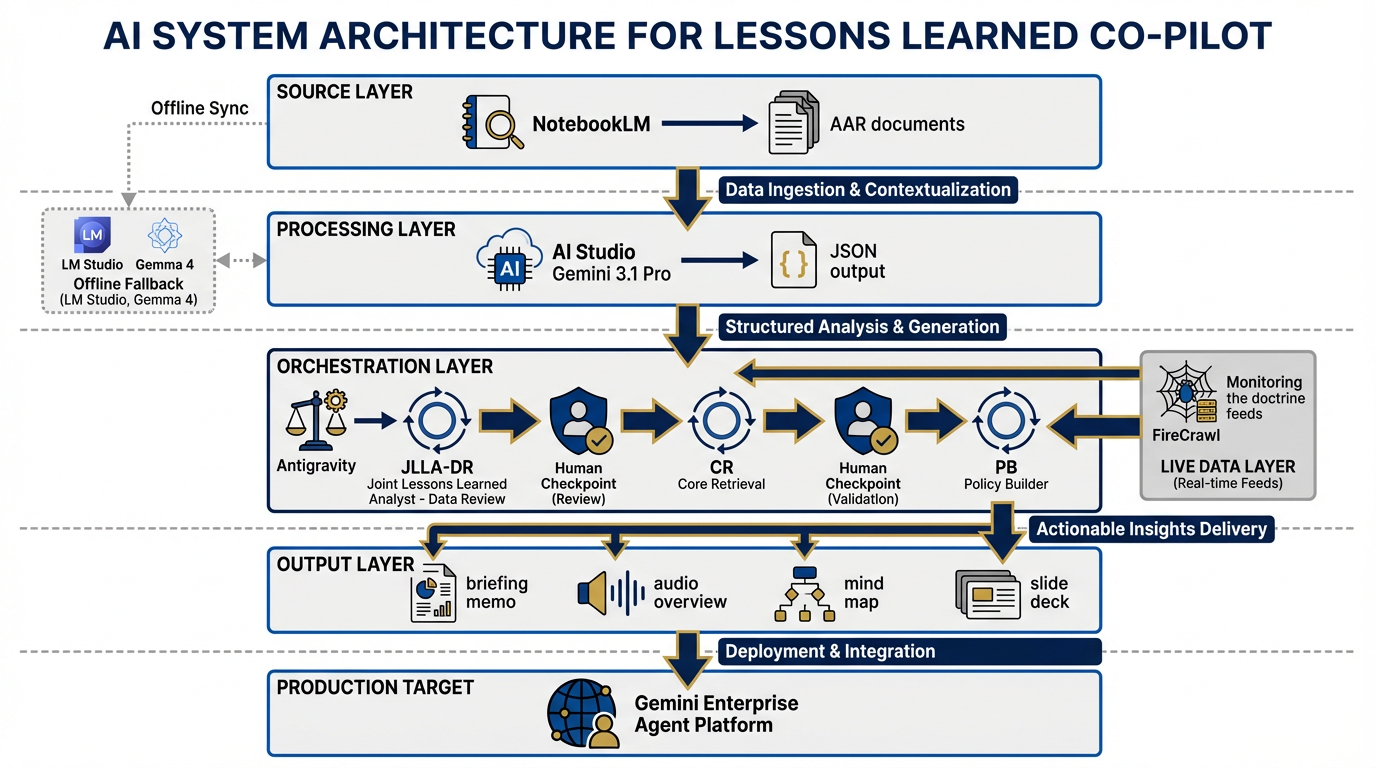
Figure 2:The complete Co-Pilot architecture. Six functional layers, four agent roles, one governance envelope. Every component maps to a chapter in this book.
The Co-Pilot has six functional layers. Each layer maps directly to chapters you’ve already completed.
Layer 1 — Source (Chapter 4: NotebookLM) The knowledge base. You upload 5–10 sanitized AARs. NotebookLM indexes them and enables grounded retrieval — every answer comes with a citation pointing back to the exact passage in the exact document. This is your corpus engine. It does not hallucinate sources it doesn’t have. That is the entire point.
Layer 2 — Processing (Chapter 3: AI Studio) The extraction engine. Gemini 3.1 Pro, running in AI Studio with Structured Outputs enabled, reads raw AAR text and produces clean JSON OIL tables — Observation, Issue, Lesson — formatted to the Lukos taxonomy. Code Execution calculates category frequencies. This is where unstructured text becomes structured intelligence.
Layer 3 — Orchestration (Chapters 6–8: Antigravity) The wolfpack. Four synthetic teammates — JLLA, DR, CR, PB — run in sequence via Antigravity’s multi-agent pipeline. Each agent has a role, a skill, a scope-of-authority document, and a human checkpoint before its output advances to the next agent. This is the automation layer. This is also where human oversight lives.
Layer 4 — Live Data (Chapter 9: FireCrawl) The intelligence feed. FireCrawl monitors for new publications from TRADOC, SOCOM doctrine updates, partner-nation exercise reports, and relevant open-source military analysis. When something new appears that cross-references an existing lesson, the Co-Pilot flags it for analyst review. Your lessons don’t live in a static database — they live in a context that is always updating.
Layer 5 — Output The deliverable layer. From the pipeline emerge: a J7-ready briefing memo (BLUF format, 1–2 pages), a NotebookLM audio overview (the “Deep Dive” podcast format), a mind map of cross-cutting themes, and a slide deck outline. Four artifacts. One pipeline run. Customer-ready.
Layer 6 — Production Target (Chapter 5: Gemini Enterprise Agent Platform) The future state. Not deployed in this workshop, but documented. The Gemini Enterprise Agent Platform (formerly Vertex AI) is where a production version of this Co-Pilot would live — enterprise security, audit trails, role-based access control, SLA guarantees. You will document the production architecture in your deliverable set. The customer needs to know it exists.
Disconnected Variant (Chapter 10: LM Studio + Gemma 4) The fallback. When the network is unavailable — or when OPSEC requires that nothing leaves the local machine — LM Studio running Gemma 4 handles the extraction layer. Quality degrades compared to the cloud pipeline; you will document exactly where. The fallback is not as good. The fallback is not supposed to be as good. The fallback is supposed to work.
The Architecture as a Mermaid Diagram
flowchart TD
    subgraph SOURCE["SOURCE LAYER (Ch. 4)"]
        A1[Sanitized AARs x5-10]
        A2[NotebookLM Notebook\nGrounded RAG Corpus]
        A1 --> A2
    end

    subgraph PROCESS["PROCESSING LAYER (Ch. 3)"]
        B1[AI Studio\nGemini 3.1 Pro]
        B2[Structured Outputs\nOIL JSON Schema]
        B3[Code Execution\nCategory Frequency]
        B1 --> B2 --> B3
    end

    subgraph WOLFPACK["ORCHESTRATION LAYER (Ch. 6-8)"]
        C1[JLLA\nJunior LL Analyst]
        C2[DR\nDoctrine Referencer]
        C3[CR\nCross-Referencer]
        C4[PB\nPack Briefer]
        C1 -->|OIL Table| C2
        C2 -->|Enriched Obs| C3
        C3 -->|NEW / KNOWN| C4
        HCK1[👤 Human Checkpoint] --> C2
        HCK2[👤 Human Checkpoint] --> C4
    end

    subgraph LIVE["LIVE DATA LAYER (Ch. 9)"]
        D1[FireCrawl Monitor]
        D2[TRADOC / SOCOM Feeds]
        D3[Partner Nation Updates]
        D2 --> D1
        D3 --> D1
    end

    subgraph OUTPUT["OUTPUT LAYER"]
        E1[BLUF Briefing Memo]
        E2[Audio Overview - Deep Dive]
        E3[Mind Map]
        E4[Slide Deck Outline]
    end

    subgraph PROD["PRODUCTION TARGET (Ch. 5)"]
        F1[Gemini Enterprise\nAgent Platform]
        F2[Enterprise Security\nAudit Trails RBAC]
        F1 --- F2
    end

    subgraph OFFLINE["DISCONNECTED VARIANT (Ch. 10)"]
        G1[LM Studio\nLocal Runtime]
        G2[Gemma 4\nOn-Device Model]
        G1 --- G2
    end

    A2 --> B1
    B3 --> C1
    A2 --> C2
    D1 --> C3
    C4 --> E1
    C4 --> E2
    C4 --> E3
    C4 --> E4
    WOLFPACK -.->|Production Path| PROD
    PROCESS -.->|Offline Fallback| OFFLINE
Lukos Lessons Learned Co-Pilot — Full Architecture
Study this diagram. Before Phase 1 begins, every member of your pack should be able to point to any node in this graph and explain: what it does, which chapter it came from, and why it’s there.
312.3 The Four Synthetic Teammates — Fully Assembled
You met these agents in Chapter 8. In the workshop builds, you ran them individually. In this capstone, you run them as a pipeline.
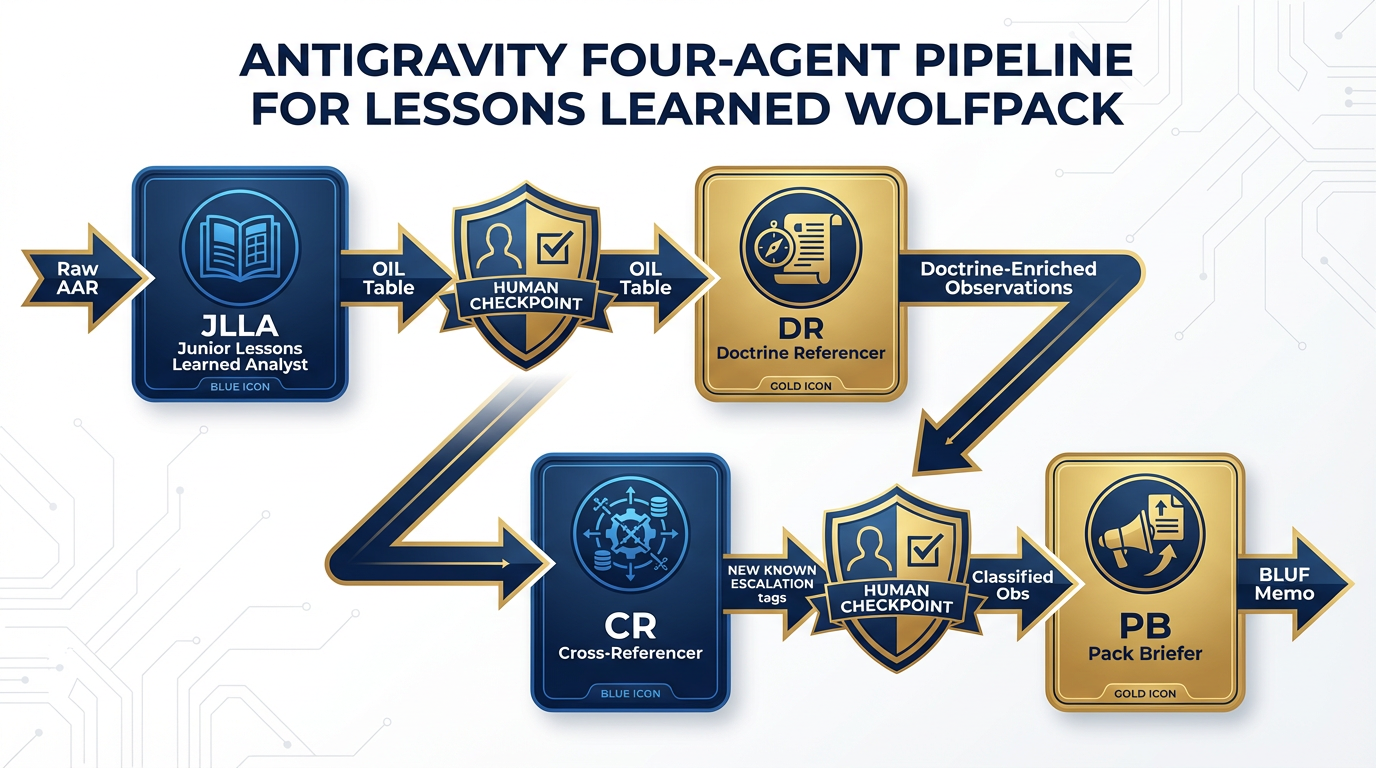
Figure 3:The four synthetic teammates assembled into a production pipeline. Human checkpoints are embedded, not optional.
Each agent has exactly one job. The pipeline has exactly one flow. Human oversight is embedded at exactly two points. This is not an accident — it is a design decision.
JLLA — Junior Lessons Learned Analyst
Role: First-pass reader. The agent that replaces three hours of manual AAR reading.
Input: Raw AAR text (sanitized). One AAR per pipeline run.
Skill: lessons-learned-extraction (from Chapter 7’s Skill Library)
System instruction excerpt:
You are JLLA, a Junior Lessons Learned Analyst for the Lukos Lessons Learned program.
Your job is to read the provided After-Action Report and extract every Observation,
Issue, and Lesson in structured OIL format.

For each observation, you will identify:
- Observation: what was directly seen or experienced
- Issue: the underlying problem the observation reveals
- Lesson: the actionable recommendation that should change behavior

Output: A JSON array conforming to the Lukos OIL schema.
Scope of authority: Extract only. Do not synthesize. Do not infer beyond what the text supports.
Flag any passage where you are uncertain with a confidence score below 0.7.
Output: A clean JSON OIL table, every observation cited to source paragraph.
Human checkpoint: The pack leader reviews the OIL table before it advances to DR. Obvious errors, missed observations, or hallucinated confidence are corrected here.
DR — Doctrine Referencer
Role: Enrichment agent. Takes the raw OIL table and anchors each observation to relevant doctrine.
Input: JLLA’s reviewed and approved OIL table.
Skill: doctrine-lookup + NotebookLM doctrine corpus query
System instruction excerpt:
You are DR, the Doctrine Referencer for the Lukos Lessons Learned program.
You receive a structured OIL table from JLLA. For each observation, you will:
1. Query the NotebookLM doctrine corpus for the most relevant doctrinal reference
2. Annotate the observation with the doctrine citation and relevance score
3. Flag observations where current doctrine is silent — these are doctrine gaps

Output: An enriched OIL table with doctrine annotations and gap flags.
Scope of authority: Enrich only. Do not remove observations. Do not re-rank priority.
Output: Doctrine-enriched OIL table, with each observation connected to — or flagged as a gap in — current doctrine.
CR — Cross-Referencer
Role: Pattern analyst. Finds what’s new versus what Lukos already knows.
Input: DR’s doctrine-enriched OIL table.
Skill: RAG query against the Lukos lessons database (NotebookLM notebook containing historical lessons)
FireCrawl integration: CR also queries FireCrawl’s live feed for recent publications that reference the same failure mode or theme.
System instruction excerpt:
You are CR, the Cross-Referencer for the Lukos Lessons Learned program.
You receive a doctrine-enriched OIL table from DR. For each observation, you will:
1. Query the existing Lukos lessons database: is this lesson already known?
2. Query the live FireCrawl feed: has this failure mode appeared in recent publications?
3. Classify each observation as: NEW (not previously documented), ALREADY KNOWN (with citation),
   or PATTERN ESCALATION (known issue, now at higher frequency or severity)

Output: A classified OIL table with NEW / ALREADY KNOWN / PATTERN ESCALATION tags.
Scope of authority: Classify only. Do not generate lessons. Do not recommend action.
Output: Classified observations. The NEW and PATTERN ESCALATION items are the intelligence product. ALREADY KNOWN items are filed without further escalation.
PB — Pack Briefer
Role: Final synthesis. Turns the pipeline’s output into something a J7 director can read in five minutes.
Input: CR’s classified and cross-referenced OIL table.
Skill: after-action-summarizer + BLUF memo template
System instruction excerpt:
You are PB, the Pack Briefer for the Lukos Lessons Learned program.
You receive a fully classified OIL table from CR. You will produce:
1. A BLUF briefing memo (1-2 pages, Lukos format):
   - Bottom Line: top 3 findings
   - Key Observations: NEW and PATTERN ESCALATION items only
   - Doctrine Gaps: flagged items with no doctrinal anchor
   - Recommended Actions: maximum 5, each with a single owner
2. A request to NotebookLM for an Audio Overview of the top findings
3. A mind map outline of cross-cutting themes

Human checkpoint: Your output is reviewed and edited by a Lukos senior analyst before delivery.
Scope of authority: Synthesize and present. Do not make commitments on behalf of Lukos.
Do not include classified or sensitive information without explicit clearance confirmation.
Output: A J7-ready BLUF briefing memo, a NotebookLM audio overview request, and a mind map outline. All three go to a senior analyst for review before any artifact leaves the building.
412.4 The Build — Phase by Phase
This is where you stop reading and start building.
The chapter is divided into four phases. Each phase has a time budget, a set of numbered steps, and a checkpoint. The checkpoint is a gate. Nothing advances until it’s cleared.
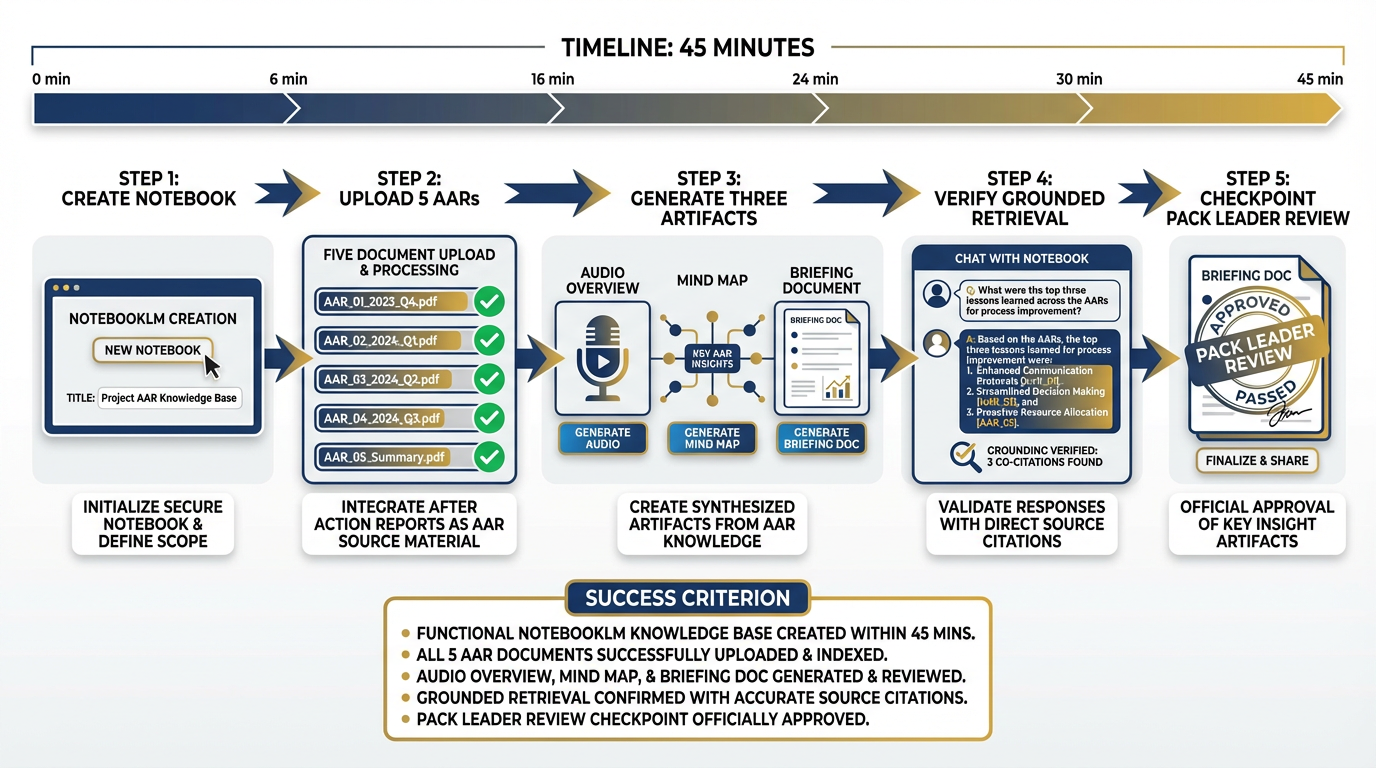
Figure 4:Phase 1: Stand up the knowledge base. Every pack clears this gate before Phase 2 begins. No exceptions.
TIER 1 — THE FOUNDATION
5Phase 1 — Stand Up the Knowledge Base
Time budget: 45 minutes Tool: NotebookLM (Chapter 4) Objective: A working, queryable AAR corpus with generated artifacts
Step 1 — Create the Notebook
Navigate to NotebookLM. Create a new notebook. Title it exactly:
Lukos LL Co-Pilot — [Exercise Name]Replace [Exercise Name] with your assigned exercise set (e.g., IRON BEAR 24-3).
Step 2 — Upload the Source Documents
Upload the 5 sanitized AARs from Appendix D. If your pack has been assigned the IRON BEAR 24-3 set, use those. If not, use the documents your pack leader has provided.
Upload sequence matters:
Upload all five documents before generating any outputs
Wait for NotebookLM to confirm indexing of all five
Do not proceed until all five show the green indexed indicator
Step 3 — Generate the Three Artifacts
From the NotebookLM Studio panel, generate in this order:
Audio Overview (Deep Dive format) — This is your first deliverable artifact. A generated “podcast” of two AI voices discussing the key findings across your AAR corpus. It takes 3–5 minutes to generate. Start it first and let it run while you complete Steps 4 and 5.
Mind Map — NotebookLM’s visual knowledge map. Generates in under a minute. Review it: are the top nodes what you’d expect? Flag any surprising omissions for your pack AAR.
Briefing Doc — A structured document summarizing key themes across your corpus. This is the document your pack leader will review for checkpoint clearance.
Step 4 — Verify Grounded Retrieval
In the NotebookLM chat panel, ask this exact question:
“What are the top 3 logistics failure modes across these AARs?”
Evaluate the response on two criteria:
Citation quality: Does every claim link to a specific source? If the answer is not cited, the corpus is not properly indexed.
Accuracy: Do the failure modes align with what your analysts know about these exercises?
If the citation quality is poor, check your uploads. NotebookLM cannot cite what it cannot find.
Step 5 — Checkpoint: Pack Leader Review
The pack leader reads the Briefing Doc and approves it. Annotate any corrections directly in the NotebookLM chat. Document what the pack leader changed and why — this becomes part of your pack AAR.
⏱️ Gate: 45 minutes. If your pack is not past this checkpoint in 45 minutes, flag it immediately. The remaining phases depend on this foundation.
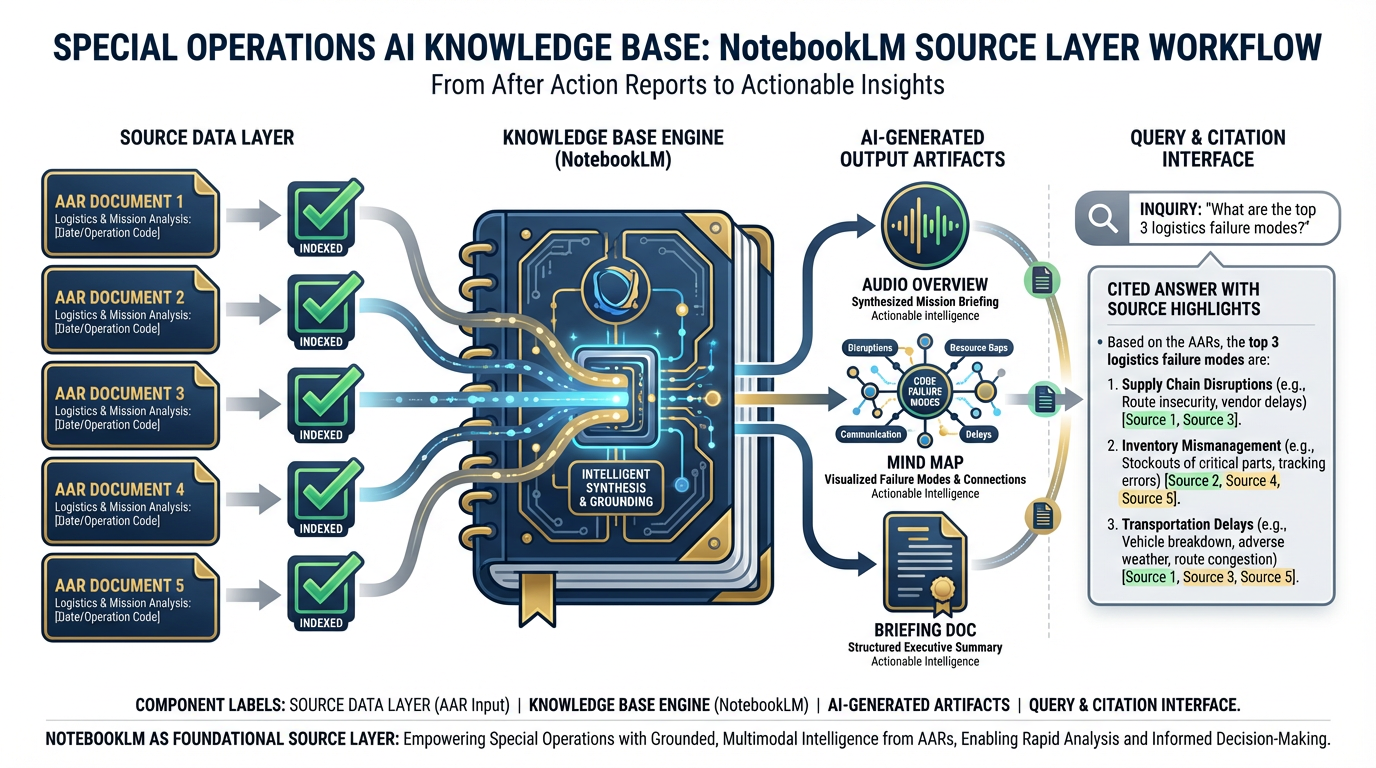
Figure 5:The source layer lives in NotebookLM. Five sanitized AARs. One grounded knowledge base. Every answer cited. Every claim traceable.
TIER 2 — THE PIPELINE
6Phase 2 — Build the Processing Pipeline
Time budget: 60 minutes Tool: AI Studio + Gemini 3.1 Pro (Chapter 3) Objective: Structured OIL extraction pipeline producing clean JSON
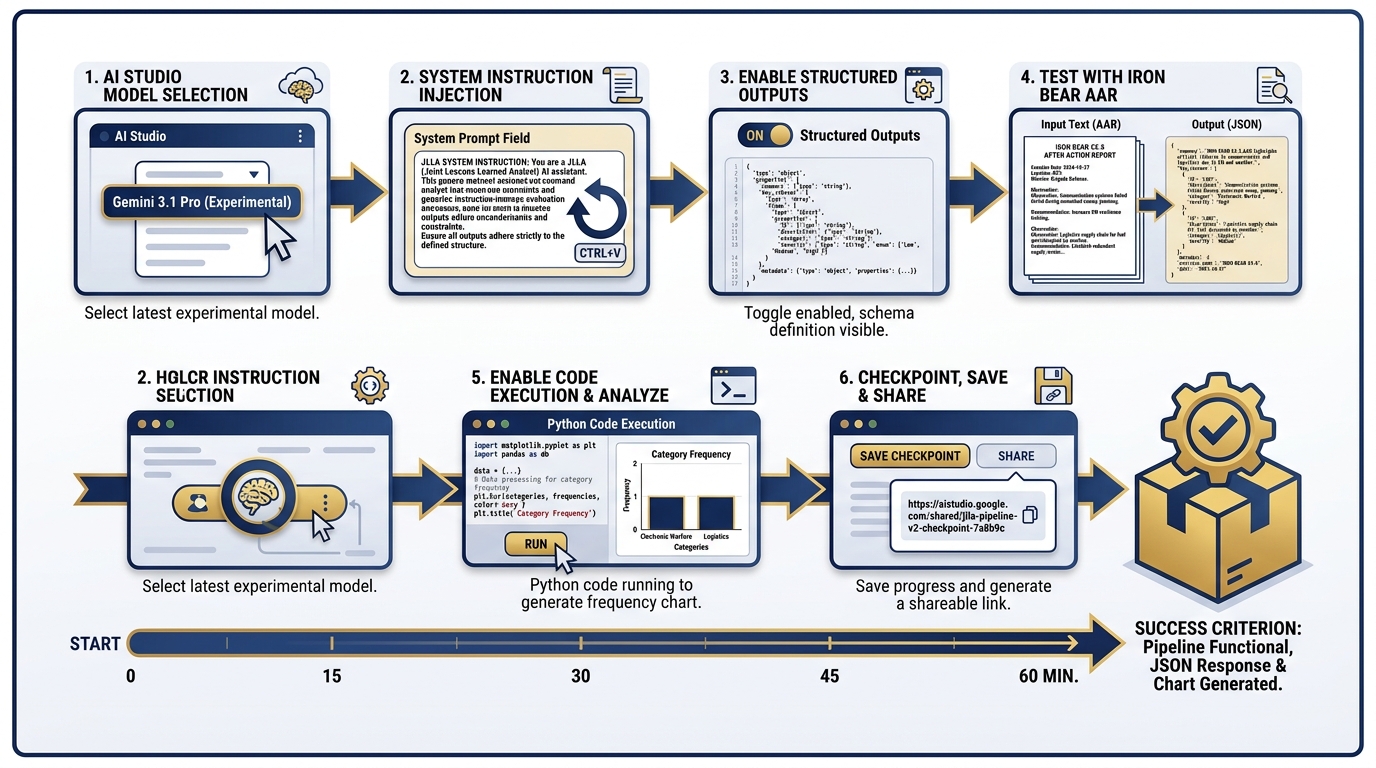
Figure 6:Phase 2: The extraction engine. Gemini 3.1 Pro with Structured Outputs converts raw AAR text into a clean, machine-readable OIL table.
Step 1 — Create a New Prompt in AI Studio
Navigate to AI Studio. Create a new prompt. Select Gemini 3.1 Pro (the February 2026 Preview model, validated at ARC-AGI-2 77.1% and GPQA 94.3% with a 1M-token context window). This is the model that can hold your entire AAR corpus in a single context window.
Step 2 — Set the System Instruction
Paste the JLLA system instruction from Section 12.3. This is the persona that transforms Gemini 3.1 Pro from a general-purpose assistant into a specialist OIL extractor. Verify that your system instruction includes:
Role definition
Output format specification
Scope of authority limitations
Confidence flagging requirement
Step 3 — Enable Structured Outputs
In the AI Studio settings panel, enable Structured Outputs. Set the JSON schema to the Lukos OIL format:
{
  "type": "array",
  "items": {
    "type": "object",
    "properties": {
      "id": { "type": "string" },
      "observation": { "type": "string" },
      "issue": { "type": "string" },
      "lesson": { "type": "string" },
      "category": {
        "type": "string",
        "enum": ["Logistics", "C2", "Communications", "Training",
                 "Personnel", "Intelligence", "Medical", "Other"]
      },
      "confidence": { "type": "number", "minimum": 0, "maximum": 1 },
      "source_paragraph": { "type": "string" }
    },
    "required": ["id", "observation", "issue", "lesson", "category",
                 "confidence", "source_paragraph"]
  }
}
Step 4 — Test on IRON BEAR 24-3
Paste the first two pages of the IRON BEAR 24-3 AAR into the user turn. Run. Verify:
Output is valid JSON
Every observation has a source paragraph citation
Confidence scores are present on all items
Low-confidence items (< 0.7) are flagged for human review
Step 5 — Enable Code Execution
Enable the Code Execution tool in AI Studio. Add a follow-up instruction:
“Using the OIL table you just produced, write and execute Python code to calculate the count of observations by category. Display the result as a sorted list.”
The model will write the Python, execute it, and return the frequency counts. This is your first automated analytics output.
Step 6 — Checkpoint
Save your AI Studio prompt as a shareable link. Paste it in your pack’s shared document. The checkpoint is: structured OIL extraction is working, and category frequency counts have been produced.
7Phase 3 — Assemble the Synthetic Wolfpack
Time budget: 90 minutes Tool: Antigravity (Chapters 6–8) Objective: Two-agent JLLA → PB pipeline producing a reviewed BLUF memo
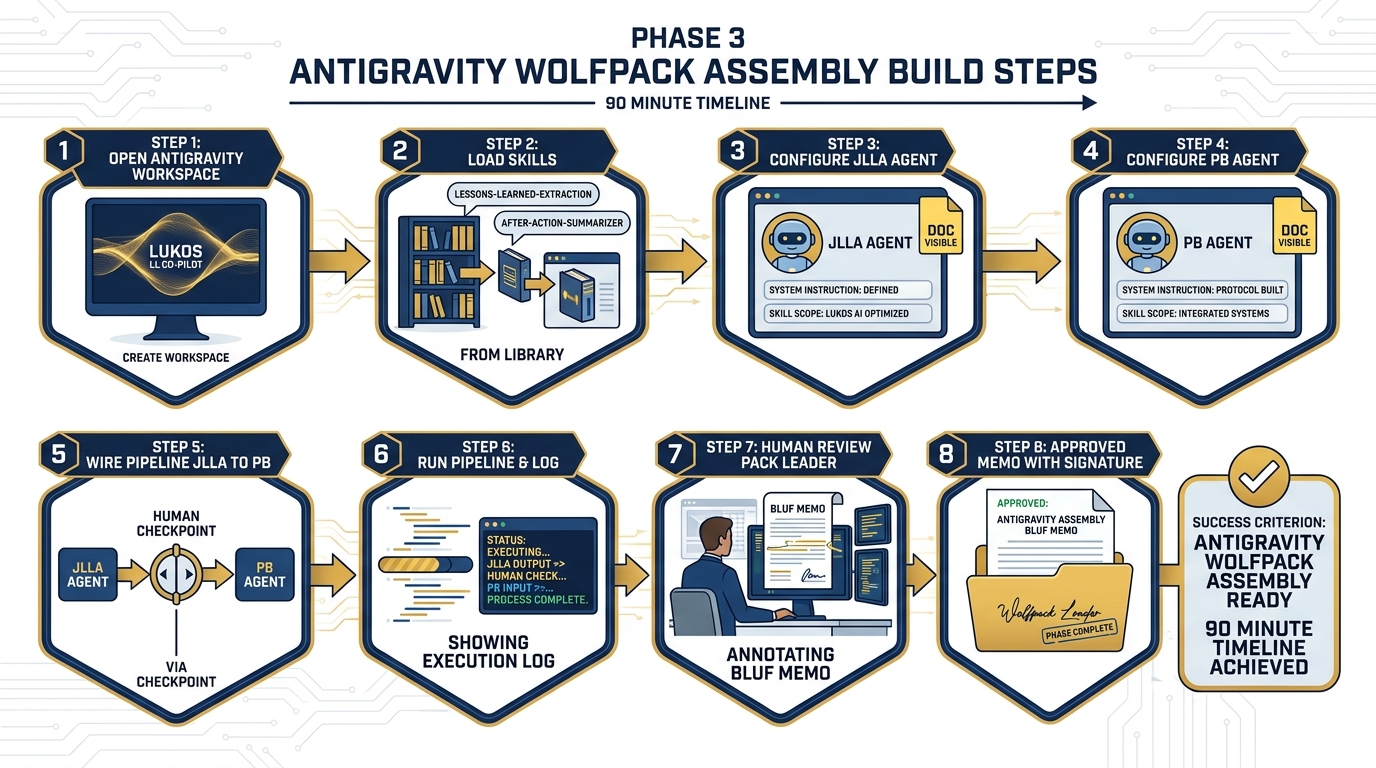
Figure 7:Phase 3: The wolfpack assembles. Two agents working in sequence, with a human reviewer at the gate before any artifact advances.
Step 1 — Open Antigravity
Navigate to Antigravity — Google’s agent-first IDE for building, running, and supervising AI agents and multi-agent pipelines. Create a new workspace titled:
Lukos LL Co-Pilot — [Your Pack Name]Step 2 — Load Skills from Chapter 7
Import the following skills from the Chapter 7 Skill Library (Appendix C):
lessons-learned-extractionafter-action-summarizer
Verify that each skill loads cleanly. Check the skill manifest for version and compatibility.
Step 3 — Configure JLLA
Create a new agent. Assign:
Name: JLLA
System instruction: The full JLLA instruction from Section 12.3
Skill:
lessons-learned-extractionScope of authority doc: Upload the JLLA scope doc (extract only, no synthesis)
Output format: JSON OIL table per the schema from Phase 2
Step 4 — Configure PB
Create a second agent. Assign:
Name: PB
System instruction: The full PB instruction from Section 12.3
Skill:
after-action-summarizerScope of authority doc: Upload the PB scope doc (synthesize and present, no commitments)
Output format: BLUF memo + audio overview request + mind map outline
Step 5 — Wire the Pipeline
Connect JLLA → PB in the Antigravity pipeline view. Insert a Human Checkpoint node between JLLA and PB. Configure it:
Reviewer: Pack leader (or designated senior analyst)
Review time limit: 10 minutes
Override: Pack leader may edit, approve, or reject JLLA output before PB receives it
Step 6 — Run the Pipeline
Input: The full IRON BEAR 24-3 AAR set (use the text extracted from Phase 2).
Run. Watch the pipeline execute:
JLLA reads the AAR and produces a JSON OIL table
Human checkpoint pauses the pipeline — pack leader reviews and edits
PB receives the reviewed OIL table and produces the BLUF memo
Second human checkpoint: senior analyst reviews PB output
Step 7 — Human Review and Edit
The senior analyst on your pack reads the BLUF memo. This is not a rubber stamp. Check:
Does the BLUF accurately represent the top three findings?
Are the recommended actions actionable and realistic?
Is any sensitive information present that should not be in a deliverable?
Would you hand this to a J7 director tomorrow morning?
Edit directly. Document every change and the reason for it.
Step 8 — Checkpoint
The approved and annotated BLUF memo is your checkpoint artifact. Save it. It is Deliverable #1.
8Phase 4 — Offline Fallback
Time budget: 30 minutes Tool: LM Studio + Gemma 4 (Chapter 10) Objective: Document what works offline and what requires cloud
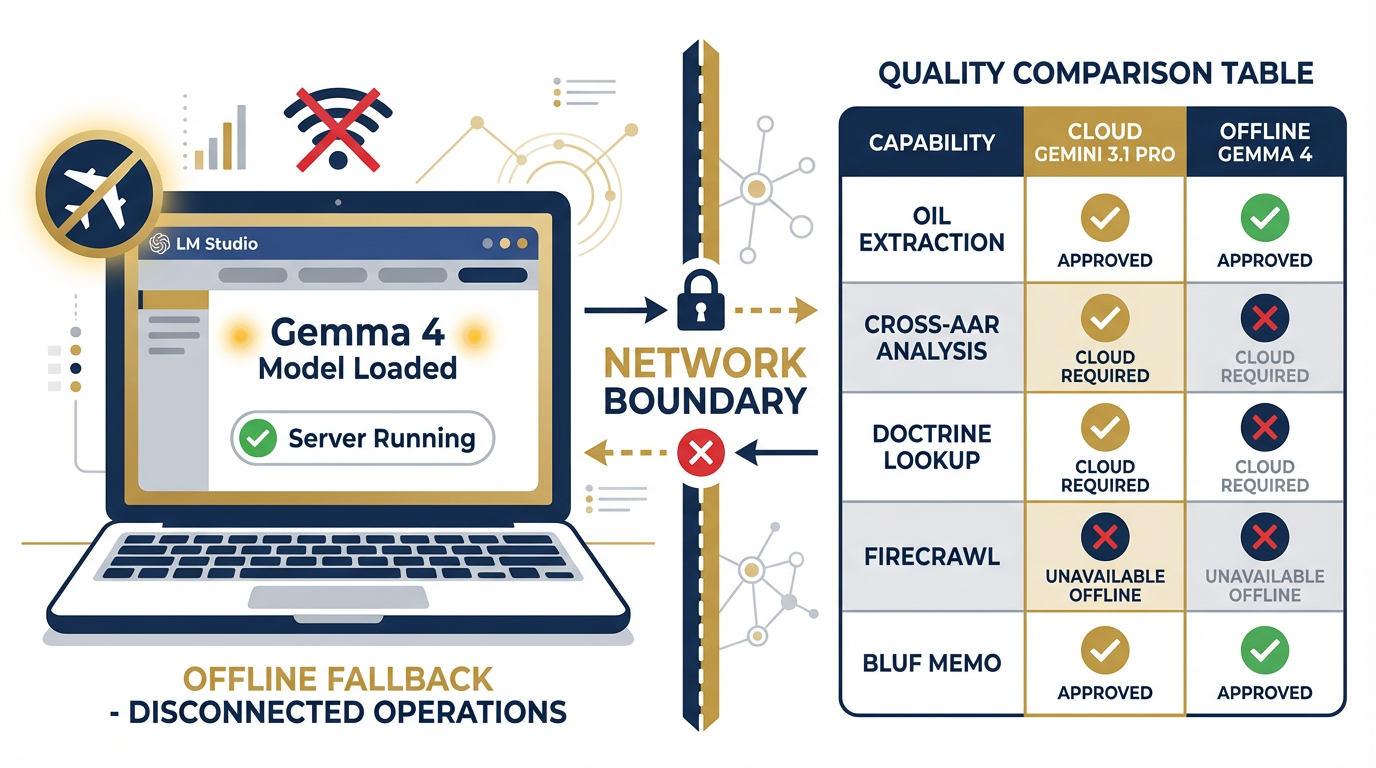
Figure 8:Phase 4: The offline fallback. Gemma 4 runs locally. The network is off. This is the degraded environment your Co-Pilot must survive.
Step 1 — Confirm LM Studio is Ready
Open LM Studio on your laptop. Confirm that Gemma 4 is loaded and the local server is running. You should see the green “Server Running” indicator. If you do not, reload the model — do not advance past this step until the local server is active.
Step 2 — Disconnect from the Network
Put your laptop in airplane mode. Verify that you have no network access. This is the disconnected environment.
Step 3 — Run the Extraction Prompt
In LM Studio’s chat interface, paste the JLLA system instruction and the IRON BEAR 24-3 AAR excerpt you used in Phase 2. Run.
Compare to Phase 2 output on three dimensions:
Completeness: Did Gemma 4 find as many observations as Gemini 3.1 Pro?
Citation quality: Does Gemma 4 cite source paragraphs with the same precision?
Confidence calibration: Are the confidence scores comparable?
Step 4 — Document the Gap
This is the most important step in Phase 4. Your pack will produce a one-page “Offline Capability Assessment” documenting:
| Capability | Cloud (Gemini 3.1 Pro) | Offline (Gemma 4) | Verdict |
|---|---|---|---|
| OIL extraction from single AAR | ✅ Full fidelity | ✅ Acceptable | Offline approved |
| Cross-AAR pattern analysis | ✅ Full fidelity | ⚠️ Degraded | Cloud required |
| Doctrine lookup (NotebookLM) | ✅ Full fidelity | ❌ Unavailable | Cloud required |
| FireCrawl live feed query | ✅ Full fidelity | ❌ Unavailable | Cloud required |
| BLUF memo generation | ✅ Full fidelity | ✅ Acceptable | Offline approved |
| Structured JSON output | ✅ Schema-locked | ⚠️ Approximate | Human review required |
Offline is not as good. It is not supposed to be as good. It is supposed to work when nothing else will. Document the boundary honestly.
Step 5 — Checkpoint
Reconnect to the network. Your Offline Capability Assessment is Deliverable #3 (OPSEC and Governance Plan, offline section).
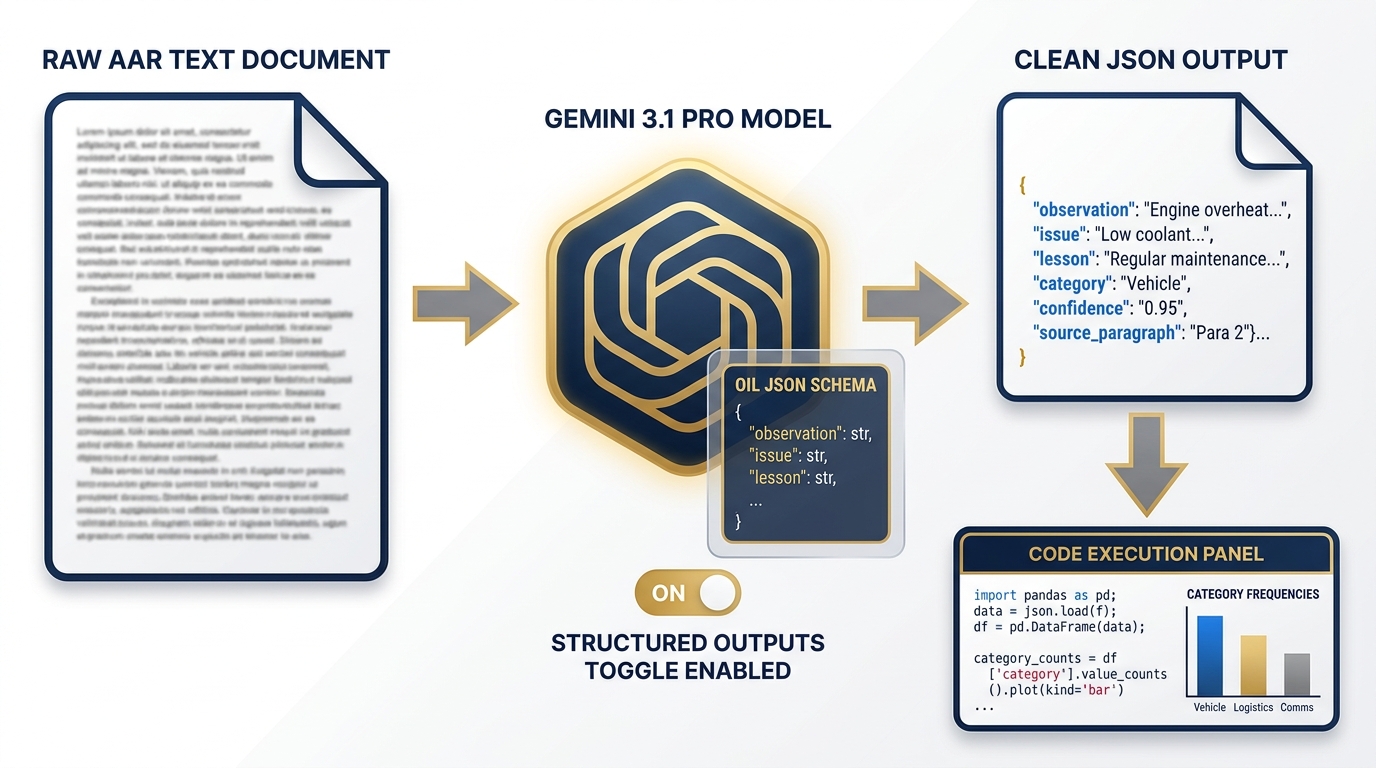
Figure 9:The processing layer transforms unstructured AAR text into a machine-readable OIL table. Structured Outputs ensure schema compliance. Code Execution calculates category frequencies.
912.5 The Deliverable Set
Your pack ships six deliverables. All six. No partial credit for a partial set.
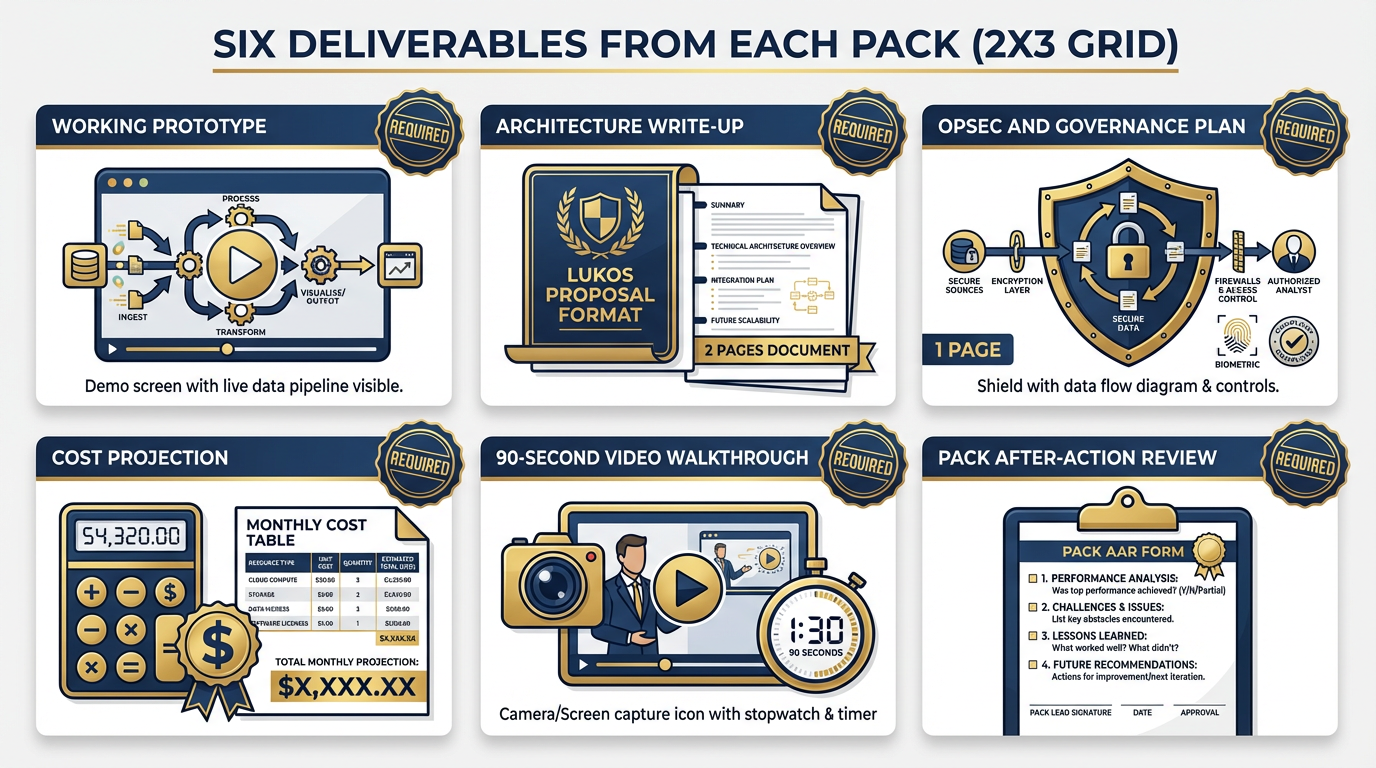
Figure 10:Six deliverables. Every pack ships all six. The governance plan and cost projection are evaluated with the same rigor as the working prototype.
Deliverable 1 — Working Prototype
Your Co-Pilot demonstrated live to the room. The demo must show:
A NotebookLM notebook queried with a cited answer
A Gemini 3.1 Pro structured output run producing a valid OIL table
At minimum, the JLLA → PB pipeline executing on real content
A human review moment made visible — show the checkpoint, show the edit
If your full four-agent pipeline is working, demonstrate all four agents. If you completed the two-agent version, demonstrate that. The standard is fidelity, not complexity.
Deliverable 2 — Architecture Write-Up (2 pages, Lukos proposal format)
Your architecture write-up covers:
Tool stack with version numbers and access method (API, SaaS, local)
Data flow diagram (you may use your Mermaid output from this chapter)
Human oversight model: where are the checkpoints, who is the reviewer, what authority do they have to reject output?
Promotion path: what would it take to move this from workshop prototype to Lukos production deployment?
Two pages. Lukos proposal format. No exceptions.
Deliverable 3 — OPSEC and Governance Plan (1 page)
Your governance plan answers, on one page:
Data classification: What classification level can this system handle? (UNCLASSIFIED, CUI, SECRET?) What controls are in place for each level?
Data residency: Where do AARs go when uploaded to NotebookLM? (Google servers, US region) What does that mean for your customer’s data handling requirements?
Access control: Who can access the notebook? The AI Studio prompt? The Antigravity workspace?
Audit trail: What is logged, where, and for how long?
Offline boundary: What data stays on-device? What leaves the device?
Incident response: If a PB output contains sensitive information that should not have been included, what is the escalation path?
One page. Honest answers only. Customers respect uncertainty more than false confidence.
Deliverable 4 — Cost Projection (1 page)
Your cost projection covers monthly cost at Lukos production volume. Use these verified pricing inputs:
| Component | Model/Tool | Input Cost | Notes |
|---|---|---|---|
| OIL extraction | Gemini 3.1 Pro | $3.50/1M tokens | Preview pricing — confirm at GA |
| Briefing generation | Gemini 3 Flash | $0.50/1M tokens | GA pricing, speed workhorse |
| NotebookLM | Google One AI Premium | $19.99/month | Up to 50 notebooks, 20 sources each |
| FireCrawl | Business tier | ~$50/month | 100K credits/month |
| Antigravity | Check current pricing | TBD | Confirm at workshop time |
| LM Studio | Free (local compute) | Hardware cost only | Gemma 4 runs on modern laptop GPU |
Production volume assumption: 12 new AARs per week × 52 weeks = 624 AARs/year. Each AAR averages ~15,000 tokens input. Calculate your monthly token volume, apply the pricing, add the SaaS subscription costs.
Show your math. Label your assumptions. Note which costs are estimates and which are confirmed.
Deliverable 5 — 90-Second Video Walkthrough
Record a screen capture (OBS, Quicktime, your phone) of your prototype in action. 90 seconds maximum. Cover:
What problem this Co-Pilot solves (10 seconds)
How it works — show the pipeline executing (60 seconds)
What the output looks like — show the BLUF memo (20 seconds)
Upload to the pack’s shared drive. Link in the Architecture Write-Up.
Deliverable 6 — Pack After-Action Review
Your pack’s AAR on the build experience itself. One page. Four questions:
What worked better than expected?
What broke or didn’t work?
If you rebuilt this from scratch tomorrow, what would you do differently?
What is the one thing this build revealed about your team’s AI capability gap?
This is the intelligence product of the capstone. It is not graded on positivity. It is graded on honesty and specificity.
1012.6 The Evaluation Rubric
Dr. Lee and Professor Marquez evaluate each pack’s presentation against five dimensions. The rubric is not a checklist — it is a judgment framework. Every dimension requires a holistic assessment.
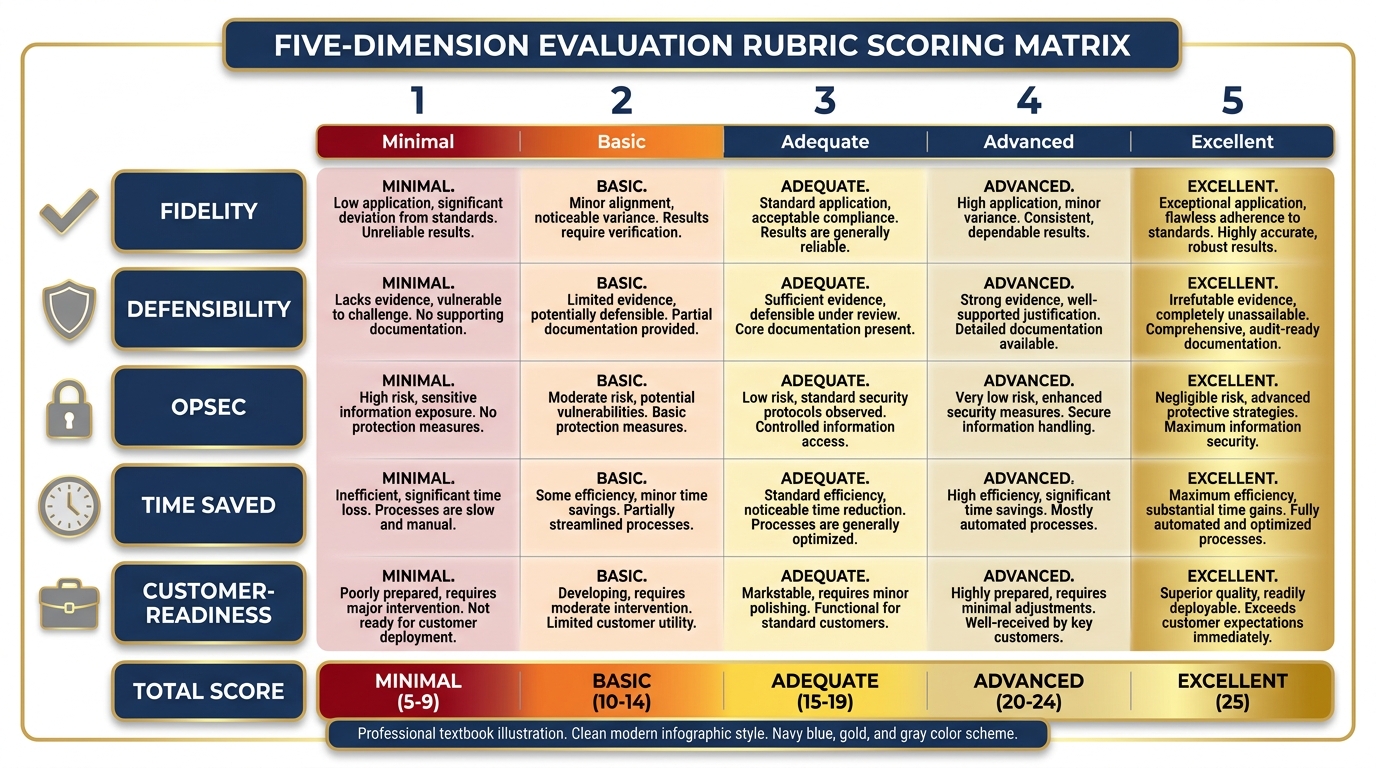
Figure 11:The evaluation rubric. Five dimensions. Each scored 1–5. The highest combined score wins — but every pack that ships all six deliverables earns full credit for completion.
Dimension 1 — Fidelity (1–5)
Does the Co-Pilot actually do what it claims? A fidelity score of 5 means: you demonstrated every claimed capability live, in real time, with real content, and it worked. A score of 1 means: the demo failed, or the capabilities you described in the architecture write-up are not present in the prototype.
Fidelity is not about perfection. A prototype that works at 70% fidelity and honestly documents the 30% gap scores higher than a prototype that claims 100% fidelity but hides its failures.
Dimension 2 — Defensibility (1–5)
Would this hold up to a customer’s audit? Could you walk a USSOCOM J7 contracting officer through your architecture, your data flow, and your governance plan without flinching?
Defensibility is built on documentation. The architecture write-up and governance plan are the primary evidence for this dimension.
Dimension 3 — OPSEC (1–5)
Is the data hygiene sound? Does your governance plan accurately account for where data goes and who can access it? Have you identified the classification ceiling for your current configuration?
A score of 5 means: a counterintelligence officer could read your OPSEC plan and approve it without modifications. A score of 1 means: you uploaded customer data to a public API without noting that in your governance plan.
Dimension 4 — Time Saved (1–5)
What is the realistic productivity claim? A score of 5 means: you can document, specifically, how many analyst-hours per month this Co-Pilot saves, at what confidence level, with what assumptions. A score of 1 means: “it saves time” without any supporting math.
Use your Phase 2 timing data. How long did JLLA take to extract a full AAR? Compare to the baseline manual extraction time from Section 12.1 (3–5 hours per AAR).
Dimension 5 — Customer-Readiness (1–5)
What would it take to put this in front of USSOCOM J7 next week? A score of 5 means: with 40 hours of additional work, this prototype is presentable to a customer as a proof of concept. A score of 1 means: the prototype is not yet ready to show anyone outside this workshop.
Be honest about the delta. Customers respond well to “here’s what it does today and here’s the roadmap to production” delivered with confidence.
1112.7 The Capstone Presentations
Time budget: 60 minutes (10 minutes per pack)
Each pack presents their Co-Pilot to the full room. Dr. Lee and Professor Marquez evaluate against the rubric in real time.
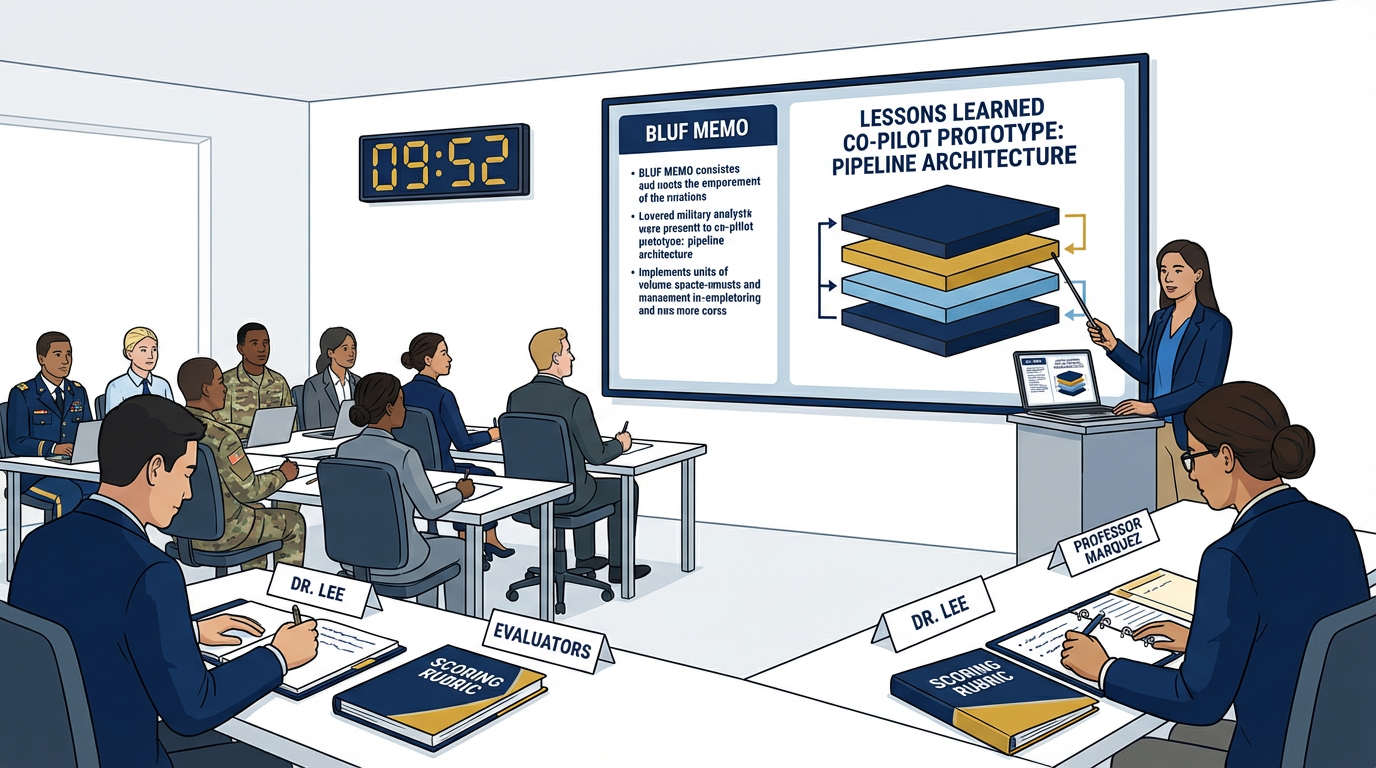
Figure 12:Each pack gets 10 minutes. Show the prototype. Walk the architecture. Present the governance plan. Make the productivity claim. Then answer questions.
The Presentation Format (10 Minutes Strict)
Minutes 0–1 — The Problem
State the problem in plain language. Not AI language. Not technical language. The problem a J7 director understands from operational experience.
“We have 45,000 lessons and a two-analyst team. Every week the backlog grows. Last quarter, the same logistics failure mode appeared in seven AARs from three different exercises. No one noticed until after the fourth occurrence. Our Co-Pilot flags it after the first.”
Minutes 1–4 — The Demo
Show the prototype working. Live. On real content. Walk through the pipeline:
Query NotebookLM with a cited answer
Show the AI Studio OIL extraction running
Show the pipeline executing (JLLA → human checkpoint → PB)
Show the BLUF memo output
If something breaks during the demo, narrate through it. “This is where the human checkpoint pauses the pipeline for review” is a strength, not a weakness. Operators respect systems with human controls.
Minutes 4–7 — The Governance and Cost
Present your governance plan and cost projection. Two minutes maximum for each. Be direct:
“Data goes to Google US servers. We are running UNCLASSIFIED/CUI only. Here is the audit trail.”
“Monthly cost at production volume: $340/month. Here is the math.”
Minutes 7–9 — Q&A
Dr. Lee and Professor Marquez ask questions. The room may ask questions. Answer from the documentation, not from memory. Your architecture write-up and governance plan are your source of truth.
Minute 9–10 — The Gap Honest Statement
Close with what your prototype does not yet do. What would it take to close the gap?
“We have a working two-agent pipeline. The full four-agent pipeline with DR and CR is architected and documented but not yet built. We estimate 16 hours of additional work to complete it. We have a Vertex production architecture ready for when the customer wants to move from prototype to deployment.”
Honesty at the close is a sales technique. It signals that your team knows the difference between what works and what is aspirational. That is a rare and valuable signal.
The Best Design Becomes the Prototype
The pack with the highest combined rubric score — or, in the event of a tie, the design with the strongest governance plan — becomes the candidate prototype for the broader Lukos Lessons Learned Program.
The pack that built it gets named in the prototype documentation. Not as a footnote. In the header.
That prototype will be reviewed by the Lukos leadership team. If it passes their review, it will be presented to the program customer as a Lukos-developed capability. The analysts who built it in this workshop built the thing that became the thing.
That is the payoff.
1212.8 The After-Action Review — On the Course Itself
Before you leave this room, the course itself gets an AAR.
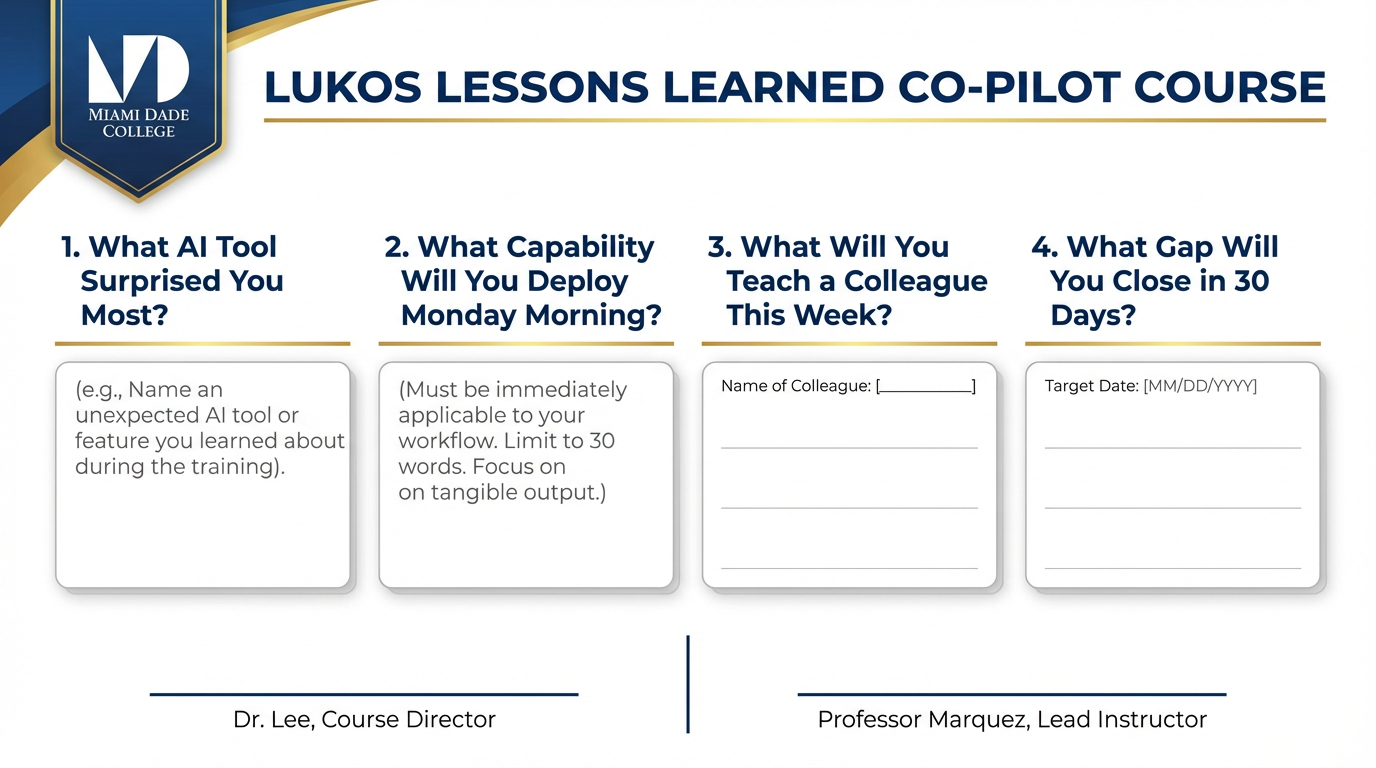
Figure 13:The course AAR. Four questions. Honest answers. This is how the course improves for the next pack of analysts who walks through this door.
This is the meta-level. You’ve been conducting AARs throughout the course — on your prompts, on your pipeline runs, on your team’s build process. Now you conduct one on the learning experience itself.
The four questions are simple. The answers should not be.
Question 1 — What AI Tool Surprised You Most?
Not which tool you used most. Which tool changed your mental model of what AI can do.
For many analysts, the answer is NotebookLM — specifically, the moment they realized they could ask a question about a 500-page document and get a cited answer in ten seconds. For others, it is the wolfpack: the moment the JLLA agent produced an OIL table that matched what a human analyst would have produced in four hours, in four minutes.
Write your answer. Be specific. Name the moment.
Question 2 — What Capability Will You Deploy Monday Morning?
Not in 30 days. Not “eventually.” Monday morning, when you sit down at your desk.
Constraints:
It must be something you can implement without budget approval
It must use a tool you have access to today
It must solve a real problem you face in your current role
If your answer is “I’ll set up a NotebookLM notebook for our exercise AAR corpus” — that is a correct answer. If your answer is “I’ll build a four-agent pipeline” — that requires more than a Monday morning. Be honest about the timeline.
Question 3 — What’s One Thing You’ll Teach a Colleague This Week?
Knowledge transfer is the force multiplier. If you leave this workshop and the knowledge stays with you, the investment was half as effective as it could have been.
Identify one person — by name — whom you will teach one thing from this course by end of week. Not a training program. A conversation. Fifteen minutes. “Here’s something I learned that changes how I think about our LL process.”
Question 4 — What’s the One Gap You’ll Close in 30 Days?
You know what you don’t know. This course revealed it.
Write the gap. Write the specific action you will take to close it. Write the date by which you will complete that action.
“I still don’t fully understand how Antigravity’s skill loading works under the hood. I will spend one hour per week for the next four weeks working through the Antigravity documentation and building one new agent per week. By [date], I will have built and documented four agents.”
That is a gap with a closure plan. That is the standard.
1312.9 The Pack Debrief — BLUF
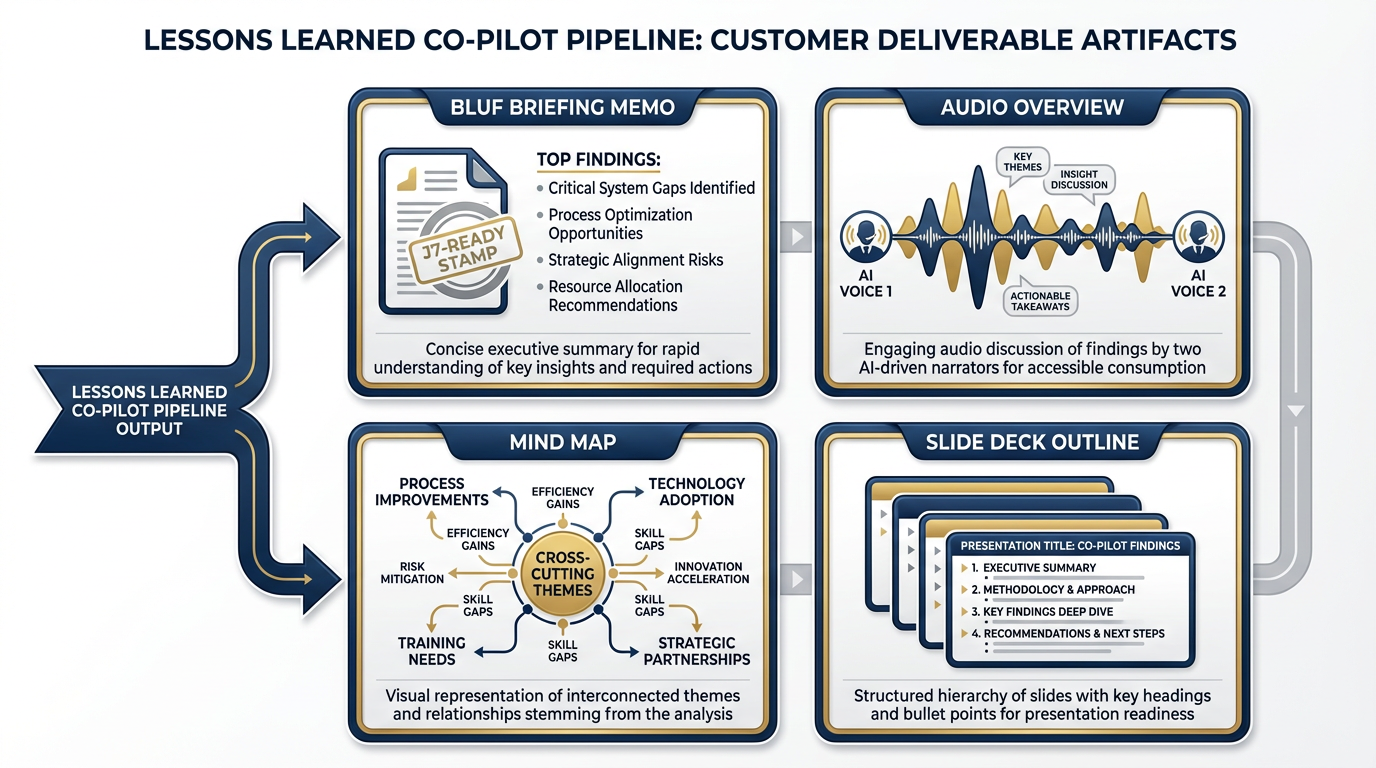
Figure 14:The output layer. Four artifacts from one pipeline run. Every artifact is customer-ready. Every artifact has a human reviewer’s name on it.
You have now done something that most AI training courses never do.
You did not just learn about AI tools. You built a system that integrates multiple AI tools into a coherent workflow with human oversight, governance documentation, cost accountability, and a production roadmap.
Let us state clearly what you built and what it means.
You built a lessons learned Co-Pilot. It is not perfect. It is a prototype. But it works — it takes an AAR as input and produces a J7-ready briefing memo as output, with a human reviewer’s name on every artifact that leaves the pipeline. That is more than most teams have achieved in six months of AI adoption work.
You used every surface in this book in one integrated build.
Chapter 1’s situational awareness: understanding when AI adds value and when it doesn’t
Chapter 2’s Field Operative Framework: the prompting discipline that makes your agents precise
Chapter 3’s AI Studio: the prototyping ground for your extraction pipeline
Chapter 4’s NotebookLM: the grounded retrieval engine that eliminates hallucinated citations
Chapter 5’s Gemini Enterprise Agent Platform: the production architecture you’ve documented for the customer
Chapters 6–8’s Antigravity wolfpack: four synthetic teammates executing a pipeline while you supervise
Chapter 9’s FireCrawl: live web access for doctrine and partner-nation monitoring
Chapter 10’s LM Studio: the offline fallback that means your Co-Pilot survives without a network
Chapter 11’s Decision Matrix: the framework you used to make every tool selection in this capstone
The muscle you built is more valuable than the prototype.
The prototype will be revised. The tools will be updated. Gemini will release a new model. Antigravity will ship new features. NotebookLM will add new artifact types.
The muscle — the ability to look at a new AI capability and know, within minutes, where it fits in the workflow, which layer it replaces, what governance questions it raises, and how to integrate it with the tools you already have — that muscle does not expire.
That is what this course built.
The Co-Pilot you built today is a candidate for the Lukos production system tomorrow.
That is not hyperbole. The governance plan you wrote, the architecture you documented, the cost projection you calculated — these are the artifacts a program manager needs to take an AI initiative from prototype to production. You did not just build a demo. You built the foundation of a production case.
The pack that built it together is stronger than any individual wolf who built it alone.
Every pack in this room built a slightly different Co-Pilot. Different architectures. Different skill configurations. Different output formats. The collective intelligence of the room — six packs, six approaches, six sets of lessons — is richer than any individual build.
That is what packs do. They cover more ground than individuals. They find things individuals miss. They build things individuals cannot build alone.
You are the pack now.
Figure 15:The synthetic wolfpack in Antigravity. Two agents. One human checkpoint. One reviewed deliverable. This is the minimum viable pipeline. You built it.
14Chapter Summary
| Concept | Key Takeaway |
|---|---|
| OPORD framing | Every significant build is a mission. Structure it like one. |
| Six-layer architecture | Source → Processing → Orchestration → Live Data → Output → Production |
| Four synthetic teammates | JLLA, DR, CR, PB — each has one job, one scope, one checkpoint |
| Human oversight is embedded | Not at the end. Not optional. Built into the pipeline from the start. |
| Governance is a deliverable | No governance plan = no customer-ready prototype |
| Offline matters | LM Studio + Gemma 4 is not as good. It is supposed to work. |
| Cost honesty is a sales technique | Customers respect accurate numbers more than optimistic ones |
| The 90-second test | If you cannot explain it in 90 seconds, you don’t yet understand it |
| The real product is the muscle | Tools change. The analytical discipline to adopt them doesn’t. |
Chapter 12 of 12. AI for Lukos Professionals — The Wolfpack’s Edge. Dr. Ernesto Lee & Professor Carlos Marquez, Miami Dade College. This book is a living document. The tools will update. The discipline remains.