Chapter 11: The Lukos AI Decision Matrix — Operating Model
One stack. Seven surfaces. One decision in under 30 seconds.
“The mark of a master isn’t knowing everything — it’s knowing exactly what to reach for.”
You have come a long way.
You started this book learning how to talk to a language model. You learned to write prompts with precision, to engineer context, to build personas that don’t drift. You gave your agents memory — through NotebookLM’s source-bounded corpus engine. You gave them personalities — through Gemini Gems with locked configurations. You gave them tools — FireCrawl for live web access, Office Viewer for document ingestion. You gave them skills — reusable specialist knowledge that turns a general-purpose model into a domain expert. You assembled those specialists into a synthetic wolfpack: four digital teammates working through the night while you sleep.
Now we do something different. Now we build the map.
This chapter is your permanent reference. The laminate card you keep at your desk. The thing you reach for when a new task lands and you need to decide — in under 30 seconds — exactly which tool to use, which model to deploy, and why.
By the end of this chapter, you will have:
A complete decision matrix: task type → right surface → right model → right rationale
A model selection decision tree for when the model choice is the hard part
A promotion path showing how any workflow matures from napkin idea to production deployment
Every Lukos line of business mapped to its exact AI stack
A cost and governance framework for federal contexts
Your personal Lukos AI laminate — a role-specific, one-page reference you’ll actually use
Let’s build the map.
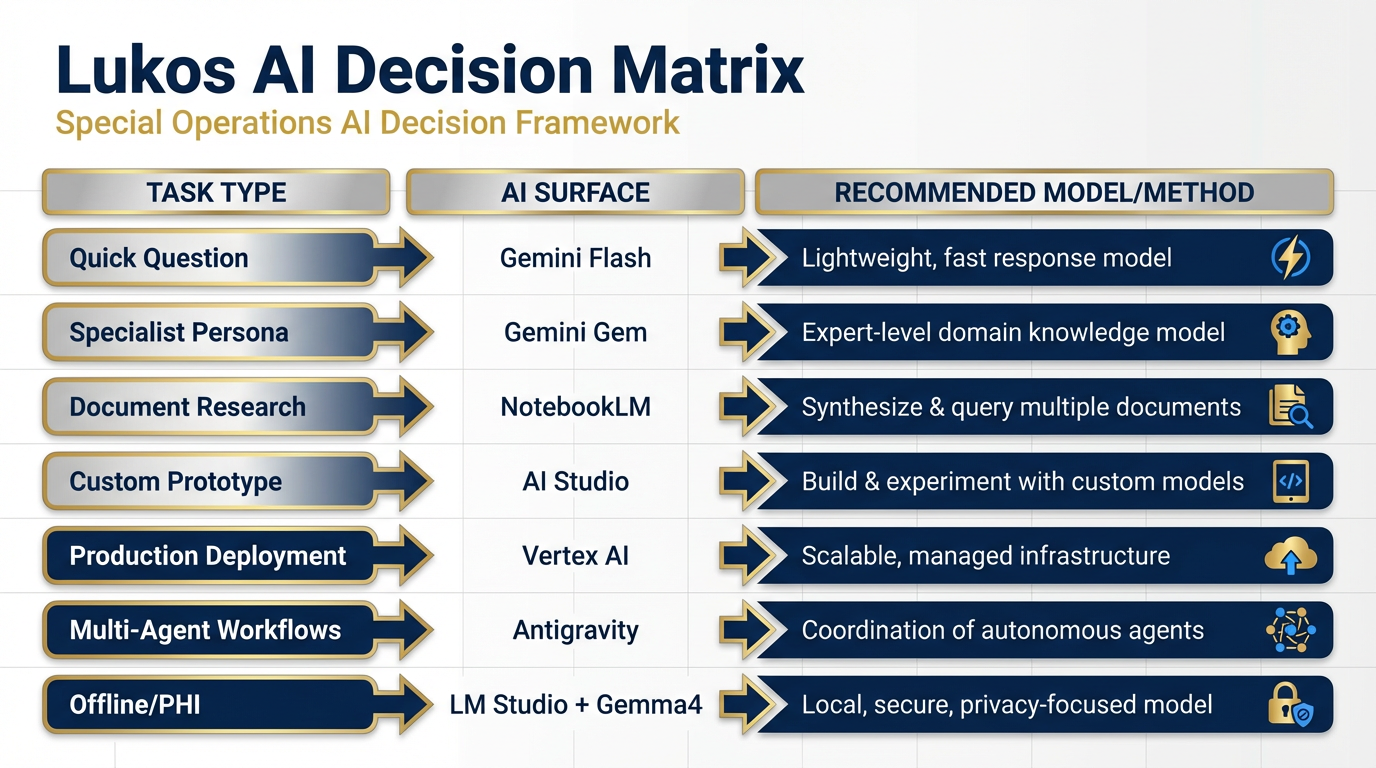
Figure 1:The Lukos AI Decision Matrix. One table. Every task type. Every surface. Every model. The central artifact of this chapter — the laminate card every Lukos analyst keeps at their desk.
111.1 The One-Page Decision Matrix — Surface Selection
Here is the core truth about the Lukos AI stack: there are seven primary surfaces, and every task you will ever face maps cleanly to one of them. The skill is not learning the tools — you’ve done that. The skill is instant recognition: this task belongs here.
The table below is that skill, externalized.
The Lukos AI Surface Decision Matrix
Task / Scenario | Surface | Model | Why |
|---|---|---|---|
Quick analyst question, unclassified | Gemini 3 Flash | Fast, free, capable — no setup required | |
Persistent specialist persona (FAR translator, brief writer) | Gemini Gem | Gemini 3.1 Pro | Configured once, reusable indefinitely |
Grounded research over known documents | Gemini 3.1 Pro (Pro/Ultra) | Source-bounded, cites everything, hallucination-resistant | |
Custom tool with adjustable parameters / prototyping | Gemini 3 Pro or 3.1 Pro | Full knob access — temperature, system prompt, structured output | |
Production deployment, customer-facing deliverables | Vertex AI / Gemini Enterprise | Gemini 3 Pro (GA) | Identity, audit trail, governance, SLA |
Multi-agent workflows with skills and tool use | Gemini 3.1 Pro + skills | Agents act in the world — JLLA, FET, AQR, TAC | |
Live web data ingestion for agents | FireCrawl (tool in Antigravity) | N/A (API layer) | Real-time, LLM-ready web content |
Disconnected / sensitive / offline / PHI-adjacent | LM Studio + Gemma 4 | Gemma 4 (local) | Zero cloud dependency — data never leaves the device |
Blind model comparison / choosing a new model | N/A (leaderboard) | Live benchmarks, side-by-side output comparison | |
Voice input for faster prompting | N/A (STT layer) | 4× faster than typing — dictate to any AI surface | |
Image generation | AI Studio / Antigravity | Nano Banana Pro | State-of-the-art image synthesis, Google native |
Video generation | AI Studio | Veo 3.1 | Free for all Google accounts — no extra setup |
Music and audio synthesis | Vertex AI | Lyria 2 | Professional-grade music generation via API |
Text-to-speech in 70+ languages | Vertex AI / API | Gemini TTS | Multilingual voice synthesis, production-ready |
How to Read This Matrix
The matrix is not a menu — it’s a decision engine. When a task lands:
What is the sensitivity level? Anything touching PHI, classified, or OPSEC-sensitive goes to LM Studio + Gemma 4. Full stop.
Is this a one-time query or a recurring workflow? One-time goes to Gemini. Recurring goes to a Gem or an Antigravity skill.
Does it require documents? Yes → NotebookLM. No → continue.
Does it need to act in the world (search the web, write to a file, trigger an API)? Yes → Antigravity. No → AI Studio or Gemini.
Is it customer-facing / production? Yes → Vertex. No → prototype in AI Studio first.
Those five questions place every task. Thirty seconds. Every time.
211.2 The Model Selection Decision Tree
Choosing a surface is the first decision. Choosing a model is the second. Here is how they map.
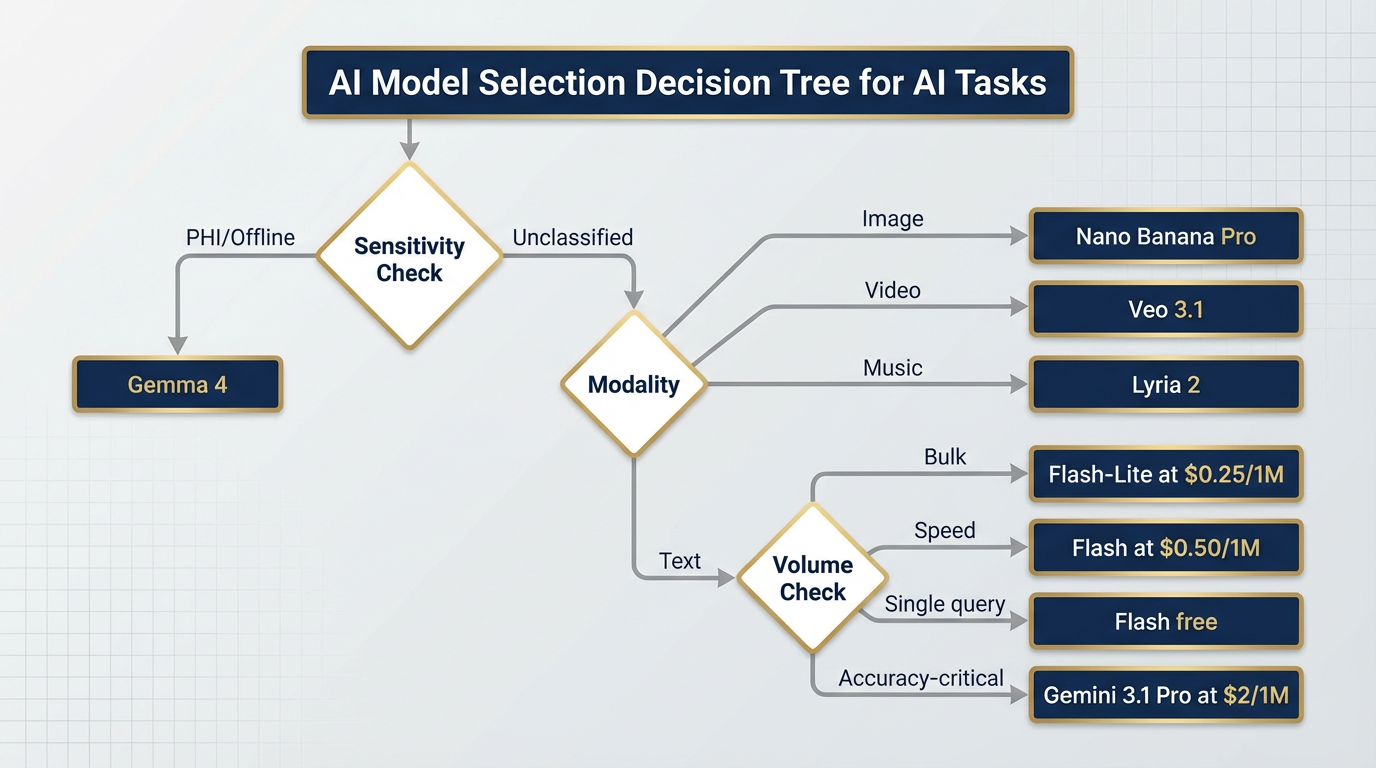
Figure 2:Model Selection Decision Tree. Every task type has a natural model home. Follow the branches: accuracy need → volume → modality → sensitivity. The right model is at the end.
Model Quick-Reference
Gemini Model Selection Guide (April 2026)
Model | Status | Context | Price (Input) | Best For |
|---|---|---|---|---|
Gemini 3.1 Pro | Preview (Feb 2026) | 1M tokens | $2 / 1M (≤200K) | Frontier reasoning — ARC-AGI-2: 77.1%, GPQA: 94.3% |
Gemini 3 Pro | GA (Nov 2025) | 1M tokens | $2 / 1M | Production accuracy workhorse — stable, auditable |
Gemini 3 Flash | GA (Dec 2025) | 1M tokens | $0.50 / 1M | Speed + volume — GPQA 90.4%, excellent value |
Gemini 3.1 Flash-Lite | Preview (Mar 2026) | 1M tokens | $0.25 / 1M | Bulk classification, tagging, high-volume pipelines |
Gemma 4 | GA (Apr 2026) | Varies | Free (local) | Offline / air-gapped / PHI-adjacent — Apache 2.0 |
Gemini 2.5 Pro | GA (retiring) | 1M tokens | Legacy pricing | ⚠️ RETIRING Oct 16, 2026 — migrate NOW |
The Gemini 2.5 Retirement — Act Now
This is not a footnote. Gemini 2.5 Pro retires October 16, 2026. If you have any production workflow — an Antigravity skill, a Vertex deployment, an AI Studio saved prompt — that specifies gemini-2.5-pro, that workflow breaks on October 17th. Zero warning. Zero graceful degradation.
The migration path is straightforward: swap the model string to gemini-3-pro (for production GA stability) or gemini-3.1-pro-preview (for frontier performance). Test your system prompts — the new models are more capable but may produce slightly different output formats. Plan one hour of QA per major workflow.
Do it now. Not in September.
311.3 The Promotion Path — From Napkin Idea to Production
Every mature Lukos capability started as a conversation in Gemini. The question isn’t “where do I start?” — you always start the same way. The question is “where does this end up?”
The Promotion Path answers that. It’s a maturity ladder: eight rungs, each representing a more capable and more governable version of the same underlying idea.
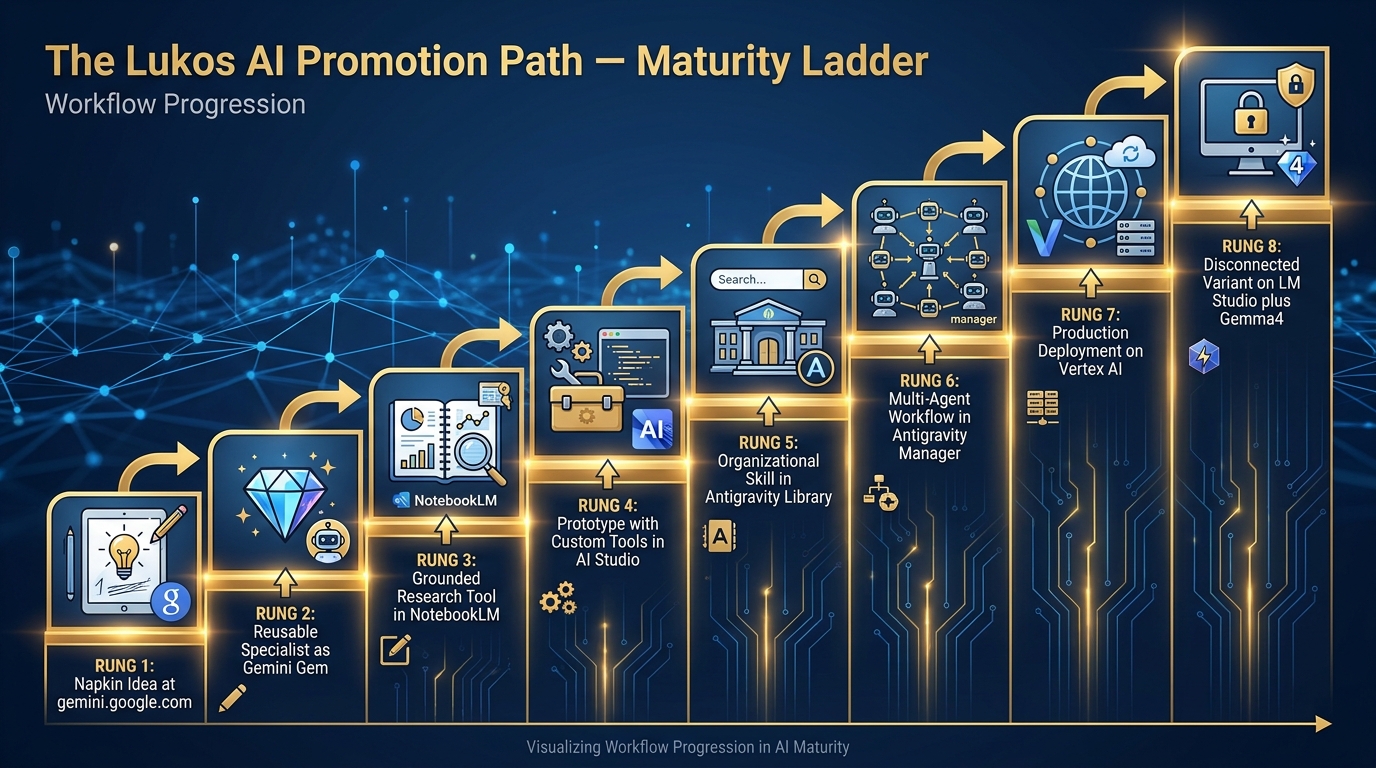
Figure 3:The Promotion Path. Every durable Lukos capability climbs this ladder. You don’t have to climb all eight rungs — most workflows live happily at rung 3 or 4. But knowing the path lets you plan for where a capability should end up.
Knowing When to Stop
Not every workflow belongs at Rung 7. A recurring personal task (summarizing your weekly read file) might live happily at Rung 2 forever. A team-wide automation might need Rung 6. A customer-deliverable product needs Rung 7.
The discipline is being intentional about where you stop — not just letting things calcify at whatever rung they happen to be on.
Rule of thumb:
Rung 1–2: Personal productivity. No governance required.
Rung 3–4: Team productivity. Shared prompts, shared notebooks. Informal review.
Rung 5–6: Organizational capability. Formalized skill documentation, supervisor sign-off.
Rung 7: Customer-facing. Full governance, identity, audit trail, FedRAMP verification.
Rung 8: Field deployment. Security review, data classification check, offline testing.
411.4 Lukos Lines of Business — Mapped to the Stack
By now you understand the tools. You understand the models. What you need is the translation layer — how those tools map to the actual work Lukos does. This section is that layer.
For each line of business, we identify the daily driver, the automation layer, the production endpoint, and any special-case handling.
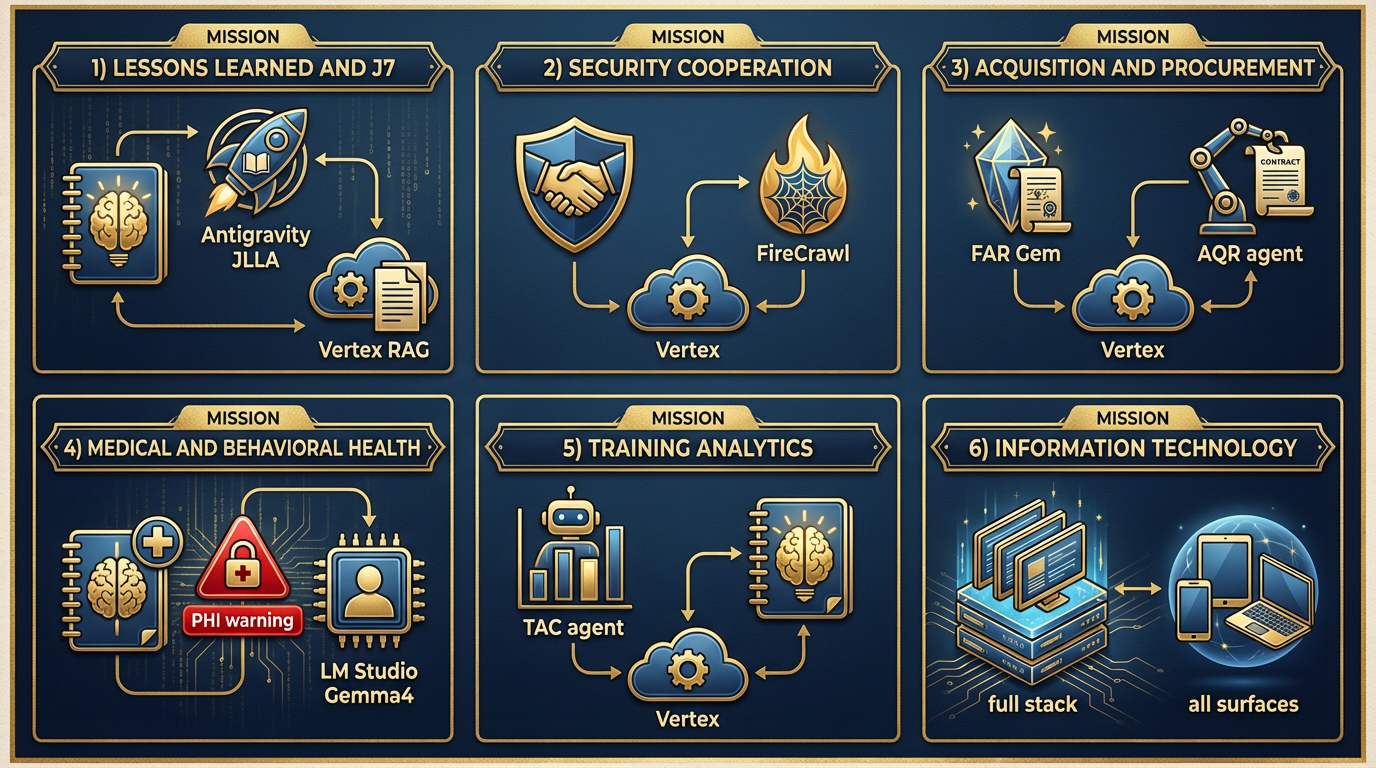
Figure 4:Lukos Lines of Business — AI Stack Map. Six mission areas. Each with a daily driver, an automation layer, a production endpoint, and special-case handling. This is not a technology overview — it is an operational blueprint.
Lessons Learned & J7 Experimentation
The original Lukos mission. 45,000+ lessons in the database. Every AAR, every observation, every issue, every lesson.
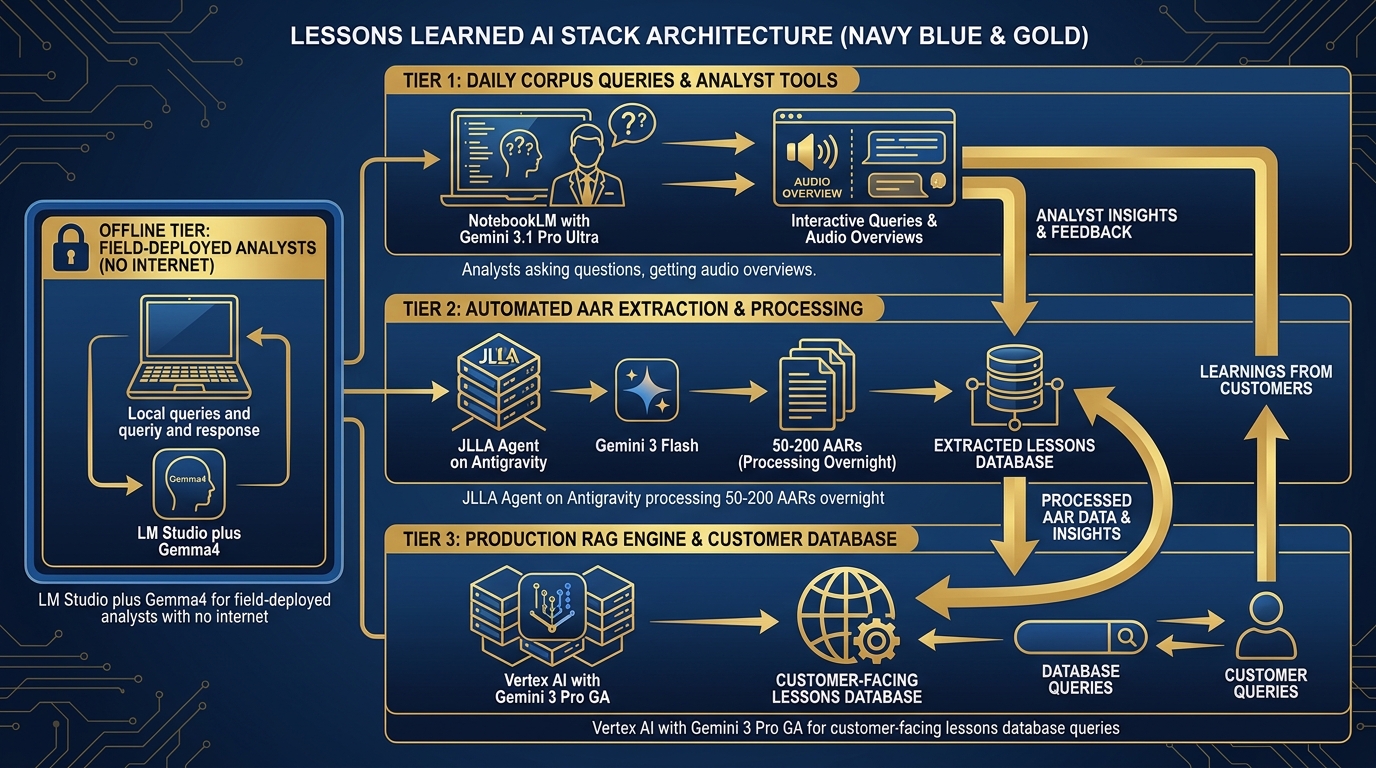
Figure 5:Lessons Learned Stack. Three tiers: daily corpus queries through NotebookLM, automated extraction through JLLA on Antigravity, and full-scale RAG over 45,000+ lessons on Vertex — each tier handling a different volume and governance requirement.
| Workflow | Tool | Model | Notes |
|---|---|---|---|
| Daily corpus query | NotebookLM | Gemini 3.1 Pro (Ultra) | Audio overviews for site leads |
| AAR ingestion automation | Antigravity + JLLA skill | Gemini 3 Flash | Overnight batch — 50–200 AARs/night |
| Production lessons query | Vertex RAG Engine | Gemini 3 Pro (GA) | Customer-facing, auditable |
| Field analysis (no internet) | LM Studio + Gemma 4 | Gemma 4 | Deployed analysts, no cloud access |
Special case: JLLA runs in Antigravity overnight. Every incoming AAR goes through JLLA first: the agent reads the document, extracts Observations, Issues, and Lessons in OIL format, and queues the structured output for senior analyst review. No AAR enters the pipeline unread. No human reads an unextracted document. The senior analyst arrives in the morning to review, edit, and approve — not to do first-pass extraction.
Security Cooperation & Foreign Partner Engagement
Partner-nation engagement, FET team support, cross-cultural communication at speed.
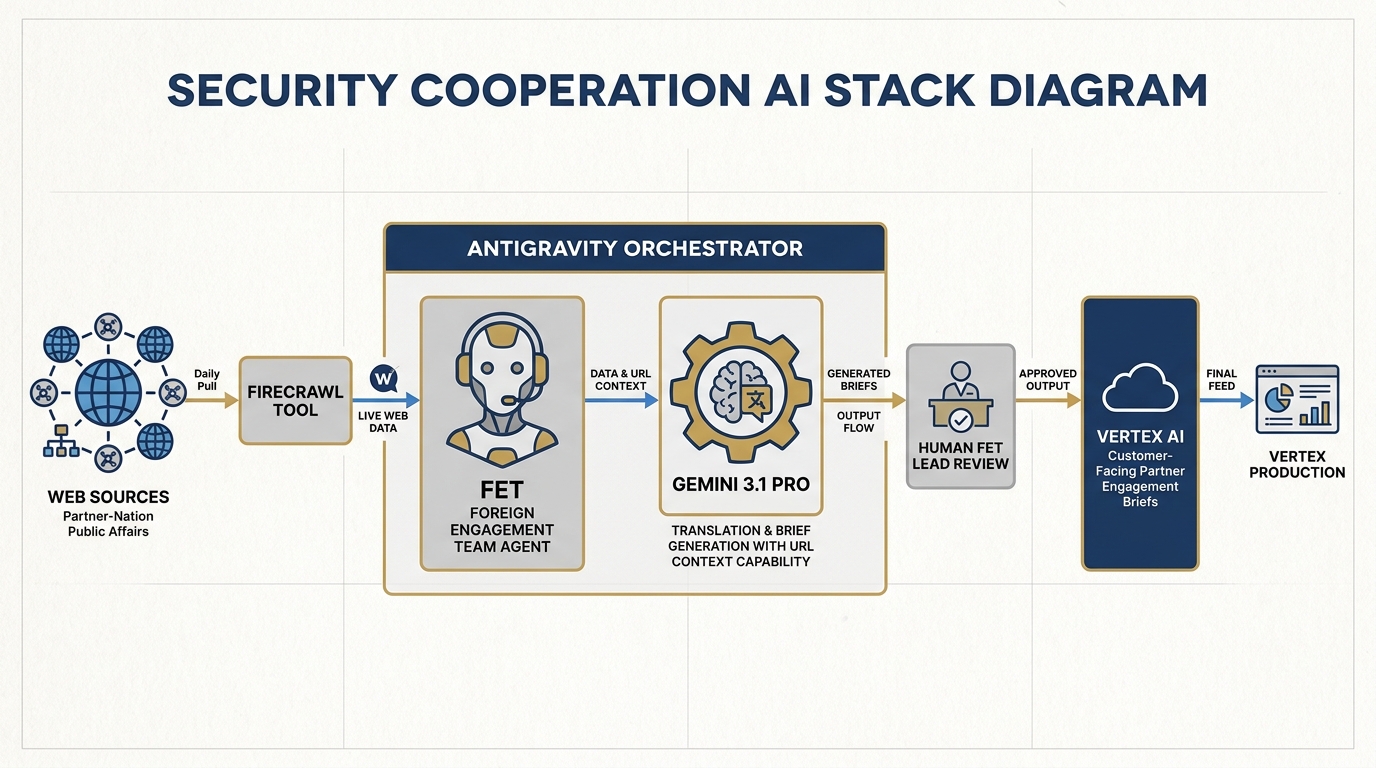
Figure 6:Security Cooperation Stack. The FET agent runs in Antigravity, using FireCrawl for daily partner-nation public affairs monitoring, Gemini 3.1 Pro for translation and brief generation, and Vertex for customer-facing partner engagement deliverables.
| Workflow | Tool | Model | Notes |
|---|---|---|---|
| Daily partner-nation monitoring | Antigravity + FET agent + FireCrawl | Gemini 3 Flash | Live web, translated, summarized |
| Document translation | Gemini (via AI Studio) | Gemini 3.1 Pro | URL Context for live documents |
| Partner brief generation | Antigravity + FET skill | Gemini 3.1 Pro | Structured output, formatted for customer |
| Customer-facing partner briefs | Vertex | Gemini 3 Pro (GA) | Identity, audit, governance |
Special case: The FET agent wakes every morning, scans partner-nation public affairs sources via FireCrawl, translates key content using Gemini 3.1 Pro’s URL Context capability, and drafts a structured daily brief. The human FET lead reviews, edits, and sends — the AI did the overnight research; the human does the final-mile cultural and contextual judgment.
Acquisition & Procurement
FAR/DFAR translation. SOW/PWS review. Acquisition strategy support for the contracting community.
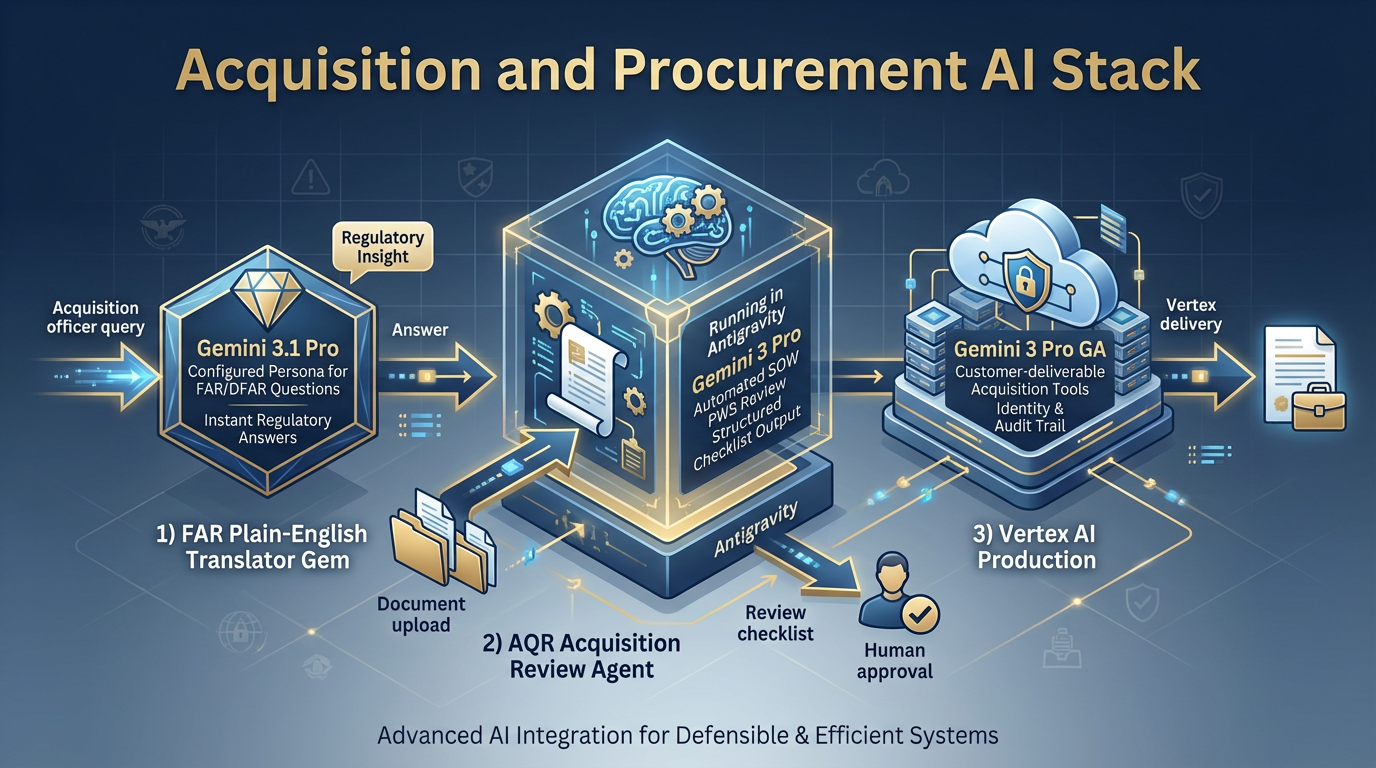
Figure 7:Acquisition Stack. FAR Plain-English Translator Gem for daily regulatory questions, AQR agent on Antigravity for SOW/PWS review, and Vertex for customer-deliverable acquisition tools.
| Workflow | Tool | Model | Notes |
|---|---|---|---|
| FAR/DFAR translation | Gemini Gem (FAR Plain-English Translator) | Gemini 3.1 Pro | Configured persona, locked system prompt |
| SOW / PWS review | Antigravity + AQR agent | Gemini 3 Pro | Structured checklist output |
| Acquisition strategy drafting | AI Studio | Gemini 3.1 Pro | Knobs open for tone adjustment |
| Customer-deliverable acquisition tools | Vertex | Gemini 3 Pro (GA) | Production, auditable |
Special case: The FAR Gem is the highest-leverage Gem in the Lukos library. An acquisition officer can ask “What does FAR 52.204-25 require?” and get a plain-English answer with citations — in ten seconds. That used to take thirty minutes of manual lookup. The Gem is configured once; every acquisition professional in the organization uses it.
Medical & Behavioral Health
The highest-stakes line of business. Where data governance isn’t optional — it’s the mission.
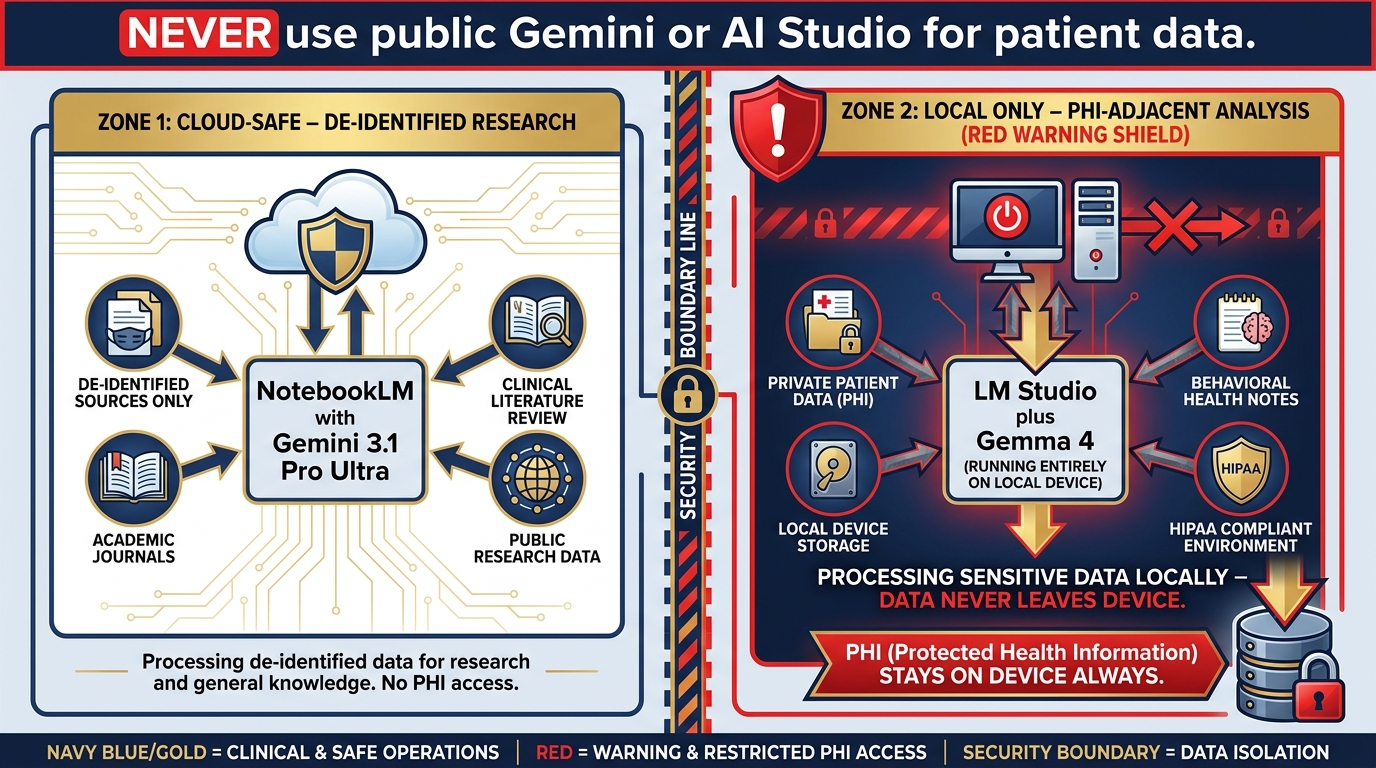
Figure 8:Medical/BH Stack. Clinical literature review through NotebookLM (de-identified sources only). PHI-adjacent work through LM Studio + Gemma 4 only — data never leaves the device. Public Gemini surfaces are never used for anything touching patient data.
| Workflow | Tool | Model | Notes |
|---|---|---|---|
| Clinical literature review | NotebookLM | Gemini 3.1 Pro (Ultra) | De-identified sources only |
| Treatment protocol research | NotebookLM | Gemini 3.1 Pro | Journal corpus, not patient data |
| PHI-adjacent analysis | LM Studio + Gemma 4 | Gemma 4 (local) | Data never leaves the device |
| De-identified trend analysis | Vertex | Gemini 3 Pro (GA) | With BAA in place |
Training Analytics
Site evaluations, training effectiveness measurement, cross-site trend analysis.
| Workflow | Tool | Model | Notes |
|---|---|---|---|
| Evaluation aggregation | Antigravity + TAC agent | Gemini 3 Flash | Batch processing, structured output |
| Cross-site trend analysis | NotebookLM | Gemini 3.1 Pro | Training evaluation corpus |
| Individual site reporting | AI Studio | Gemini 3 Pro | Structured output, formatted |
| Customer training dashboards | Vertex | Gemini 3 Pro (GA) | Identity, audit, customer-facing |
The TAC agent runs evaluation data through a standardized rubric, surfaces anomalies and trends, and drafts the initial training effectiveness report. The human training analyst reviews and contextualizes. The customer gets a cleaner, faster deliverable. The analyst spends their time on insight and recommendation — not on aggregating spreadsheets.
Information Technology
The full stack applies here. IT is the only line of business that uses every surface.
Antigravity is the primary development environment for Lukos IT work. Gemini models power the code review, documentation generation, and debugging loops. AI Studio handles API prototyping. Vertex handles production deployments. LM Studio + Gemma 4 handles any work touching sensitive system configurations or security data that can’t touch cloud inference.
The IT lead is also the Stack Guardian: they own the responsibility of keeping model strings current, managing API key rotation, and validating that production workflows haven’t drifted onto deprecated model versions.
511.5 Cost, Governance, and the Federal Lens
The decision matrix tells you what to use. The governance framework tells you how to use it responsibly in a federal contracting environment.
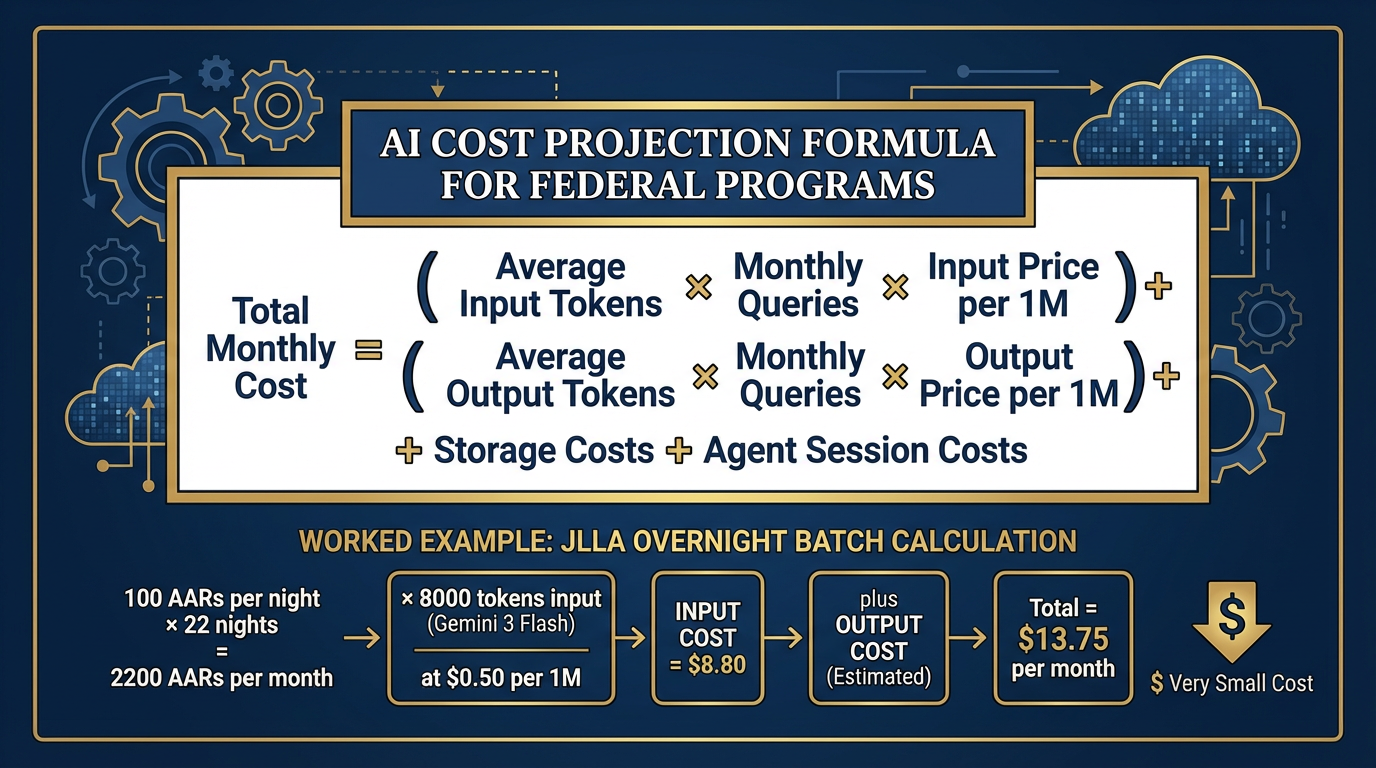
Figure 9:Cost Projection Model. Honest AI budgeting for federal programs: input tokens × volume + output tokens × volume + storage + agent sessions. The formula isn’t complicated — the discipline is applying it before you sign the contract, not after.
The Honest Cost-Projection Method
Federal program managers need to budget AI costs. Here is the formula:
Total Monthly Cost =
  (Avg Input Tokens × Monthly Queries × Input Price/1M)
  + (Avg Output Tokens × Monthly Queries × Output Price/1M)
  + Storage Costs (for RAG, embeddings, file storage)
  + Agent Session Costs (for Antigravity/Vertex Agent sessions)
Example — JLLA overnight batch:
100 AARs/night × 22 nights/month = 2,200 AARs/month
Average AAR: 8,000 tokens input, 1,500 tokens output
Model: Gemini 3 Flash (1.50 output per 1M tokens)
Monthly cost: (2,200 × 8,000 × 1.50/1M) = 4.95 = $13.75/month
That is not a typo. Thirteen dollars and seventy-five cents per month to have a junior analyst read every AAR your site receives and produce structured OIL extractions overnight. The conversation about whether AI is “worth it” ends when you run this math.
The Audit Trail Discipline
In a federal contracting environment, you are not just responsible for what AI produces — you are responsible for being able to demonstrate what AI produced, when, and why.
The discipline:
What gets logged: Every Vertex API call logs to Cloud Logging by default. Every Antigravity agent session has a session ID and a trace. Keep these logs.
How long: Your contract likely specifies. If not, default to the same retention policy as your other work products. Three years is common.
What gets reviewed: Any AI-generated content that goes to a customer should have a named human reviewer in the workflow. That reviewer’s approval is the governance checkpoint.
What never gets blamed on AI: Decisions. Analysis recommendations. Anything that requires professional judgment. AI produces drafts. Humans make decisions. Always.
OPSEC Checklist — Compact Version
(Full version in Chapter 13)
Before using any AI surface with any data:
What is the classification / sensitivity level of this data?
Is there PHI anywhere in this dataset?
Does this surface have a BAA / data processing agreement in place?
Is this model endpoint FedRAMP authorized? (Verify at marketplace
.fedramp .gov — never assume) What gets stored, for how long, and where?
Who is the named human reviewer for this workflow’s output?
Is the model version pinned? (Avoid floating version strings in production)
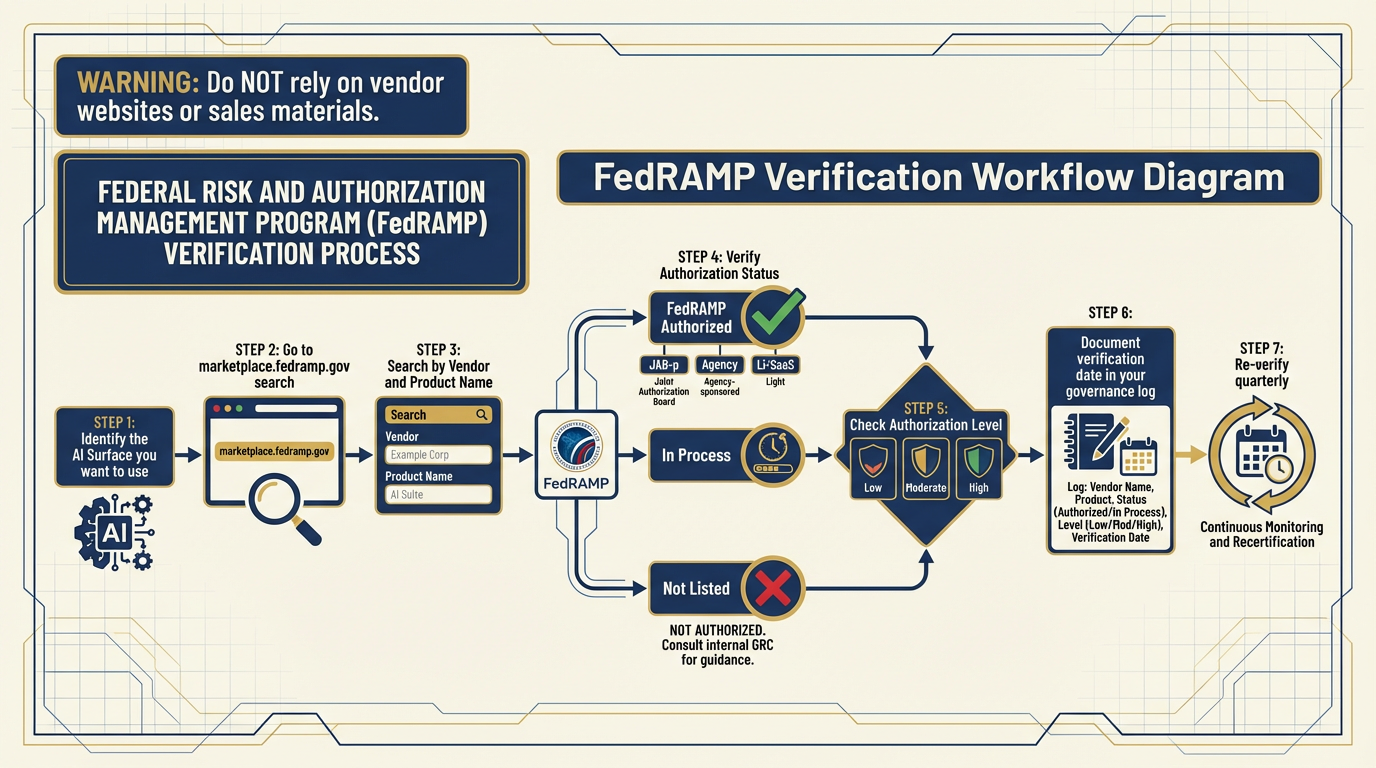
Figure 10:FedRAMP Verification Workflow. Never assume a cloud AI service is FedRAMP authorized. Always verify at marketplace
The FedRAMP Question
FedRAMP authorization status is not permanent. It changes. A service that was FedRAMP Moderate authorized last year may have changed scope, changed ownership, or lapsed. A new service may have achieved authorization since you last checked.
The rule: Before any new AI surface touches federal data, verify current FedRAMP authorization at marketplace
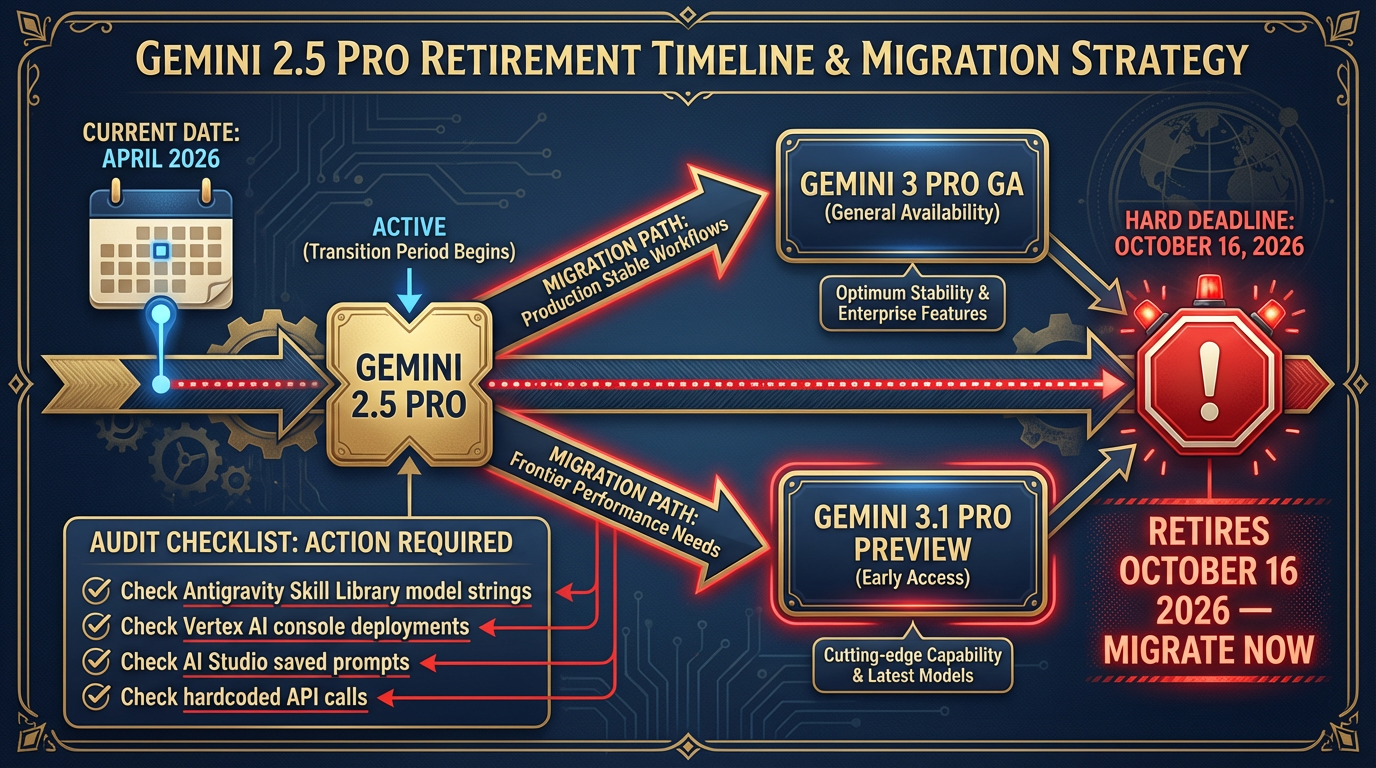
Figure 11:Gemini 2.5 Retirement Timeline. October 16, 2026 is a hard cutoff. Any production workflow running on Gemini 2.5 Pro goes dark on October 17th. The migration path is one model string change plus one hour of output QA. There is no reason to wait.
The Gemini 2.5 Retirement — Detailed Migration Guide
Hard deadline: October 16, 2026.
To audit your exposure right now:
Go to your Antigravity Skill Library. Search for
gemini-2.5in any model string configuration.Go to your Vertex AI console. Filter deployments by model family. Any
gemini-2.5-proendpoint needs migration.Go to your AI Studio saved prompts. Check the model selector on each.
Check any hardcoded API calls in custom code.
Migration decisions:
Gemini 3 Pro (GA): Drop-in replacement for stable production workflows. GA status = tested, stable, same pricing tier.
Gemini 3.1 Pro (Preview): Step-up for workflows where frontier performance matters. Preview status = may change; acceptable for internal tools, evaluate for production.
QA your migration: The new models are more capable but may format outputs differently. If your workflow parses structured JSON from the model, test that parsing logic against the new model’s output before go-live. Budget one hour per major workflow.
611.6 The Weekly Practice
Tools change. Models get deprecated. New surfaces appear. The only thing that doesn’t change is your ability to learn.
The analysts who stay sharp do one thing differently from the analysts who fall behind: they practice.
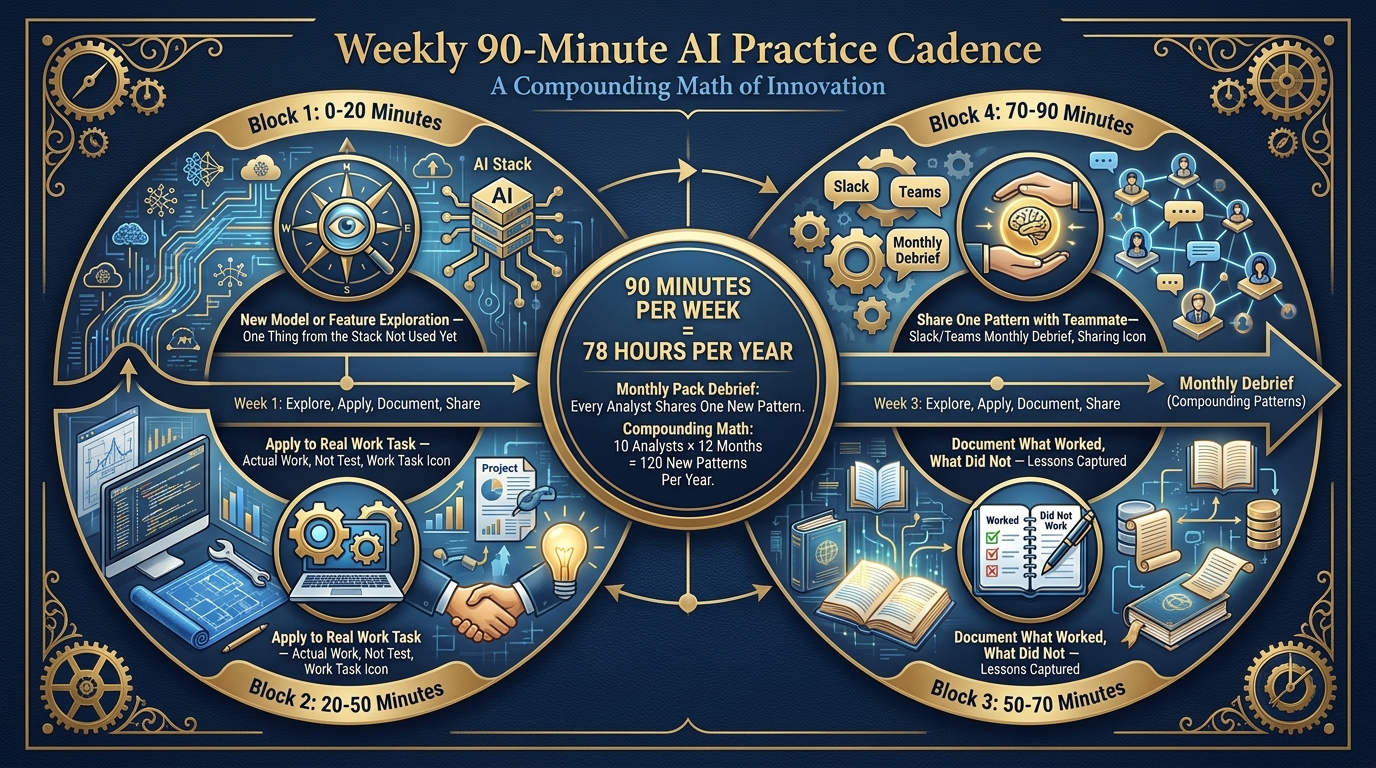
Figure 12:The Weekly 90-Minute Practice. Not a training event — a habit. Ninety minutes per week of structured exploration keeps your skills current as the stack evolves. The monthly pack debrief multiplies this across the team.
The 90-Minute Weekly Structure
| Time | Activity |
|---|---|
| 0:00–0:20 | New model or feature exploration — one thing from the stack you haven’t used yet |
| 0:20–0:50 | Apply it to a real work task — not a test, actual work |
| 0:50–1:10 | Document what worked, what didn’t, what you’d do differently |
| 1:10–1:30 | Share one pattern with a teammate (Slack, Teams, or the monthly debrief) |
Ninety minutes a week. That is 78 hours of structured AI skill-building per year. The analyst who does this consistently for one year is unrecognizable from the analyst who started. Not because they have a different mind — because they have built a different habit.
The Monthly Pack Debrief
Once a month, every Lukos analyst shares one new pattern they discovered during their weekly practice. One pattern. Three minutes. No slides required.
The compounding math: if a team of 10 analysts each discovers one new pattern per month, the team learns 120 new patterns per year — collectively. No one person has to discover everything. The pack learns together.
Why the Principles Outlive the Tools
In five years, some of the tools in this decision matrix will be deprecated. New ones will replace them. The model names will be different. The surface names may be different. This is expected. This is fine.
What will not change:
Context engineering: The quality of the context you give a model determines the quality of what it produces. This has been true since the first transformer. It will be true for every successor.
Persona: Defining who the model is talking to and as focuses its output in ways that raw prompting doesn’t. This principle is stable.
Grounding: Connecting a model to authoritative sources (NotebookLM, RAG, URL Context) keeps it from hallucinating. This principle is stable.
Supervision: AI drafts. Humans decide. This is not a limitation — it’s the correct operational posture for a federal environment. This principle is stable.
Governance: Knowing what ran, when, on what data, reviewed by whom. This is a federal contracting requirement that will not go away regardless of which model is running.
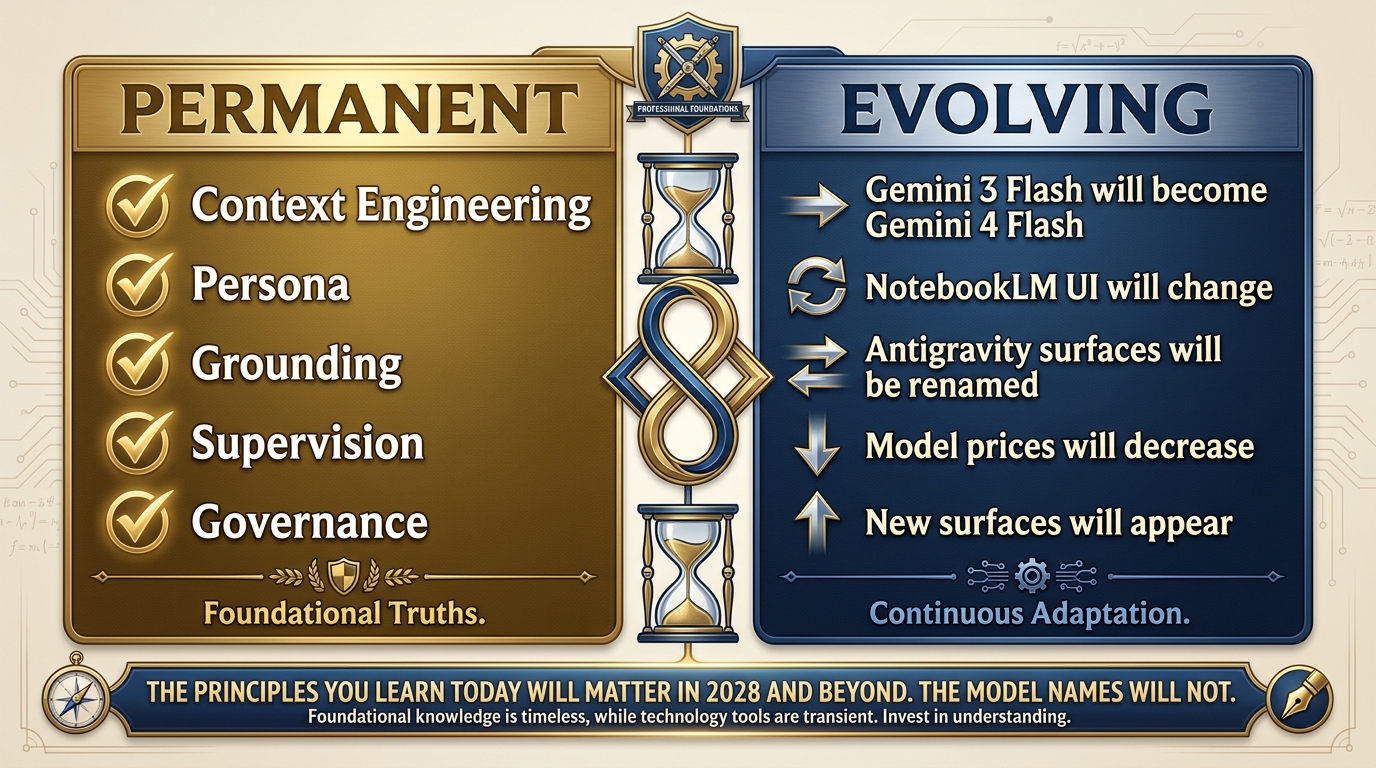
Figure 13:Principles vs. Tools. The tools in this chapter will be replaced. The principles will not. Context engineering, persona, grounding, supervision, governance — these are the durable skills you carry forward regardless of what the stack looks like in 2028.
The decision matrix in Section 11.1 will need to be updated. This chapter will need a second edition. The model names will change. The principles never will.
711.7 The Quick Reference Card — Your Personal Laminate
This is the printable version. Clean, minimal, actionable. No explanatory text. Cut it out, laminate it, put it on your desk. When a task lands, read down the left column until you find your scenario. Then do what the right columns say.
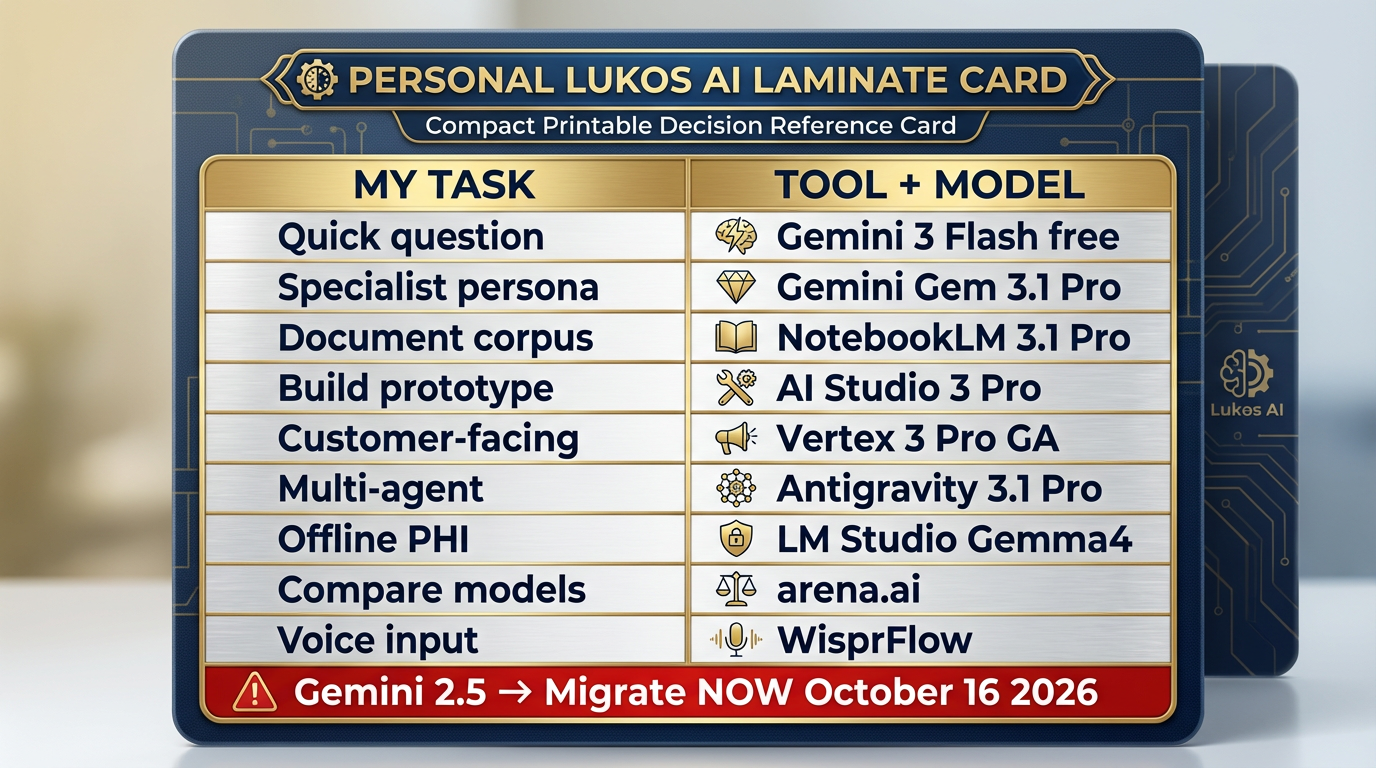
Figure 14:The Lukos AI Laminate. The printable, deskside version of the decision matrix. Every Lukos analyst should have a version of this — personalized to their role — within reach at all times.
Lukos AI Quick Reference — The Laminate
If you need to… | Use this | With this model | Key constraint |
|---|---|---|---|
Answer a quick question | 3 Flash (free) | Unclassified only | |
Use a specialist persona repeatedly | Gemini Gem | 3.1 Pro | Configure once |
Query your document corpus | NotebookLM | 3.1 Pro (Ultra) | Upload docs first |
Build / prototype a custom tool | AI Studio | 3 Pro or 3.1 Pro | Not production |
Deploy customer-facing | Vertex AI | 3 Pro (GA) | FedRAMP verify |
Run multi-agent workflows | Antigravity | 3.1 Pro + skills | Human review required |
Work offline / with PHI | LM Studio + Gemma 4 | Gemma 4 (local) | Data stays local |
Compare models blind | N/A | Free leaderboard | |
Voice-to-prompt | WisprFlow | N/A | Works with any surface |
Generate images | AI Studio / Antigravity | Nano Banana Pro | State-of-the-art |
Generate video | AI Studio | Veo 3.1 | Free / Google account |
⚠️ URGENT: Gemini 2.5 | Migrate NOW | → Gemini 3 Pro | Retires Oct 16, 2026 |
8Three-Tier Hands-On Labs
Group Lab: The Triage Exercise
The payoff lab. Everything you’ve learned in this book converges here. The goal: place any inbound request on the right surface in under 30 seconds.
Tier 1 — The On-Ramp (5 minutes)
Read Section 11.1 (the decision matrix). Without discussing with your group, individually assign a tool and model to each of these five inbound requests. Write your answers before the group discussion begins.
“I need to summarize this 30-page AAR quickly.”
“I need to monitor partner-nation X’s public affairs daily and get a brief every morning.”
“I need to build a customer-facing tool for J7 to query our lessons database.”
“I’m in the field with no internet and need AI assistance.”
“I want to compare three AI models to see which handles our specific prompts best.”
Answer key (don’t peek before you write):
NotebookLM (Gemini 3.1 Pro) or Gemini (3 Flash) — depends on whether you have context documents
Antigravity + FET agent + FireCrawl
Vertex AI RAG Engine (Gemini 3 Pro GA)
LM Studio + Gemma 4
✅ Success: Five assignments written down before group discussion begins.
Tier 2 — The Core Rep (20 minutes)
Twenty inbound requests. For each, your group assigns: tool, model, and one-sentence rationale. Compare answers. Debate genuine disagreements.
“I need a persistent persona that knows FAR Part 12 inside-out.”
“I need to process 500 training evaluation forms and identify trend patterns.”
“I have a clinical case summary I need to analyze — no patient names, but it references medical record numbers.”
“I want to prototype a structured output tool that extracts action items from meeting transcripts.”
“I need to generate a professional image for our partner engagement brief.”
“I need to create a 2-minute video overview of our lessons learned program.”
“I have 200 pages of acquisition regulations I need to make searchable and citable.”
“I need a daily brief on a specific country’s defense procurement news.”
“I need to check whether an AI service is authorized before we use it with CUI.”
“I need to write a customer-deliverable training effectiveness report — auditable, named reviewer.”
“I’m building a workflow that needs to search the live web, extract content, and summarize it.”
“I need to dictate a complex prompt — I type slowly and this needs to be precise.”
“I need to compare GPT-5 vs. Gemini 3.1 Pro on our specific use case — blind, side-by-side.”
“I need to run JLLA automatically every night on new AARs without babysitting it.”
“I have a 500-page corpus of lessons from Iraq and Afghanistan. I need analysts to query it with citations.”
“I need to generate background music for an instructional video.”
“I need a narrated audio overview of this week’s lessons learned — something I can listen to on my commute.”
“I want to build a custom skill for the AQR agent — document it and publish it to the skill library.”
“I need to run a what-if analysis that requires frontier-level reasoning — state-of-the-art performance.”
“Our site lead wants a cost estimate for running JLLA on 150 AARs per month.”
Reference answers for facilitator:
Gemini Gem / 3.1 Pro | 2. Antigravity + TAC / 3 Flash | 3. LM Studio + Gemma 4 (PHI-adjacent — MRNs = identifiable) | 4. AI Studio / 3.1 Pro | 5. AI Studio / Nano Banana Pro | 6. AI Studio / Veo 3.1 | 7. NotebookLM / 3.1 Pro Ultra | 8. Antigravity + FET + FireCrawl | 9. marketplace
.fedramp .gov (not an AI question) | 10. Vertex / 3 Pro GA | 11. Antigravity + FireCrawl | 12. WisprFlow | 13. arena.ai | 14. Antigravity Manager / JLLA skill | 15. NotebookLM / 3.1 Pro Ultra or Vertex RAG | 16. Vertex / Lyria 2 | 17. NotebookLM audio overview | 18. Antigravity Skill Library + documentation | 19. Gemini 3.1 Pro Preview | 20. Run the cost-projection formula from Section 11.5
✅ Success: 20 completed assignments with rationale, at least 3 genuine debates between group members.
Tier 3 — The Wow Moment (25 minutes)
Build your personal Lukos AI Laminate — a customized version of the decision matrix tailored to your specific role.
A site lead’s laminate looks different from an ORSA’s laminate. An acquisition officer’s laminate looks different from a training analyst’s laminate. Yours should reflect the tasks you actually face — not a generic taxonomy.
Your laminate has four columns:
My common task (in your own words, from your actual job)
Tool (from the decision matrix)
Model (from Section 11.2)
My special constraint (PHI? Offline? Customer-facing? Bulk volume?)
Build at least 8 rows. Export it as a PDF or Google Doc.
This is the artifact you take home from this class. Not notes — a tool. One you will actually use at your desk next week.
✅ Success: A role-specific, personalized decision matrix the participant will actually use at their desk next week.
Individual Lab: Map Your Workflow to the Stack
For self-paced learners or analysts who want to go deeper outside of class.
Tier 1 (5 minutes)
List your five most common work tasks. For each, identify which tool from the decision matrix you would use. Don’t overthink it — use the matrix as a lookup table.
| My Task | Tool from Decision Matrix | Model |
|---|---|---|
Tier 2 (15 minutes)
Pick your highest-value task. Trace the full Promotion Path:
Where does it start? (Rung 1: napkin idea in Gemini)
Where is it now? (What rung is this workflow currently at?)
Where should it end up? (Rung 7 Vertex? Rung 6 Antigravity? Rung 8 LM Studio?)
Draw the path. Identify what would need to happen to move it to the next rung.
Tier 3 (25 minutes)
Build your 30-Day AI Implementation Plan:
For three specific AI-augmented workflows you will implement in the next 30 days:
Workflow name:
Tool + model:
What the human review step looks like:
How I’ll measure success:
Workflow name:
Tool + model:
What the human review step looks like:
How I’ll measure success:
Workflow name:
Tool + model:
What the human review step looks like:
How I’ll measure success:
Share this plan with your site lead before the end of the week.
✅ Success: A 30-day AI implementation plan specific to your Lukos role, grounded in the decision matrix.
9Field Notes
The stack changes constantly. Models get deprecated. Surfaces get renamed. New tools appear. This is not a bug — it is the nature of a technology frontier. The Gemini 3 Flash that exists today is better than the Gemini 2.5 Flash that existed eight months ago, and it costs less. The tools get better. The prices go down. The stack evolves.
The decision framework is what you carry forward, not specific model names. When Gemini 3 Flash is eventually succeeded by Gemini 4 Flash, you won’t need to relearn the decision matrix — you’ll just update one row in the model column. The logic stays the same.
The Gemini 2.5 retirement is real. October 16, 2026. We have said this three times in this chapter. We will say it once more: if you have anything running on Gemini 2.5, migrate it. Now. Not in September.
Your personal laminate should be a living document. Update it quarterly. Every time a model releases, check: does it change which row I’d fill in? Every time a surface adds a major feature, check: does it change my decision logic? The laminate is a tool — keep it sharp.
10Pack Debrief
One stack. Seven surfaces. One decision matrix.
Everything in this book has led to this chapter. The Lukos AI stack isn’t a collection of cool tools — it is a coherent operational framework. Each tool has a role. Each model has a lane. Each workflow has a natural promotion path. And every task — every inbound request, every new use case, every “could we use AI for this?” question — can be placed on the right surface in under 30 seconds.
That is the standard. That is the goal. That is what the laminate card enables.
Master this chapter and you have something more valuable than AI knowledge — you have AI judgment. The ability to look at any task, any sensitivity level, any organizational context, and say with confidence: this goes here, on this tool, with this model, with this governance posture. And be right.
The principles outlive the tools. Context engineering. Persona. Grounding. Supervision. Governance. These are the five concepts that will still matter when the model names on this page have all been replaced.
The weekly practice is what separates the analyst who stays sharp from the one who falls behind. Ninety minutes a week. One new technique per month. One pattern shared at the pack debrief. That is the habit that turns a workshop attendee into a Lukos AI practitioner.
You have the map. You have the decision framework. You have the laminate card.
Now go use it.
Chapter 12: Capstone — The Full-Stack Wolfpack Mission →