1Local AI & Disconnected Ops
The Edge Wolf
“The wolf that hunts alone isn’t weaker than the pack. It’s the wolf that hunts when the rest of the pack can’t.”
You’ve built something serious over the last nine chapters. You can prompt like a professional analyst, configure AI personas for specific missions, build automated research pipelines, spin up synthetic wolfpacks that scale your cognitive bandwidth, and deploy FireCrawl reconnaissance across live web targets. Your cloud stack is real capability, not a toy.
Now we need to talk about what happens when the cloud goes away.
Maybe you’re forward deployed to a location where bandwidth is a rumor and internet access is intermittent at best. Maybe you’re working with data that classifies higher than what your cloud service agreement covers — data that cannot leave the device under any circumstances. Maybe your client just needs a hard guarantee that their sensitive corpus stays on-premises, air-gapped, never touched by a server they don’t control.
Or maybe you just got on an airplane.
In any of those scenarios, the tools you built in Chapters 1 through 9 stop working. Cloud Gemini needs the cloud. NotebookLM needs the cloud. FireCrawl needs the internet. Antigravity agents need to reach their endpoints. Everything that made you powerful in Chapters 1–9 depends on a connection you no longer have.
This chapter is about what you do next.
We’re going to stand up a fully functional, AI-powered analysis capability that runs entirely on your local machine — no internet required, no data leaves the device, no rate limits, no service outages. We’re going to do it with two pieces of technology: LM Studio (version 0.4.12 as of April 2026) and Gemma 4, Google’s most capable open-weight model family, released April 2, 2026.
The edge wolf isn’t a fallback position. It’s a fully credentialed member of your kit.
Figure 1:The Edge Wolf. The wolf that operates alone isn’t weaker than the pack — it’s the one that can still hunt when the pack is offline. Local AI capability is not a compromise. It’s a strategic redundancy that makes the whole system more resilient.
10.1 What LM Studio Is
LM Studio is a free desktop application that lets you download and run large language models entirely on your own hardware. No internet required after the initial model download. No API keys. No subscription. No data leaving your device.
It runs on macOS, Windows, and Linux. It’s free for home and professional use.
Here’s what it gives you in practice:
A visual model browser — Search, preview, and download thousands of open-weight models from a clean interface. LM Studio auto-detects your hardware and recommends models that will actually run on your machine.
A chat interface — Talk to any downloaded model exactly like you’d talk to Gemini or Claude. Configure system instructions, adjust temperature, set context.
A local API server — One click, and your machine becomes an OpenAI-compatible API endpoint at
localhost:1234. Any tool, script, or workflow that speaks the OpenAI API format can point at your local model instead. No code changes.An Anthropic-compatible API — LM Studio 0.4.x also exposes an Anthropic-compatible endpoint, meaning tools built for Claude’s API format work too.
A CLI — The
lmscommand-line interface lets you manage models, start servers, and interact with the API from a terminal.Python and JavaScript SDKs — Full programmatic control if you want to build custom applications against your local model.
MCP client support — Connect local models to Model Context Protocol servers, enabling structured tool use even offline.
The current stable release is LM Studio 0.4.12 (April 17, 2026). It added Gemma 4 chat template support in 0.4.11 and improved Gemma 4 tool call reliability across 0.4.9 and 0.4.10. If you’re using an older version, update before running the labs in this chapter.
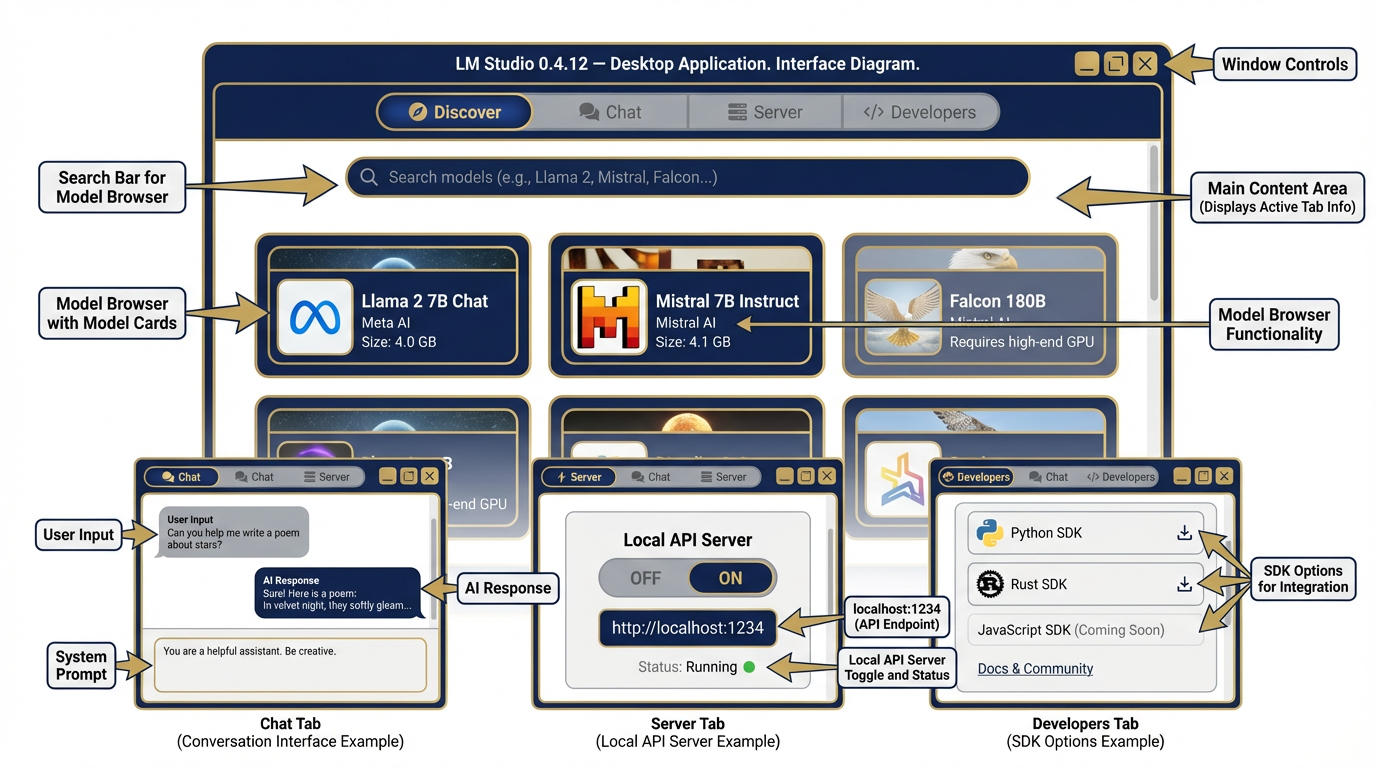
Figure 2:LM Studio 0.4.12 Interface. The Discover tab lets you browse and download models. The Chat tab is your primary interaction surface. The Server tab starts your local OpenAI-compatible API. The Developers tab exposes SDKs and the CLI. Everything a Lukos analyst needs in one application.
10.2 Why a Lukos Analyst Should Care
You might be thinking: “I have Gemini 3.1 Pro. Why would I use a smaller, less capable local model?”
Fair question. Here are three scenarios where you don’t get to choose.
Scenario 1: The Disconnected Environment
You’re at a joint exercise in a location with no reliable internet. The tactical network is up, the local LAN is functional, but public cloud endpoints are blocked or unavailable. Your Antigravity agents can’t reach their APIs. AI Studio times out. Your AI stack is offline.
If you’ve pre-downloaded Gemma 4, you’re still operational. Your local model runs entirely within the tactical LAN — or entirely offline — with zero dependency on public cloud infrastructure. The rest of your team is staring at spinning loaders. You’re extracting observations and drafting Lessons Learned summaries.
Scenario 2: The Sensitive Data Problem
You’ve been handed a corpus that cannot leave the client’s environment. Proprietary source selection criteria. Personnel records. Pre-decisional acquisition strategy. Data that, regardless of your cloud provider’s security claims, simply cannot be transmitted to a third-party server.
Local inference solves this at the hardware level. The model runs on the device. The data stays on the device. The outputs stay on the device. There is no transmission event to worry about. Your client’s security officer doesn’t have to ask “what server is this going to?” The answer is “none.”
Scenario 3: The Always-Available Requirement
Cloud AI comes with operational uncertainty. Rate limits. Service degradations. API outages. Upstream provider incidents. If you’re building a workflow that needs to run reliably at 0200 on a Sunday when nobody is awake to restart it, cloud dependency is a single point of failure.
A local model has none of those dependencies. It runs when your machine runs. It processes requests when you submit them. It doesn’t care about API quotas or upstream incidents because there is no upstream.
These aren’t edge cases. Every one of these scenarios will occur in Lukos work. The analyst who has only ever operated with cloud AI is not ready for all of them.
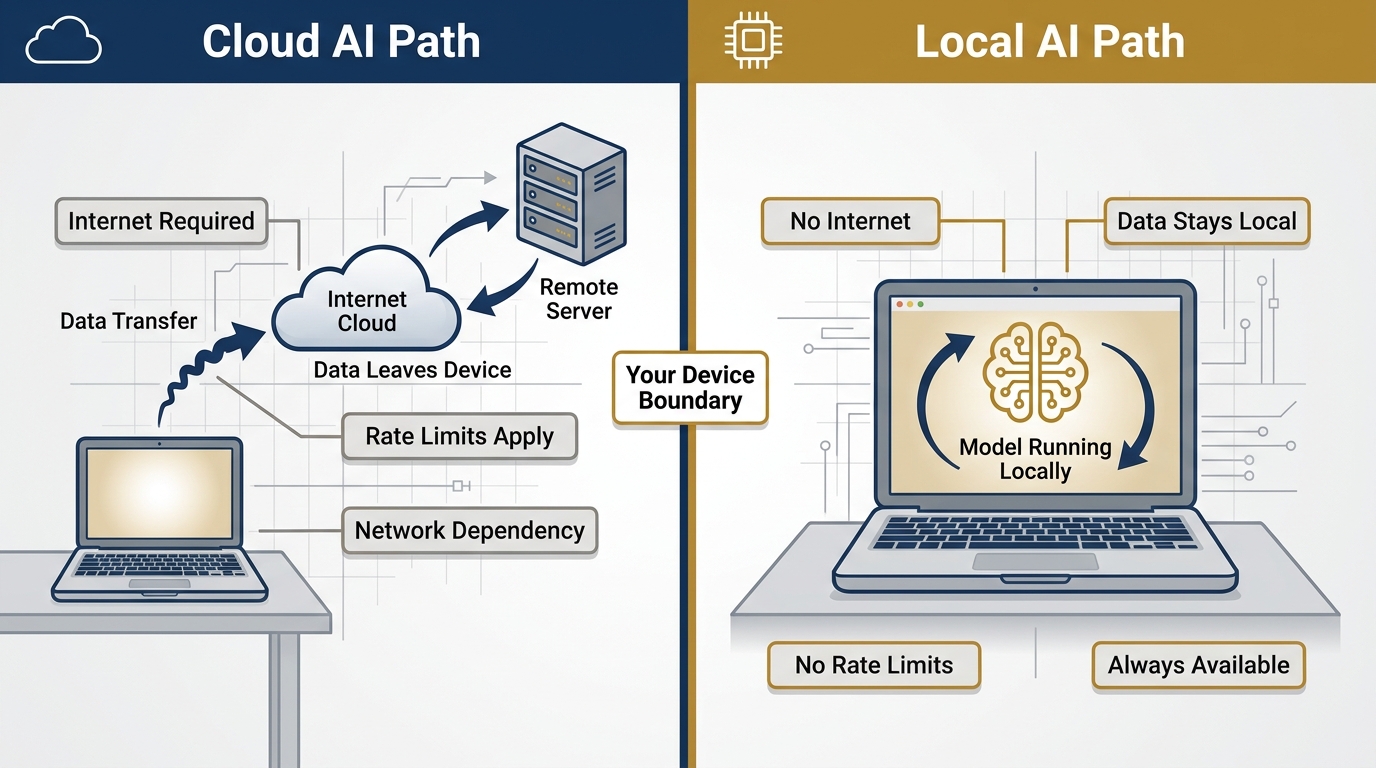
Figure 3:Cloud AI vs. Local AI. Both are real capability. They’re different instruments for different conditions. The Lukos analyst carries both.
10.3 What You Give Up
This chapter would be incomplete without honesty about the tradeoffs. Local AI is not a free upgrade — it’s a different instrument with different characteristics.
Frontier-model intelligence. The largest Gemma 4 model you can realistically run on a laptop — the 26B MoE or the 31B dense — is genuinely impressive. It is not Gemini 3.1 Pro. On complex multi-step reasoning, nuanced analysis requiring deep domain expertise, or tasks where output quality is paramount, the frontier model will outperform the local model. Know the gap. Manage it.
Live web grounding. FireCrawl works because it can reach the live internet. With no internet connection, there’s no web reconnaissance, no live search augmentation, no current data ingestion. Your local model’s knowledge is frozen at its training cutoff. For current-events analysis, you’re working from pre-downloaded materials only.
Heavy multimodal capability. Gemma 4 supports image input across all sizes, and the E2B and E4B models also handle audio. But running full multimodal pipelines locally requires more RAM and compute than text-only tasks. Know your hardware before promising a capability.
Convenience. Cloud AI starts immediately, scales automatically, and doesn’t require you to think about RAM or hardware specifications. Local AI requires setup, model downloads, and hardware awareness.
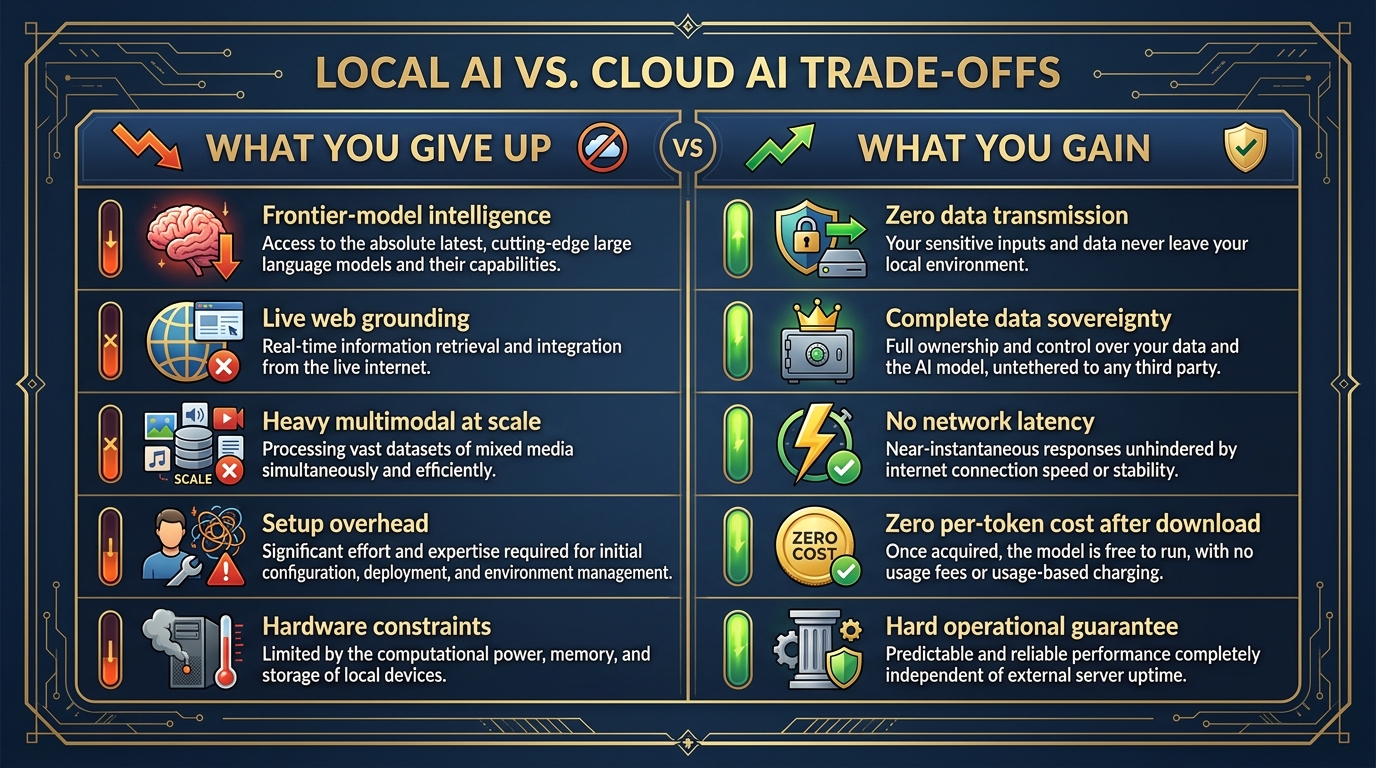
Figure 4:The Honest Tradeoff. What you give up is real. So is what you gain. The Lukos analyst maps both clearly before deployment.
10.4 What You Gain
The gains are also real — and in specific operational conditions, they’re decisive.
Privacy that cannot be argued with. When the model runs locally, there is no transmission event. No data in transit. No API call to log. No terms of service to parse. No DPA to review. The data is on the device. The model is on the device. The outputs are on the device. Zero data leaves.
Sovereignty over the model, the weights, and the outputs. You own the model. You can inspect the weights. You can modify the system instructions without a provider’s safety filters overriding you. You can deploy it in environments where no third-party software is approved. The model is yours in the most literal sense.
Zero network latency. Cloud AI involves a network round-trip — your input travels to a server, gets processed, and the response travels back. Local inference happens on-chip. For some use cases, especially where you’re processing many short requests, local latency is actually faster in practice.
Zero per-token cost after download. After you download the model, inference is free. No metered API calls. No usage bills. No cost management. Run as many prompts as you want, as long as you want.
A hard operational guarantee. When you tell a client “your data never leaves this machine,” you can back it up architecturally. That’s not a policy claim — it’s a fact about how the software works. In federal acquisition, sensitive data environments, and regulated industries, that guarantee has real value.
10.5 Small Language Models — The Right Mental Model
Here’s where most people go wrong when they first encounter local AI: they compare it to the frontier model they’ve been using, find it lacking, and write it off.
That’s the wrong comparison.
The right comparison is: what job needs to be done, and what’s the appropriate tool for that job?
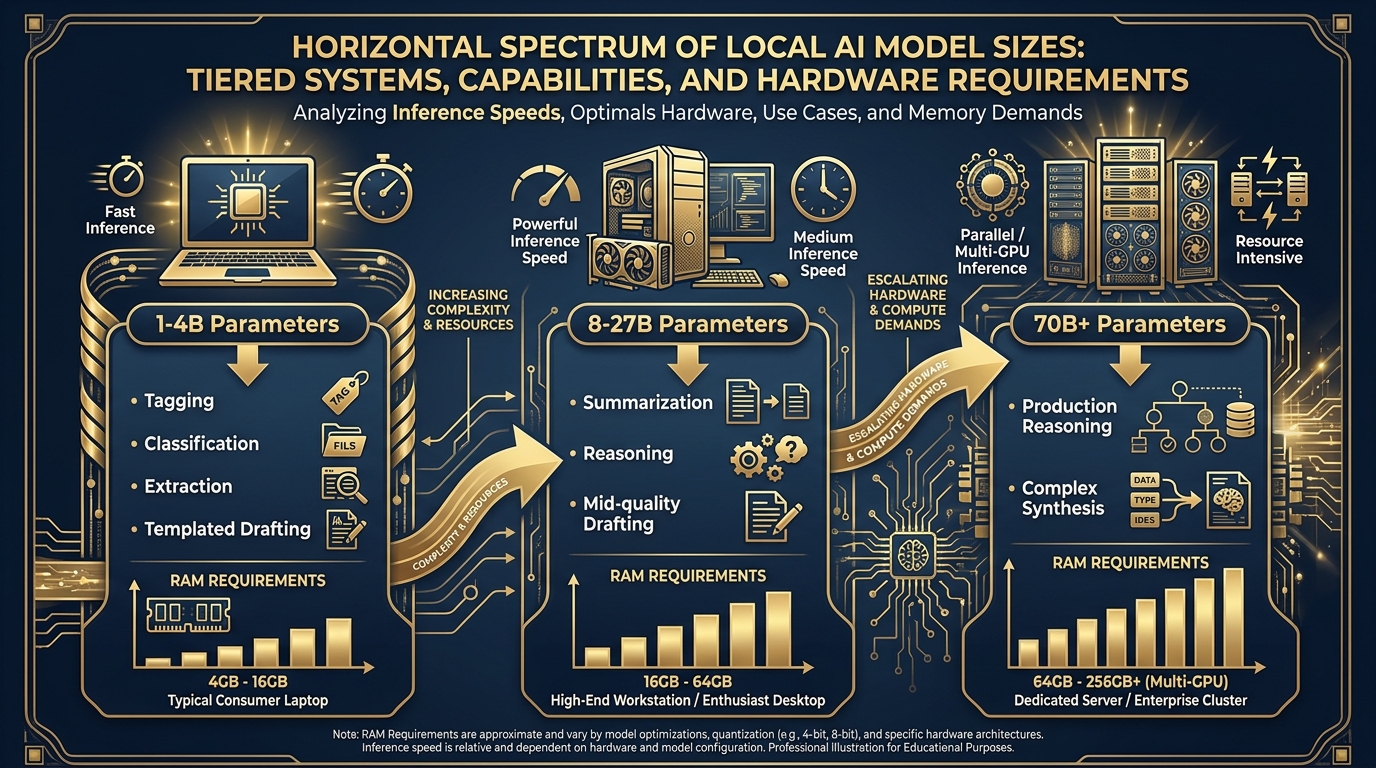
Figure 5:The Model Size Spectrum. Match the model to the mission. Larger isn’t always better — it’s about selecting the right instrument for the task, the hardware, and the operational environment.
Think about it in terms of human analogs:
1–4B Parameters: The Fast Specialist
A 1–4 billion parameter model runs on essentially any modern laptop, often fast enough to stream responses in real-time. What can it do well? Narrowly defined tasks where the format is clear. Classification. Tagging. Structured extraction. Simple reformatting. Regex-like pattern matching on text. Generating short, templated outputs.
Think of this model like a competent junior analyst who is very good at their specific job. They can process a stack of documents and pull out specific fields — fast, reliably, consistently. They are not writing strategic assessments. They’re doing the structured work that allows you to do the strategic work.
8–27B Parameters: The Capable Generalist
Models in the 8–27B range need more hardware — a recent Mac with 16GB+ unified memory, or a Windows workstation with a solid discrete GPU — but they deliver meaningfully more capability. Summarization. Reasoning. Mid-quality drafting. Synthesis across multiple documents.
This is where Gemma 4’s 26B MoE model lives. At ~4 billion active parameters per forward pass (the rest are experts that activate selectively), it delivers capability that scales well above its active parameter count. Think of this as a senior analyst who can handle a full analytical workflow without constant oversight.
70B+: The Heavyweight
Models above 70 billion parameters require serious hardware — a multi-GPU workstation, a powerful Mac Studio with 64GB+ unified memory, or a dedicated inference server. They deliver performance that approaches frontier-model quality on many tasks. These are the models you run at a fixed site with proper equipment, not on a laptop in the field.
The Lukos guidance: match the model to the mission, the hardware, and the environment. Stop trying to run a 70B model on a 16GB laptop and blaming local AI for being slow.
10.6 Quantization — The Free Lunch
When you download a model from LM Studio, you’ll see variants with labels like Q4_K_M, Q8_0, Q5_K_S, F16. These aren’t arbitrary identifiers. They describe the quantization of the model — and understanding this one concept will save you a lot of confusion.
Here’s the idea: a neural network model is essentially a large collection of numbers (called weights). In full precision (F16 or F32), these numbers take up a lot of storage — a 26B parameter model in F16 might be 52GB. Most laptop hardware can’t hold that in RAM.
Quantization reduces the precision of these numbers — from 16-bit floating point to 8-bit, or 4-bit, or even lower. The file gets smaller. Inference gets faster. The tradeoff is a small reduction in output quality.
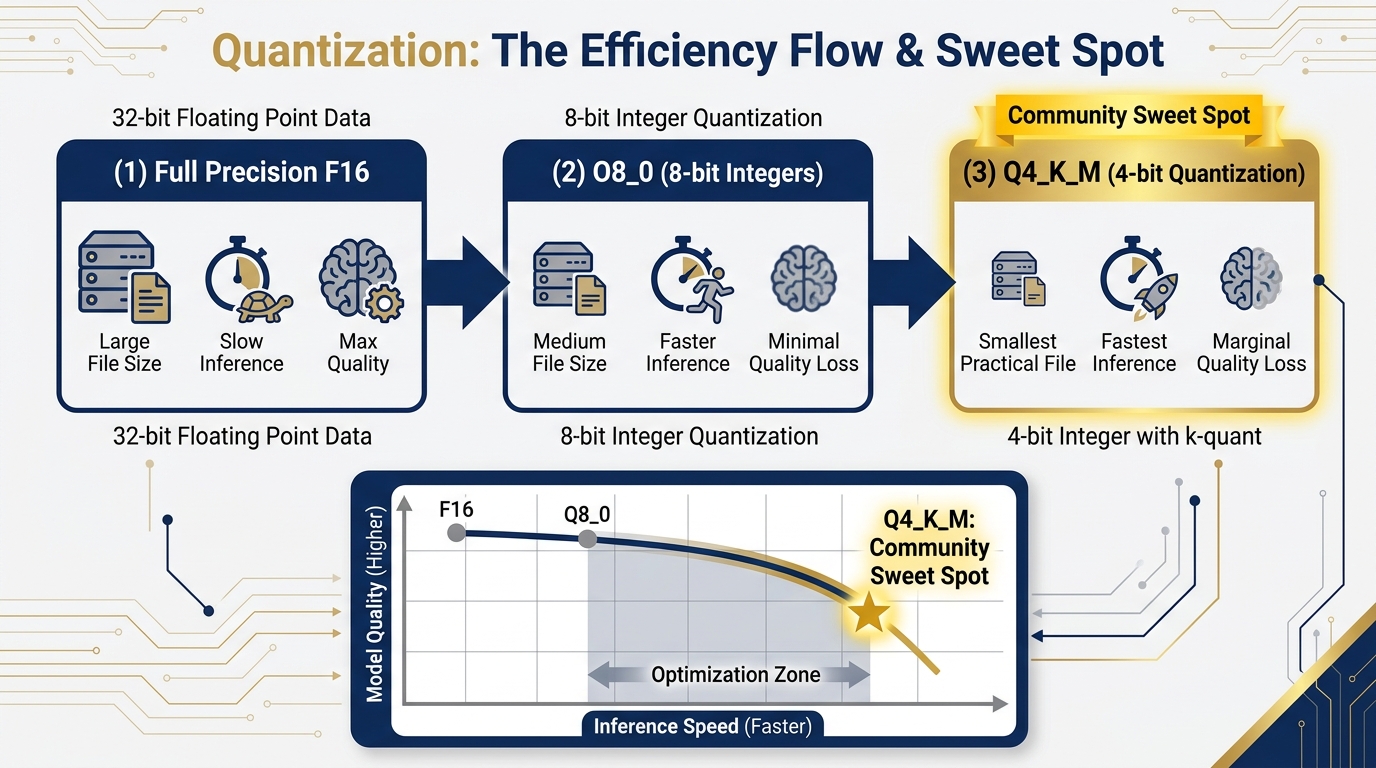
Figure 6:Quantization: The Free Lunch. Reducing numerical precision shrinks the model dramatically while preserving most of the quality. Q4_K_M sits at the community-accepted sweet spot — big enough performance, small enough to actually run on typical hardware.
The community-accepted sweet spot is Q4_K_M: 4-bit quantization with a mixed-precision approach that preserves quality in the most important layers. A 26B model at Q4_K_M lands around 15–16GB — runnable on a Mac with 24GB unified memory or a PC workstation with 16GB VRAM.
The critical insight: on real analytical tasks, most users cannot tell the difference between a Q4_K_M model and a full-precision model. The quality degradation is real but minor on the tasks you’re likely running — extraction, summarization, drafting, classification. It becomes meaningful on highly specialized reasoning tasks or tasks with strict numerical precision requirements.
The Lukos practical guidance: start with Q4_K_M. Only move to higher precision (Q8_0 or F16) if you have a specific, verified reason to — and the hardware to support it. LM Studio will auto-recommend a quantization based on your detected hardware. Trust that recommendation to start.
10.7 The Lukos Sizing Decision Tree
Not a theoretical framework. A practical decision tool.
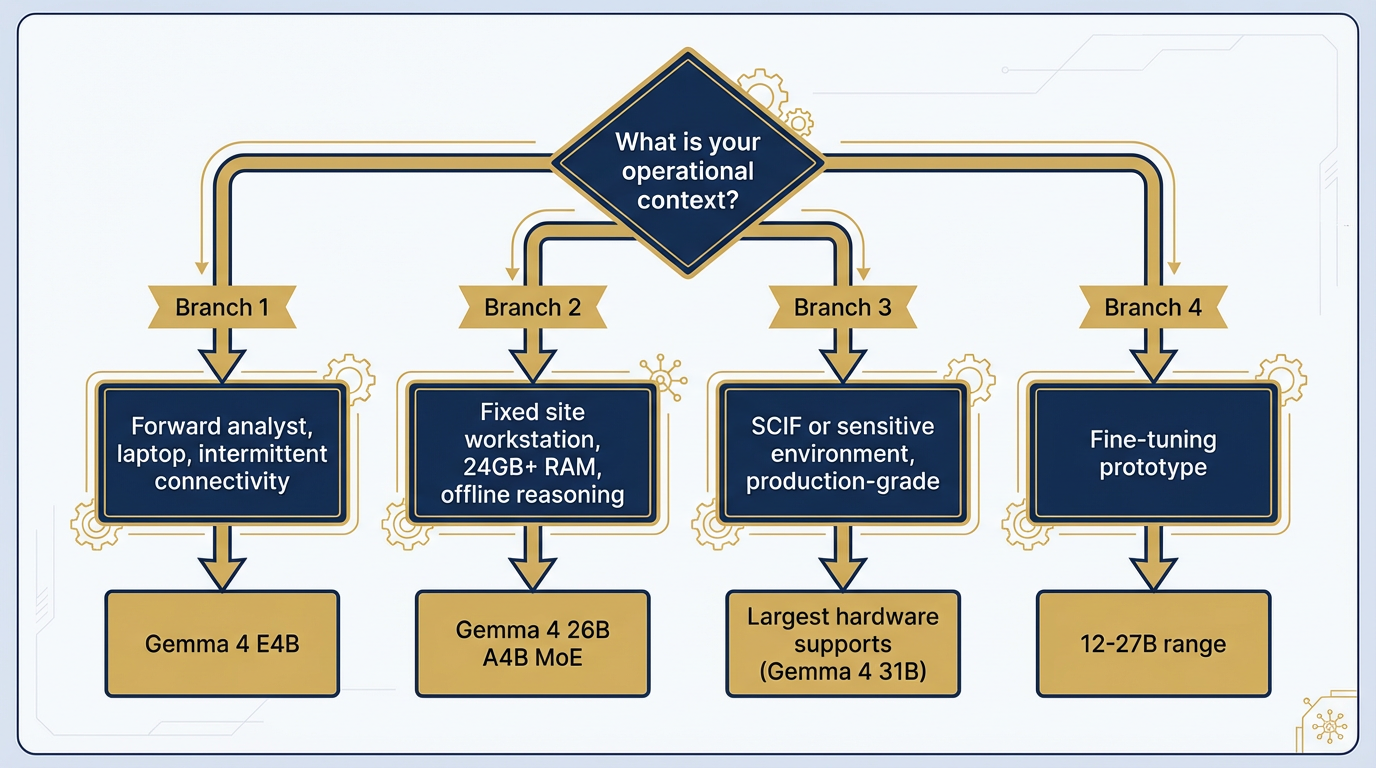
Figure 7:The Lukos Sizing Decision Tree. Start with the operational context. Work backward to the hardware. Match the model to what both require.
You’re a forward analyst with a standard-issue laptop and intermittent connectivity: → Gemma 4 E4B (4.5B effective parameters). Runs on 4–8GB RAM. Fast enough to be practical in a field environment. Strong at structured extraction and concise summarization. This is your daily driver when disconnected.
You’re at a fixed site workstation with reliable power and 24GB+ RAM, with offline reasoning needs: → Gemma 4 26B A4B (MoE). The efficiency play — 25.2B total parameters, only ~4B active at inference time. Delivers high throughput at relatively low compute cost. Strong on AIME 2026 math, LiveCodeBench, and τ2-bench agentic tool use. Your best offline workhorse for serious analytical tasks.
You’re in or supporting a sensitive environment — SCIF or equivalent — with a sensitive corpus and production-grade reasoning requirements: → Largest model your approved hardware supports. If you’ve got a high-end workstation, that’s Gemma 4 31B dense (256K context, 30.7B parameters, requires 19GB+ RAM). Run an honest hardware assessment before deployment.
You’re prototyping a fine-tuning pipeline on a Lukos-specific corpus for a future deployment: → Start at 12–27B range. Enough capacity to demonstrate the gain from fine-tuning; small enough that you’re not fighting hardware constraints during the experimentation phase. Plan the scale-up path before you commit.
10.8 Gemma 4 — The Open-Weight Frontier
Released April 2, 2026, Gemma 4 is Google’s most capable open-weight model family to date — and one of the most significant open-weight releases in the history of the field.
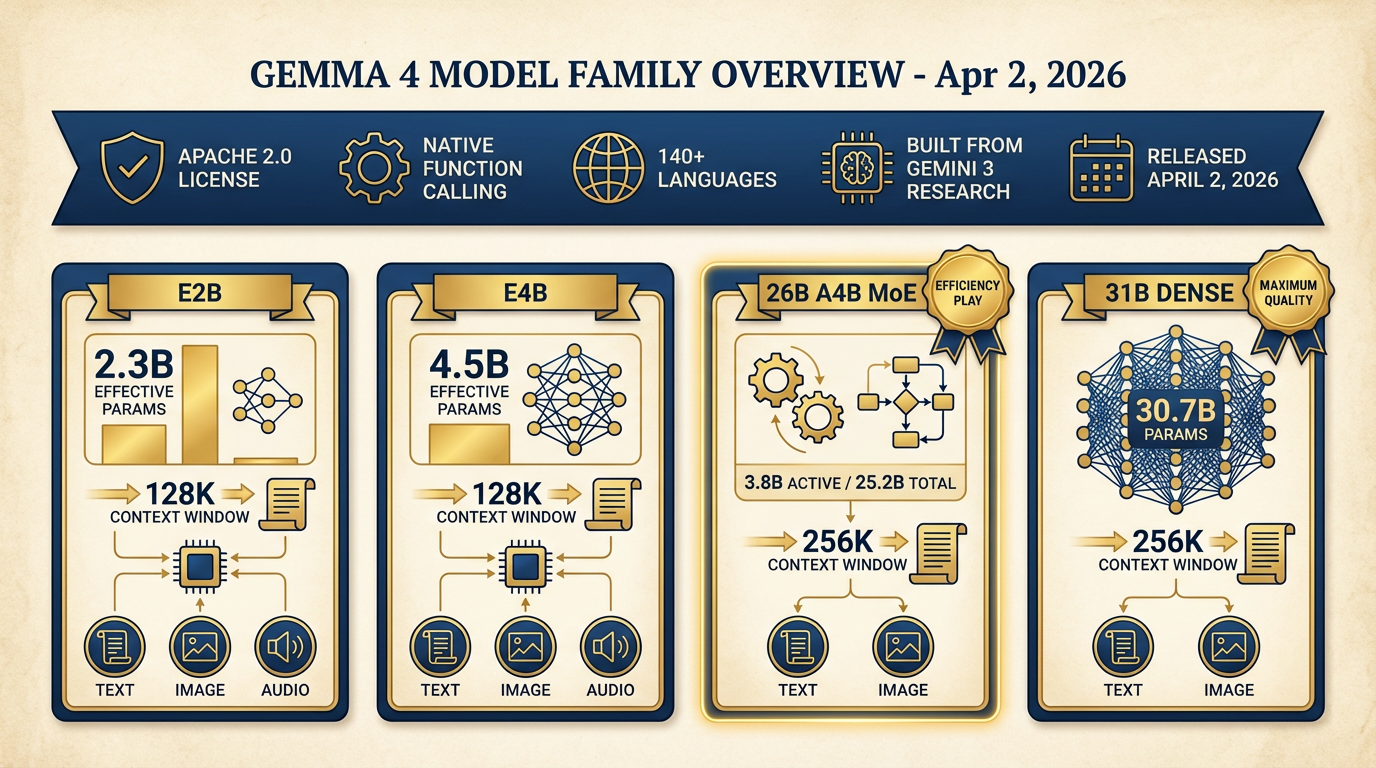
Figure 8:Gemma 4 Family Overview. Built from Gemini 3 research. Four model sizes. Two architectures. Apache 2.0 license. Native function calling. Multimodal across all sizes. This is the open-weight frontier as of April 2026.
Built From Gemini 3 Research
The positioning matters: Gemma 4 isn’t a separate research thread that happened to be made open-source. It’s built directly from the same research and technology base as Gemini 3 — Google’s frontier model family. You’re getting the open-weight crystallization of the same architecture advances that produced the model you’ve been using throughout this course. Same research. Different deployment model.
The Model Family
Gemma 4 ships four variants, verified from Google DeepMind and LM Studio documentation:
| Model | Architecture | Total Parameters | Active Parameters | Context | Modalities |
|---|---|---|---|---|---|
| Gemma 4 E2B | Dense | 5.1B (2.3B effective) | 2.3B | 128K | Text, Image, Audio |
| Gemma 4 E4B | Dense | 8B (4.5B effective) | 4.5B | 128K | Text, Image, Audio |
| Gemma 4 26B A4B | MoE | 25.2B | 3.8B | 256K | Text, Image |
| Gemma 4 31B | Dense | 30.7B | 30.7B | 256K | Text, Image |
The “E” in E2B and E4B stands for “effective” — these models use Per-Layer Embeddings (PLE) to maximize parameter efficiency in on-device deployments. The smaller models support audio natively, making them interesting for voice-to-text pipelines even at the edge.
Apache 2.0 License — Clean for Federal Use
This is critical for Lukos work. Apache 2.0 is one of the most permissive open-source licenses available. It allows commercial use, modification, distribution, and deployment without copyleft requirements. It’s been reviewed and accepted by federal acquisition attorneys in numerous programs.
If you’re deploying AI in a federal context — whether as a contractor tool, a government-owned capability, or a research instrument — you need to know the license. Gemma 4 is clean. Always verify the license of any model before deployment. Not all open-weight models use licenses this permissive.
Benchmark Context
On the AIME 2026 mathematics benchmark, Gemma 4 31B Thinking scores 89.2% — a remarkable result for an open-weight model. On GPQA Diamond (scientific knowledge), 84.3%. On LiveCodeBench v6 competitive coding problems, 80.0%. On τ2-bench agentic tool use, 86.4%. These are not toy model numbers. These are serious capability.
Key Capabilities for Lukos
Native function calling — Agentic workflows that use tool use can run entirely locally. The Antigravity-style patterns you built in Chapter 8 can be ported to a local model for offline operation.
256K token context window (26B and 31B models) — Long-context document analysis works offline. Process a full exercise after-action review corpus without chunking.
Configurable thinking modes — Gemma 4 supports explicit reasoning traces, similar to the thinking capability in frontier models.
140+ languages — Multilingual Lessons Learned extraction works offline.
Hardware memory requirement — LM Studio confirms 4GB minimum (E2B model), up to ~19GB for the 31B dense. Plan accordingly.
LM Studio added Gemma 4 support on April 2, 2026 (version 0.4.9), with tool call reliability improvements in 0.4.10, chat template fixes in 0.4.11, and current stable version 0.4.12. The toolchain is mature for this model family.
10.9 Setting It Up — Step by Step
This is an operational section. Follow the steps. They work.
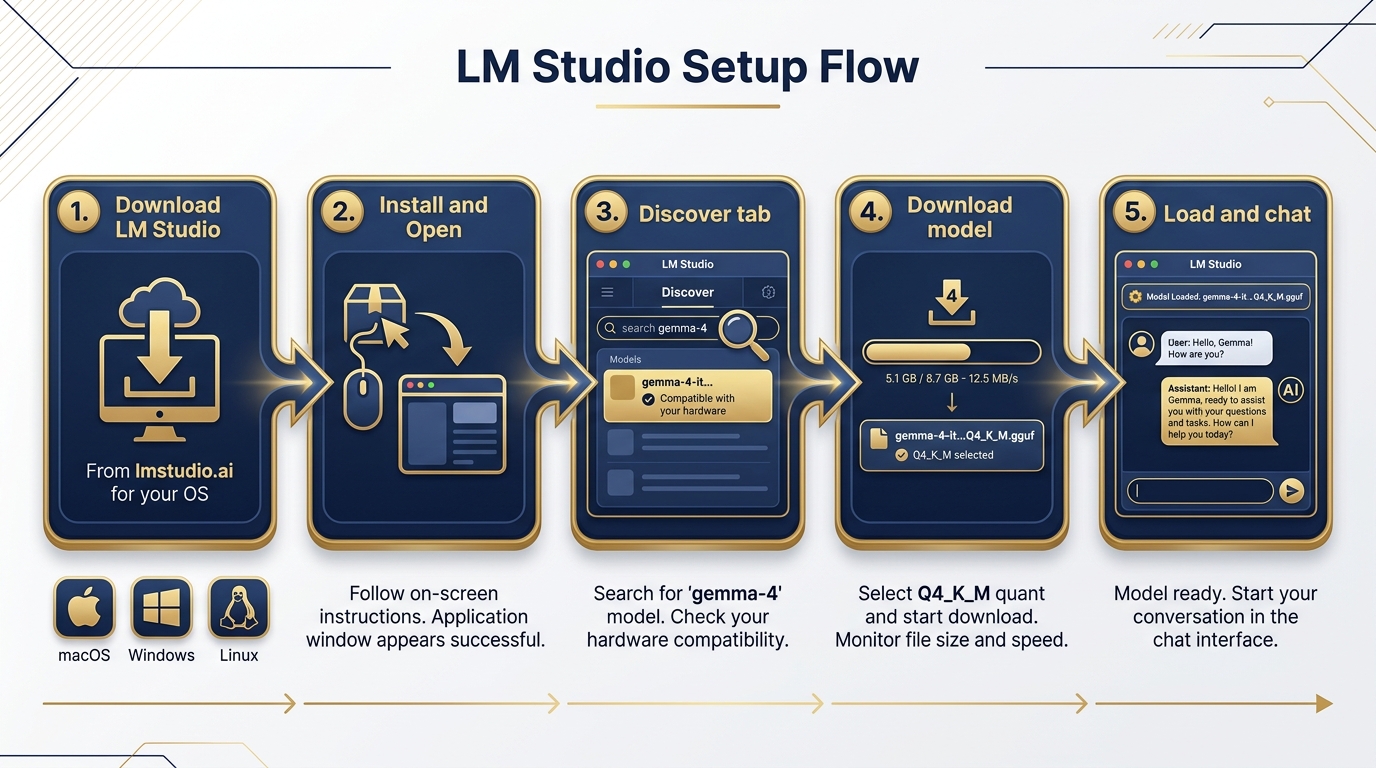
Figure 9:LM Studio Setup Flow. Download → Install → Discover → Load → Chat. Five steps from zero to a running local AI session. The model download is the longest part.
Step 1: Download LM Studio
Go to lmstudio.ai. Click the download button for your operating system. LM Studio is available for macOS (Apple Silicon and Intel), Windows, and Linux. The installer is a standard application package — no unusual permissions required.
Step 2: Install and Open
Run the installer. On macOS, drag to Applications. On Windows, run the .exe. Launch LM Studio. On first open, it will detect your hardware and configure appropriate defaults.
Step 3: Navigate to the Discover Tab
The Discover tab is your model browser. In the search bar, type gemma-4. LM Studio will show available Gemma 4 variants sourced from Hugging Face. You’ll see the model names, sizes, and quantization options.
Step 4: Let LM Studio Recommend
LM Studio auto-detects your hardware (RAM, GPU, unified memory) and highlights the models it estimates will run on your machine. Look for the hardware compatibility indicator next to each model. This recommendation is your starting point — not a ceiling.
Step 5: Download Your Model
For most field laptops, start with Gemma 4 E4B Q4_K_M or Gemma 4 26B A4B Q4_K_M depending on your RAM. The E4B at Q4_K_M is approximately 4–5GB. The 26B MoE at Q4_K_M is approximately 15–16GB. Download happens in-app. Progress bar included.
Note: Do this download on a good connection before you deploy to a disconnected environment. The whole point is that the model runs offline after download — but the download itself requires internet.
Step 6: Load the Model
Click the model in your local library. Click “Load Model.” LM Studio loads the weights into RAM (or VRAM on GPU-enabled systems). You’ll see resource usage metrics — RAM consumed, tokens per second.
Step 7: Open the Chat Tab and Prompt
Navigate to the Chat tab. The loaded model is now your local AI. Configure a system prompt. Start typing. You have a running AI session with no internet dependency.
The Calibration Exercise: Run the same prompt you used in Chapter 1 against the IRON BEAR 24-3 AAR excerpt. How does the local output compare to what Gemini produced? Note the differences. That’s your quality delta for this hardware and model combination.
10.10 Turning On the Local API Server
This is where the edge wolf gets serious.
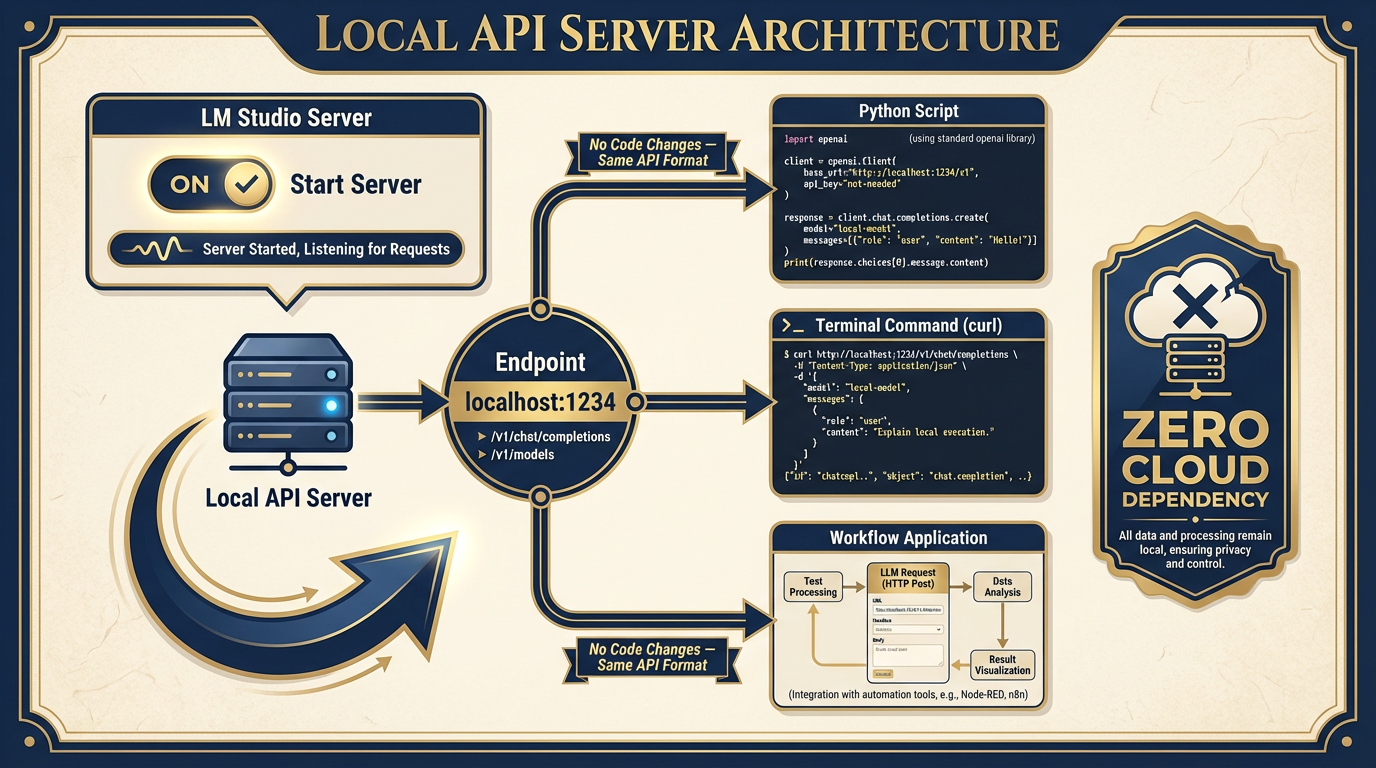
Figure 10:The Local API Server. One click in LM Studio’s Server tab starts an OpenAI-compatible API endpoint at localhost:1234. Any tool that speaks the OpenAI API format now has a local model available as a drop-in replacement.
In LM Studio, navigate to the Server tab. Click Start Server. That’s it.
Your machine is now running an OpenAI-compatible REST API at http://localhost:1234/v1. The same endpoint format. The same JSON request/response structure. The same model listing at /v1/models.
Here’s what this means in practice:
Your existing Python scripts work. Any script you’ve written that calls the OpenAI API can be pointed at your local model by changing one line — the base URL:
from openai import OpenAI

# Before: cloud Gemini / OpenAI
# client = OpenAI(api_key="your-api-key")

# After: local model, zero cloud dependency
client = OpenAI(base_url="http://localhost:1234/v1", api_key="lm-studio")

response = client.chat.completions.create(
    model="google/gemma-4-26b-a4b-it",  # or whatever model you've loaded
    messages=[
        {"role": "system", "content": "You are a Lukos Lessons Learned analyst."},
        {"role": "user", "content": "Extract all observations from this AAR in OIL format."}
    ]
)
print(response.choices[0].message.content)
Your AI Studio prototypes from Chapter 3 can run offline. Any Antigravity workflow that uses an OpenAI-compatible endpoint can be reconfigured to hit localhost:1234 instead of a cloud endpoint. The agentic patterns you built in Chapter 8 work locally.
Curl works too — useful for quick testing:
curl http://localhost:1234/v1/chat/completions \
  -H "Content-Type: application/json" \
  -d '{
    "model": "google/gemma-4-26b-a4b-it",
    "messages": [
      {"role": "system", "content": "You are a Lukos Lessons Learned analyst."},
      {"role": "user", "content": "Extract all observations from this text in OIL format."}
    ],
    "temperature": 0.3
  }'
The Lukos strategic implication: the same API contract means you can build workflows that work both online and offline, switching the base URL based on environment detection. Disconnected by design. Resilient by architecture.
10.11 The Decision Matrix — Where Local Fits
You now have the full Lukos tool stack. Here’s how to use it.
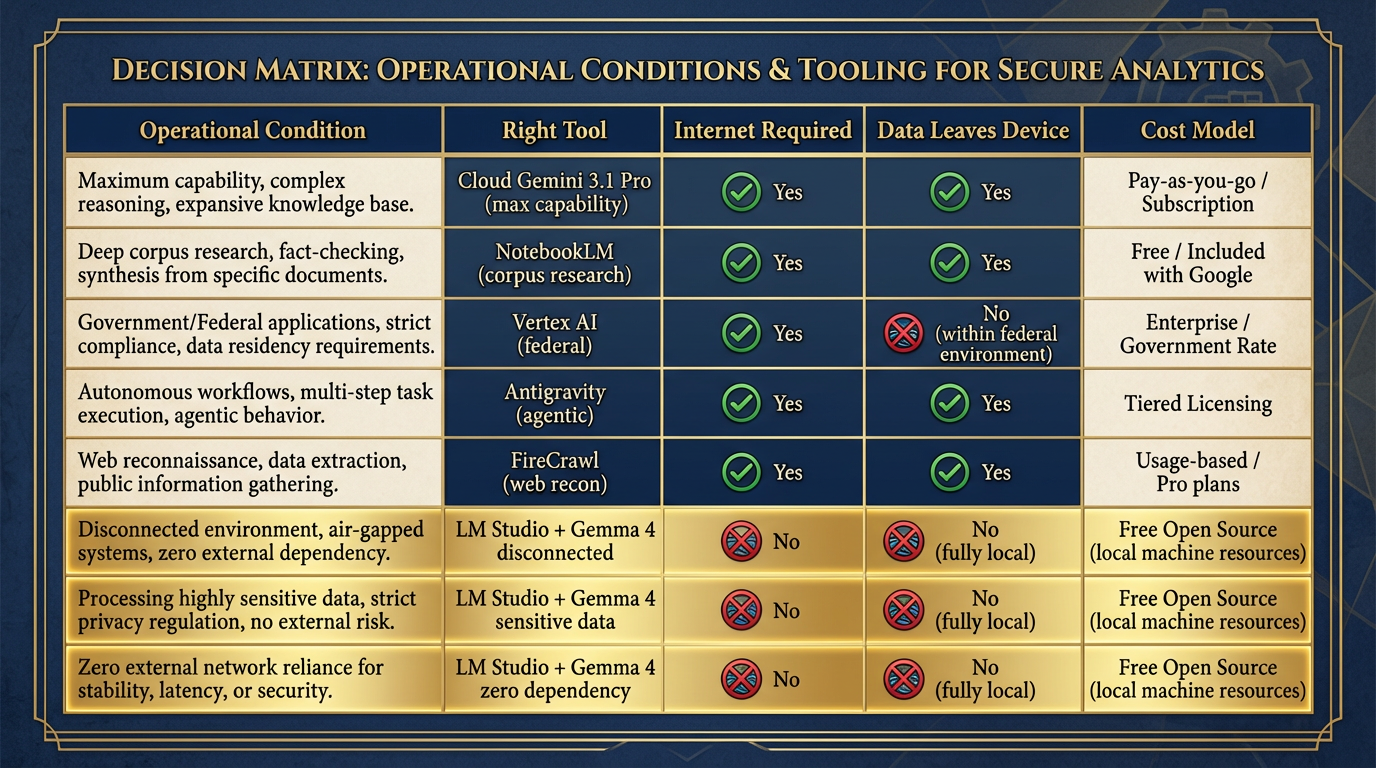
Figure 11:The Full Lukos Tool Decision Matrix. Match the tool to the mission conditions. Cloud when you can. Local when you must. Often both — cloud for development, local for deployment.
| Operational Condition | Right Tool |
|---|---|
| Max capability, unclassified, internet available | Cloud Gemini 3.1 Pro |
| Grounded research from a known corpus | NotebookLM |
| Production federal deployment, FedRAMP required | Vertex AI |
| Agentic multi-step workflows | Antigravity |
| Live web reconnaissance | FireCrawl + Cloud model |
| Disconnected, austere, or air-gapped environment | LM Studio + Gemma 4 |
| Sensitive data that cannot leave the device | LM Studio + Gemma 4 |
| Zero cloud dependency required | LM Studio + Gemma 4 |
| Offline agentic tool use | LM Studio + Gemma 4 (local API server) |
The rule is not “use local AI instead of cloud AI.” The rule is use the right tool for the mission conditions. A Lukos analyst who carries only cloud tools is not fully equipped. Neither is one who uses only local tools when cloud is available. The complete kit includes both.
10.12 SCIF Considerations
A brief but important section for anyone operating in or supporting classified environments.
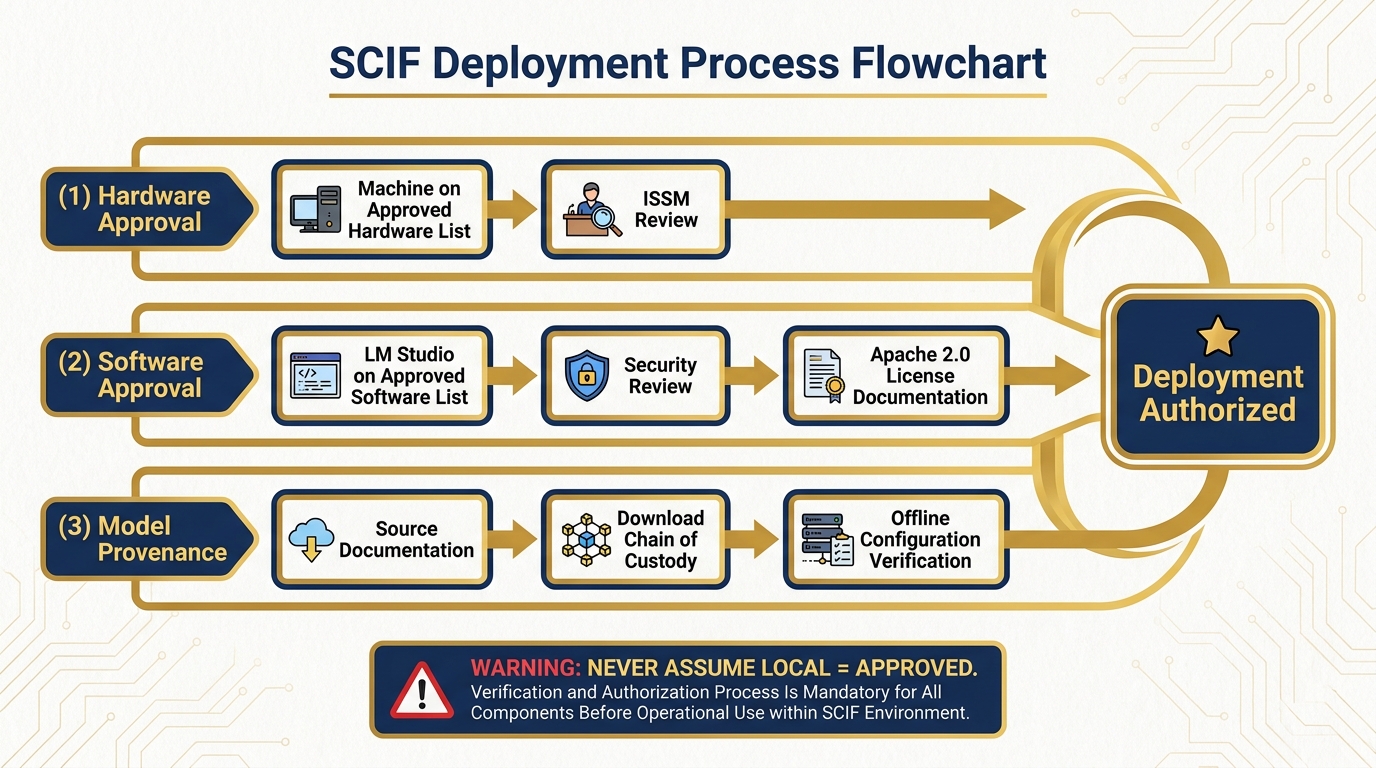
Figure 12:SCIF Deployment: Know Before You Go. Every classification environment has its own approval chain. Know it. Work it. Never assume.
Local AI in a Sensitive Compartmented Information Facility is not automatic. It requires explicit approval from the facility’s Information Systems Security Manager (ISSM). The ISSM controls what software runs on systems within the SCIF perimeter, including locally running AI models.
The conversation you need to have before deployment includes:
Hardware approval. Is the machine on the approved hardware list? This is a separate question from software.
Software approval. Does LM Studio appear on the facility’s approved software list? If not, you or your program office needs to go through the approval process. This includes providing the software package for security review.
Model provenance. Where did the model weights come from? You need to be able to document the source, the license (Apache 2.0 for Gemma 4 — this is the answer), and the integrity of the download. Chain of custody for model weights is a real requirement in some environments.
Network segregation. Even local AI can generate network traffic in unexpected ways — telemetry, model update checks, etc. Confirm that LM Studio is configured for offline operation before bringing it into a controlled environment. Review the settings panel.
Output handling. Model outputs are data. In a classified environment, the classification level of inputs may govern the classification level of outputs. Coordinate with your security officer.
None of this is unique to AI. Every piece of software in a SCIF goes through this process. The point is: do not assume that “it runs locally” means “it’s automatically approved.” It isn’t. Plan the approval process into your timeline.
10.13 The Fine-Tuning Horizon
This chapter doesn’t cover fine-tuning — that’s a course in itself. But it’s worth planting the flag on where this goes, because the Lukos-specific application is genuinely compelling.
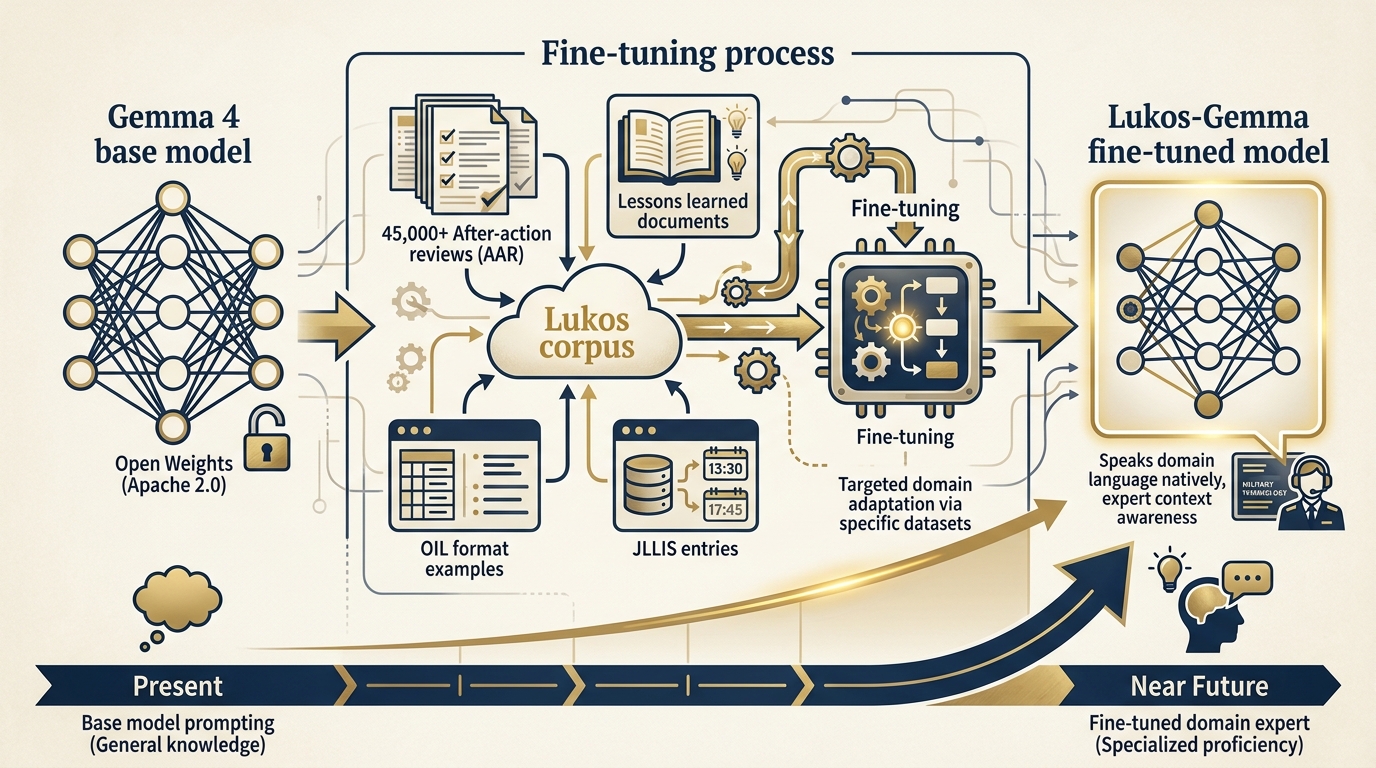
Figure 13:The Fine-Tuning Horizon. A Gemma 4 model fine-tuned on 45,000+ Lukos lessons would be a different kind of instrument — not a general assistant, but a domain expert that speaks the specific language, formats, and analytical frameworks of the community.
The Lukos corpus — 45,000+ after-action reviews, lessons learned documents, exercise reports, JLLIS entries — is a domain-specific dataset of extraordinary value. A base language model trained on general internet text doesn’t inherently understand the difference between an Observation, an Issue, and a Lesson. It doesn’t know what OIL format means, what a JLLIS entry looks like, or what makes a Lessons Learned observation actionable rather than generic.
A Gemma 4 model fine-tuned on the Lukos corpus would. It would speak the domain natively. It would generate OIL-format extractions that don’t require extensive prompting to format correctly. It would recognize patterns across exercises that a general model would miss. It would be a different kind of instrument — not a general assistant, but a Lukos Lessons Learned expert running entirely offline on your hardware.
Gemma 4 supports fine-tuning. The Apache 2.0 license permits it. The technology exists. The dataset exists. The compute to fine-tune in the 12–27B range is accessible on modern cloud platforms or high-end workstations.
That’s a future conversation. But it’s a conversation worth having.
Three-Tier Hands-On Labs
Group Lab: The Disconnected Drill
Setup: This lab is best run in a classroom or workshop where participants can verify connectivity conditions as a group. It’s designed to deliver a genuine “wow moment” — the experience of running AI analysis with airplane mode on.
Tier 1 — The On-Ramp (5 minutes)
Everyone opens a browser and goes to lmstudio.ai. Start the download for your operating system. While it downloads:
As a group, answer this question: What are three scenarios in your Lukos work where cloud AI would not be available? Write them down before the model is ready. Not hypothetical scenarios — real situations you’ve encountered or can realistically anticipate. Forward deployment. Classified environment. Network outage during a critical delivery.
When LM Studio opens, confirm it launches and shows the Discover tab. The model download can happen during Tier 2.
✅ Success looks like: LM Studio open on screen. Three disconnected scenarios documented per participant.
Tier 2 — The Core Rep (20 minutes)
In the Discover tab, search for gemma-4. Select the smallest available model (E4B recommended for time). Start the download.
While it downloads, configure your system instructions. Copy the Lukos Lessons Learned analyst persona you built in Chapter 2. Paste it into the System Prompt field in the Chat tab.
When the model is ready and loaded, run this prompt against the IRON BEAR 24-3 AAR excerpt from Chapter 1:
“Extract all observations in OIL format. For each observation, provide: Observation (what happened), Issue (the root cause or problem identified), and Lesson (the actionable takeaway for future operations).”
Compare the output to what Gemini produced in Chapter 1. Document honestly:
What did the local model get right?
What did it miss?
What would you have to add to the prompt to close the quality gap?
✅ Success looks like: An OIL-formatted extraction from a local Gemma 4 model, with a documented quality delta vs. cloud Gemini.
Tier 3 — The Wow Moment (25 minutes)
Put your laptop in airplane mode. Everything off. WiFi disconnected. Cellular off (if applicable). You are now, operationally speaking, in a disconnected environment.
Open LM Studio. The model is already downloaded. Run the same Lessons Learned extraction. Watch it run.
It works.
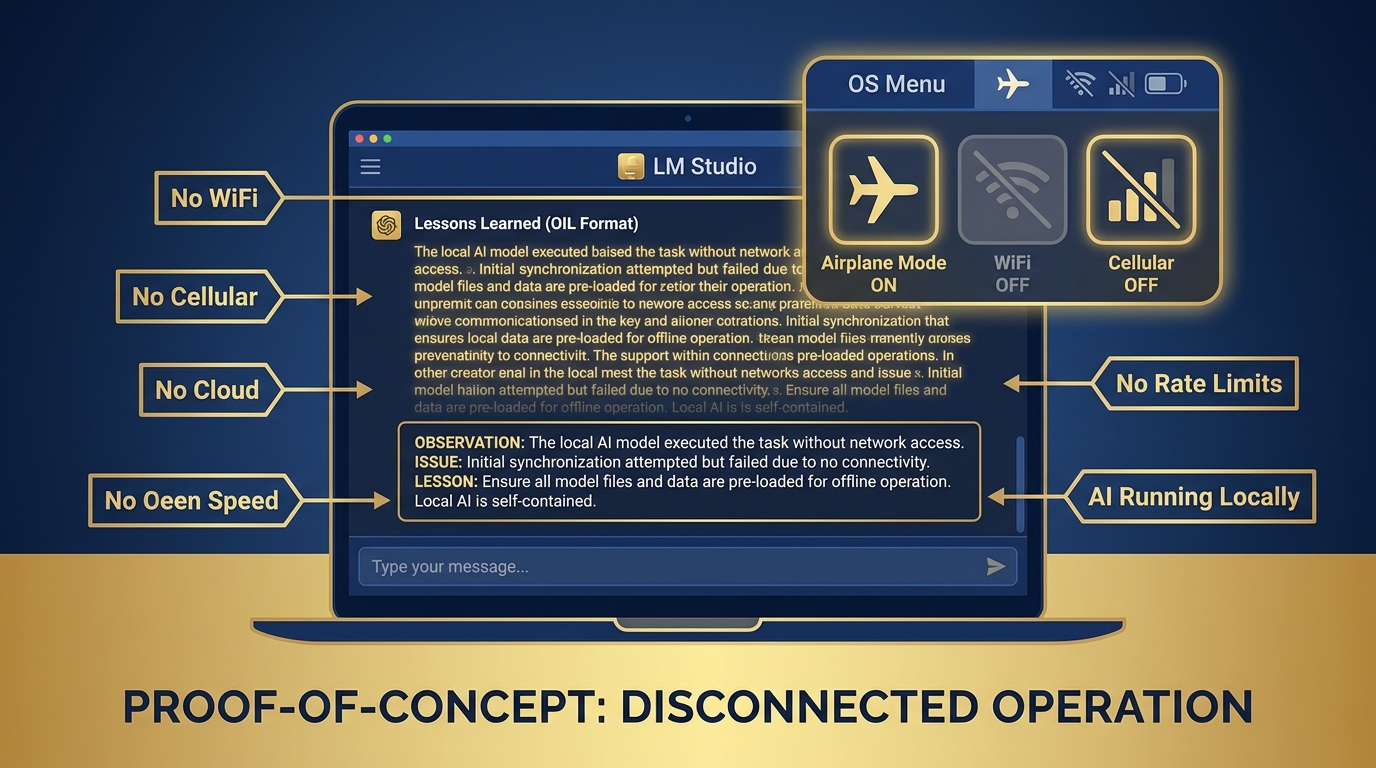
Figure 14:The Disconnected Proof. Airplane mode on. WiFi off. Cellular off. LM Studio generating Lessons Learned output from a local Gemma 4 model. This is not a simulation — this is what forward-deployed AI capability looks like in practice.
You have AI-assisted analysis running with:
Zero internet connectivity
Zero cloud dependency
Zero data leaving the device
Zero per-token cost
This is what forward-deployed capability looks like.
After you’ve confirmed the offline analysis works: navigate to the Server tab. Click Start Server. LM Studio reports that your local API is running at localhost:1234. Open a terminal and run the curl command from Section 10.10. Confirm the API responds.
Bring your laptop back online. Discuss: how would you integrate local AI into a workflow where you don’t know in advance whether you’ll have connectivity? What would the “cloud first, local fallback” architecture look like for a Lukos delivery you’ve actually done?
✅ Success looks like: A working AI analysis session with airplane mode enabled — proof that the edge wolf hunts alone.
Individual Lab: Stand Up Your Offline Toolkit
Tier 1 — The On-Ramp (5 minutes)
Download and install LM Studio. Open the Discover tab. Browse the model library without downloading anything yet. Identify two models you’d want available offline for your specific role. One smaller (for fast, narrow tasks), one larger (for reasoning and synthesis). Write down your reasoning.
Tier 2 — The Core Rep (15 minutes)
Download Gemma 4 (E4B for speed, or 26B MoE if your hardware supports it). Load it. Test it on one real task from your actual job — not the exercise example. A classification task. A summary request. A drafting task. Something you actually do.
Evaluate honestly: Is the quality acceptable for that task? Not “is it as good as Gemini?” — is it good enough to be operationally useful in a context where Gemini isn’t available? Document the gaps. Document what you’d need to improve in your prompts to close them.
Tier 3 — The Wow Moment (25 minutes)
Start the local API server (Server tab → Start Server). Open a terminal. Run this exact command, confirming you have a model loaded:
curl http://localhost:1234/v1/chat/completions \
  -H "Content-Type: application/json" \
  -d '{
    "model": "google/gemma-4-e4b-it",
    "messages": [
      {
        "role": "system",
        "content": "You are a Lukos Lessons Learned analyst. Extract observations in OIL format."
      },
      {
        "role": "user",
        "content": "Summarize the key lesson from this text: [paste your AAR excerpt here]"
      }
    ],
    "temperature": 0.3,
    "max_tokens": 500
  }'
Confirm you receive a valid JSON response with your model’s output. You have just called an AI API from a terminal with no internet connection. Your machine is now an AI API endpoint.
Now open a text editor. Write a two-sentence plan for how you’d use this capability in your next engagement. Where would local AI fit in the workflow? When would you switch to cloud?
✅ Success looks like: A successful API response from your local LM Studio server — your machine is an AI API endpoint. A documented plan for integrating local AI into a real workflow.
Field Notes
Pack Debrief
Dr. Ernesto Lee and Professor Carlos Marquez — Miami Dade College
Research verified April 26, 2026: LM Studio version 0.4.12 (released April 17, 2026) confirmed from lmstudio