Chapter 9: Live Web Access for AI Agents — FireCrawl
The SIGINT Layer That Gives Your Agents Eyes on the Live Web
“An analyst locked in a room with no windows and no internet is still brilliant. But they’re operating on yesterday’s intelligence. FireCrawl opens the window.”
You have spent the last three chapters building agents.
You gave them roles — JLLA, FET, AQR, TAC. You gave them skills — reusable specialist knowledge that turns a general-purpose model into a domain expert. You assembled them into a synthetic wolfpack that runs workflows while you sleep.
And every single one of them has a hidden limitation you haven’t addressed yet.
They are operating blind.
Not completely blind. NotebookLM sees the sources you uploaded. Vertex AI agents see your enterprise data. Antigravity sees your codebase, your uploaded documents, the context you’ve given it. But the live web? The partner-nation public affairs site updated this morning? The GAO report released yesterday? The doctrine change posted an hour ago? That content doesn’t live in your uploaded files. It lives on the open internet — and your agents cannot see it.
Until now.
This chapter is about FireCrawl — the API layer that gives your agents real-time access to the live web at scale, in LLM-ready format, handling every technical barrier that would otherwise stop them cold.
If Chapter 6 was about building the forge and Chapter 7 was about programming the specialists, Chapter 9 is about opening the window. The entire web just became your agent’s live database. This is where everything changes.
19.1 The Data Bottleneck Problem
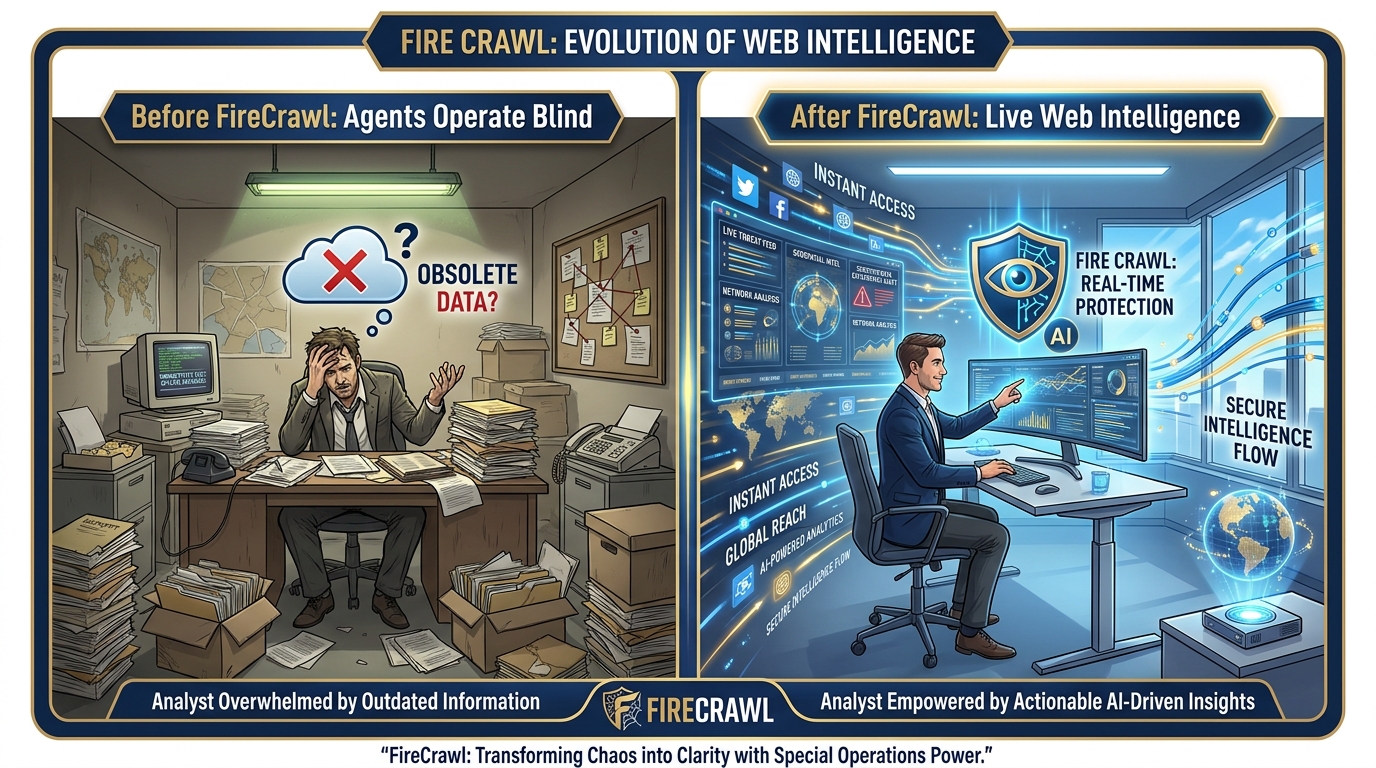
Figure 1:The Data Bottleneck. Every agent built in Chapters 6–8 is bounded by what it can see. Without FireCrawl, brilliant agents operate on static inputs — uploaded documents, enterprise databases, pre-loaded sources. FireCrawl opens the window. The live web becomes the agent’s real-time intelligence feed.
Here is the problem in plain terms.
Every AI model — every agent you have built — operates on training data plus context. Training data is what the model learned during its creation: everything scraped from the web up to a certain cutoff date. Context is what you provide in the conversation: documents you upload, data you paste, sources you share.
The training data is stale by definition. Claude’s cutoff. Gemini’s cutoff. GPT’s cutoff. Whatever the date was when the model stopped learning, that’s where its world knowledge ends. Everything that happened after that — every report published, every policy changed, every partner-nation press release issued — is invisible to the model unless you bring it in as context.
Most workflows solve this by uploading documents. You feed the model the AAR. You paste the regulation update. You attach the PDF. That’s fine for content you already have. But what about content you don’t have yet? What about the document that was published this morning on a government website? What about the news story that broke an hour ago about a partner nation’s training accident?
That content is not in your uploaded files. It’s not in your enterprise database. It’s not in NotebookLM unless you manually added it. It lives on the open internet — and there’s an 80% chance your agent cannot read it, even if you give it the URL.
Why 80%?
Because the modern web is not a collection of static text files. It’s a collection of JavaScript applications. A page like a partner-nation defense ministry dashboard doesn’t load its content when the page loads — the JavaScript runs first, makes additional API calls, renders the content dynamically, and only then shows you the text. A traditional web scraper sees the raw HTML before the JavaScript runs: a blank page or a shell. It misses the actual content entirely.
Add to that: login screens protecting authoritative databases. CAPTCHAs blocking automated access. Rate limits stopping repeated requests. Anti-bot mechanisms detecting and blocking scraping attempts. Pagination spreading content across 50 pages. PDF and DOCX files that need parsing before they’re readable.
The result: agents are brilliant analysts locked in a room with no windows and no internet. They can work with what you give them. But the live web — the primary source of real-time intelligence — is largely inaccessible.
FireCrawl solves this.
FireCrawl is described on its homepage as “the API to search, scrape, and interact with the web at scale.” It’s trusted by over 80,000 companies including Shopify, Zapier, Canva, Apple, Alibaba, DoorDash, and Sierra. It’s open source and available as a hosted service. And for the Lukos mission, it represents something specific: the SIGINT collection layer that supplies real-time open-source intelligence to every agent in your wolfpack.
29.2 Why This Was Hard Before — And How FireCrawl Solved It
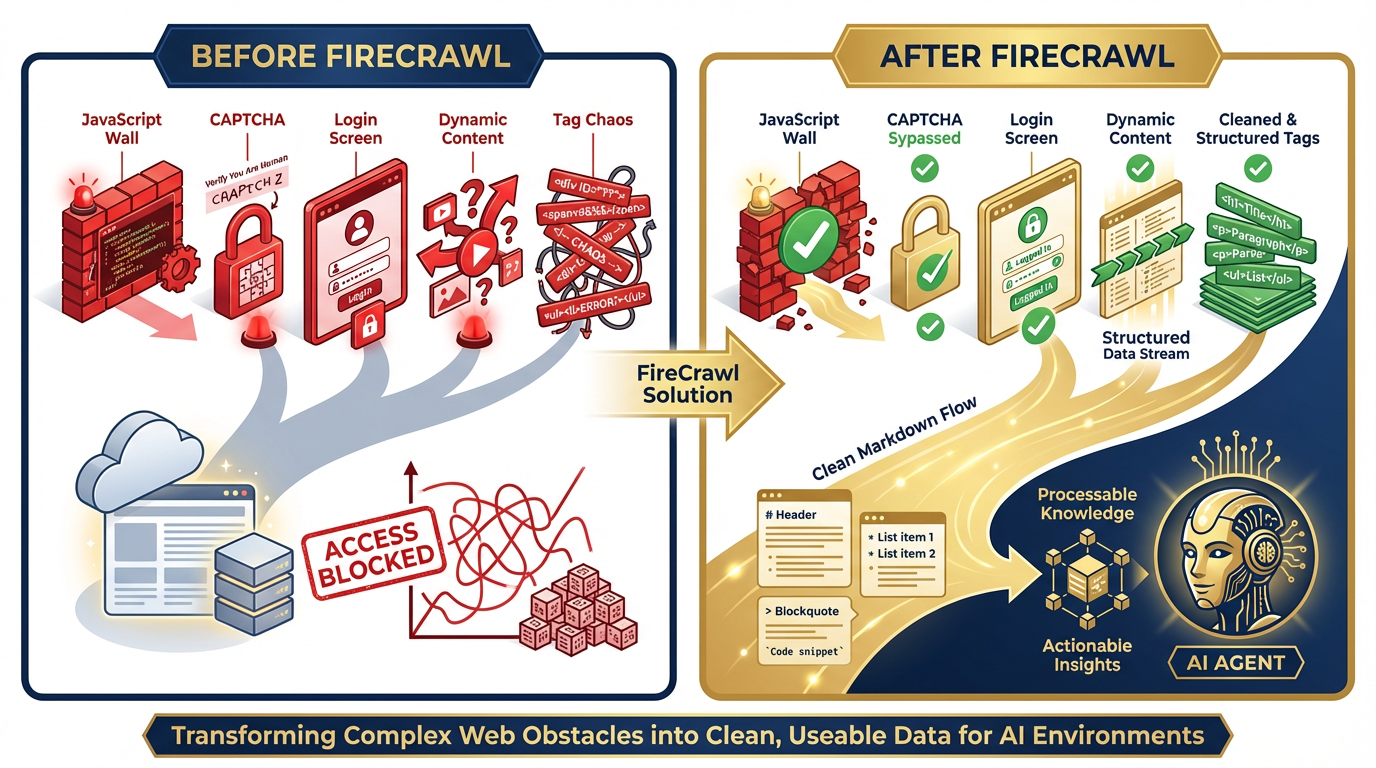
Figure 2:The Web Access Gap. Traditional scrapers fail against JavaScript walls, CAPTCHAs, login screens, dynamic content, and tag chaos. FireCrawl’s managed infrastructure — with rotating proxies, Chromium rendering, and LLM-optimized output — resolves all five barriers with 96% web coverage.
To appreciate what FireCrawl does, you need to understand what it replaced.
The Five Barriers
JavaScript Walls. The modern web runs on JavaScript frameworks — React, Vue, Angular, Next.js. A traditional web scraper makes an HTTP request and reads the HTML response. But on a JavaScript-heavy site, the HTML response is just a shell: <div id="app"></div> and a bundle of JavaScript. The actual content is rendered by the browser after the JavaScript executes. Traditional scrapers see the shell. They miss everything inside. FireCrawl runs a full Chromium browser, executes the JavaScript, waits for the content to render, then extracts clean text. That’s why its coverage is 96% of the web — including every JS-heavy site a static scraper would fail on.
Login Screens. The most authoritative sources are often behind authentication: JSTOR, Jane’s Intelligence, premium news services, internal analytics platforms. Traditional scrapers can’t log in. FireCrawl’s browser sandbox can — and it can preserve the authenticated session so every subsequent agent run starts already logged in. More on this in Section 9.5.
CAPTCHAs. Every scraper eventually encounters a CAPTCHA. FireCrawl handles this through its managed infrastructure: rotating proxies, browser fingerprint management, and the behavioral patterns that distinguish legitimate browser usage from bot traffic. Zero configuration on your side.
Dynamic Content. Some content loads after user interaction — scroll down to reveal more, click a tab to see data, paginate through results. FireCrawl’s Interact capability handles this through natural language automation: “scroll down,” “click the next page button,” “wait for the results to load.” The agent directs the browser; the browser executes the action; FireCrawl returns the resulting content.
Tag Chaos. Raw HTML is nearly useless for an LLM. A news article page might contain the actual article text surrounded by navigation menus, advertisement slots, footer links, cookie banners, social sharing buttons, and comment sections — all wrapped in nested div tags with class names optimized for CSS, not readability. FireCrawl strips all of this. What emerges is clean markdown: just the meaningful content, correctly structured, ready for an LLM to process without wasting tokens on noise.
FireCrawl’s Solution Stack
| Barrier | FireCrawl’s Answer |
|---|---|
| JavaScript walls | Full Chromium browser rendering |
| Login screens | Persistent authenticated sessions |
| CAPTCHAs | Rotating proxies + behavioral fingerprinting |
| Dynamic content | Natural language browser interaction |
| Tag chaos | LLM-ready markdown + structured JSON output |
| Slow load times | Smart wait — intelligently waits for content before extracting |
The result: 96% web coverage, P95 latency of 3.4 seconds, zero configuration required from the developer or analyst. You provide a URL or a goal. FireCrawl handles everything between you and the clean data.
39.3 The Five Capabilities
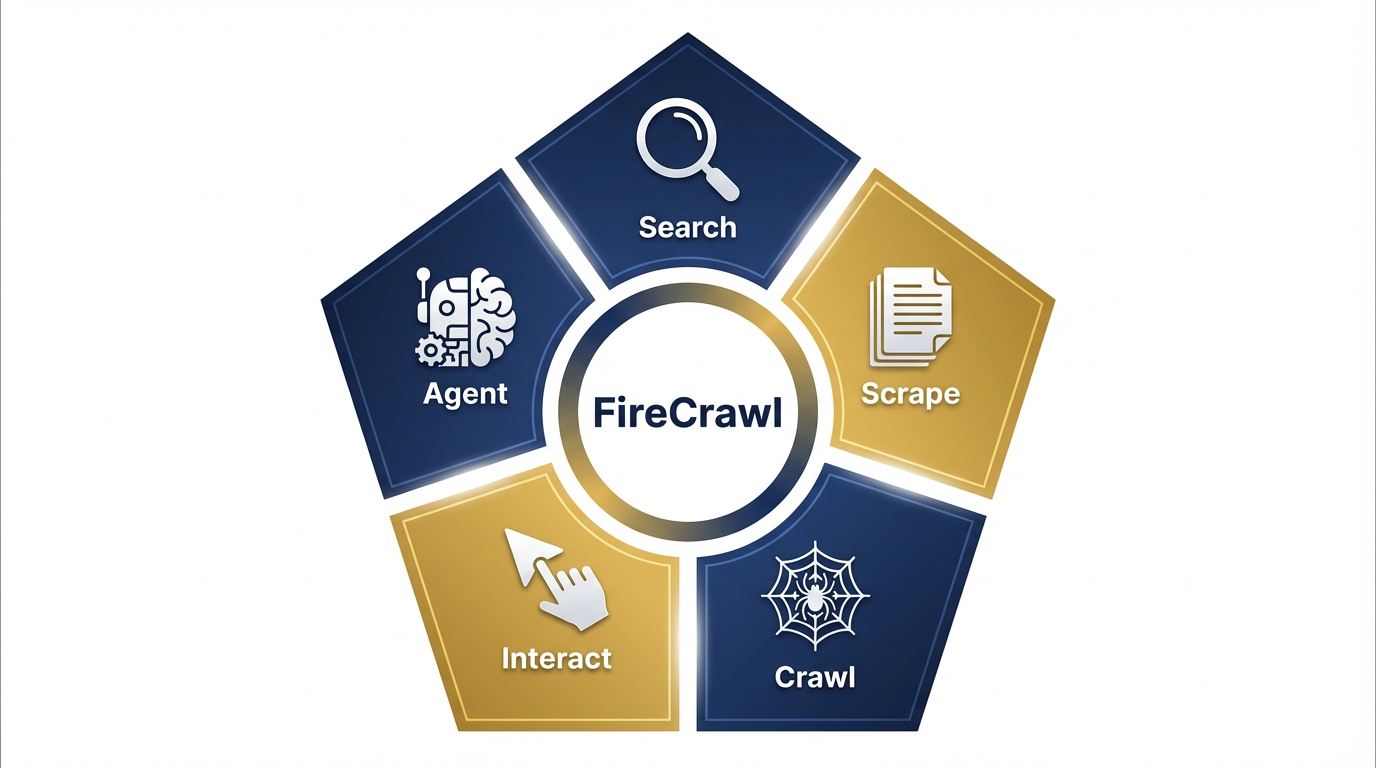
Figure 3:The FireCrawl Capability Pentagon. Five capabilities, each designed for a different data acquisition scenario. Search for current intelligence. Scrape for specific sources. Crawl for complete site coverage. Interact for authenticated and dynamic access. Agent for autonomous goal-driven research.
FireCrawl’s core capabilities are not just features — they’re a taxonomy for every kind of web intelligence problem you will face. Think of them as five different mission profiles. The right one depends on what you know going in and what you need coming out.
Capability 1: Search — Your Agent Reads the Whole Internet
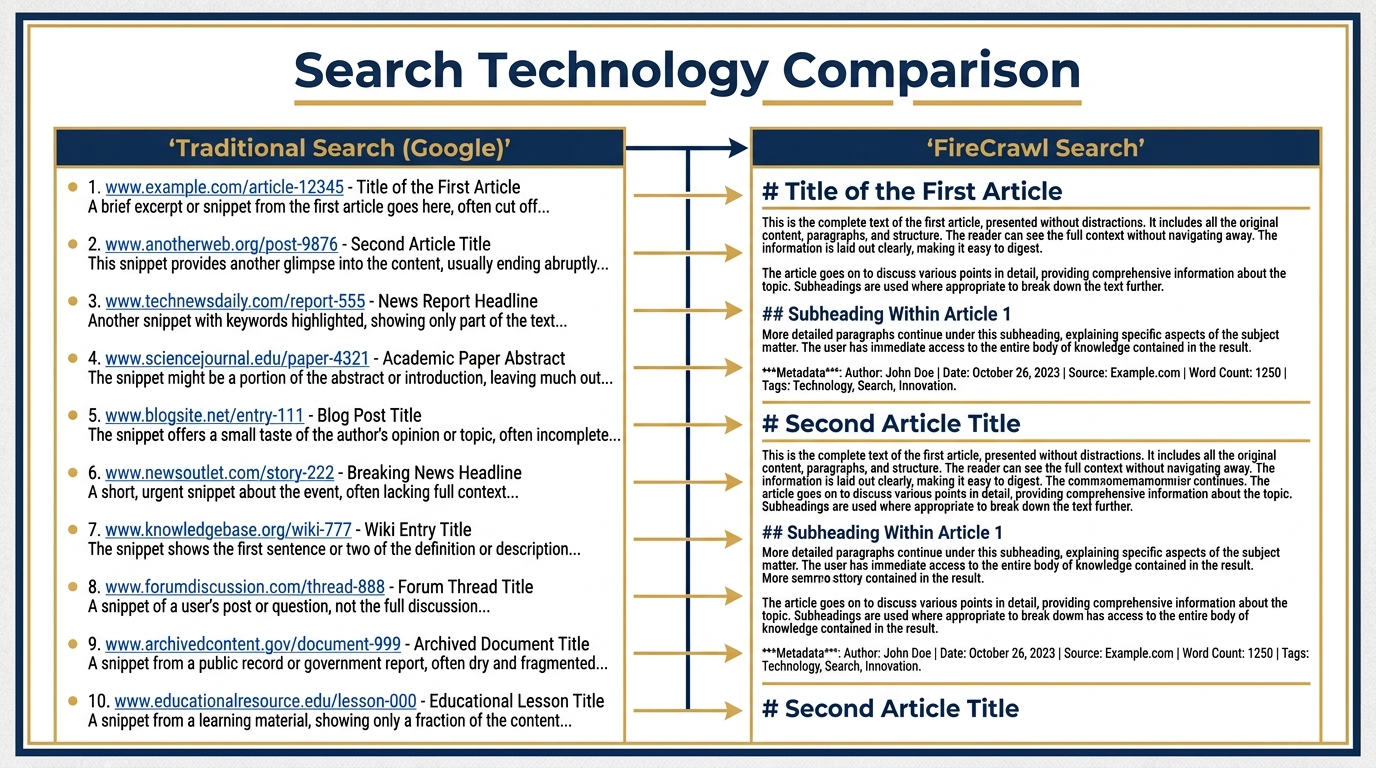
Figure 4:Search vs. Google. A Google search returns ten blue links. FireCrawl Search returns the full scraped content of each result — headline, body text, metadata — all in clean markdown, ready for your agent to analyze. The difference between a pointer and the intelligence itself.
What it does: FireCrawl Search queries the web and returns the full scraped content of the top results — not just links. Your agent doesn’t get a list of URLs to follow up on. It gets the actual text of each source, in clean markdown, in a single API call. One call. Twenty sources. Full content.
How it works: Under the hood, FireCrawl performs a web search, visits each result URL, renders the page in its Chromium infrastructure, extracts the meaningful content, strips navigation and advertising noise, and returns structured output with the URL, title, and markdown content for each result. The agent never touches a browser. The agent never follows a link. It receives intelligence directly.
The Lukos use case: The FET agent’s morning brief. The prompt: “Use FireCrawl to search for the 3 most recent news articles about [partner nation]'s military training exercises. Return: headline, source URL, publication date, one-sentence summary.” The agent sends one Search call. FireCrawl queries the live web, visits the top results, extracts the articles, returns structured data. The agent formats a brief. Total time: under 30 seconds. Intelligence currency: today’s web, not training data from last year.
The distinction that matters: This is not a Google search that returns links for a human to click. This is a search that returns the content of those links, ready for an AI to process. The analyst doesn’t browse the web. The agent reads it.
Capability 2: Scrape — Clean Data From Any URL
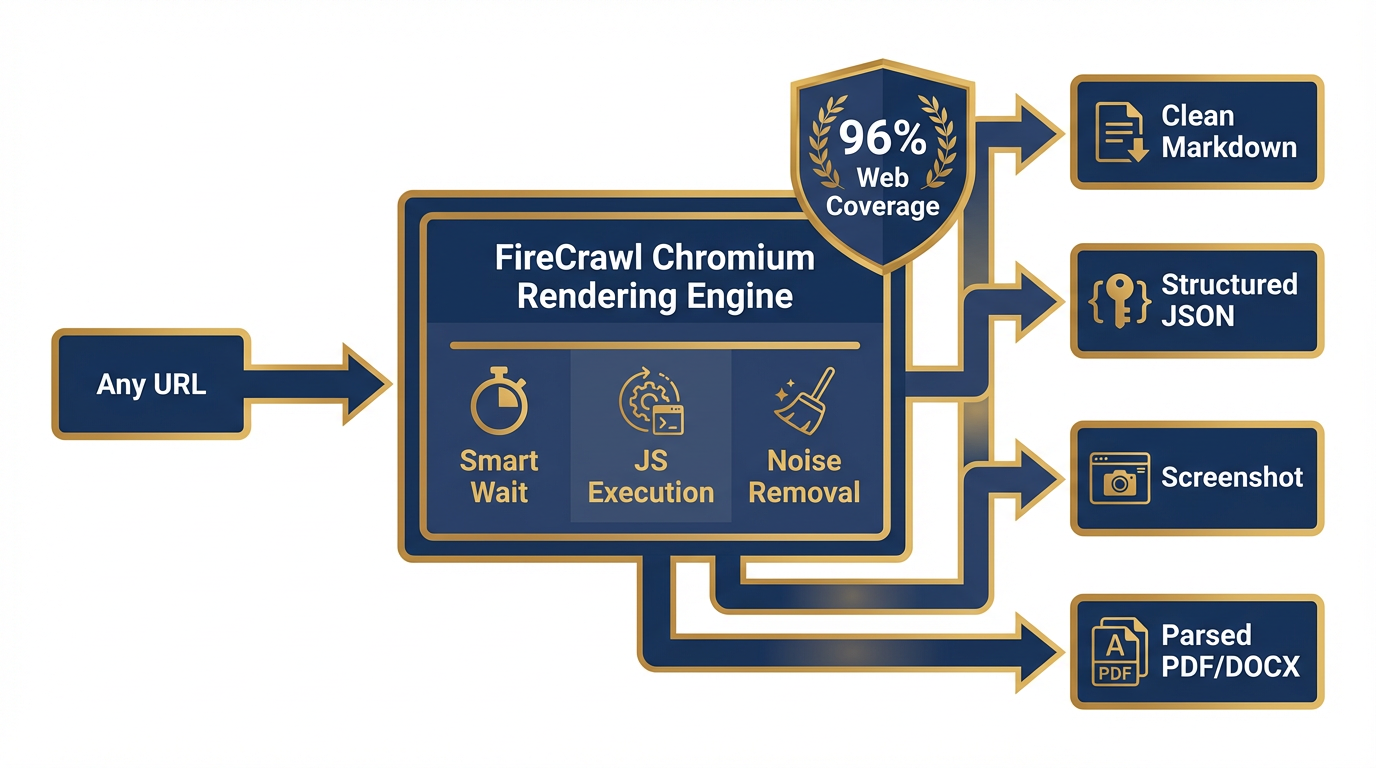
Figure 5:The Scrape Workflow. One URL goes in. FireCrawl renders it in managed Chromium, strips noise, and outputs clean markdown, structured JSON, a screenshot, or parsed content from PDFs and DOCX files. 96% web coverage, no configuration required.
What it does: Scrape converts any URL into clean, LLM-ready output. Formats available: clean markdown, structured JSON, screenshots, or semantic HTML. FireCrawl also parses web-hosted PDFs, DOCX files, and other document formats — you get the text content, not the raw binary file.
How it works: One URL in, one structured document out. FireCrawl loads the page in Chromium, waits for all dynamic content to render (smart wait is built in — it intelligently determines when the page has finished loading), strips navigation, ads, and boilerplate, and returns just the meaningful content. For PDFs and DOCX files, it handles the extraction and returns clean text. One credit per page.
The Lukos use case: AAR archives published as dynamic government dashboards. Doctrine update pages on defense ministry websites. GAO reports hosted as PDFs on gao.gov. A JLLA agent given a URL and instructed to extract the document content no longer needs the human to download the PDF and upload it manually. The agent calls FireCrawl Scrape, gets the full text in markdown, processes it, and produces OIL output — all without human intermediary steps.
Media parsing: FireCrawl explicitly supports parsing and outputting content from web-hosted PDFs, DOCX, and more. For a Lessons Learned workflow where AARs are often published as PDFs on SharePoint or external portals, this capability closes the last gap between “document on the web” and “structured data in the pipeline.”
Capability 3: Crawl — Harvest an Entire Website
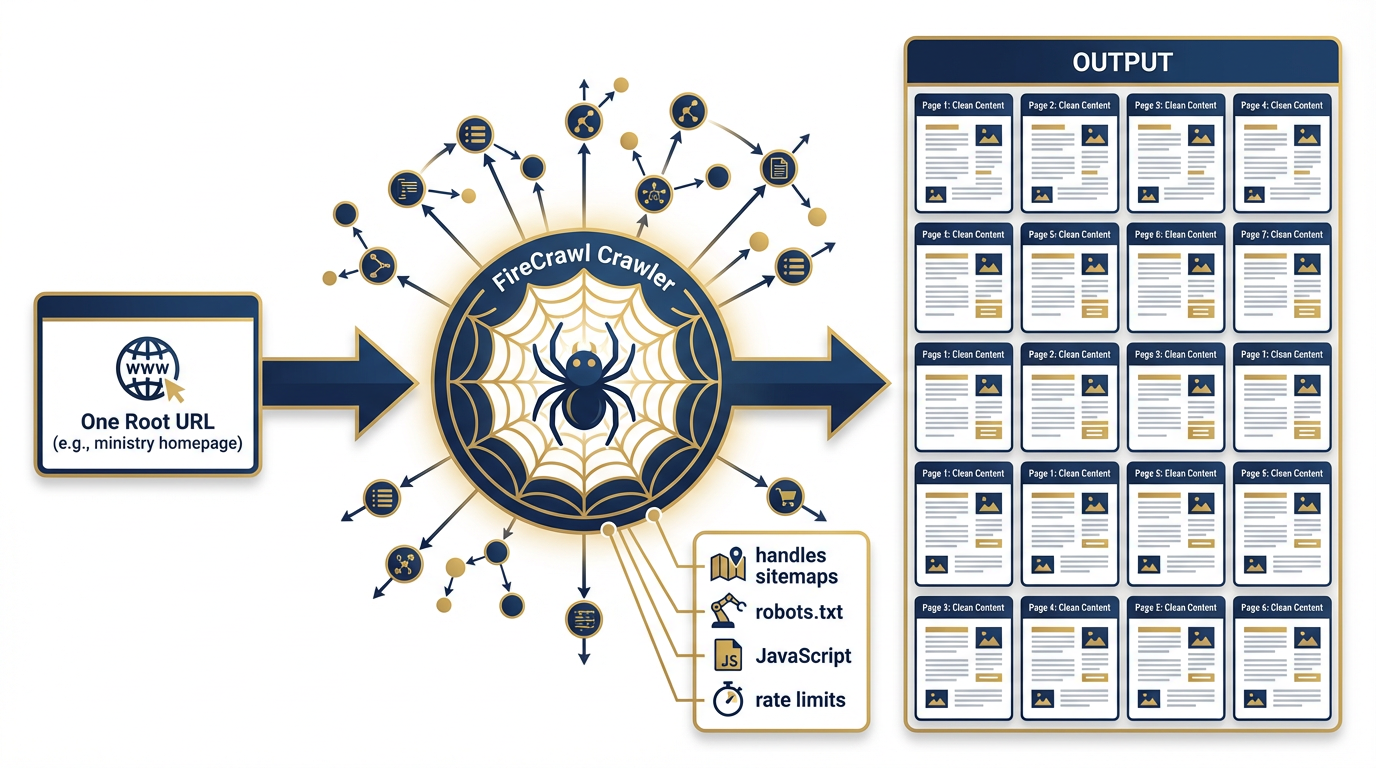
Figure 6:The Crawl Workflow. Enter one URL. FireCrawl discovers and scrapes every accessible subpage — following internal links, respecting sitemaps and robots.txt, handling JavaScript rendering at each step. The result: the complete web presence of any site, delivered as structured, clean content.
What it does: Crawl takes a single URL and harvests every accessible subpage on that domain. Give it the homepage of a partner-nation defense ministry and it returns every page on that site — press releases, organizational charts, doctrine documents, personnel announcements — all clean, all structured, all in one operation.
How it works: FireCrawl starts at your specified URL, discovers links, follows them, renders each page in Chromium, extracts content, and continues — handling sitemaps, robots.txt rules (FireCrawl respects robots.txt directives including the “FirecrawlAgent” directive), rate limiting, and JavaScript at every step. The result is an organized collection of pages, each with its URL and clean content. One credit per page crawled.
The Lukos use case: Intelligence mapping of a partner nation’s complete public web presence. An analyst assigned to a new engagement with a partner nation’s military wants to understand everything publicly available before the first meeting. Previously, this required hours of manual browsing. With FireCrawl Crawl, the AQR agent receives one URL — the partner ministry’s homepage — and returns the full public web presence: every page, every document, every organizational announcement. The analyst reviews structured output instead of clicking through 200 pages of a foreign-language website.
Important calibration: Crawling entire sites is not free and not instantaneous. A large government site might have thousands of pages. Build cost ceilings into every crawl workflow and scope them carefully — you rarely need every page on a site. Target specific subdirectories: /press-releases/, /doctrine/, /publications/ rather than the entire domain.
Capability 4: Interact — Natural Language Web Automation
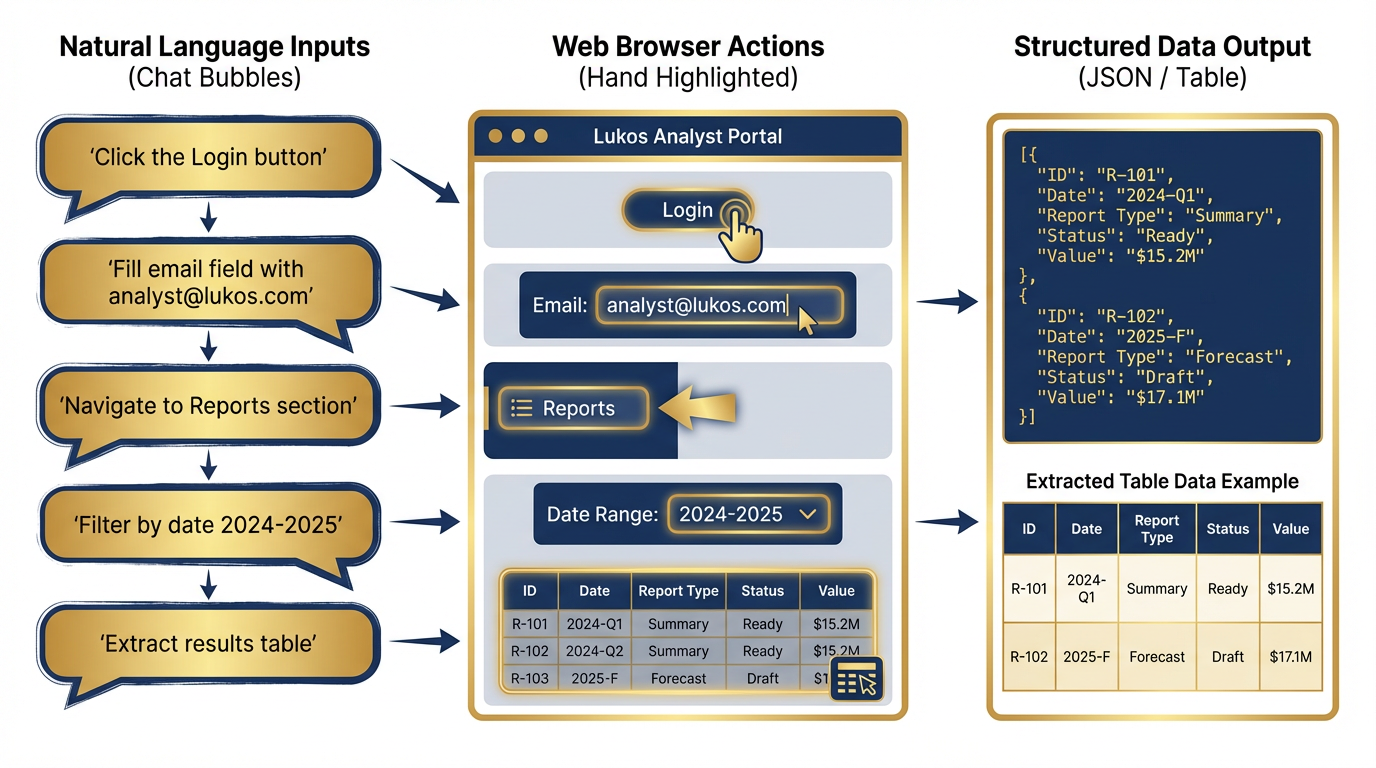
Figure 7:Natural Language Web Automation. FireCrawl Interact translates plain English commands into browser actions. Non-developer analysts can navigate complex authenticated portals, paginate through results, filter databases, and extract dynamic content — all through conversational instructions.
What it does: Interact extends Scrape by allowing your agent to take actions on a page after loading it. Click buttons. Fill forms. Navigate dropdowns. Submit queries. Paginate through results. Wait for content to load. All through natural language prompts or Playwright code — and state carries between calls, so each action builds on the last.
How it works: The Scrape call returns a scrape ID — a reference to the live browser session. The agent then calls Interact with that scrape ID and a natural language prompt: “Search for ‘mechanical keyboard’” or “Click the first result” or “Navigate to the reports section and filter by date range 2024-2026.” FireCrawl executes the action in the live Chromium session and returns a live view URL so you can watch the automation in action, plus the resulting page content. The session persists between calls.
The Lukos use case: Navigating a public records portal that requires multi-step filtering. Many government databases require you to: select a category, enter a date range, click search, wait for results, and then paginate through 50 pages of output. A traditional scraper fails at step one — the category selector is a JavaScript dropdown that doesn’t exist in raw HTML. FireCrawl Interact handles every step through natural language: “Select ‘Contracting Actions’ from the category dropdown. Set date range to January 2024 through December 2024. Click search. Wait for results. Extract all rows from the results table. Click next page. Repeat until no next page button is visible.”
Non-developer analysts can author these workflows. The instructions are plain English. No Playwright code required. No browser automation expertise needed.
Capability 5: Agent — Autonomous Web Research
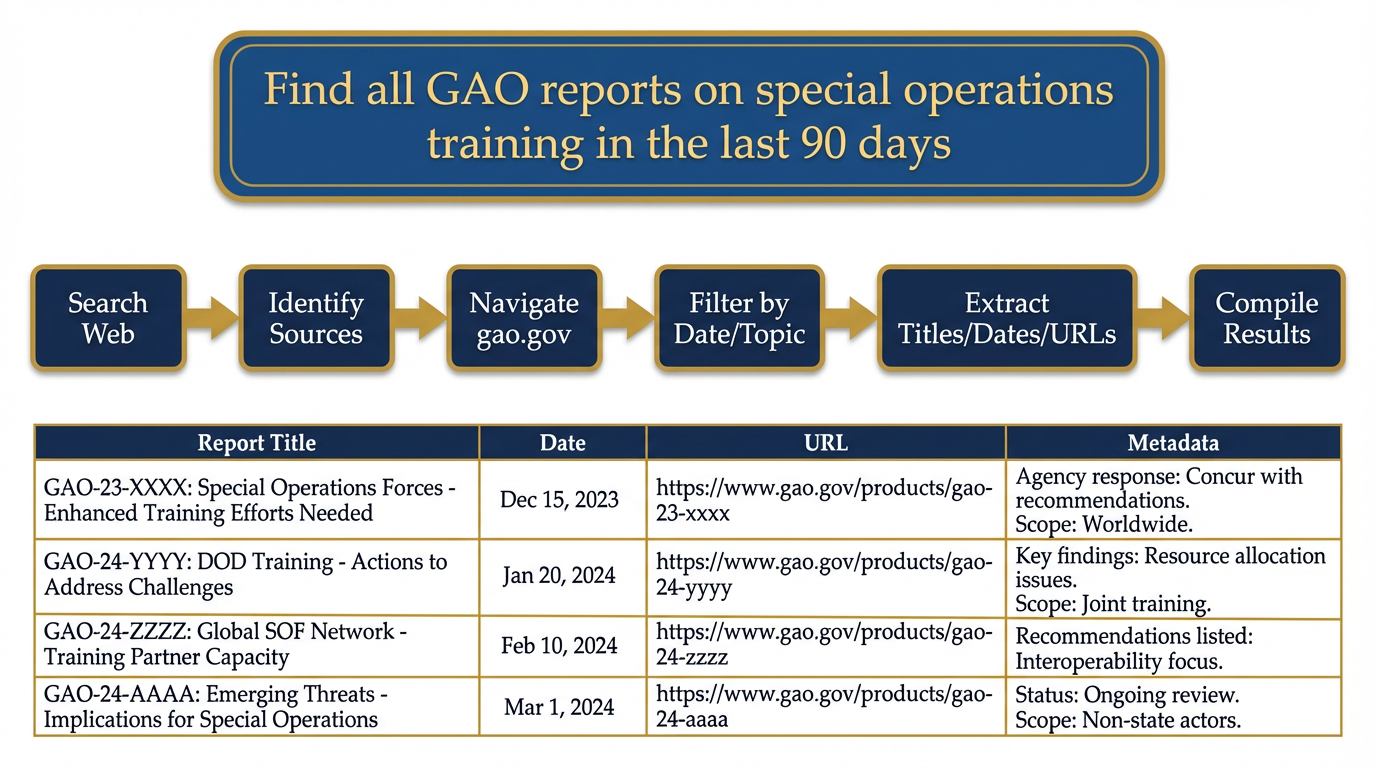
Figure 8:Agent Mode. Skip the URL. Provide a goal. FireCrawl Agent autonomously searches, decides which sources to visit, navigates complex sites, extracts structured data, and returns cited results. This is autonomous open-source intelligence at machine speed.
What it does: Agent is the most powerful and most autonomous mode. You don’t provide a URL. You provide a goal. FireCrawl figures out where to look, decides which sources are relevant, navigates to them, extracts what it needs, and returns structured data.
How it works: Describe what you need in plain language. “Find all GAO reports published in the last 90 days related to special operations training or DoD readiness.” FireCrawl Agent breaks this into sub-tasks: search the web for relevant queries, identify the GAO website as the authoritative source, navigate to gao.gov’s search interface, filter by date and topic, paginate through results, extract each report’s title, date, URL, and summary, and return structured output. No URL provided. No manual navigation. Just a goal and structured intelligence.
The Lukos use case: Autonomous research on any topic without knowing the sources in advance. The JLLA agent’s morning task: “Find any new doctrine publications, lessons-learned databases, or joint training reports published by DoD, SOCOM, or JFKSWCS in the last 30 days. For each: title, date, source URL, 2-sentence summary, relevance to combined arms integration.” The agent returns a structured list of what was published since yesterday. An analyst reviews it in five minutes. The alternative — manually checking a dozen websites, searching each one, reading each publication — takes hours.
The strategic implication: Agent mode turns a question into intelligence without specifying sources. This mirrors how a human analyst briefs research tasks to a junior analyst: “Find everything relevant to this topic from the last month.” The junior analyst figures out where to look. FireCrawl Agent does the same — at machine speed, 24 hours a day.
49.4 The Agentic Browser Sandbox
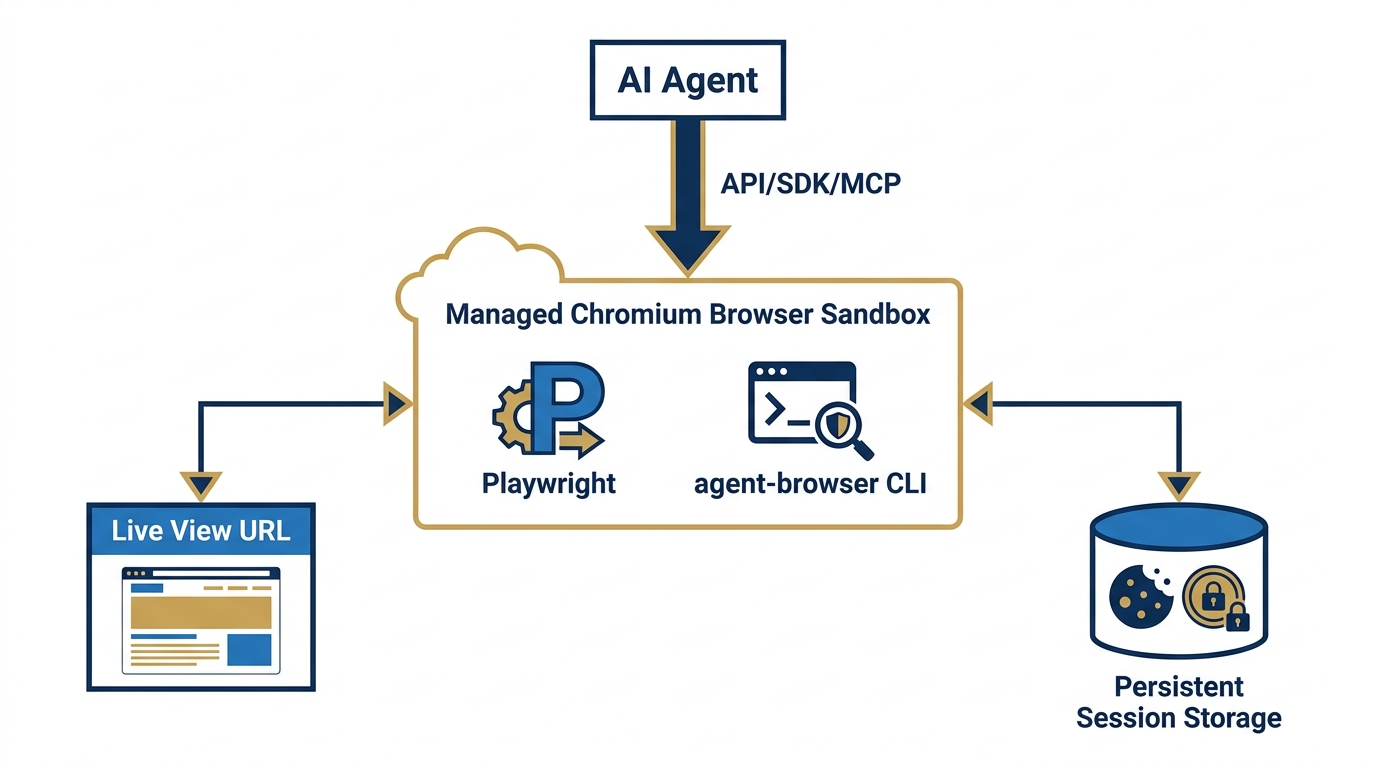
Figure 9:The Agentic Browser Sandbox. A fully managed Chromium instance runs in an isolated cloud container. Your agent connects via API, SDK, or MCP and takes full control. A live view URL lets you watch the automation in real time. Sessions persist — cookies, local storage, and authentication tokens survive between runs.
Every FireCrawl operation runs against a managed infrastructure that most users never see. But for Lukos — where understanding the security posture of every capability is a professional requirement — you need to understand what’s actually happening under the hood.
The environment: FireCrawl runs a fully managed Chromium browser in an isolated cloud container. This is not a lightweight headless browser or an HTTP client pretending to be a browser. It’s a real Chromium instance with full JavaScript execution, cookie management, local storage, session tokens, and the full browser API. When FireCrawl renders a page, it renders it exactly as a real user’s browser would.
The connection model: Your AI agent connects via API, SDK, or MCP server. The agent sends instructions; FireCrawl executes them in the managed Chromium instance; results return to the agent. The agent never manages browser infrastructure, driver compatibility, proxy configuration, or rate limiting. Zero configuration. Zero maintenance.
Live view: Every interactive session generates a live view URL — a real-time screen share of the Chromium instance. While your agent is working, you can open this URL in your browser and watch the automation happen. This is not cosmetic. For a Lukos analyst overseeing an automated research workflow, the live view is your supervision tool: you can see exactly what your agent is doing on the web, verify it’s following the expected path, and intervene if needed.
Session persistence: This is where it gets important. Chromium sessions can be persisted between runs. Cookies are preserved. Local storage is preserved. Authentication tokens are preserved. Log into a site once; the session stays alive for future calls. This is the foundation for the authentication capability described in the next section.
Pre-installed tooling: The browser sandbox comes pre-installed with Playwright and the agent-browser CLI, giving agents programmatic control when natural language instructions alone aren’t sufficient.
59.5 Authentication — Browse As Yourself
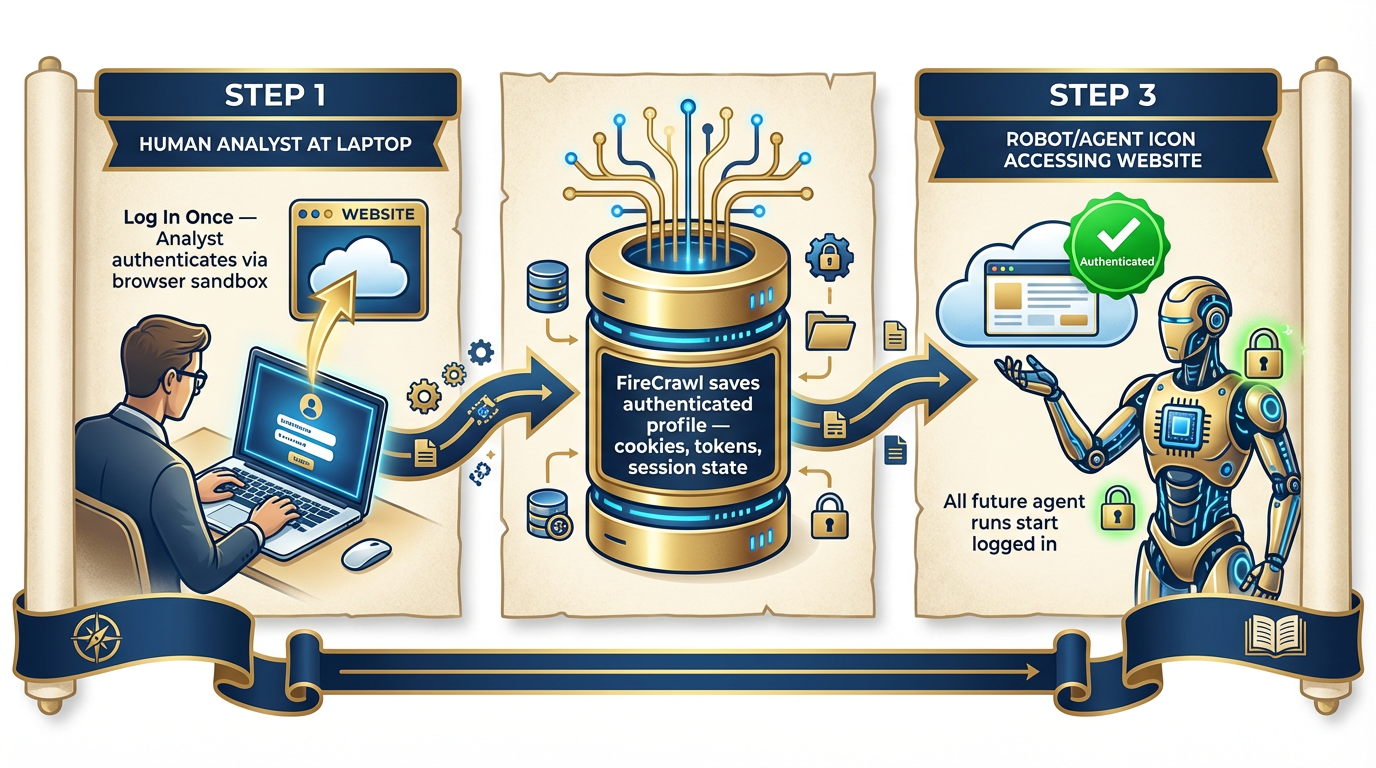
Figure 10:Browse As Yourself. Log in once. FireCrawl saves the authenticated session as a persistent profile. Every subsequent agent run loads the profile — the agent is already logged in, already authorized, already inside the authenticated environment. The analyst’s access becomes the agent’s access.
This capability is the one that will change how your team thinks about agent-accessible intelligence.
Most of the most authoritative sources in the world are behind authentication:
JSTOR and academic databases used by defense researchers
Jane’s Intelligence products
Premium news services and wire services
Internal analytics dashboards
State and local government portals requiring registration
Commercial platforms your organization already has licensed access to
Previously, these sources were inaccessible to agents. Even if you gave an agent the URL, it would hit the login screen and stop. Your licensed access, your credentials, your authorized sessions — all invisible to the agent.
FireCrawl’s persistent session model changes this.
How it works: Using the browser sandbox, log into any authenticated site manually — or use FireCrawl Interact to automate the login sequence. FireCrawl saves the authenticated state: cookies, session tokens, local storage. This state is preserved as a persistent profile. Every future agent call that uses this profile starts already authenticated. The agent doesn’t see a login screen. It’s already inside.
The Lukos application: An analyst who has licensed access to a premium security intelligence platform can authenticate once through FireCrawl’s browser sandbox. From that point forward, the FET agent can query that platform’s search interface, extract current intelligence reports, and incorporate them into daily briefs — without any human login step in the middle. The analyst’s authorized access becomes the wolfpack’s authorized access.
The discipline this requires — this is not optional:
69.6 Why This Is Revolutionary for Lukos Specifically
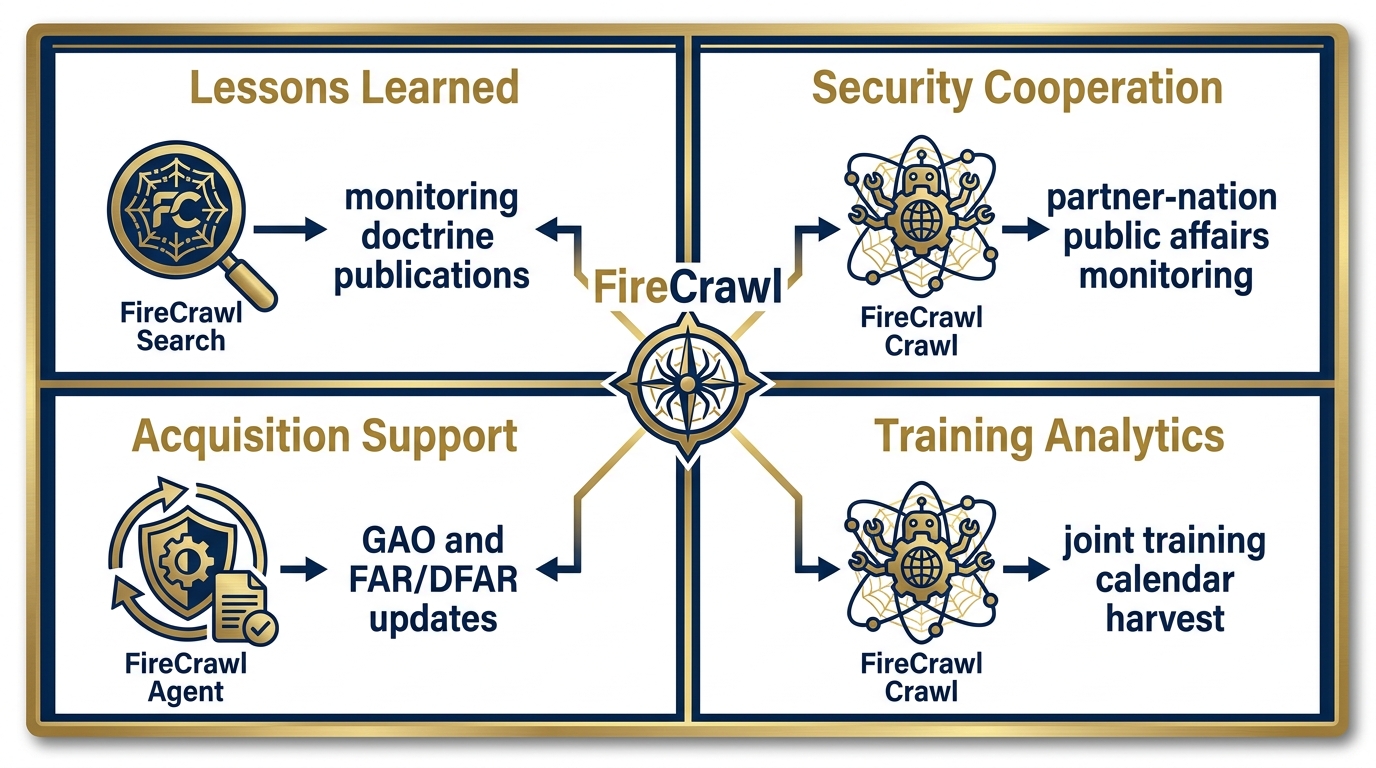
Figure 11:FireCrawl Meets the Lukos Mission. Every Lukos line of business gains a live intelligence feed. Lessons Learned monitors published doctrine and research. Security Cooperation automates partner-nation public affairs monitoring. Acquisition Support tracks GAO reports and regulatory updates in real time. Training Analytics harvests joint training calendars across 25 states.
The general capabilities of FireCrawl are impressive. But this book is not about general capabilities — it’s about the Lukos mission. So let’s be specific.
Lessons Learned — Monitoring the Currency of Published Knowledge
The Lessons Learned function exists to ensure that what the organization knows stays current with what the community has learned. That means monitoring publications: new JLLIS entries, new joint doctrinal publications, academic research on lessons learned methodology, AAR formats from partner organizations, doctrine updates from SOCOM, JFKSWCS, and the broader joint community.
Previously, this was a manual function: a staff member checking websites, subscribing to mailing lists, manually reviewing release announcements. FireCrawl converts this to an automated workflow. The JLLA agent runs a daily FireCrawl Search on a rotating set of queries — doctrine updates, lessons learned methodology, joint training innovations — and returns a structured brief of what was published in the last 24 hours. The human analyst reviews structured output instead of spending two hours browsing.
Security Cooperation — Daily Partner-Nation Intelligence Feeds
The Security Cooperation function requires current awareness of partner-nation activities, policy shifts, and public statements. Partner-nation military public affairs websites are updated continuously — press releases, official statements, training announcements, organizational changes.
FireCrawl Crawl on a partner ministry’s public affairs section, run nightly, produces a structured inventory of everything published since the last run. The FET agent processes this, identifies items relevant to the current security cooperation portfolio, and surfaces them in the morning brief. The analyst arrives to a curated brief instead of manually checking six foreign-language websites.
Acquisition Support — Real-Time Regulatory Intelligence
Acquisition professionals need current awareness of GAO decisions, FAR/DFAR changes, protest outcomes, and policy updates. These are published on gao.gov, acquisition.gov, and a constellation of regulatory sites — continuously, without a centralized alert system.
FireCrawl Agent mode, given a topic like “FAR updates related to AI and technology services,” autonomously searches, navigates to the relevant regulatory sites, extracts recent changes, and returns structured summaries with citations. The AQR agent runs this weekly and surfaces only what’s changed. The alternative is a manual review process that most acquisition shops currently handle by hoping someone notices a relevant email.
Training Analytics — Joint Calendar Intelligence
The Training Analytics function requires awareness of joint training events, exercises, and certification opportunities across the National Guard bureau and 25+ state programs. This information is distributed across dozens of state military department websites, FORSCOM publications, and training command calendars.
FireCrawl Crawl, targeted at training calendar sections of these sites, produces a structured inventory of upcoming events. The TAC agent processes this inventory, identifies events relevant to Lukos clients, and produces a monthly opportunity brief. Research that currently requires manual contact with multiple state G3 shops becomes an automated overnight process.
The “As Yourself” Multiplier
The authentication capability has a specific Lukos application that deserves separate emphasis.
Lukos analysts are professionals with institutional affiliations, library access, academic credentials, and licensed subscriptions to intelligence platforms. Each analyst has personal authorized access to sources their organizations have paid for.
FireCrawl’s authenticated session capability means each of those individual subscriptions can be extended to that analyst’s personal agent profile. An analyst with JSTOR access can configure their FET agent to search JSTOR’s full-text database. An analyst with access to a commercial defense intelligence platform can configure their AQR agent to query that platform’s current reporting. The access they already have becomes access their agents can use.
This does not change the authorization question — the agent uses the analyst’s credentials, operates within the analyst’s authorized scope, and the analyst remains responsible for that access. But it removes the friction that currently makes those sources practically inaccessible for agent-assisted research.
79.7 Connecting FireCrawl to Antigravity
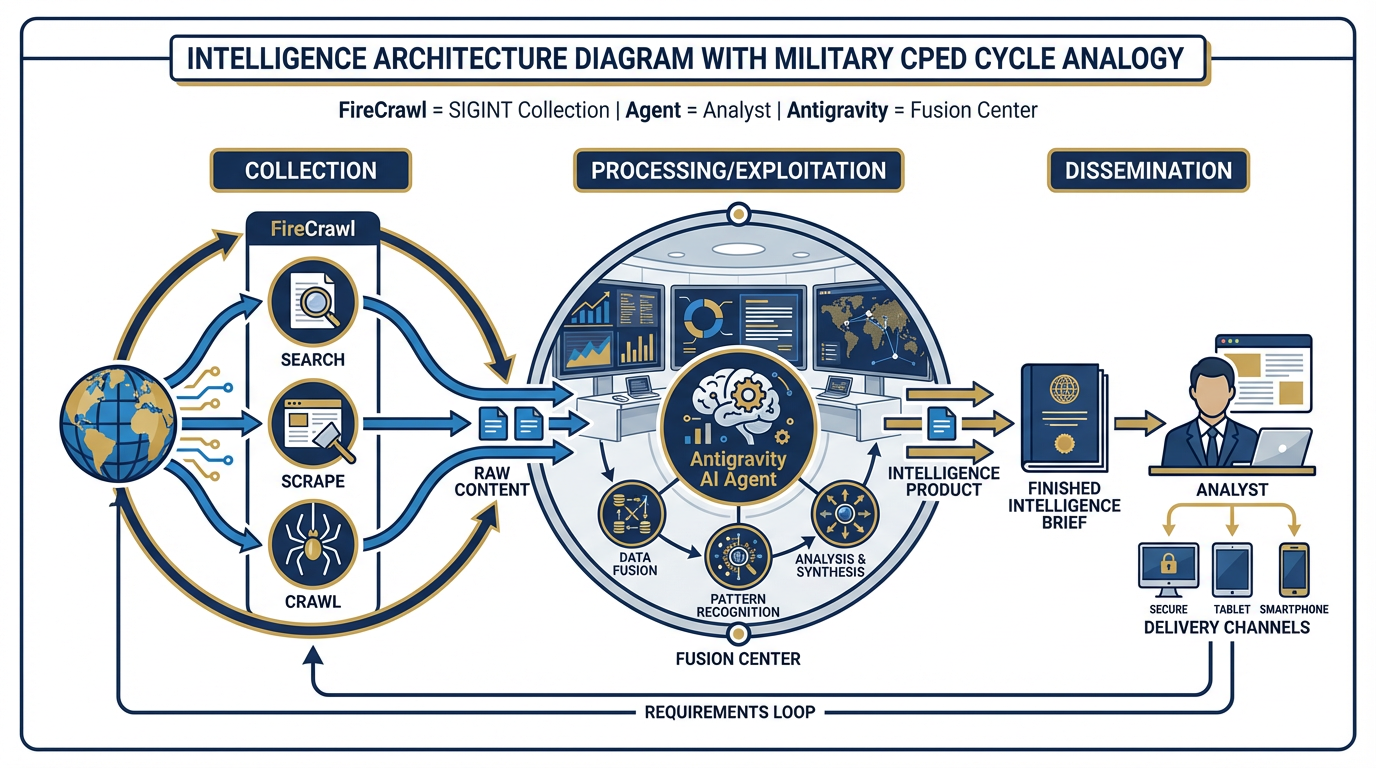
Figure 12:SIGINT Collection → Fusion Center. FireCrawl is the collection system. The Antigravity agent is the analyst. The Antigravity platform is the fusion center. FireCrawl acquires raw web intelligence; the agent processes it into structured output; Antigravity orchestrates the workflow. This is the complete intelligence stack.
FireCrawl is not a separate platform from your Antigravity workflow. It’s a Tool within your Antigravity workflow.
Recall from Chapter 6: Antigravity agents can use Tools — external capabilities that extend what the agent can do beyond its built-in knowledge. FireCrawl publishes an MCP server (Model Context Protocol server) that connects directly to Antigravity’s tool ecosystem. The setup is a single command:
npx -y firecrawl-cli@latest init --all --browserAfter this initialization, your Antigravity agent knows FireCrawl exists and knows how to use it. You can also configure it manually via the MCP server configuration:
{
  "mcpServers": {
    "firecrawl-mcp": {
      "command": "npx",
      "args": ["-y", "firecrawl-mcp"],
      "env": {
        "FIRECRAWL_API_KEY": "fc-YOUR_API_KEY"
      }
    }
  }
}
Once connected, every agent in your Antigravity environment has access to FireCrawl’s full capability set as a native tool. The agent decides when to use it based on the task — exactly as a human analyst decides when to open a browser versus consulting an internal database.
The intelligence architecture analogy:
In military intelligence, the collection-processing-exploitation-dissemination (CPED) cycle describes how raw signals become actionable intelligence. SIGINT assets collect raw signals. Analysts process them into structured reporting. Intelligence products disseminate to decision-makers.
FireCrawl is the collection layer. Every Search call, every Scrape, every Crawl is a collection event — raw web content acquired from the open source environment. The Antigravity agent is the analyst — it processes the raw content, extracts the relevant elements, applies the context from its Skill and its instructions, and produces structured output. The Antigravity platform is the fusion center — it orchestrates the collection, processing, and dissemination of the finished product.
The practical application: The FET Skill (Chapter 7) + FireCrawl Tool = a fully autonomous daily partner-nation brief. The skill tells the agent how to write a partner-nation brief and what a good one contains. FireCrawl gives the agent access to the live web content it needs to populate that brief with current intelligence. Neither works without the other. Together, they constitute a complete operational workflow.
89.8 The Trajectory — Where This Is Going
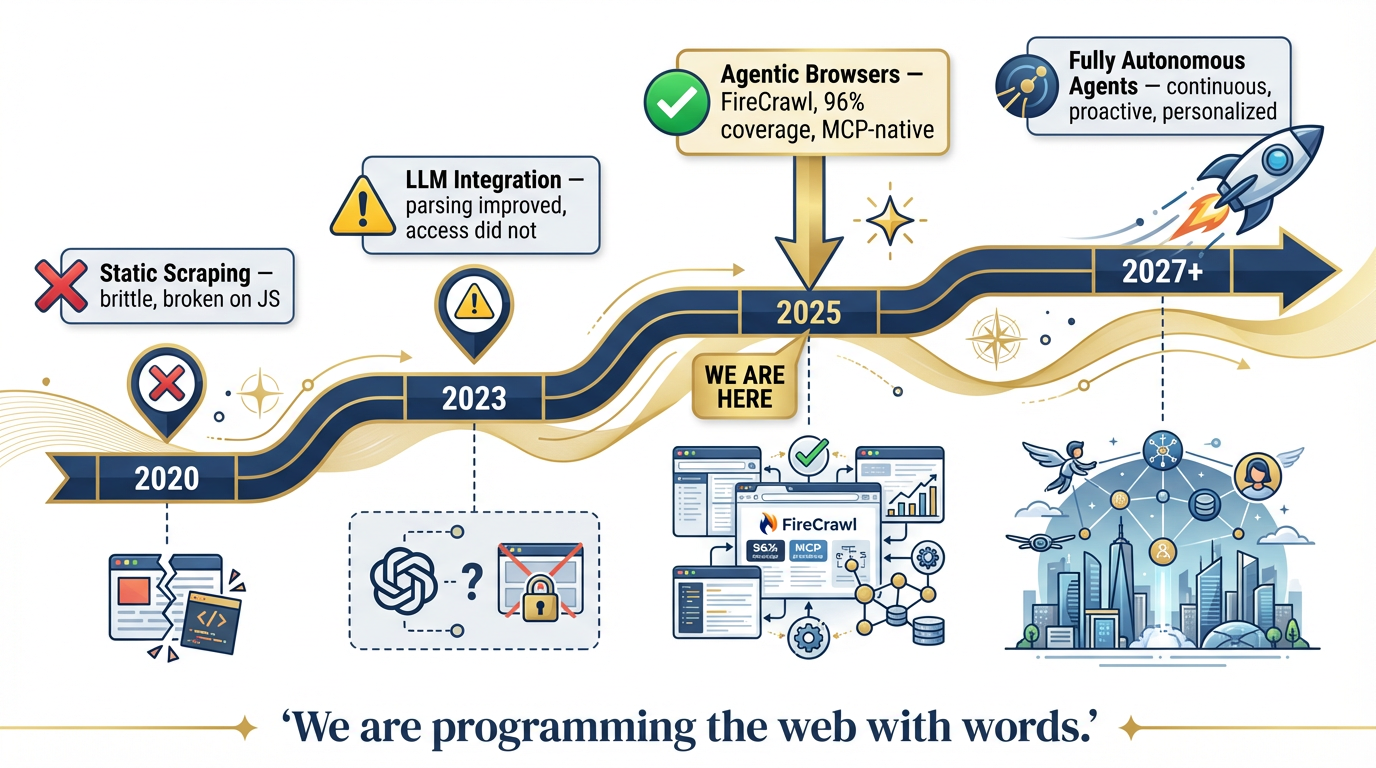
Figure 13:The Capability Trajectory. 2020: brittle static scraping. 2023: LLM integration improved parsing but not access. 2025: agentic browsers solve the access problem. 2027+: fully autonomous personal agents operating continuously on your behalf. We are at the inflection point.
It’s worth zooming out to see where we are in the history of this technology.
| Era | Capability | Limitation |
|---|---|---|
| 2020 | Static scraping — HTTP requests, raw HTML | Brittle; broke on every JavaScript site |
| 2023 | LLM integration — models could parse scraped text | Parsing improved; access didn’t. Still couldn’t handle JS, auth, or dynamic content |
| 2025 | Agentic browsers — FireCrawl, managed Chromium, MCP integration | The access problem is solved. 96% coverage. LLM-ready output. Agent-native. |
| 2027+ | Fully autonomous personal agents | Agents operate continuously, monitor sources proactively, deliver intelligence without being asked |
We are at the 2025 inflection point. The access barrier — the thing that made the live web largely inaccessible to agents — is resolved. FireCrawl and systems like it have crossed the threshold.
The 2027+ scenario is not science fiction. It is the logical continuation of what you can build today. An agent with a FireCrawl Tool, a persistent session to relevant sources, a well-authored Skill, and a schedule is already operating autonomously. The only difference between today and 2027 is the scale, the latency, and the degree of human review required before output is acted upon.
The frame shift:
When browsers first became mainstream in 1995, the frame shift was: “The web is a place you can go to find information.”
When search engines matured in 2003, the frame shift was: “You don’t navigate the web — you query it.”
We are at a third frame shift: “You don’t query the web — your agents program it with words.”
An analyst doesn’t browse partner-nation websites. Their agent reads them. An analyst doesn’t search GAO for relevant reports. Their agent retrieves them. An analyst doesn’t monitor a dozen regulatory sites for changes. Their agent surfaces only what changed.
“We are not just browsing the web — we are programming it with words.”
99.9 Field Notes — What the Manual Doesn’t Tell You
Every capability has operational considerations that don’t appear in the marketing materials. These are the things that matter for a Lukos deployment.
109.10 Three-Tier Hands-On Labs
Group Lab: The Open-Source Intelligence Drill
Objective: Experience FireCrawl’s live web access firsthand, progressing from a basic search to autonomous GAO report extraction.
Setup: Antigravity with FireCrawl MCP Tool connected. Your API key configured in the MCP server environment. A partner nation selected from the exercise scenario.
Tier 1 — The On-Ramp (5 minutes)
In Antigravity with the FireCrawl Tool available, type this exact prompt:
“Use FireCrawl to search for the 3 most recent news articles about [named partner nation from exercise scenario]'s military or defense activities. Return: headline, source URL, publication date, one-sentence summary.”
Watch the agent call the FireCrawl Search tool. Watch it return cited results from the live web — not training data from months ago.
Tier 2 — The Core Rep (20 minutes)
Now build a structured intelligence brief. Prompt:
“You are a Foreign Area Officer preparing a weekly partner-nation brief. Use FireCrawl to search for the last 7 days of news about [partner nation] covering: (1) security environment, (2) political landscape, (3) economic indicators. Return a BLUF-formatted brief with citations for each section.”
Compare the time this takes — under 2 minutes — to what a manual search and writing session takes. Then compare the quality of the citations: URLs, publication dates, source names. This is a citable intelligence product, not a summary from memory.
Tier 3 — The Wow Moment (30 minutes)
Use FireCrawl Agent mode. Prompt:
“Find all GAO reports published in the last 90 days related to special operations, military training, or DoD readiness. For each report: title, publication date, URL, 2-sentence summary, and one sentence on relevance to Lessons Learned programs. Return as a structured table.”
No URL provided. Just a goal. Watch FireCrawl Agent autonomously search, navigate to gao.gov, filter by date and topic, extract each report’s details, and return structured output.
Individual Lab: Wire FireCrawl to Your Workflow
Objective: Each analyst integrates FireCrawl into at least one personal workflow and creates a reusable Skill.
Tier 1 — Proof of Concept (5 minutes)
In Antigravity, use FireCrawl Scrape on one URL directly relevant to your work:
A doctrine page on a defense ministry site
A publications page on a government agency you monitor
An academic department’s research publications page
A partner organization’s news section
Look at the clean markdown output. Notice what’s missing: no ads, no navigation menus, no cookie banners, no social sharing buttons. Just the content. This is what your agent receives when it calls Scrape — clean signal, no noise.
Tier 2 — The Reusable Template (15 minutes)
Build a monitoring prompt for your highest-value information source. Model:
“Use FireCrawl to check [specific URL] for any new publications or announcements added in the last 7 days. Return: title, publication date, and a one-sentence summary of each new item. If nothing new has been published since last week, say so explicitly.”
Test it. Refine it until the output matches what you’d actually want in a weekly brief. Save this as a named template in Antigravity — a reusable starting point for your Monday morning workflow.
Tier 3 — The Open-Source Monitor Skill (25 minutes)
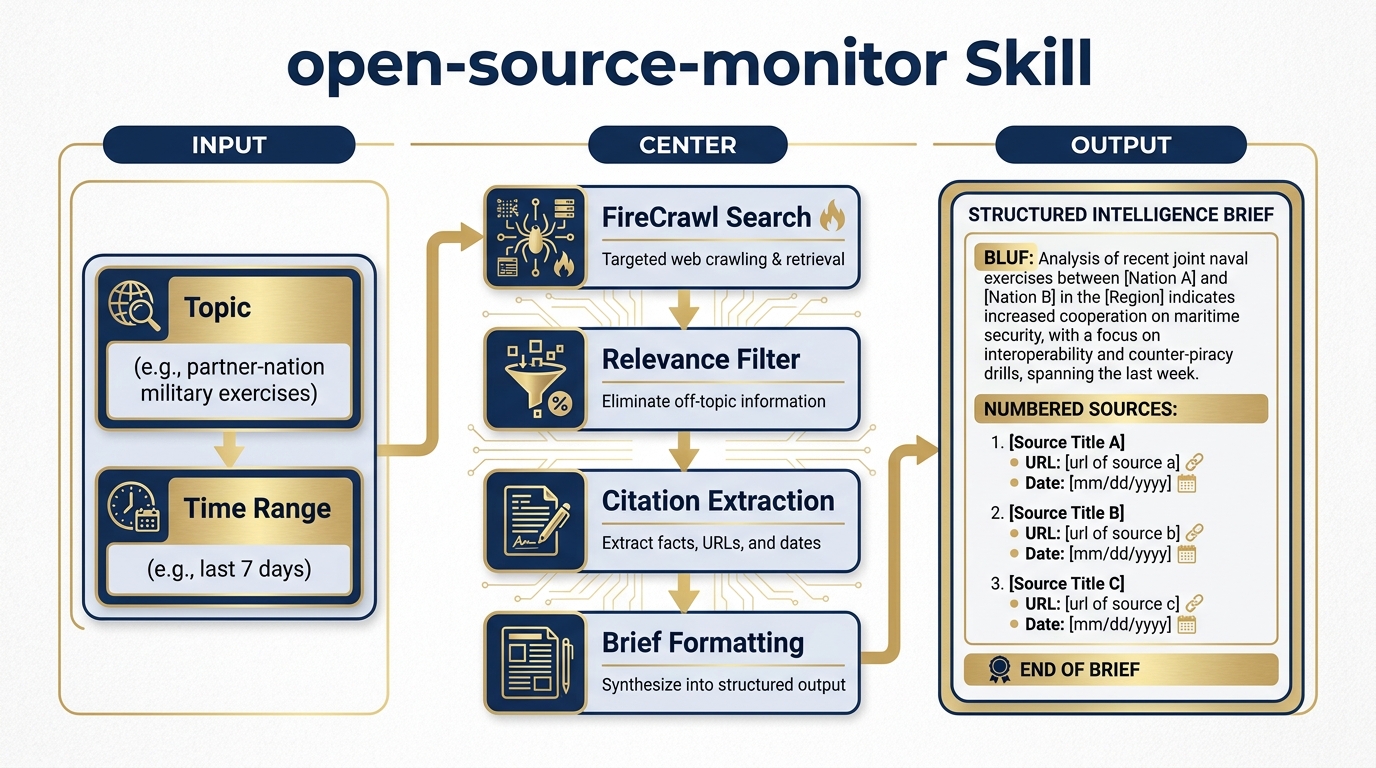
Figure 14:The open-source-monitor Skill. A reusable intelligence workflow: topic and time range go in; a cited, structured web intelligence brief comes out. Connect this to any Antigravity agent — JLLA, FET, AQR, TAC — and every agent gains autonomous open-source research capability.
Author a Skill in Chapter 7 format called open-source-monitor. The Skill takes two inputs — a topic and a time range — performs a FireCrawl Search, and returns a structured brief with citations.
Here is the Skill template to adapt:
# Skill: open-source-monitor

## Purpose
Monitor the open web for current reporting on a specified topic within a specified time range. Return a structured intelligence brief with citations.

## Inputs
- `topic`: The subject to monitor (e.g., "partner-nation X military exercises", "FAR updates AI services", "SOCOM doctrine publications")
- `time_range`: How far back to search (e.g., "last 7 days", "last 30 days", "last 90 days")

## Process
1. Use FireCrawl Search to query the web for the specified topic within the specified time range
2. Request full content (not just links) from the top results
3. Evaluate each result for relevance to the specified topic
4. Discard results that are clearly off-topic or outside the time range
5. For each relevant result, extract: headline, source name, URL, publication date, key finding (2 sentences max)
6. Format output as a structured brief

## Output Format
**TOPIC:** [stated topic]
**TIME RANGE:** [stated range]
**SOURCES REVIEWED:** [number]
**RELEVANT RESULTS:** [number]

---

**[Headline]**
Source: [Source Name] | Date: [Date] | URL: [URL]
Summary: [2-sentence summary of key finding]
Relevance: [1 sentence on why this matters to the stated topic]

---
[Repeat for each relevant result]

---
**BOTTOM LINE:** [1-2 sentence synthesis of what the results collectively suggest]

## Quality Standards
- Only include results with verifiable URLs and publication dates
- If FireCrawl returns fewer than 3 relevant results, note this explicitly and suggest refining the topic
- Flag any results that appear to be from clearly non-authoritative sources
- Never invent citations — if a result doesn't have a clear URL and date, omit it
Test the Skill on a topic relevant to your actual work. Then consider: this Skill + the FET agent (Chapter 8) + a scheduled Antigravity workflow = a fully operational daily intelligence brief running autonomously.
119.11 Pack Debrief
12What’s Next — Chapter 10: The Edge Wolf
You have now equipped your synthetic wolfpack with live web intelligence. In Chapter 10, we take the final step: deploying the wolfpack at the edge — on disconnected and low-bandwidth networks, in operational environments where cloud connectivity is intermittent, and in multi-classification environments where data must stay within strict boundaries.
The Edge Wolf is the wolfpack, hardened for deployment.