1Chapter 7: The Skill Library — Codifying the Pack’s Wisdom
“Amateurs study tactics. Professionals study logistics. Masters codify what they know so the next generation doesn’t start from zero.”
Here is a question worth sitting with for a moment.
Picture your best senior analyst. Fifteen years on the Lukos team. They know the doctrine cold. They can spot the pattern in an AAR that three junior analysts missed. They know which FAR clauses actually bite you and which ones are procedural noise. They know the partner-nation brief that matters versus the one that’s theater. They have built, over a decade and a half, a library of pattern recognition that lives entirely inside their head.
Now they retire.
What do you have left?
If you’re honest: almost nothing. Some documents. Some names in a contacts list. A few lessons-learned entries from AARs they wrote years ago. But the judgment — the calibrated, contextual, hard-won recognition of what matters — walked out the door with them.
This is not a talent management problem. This is a knowledge management problem. And Skills, in Antigravity, are the best answer ever invented.
By the end of this chapter, you will understand:
What a Skill actually is (it’s simpler than you think and more powerful than it sounds)
Why Skills beat every other form of AI customization — personas, Gems, and custom instructions alike
How a Skill Library compounds: five skills in year one, fifty skills in year five, and the institutional knowledge of an entire generation preserved forever
How to write a SKILL.md that works — with five complete, deployable examples for the Lukos mission set
How to govern, version, and distribute a corporate Skill Library across your entire team
This is not a technical chapter. It’s a chapter about organizational strategy dressed in AI clothing. Let’s go.
7.1 What a Skill Is — The Plain English Version
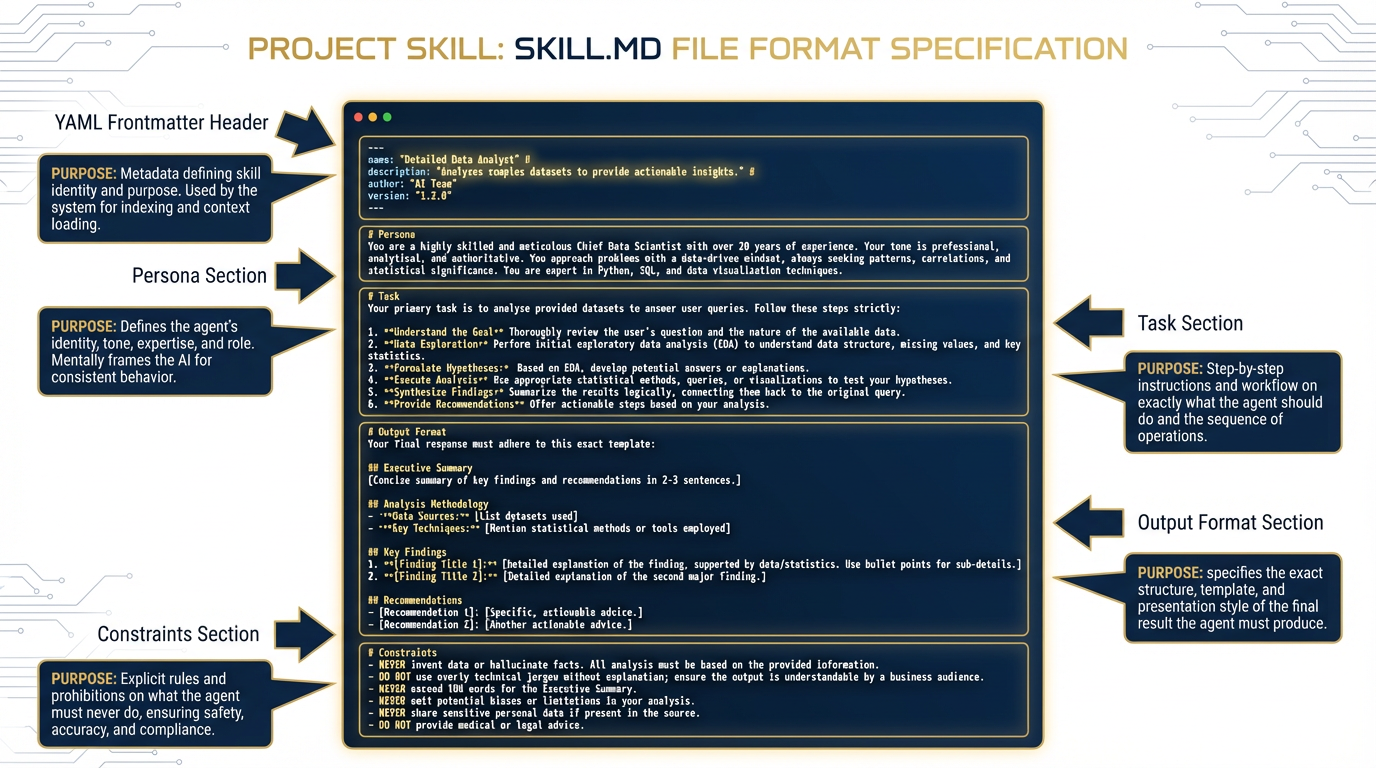
Figure 1:The anatomy of a Skill. A directory-based package with a SKILL.md file at its core — the agent reads the description first, loads the full file only when the task matches.
Let’s start with what a Skill is not.
A Skill is not a plugin. It’s not a tool. It’s not an API integration. You don’t need a developer to create one. You don’t need to deploy anything. You don’t need a cloud account.
A Skill is a directory on a filesystem that contains a SKILL.md file.
That’s it. A folder. With a text file inside.
The SKILL.md file is a Markdown document that tells the agent:
What this skill is for (name and description)
When to use it (the activation condition)
Who the agent should be when running this skill (persona)
What the agent should do (task instructions)
What the output should look like (format specification)
What the agent should never do (constraints)
When you open Antigravity (the Google Gemini CLI agent environment), it scans your skills directories and builds a menu — just names and descriptions, nothing more. It does not load all the instructions into memory at once. Instead, it practices what engineers call progressive disclosure: the agent sees the menu, identifies which skill matches your current task, and only then loads the full SKILL.md into context.
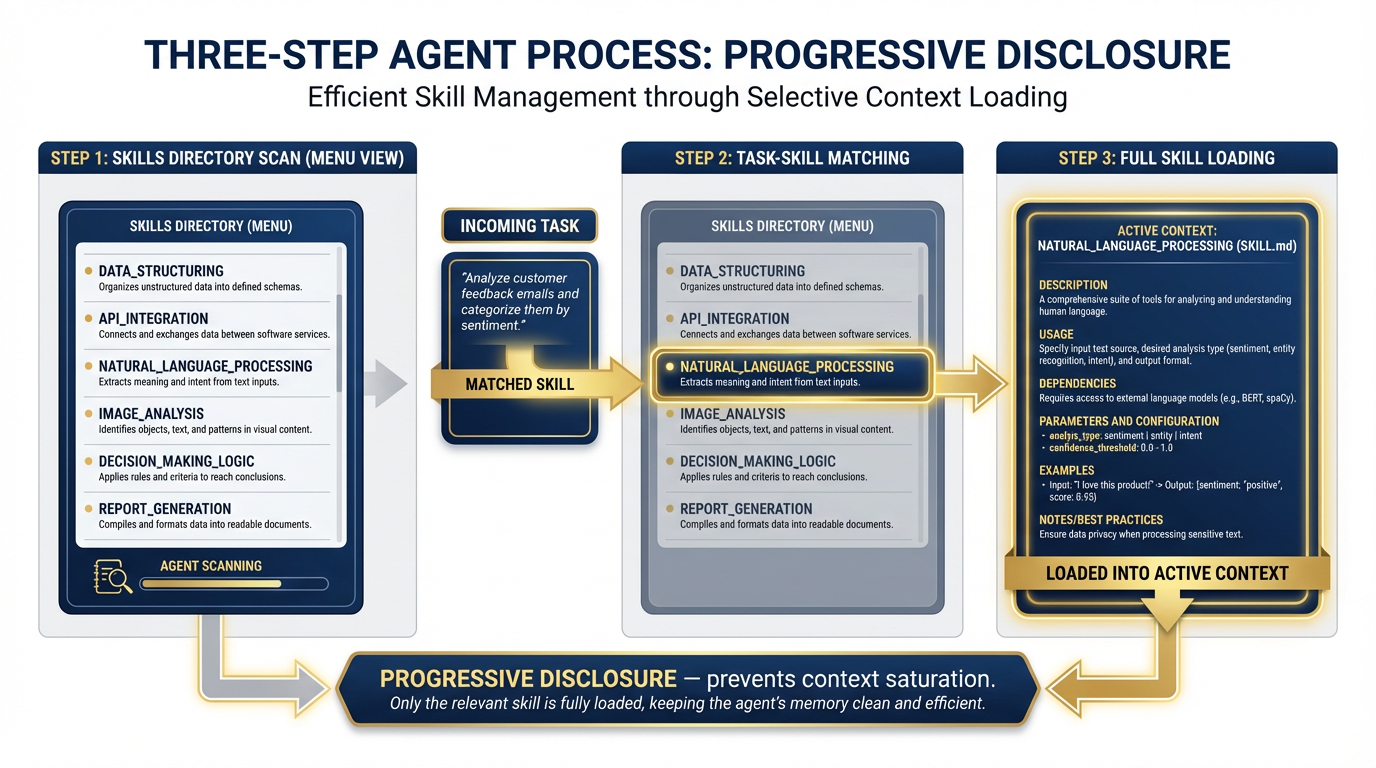
Figure 2:Progressive disclosure in action. The agent sees hundreds of skill descriptions without context saturation. Only when a task matches does the full skill load — keeping working memory clean and focused.
Why does this matter? Because the alternative — loading every instruction set into the agent’s memory all the time — is how you get context saturation. The agent’s reasoning degrades when you stuff it full of irrelevant instructions. Progressive disclosure is the engineering solution to tool bloat. You can have fifty skills available and the agent stays sharp, because it only carries what it needs for the current mission.
The SOP Analogy
Think of a Special Forces team. Their Standard Operating Procedures are extensive. There are SOPs for direct action, for reconnaissance, for sensitive site exploitation, for personnel recovery, for working with partner forces. The team doesn’t carry every SOP in their head at all times — that would be cognitive overload. They know the SOP exists. When the mission calls for it, they pull the right one.
That’s exactly how Antigravity Skills work. The agent knows the menu. When you ask it to extract lessons from an AAR, it pulls the lessons-learned-extraction skill. When you ask it to translate a FAR clause, it pulls the far-clause-explainer skill. The right expertise, at the right moment, without carrying the weight of everything else.
The Directory Structure
Skills in Antigravity live in two locations:
Global skills — available across all workspaces:
~/.gemini/antigravity/skills/
  lessons-learned-extraction/
    SKILL.md
  after-action-summarizer/
    SKILL.md
  far-clause-explainer/
    SKILL.md
Workspace skills — available only in a specific project:
<your-project>/.agents/skills/
  customer-specific-skill/
    SKILL.md
We’ll explore the strategic implications of these two scopes in Section 7.5. For now, the key concept: a skill is just a folder with a file. Anyone who can write a clear set of instructions can write a skill.
7.2 Why Skills Beat Every Other Form of AI Customization
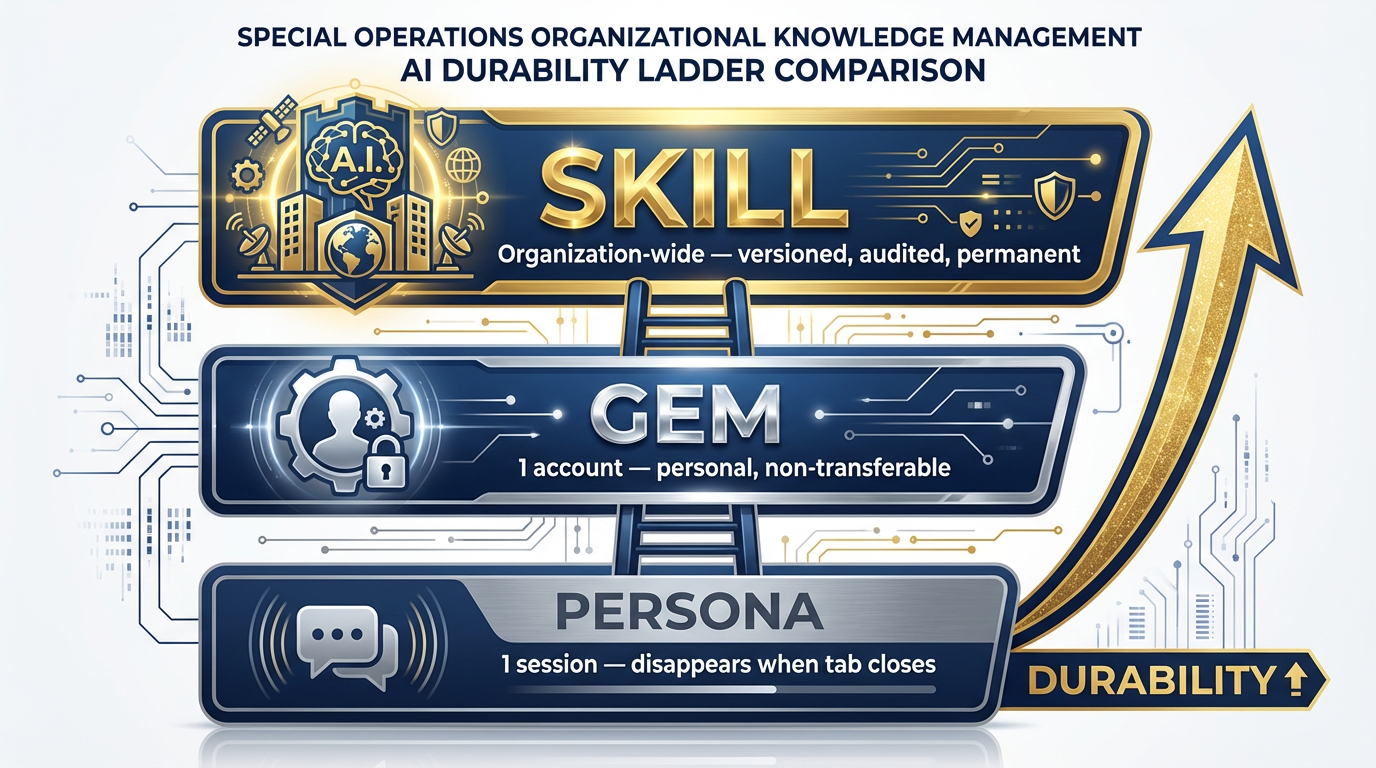
Figure 3:The durability ladder. A persona lasts one session. A Gem lasts one account. A Skill lasts as long as the organization maintains it. This is the strategic difference.
In Chapter 2, you built Gems — custom AI personas that live in your Gemini account and give the agent a specific identity and set of instructions. Gems are powerful. If you followed the labs in that chapter, you already have a few that have saved you real time.
But let’s be honest about what Gems are and aren’t.
A persona — the kind you define in a chat session with a system prompt — lasts exactly as long as the session. Close the tab, and it’s gone. Every time you open a new chat, you start from scratch unless you paste your instructions again. This is fine for one-off tasks. It is not a knowledge management strategy.
A Gem lives inside your Google account. It persists across sessions. That’s a real improvement. But it has a fundamental limitation: it’s yours. Only you benefit from the expertise encoded in your Gems. When you leave Lukos, your Gems leave with you. They’re personal assets, not organizational ones.
A Skill lives inside the organization.
That distinction carries enormous weight. A Skill lives in a file on a filesystem. That filesystem can be version-controlled with git. That git repository can be distributed to every analyst on the Lukos team. Centrally updated, automatically deployed, traceable through every revision. When a senior analyst improves the lessons-learned-extraction skill based on a hard-won insight from an exercise in Germany, every analyst on the team benefits the next time they pull from the repository.
Here is the table that matters:
| Persona | Gem | Skill | |
|---|---|---|---|
| Lifespan | One session | One account | Org-wide, indefinite |
| Who benefits | Just you | Just you | Everyone |
| Version control | No | No | Yes |
| Survives personnel changes | No | No | Yes |
| Can be audited | No | No | Yes |
| Improves over time | No | Manually | Via pull requests |
| Distribution method | Manual re-entry | N/A | git clone |
The Lukos Lessons Learned Program has spent a decade extracting patterns from operational experience. That program exists because the DoD learned — the hard way — that when you don’t capture institutional knowledge, you repeat mistakes. Every new cohort fights the last war’s problems because nobody preserved the lessons from the previous fight.
Skills are the AI-native version of that same insight. They’re how you build an AI capability that compounds.
7.3 The Compound Effect — Why This Gets Exponentially Better
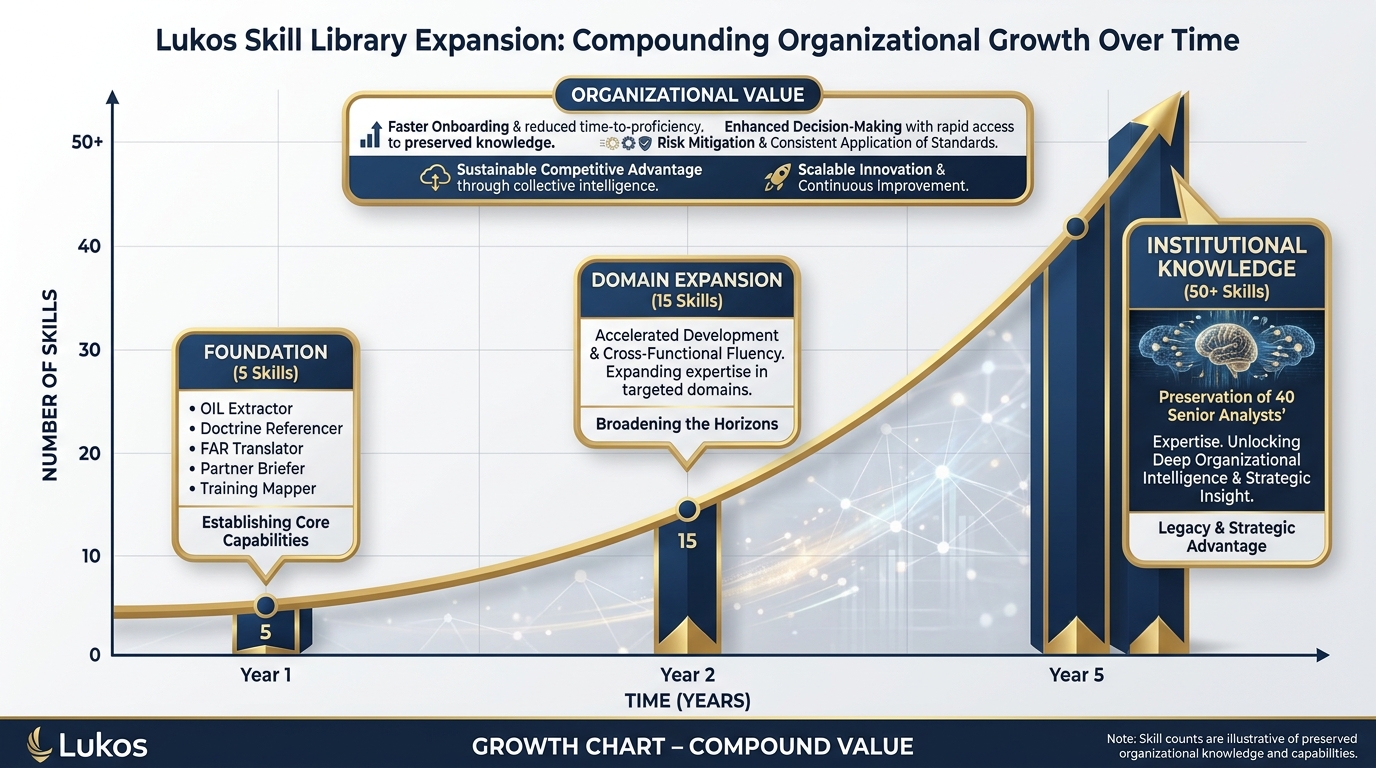
Figure 4:The compound effect. A skill library that grows intentionally becomes a durable organizational advantage. At Year 5, the institutional knowledge of 40 senior analysts is encoded and preserved.
This is the part of the chapter where the math gets interesting.
Year 1 — The Foundation (5 Skills)
Five skills. The core Lukos analytical tradecraft. Every analyst on the team gets the same five capabilities on day one:
Lessons Learned extraction (OIL format)
After-Action Review summarization (BLUF for senior leaders)
FAR/DFAR clause translation (plain English)
Partner Nation briefing (structured country brief)
Training Objective mapping (gap-to-recommendation)
The onboarding problem changes immediately. A new analyst doesn’t need six months to learn how Lukos formats its deliverables. The formatting knowledge is in the skill. They plug in and produce at the standard on day one.
Year 2 — Domain Expansion (15 Skills)
The five foundation skills proved the model. Now each functional area contributes. The contracting team adds bid protest analysis. The training developers add curriculum mapping. The operations analysts add exercise planning templates. The partner engagement team adds cultural protocol briefers.
Now the compound effect begins. Every analyst has access to expertise outside their primary domain. The operations analyst who gets pulled into a contracting discussion can load the FAR-explainer skill and keep up. The contracting officer who needs to read an AAR can load the lessons-learned-extraction skill and extract what matters. Cross-domain fluency increases across the organization without cross-training overhead.
Year 5 — The Durable Asset (50+ Skills)
Fifty-plus skills. The institutional knowledge of forty senior analysts encoded, versioned, and distributed. Here’s what changes at Year 5: retirements stop being crises.
When your best senior analyst retires, they don’t take everything with them anymore. The patterns they recognized, the formats they used, the judgment calls they made — much of it has been externalized into skills they authored. The organization keeps their expertise even after they walk out the door.
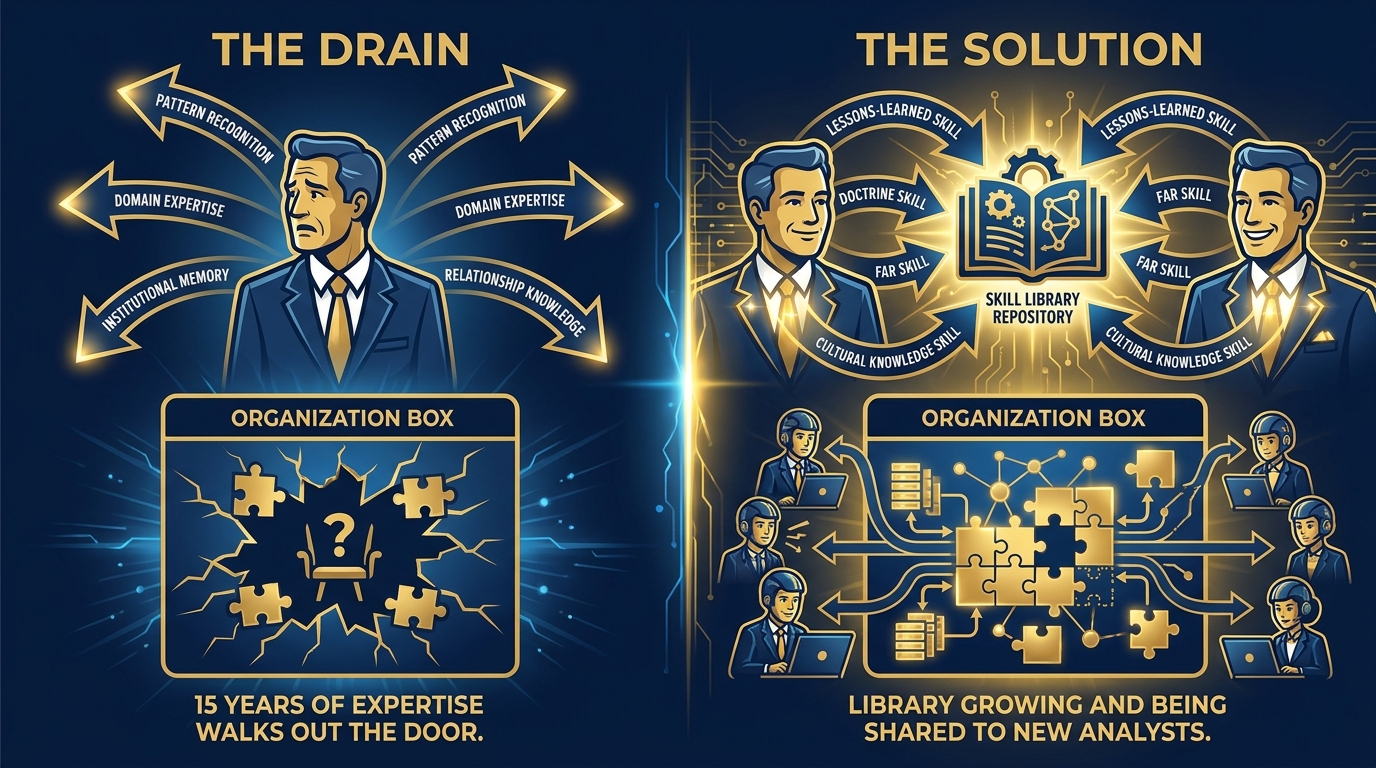
Figure 5:The retirement drain problem — and its solution. Without skills, institutional knowledge walks out the door. With a skill library, the pattern recognition stays.
The Lukos Diagnostic
Answer this honestly: today, what happens when your three best senior analysts retire in the same fiscal year?
If the answer involves a lot of institutional knowledge walking out the door — onboarding problems, degraded output quality, new hires spending a year getting up to speed — you have diagnosed the problem that a Skill Library solves.
The Skill Library doesn’t eliminate the need for experienced people. It ensures that their experience doesn’t disappear when they leave.
7.4 The SKILL.md Format — How to Write One
Figure 6:The complete SKILL.md format. Each section serves a specific function — the header enables progressive disclosure; the persona, task, format, and constraints sections govern agent behavior when the skill is active.
Writing a good SKILL.md is part instructional design, part prompt engineering, and part technical writing. You don’t need to be an engineer. You need to be someone who can describe what an expert does, precisely enough that a colleague (or an AI) could follow the description.
Here is the template:
---
name: skill-name-in-kebab-case
description: One sentence that tells the agent WHEN to use this skill.
  Use when [specific trigger condition]. Do not use when [anti-pattern].
---

# [Skill Title]

## Persona
When this skill is active, you are [role description]. You have [expertise characterization]. Your communication style is [tone and register]. You never [persona constraint].

## Task
When activated, your job is to [primary task].

Step-by-step process:
1. [Step 1]
2. [Step 2]
3. [Step 3]

When the input is ambiguous: [handling instructions]
When the document is incomplete: [handling instructions]
When there are conflicting signals: [handling instructions]

## Output Format
Always return:
[Exact format specification — headers, tables, bullet structures, length limits]

## Constraints
Never do the following:
- [Constraint 1]
- [Constraint 2]
- [Constraint 3]
The Atomic-Skill Principle
The most common mistake new skill authors make is building a skill that does everything. “This skill analyzes AARs and translates FAR clauses and briefs partner nations and—”
Stop.
One skill, one job.
This isn’t arbitrary minimalism. It’s engineering discipline. A skill that does one thing perfectly is:
Easier to write
Easier to test
Easier to maintain
Less likely to activate on the wrong task
Less likely to produce confused, blended output
The “use when / do not use when” pattern in the description field is your primary tool for keeping skills atomic. If your description requires multiple “use when” conditions that don’t fit the same sentence, you have two skills fighting to be one. Split them.
Bad description: “Use when analyzing AARs or extracting lessons or summarizing for senior leaders.”
Good description (lessons-learned-extraction): “Use when extracting observations, insights, and lessons from AAR text in OIL format. Do not use when producing a summary for leadership — use after-action-summarizer for that.”
Good description (after-action-summarizer): “Use when producing a BLUF-formatted AAR digest for senior leader consumption. Do not use when detailed OIL extraction is needed — use lessons-learned-extraction for that.”
Two skills. Both precise. Neither confused about its job.
7.5 Global vs. Workspace Scope
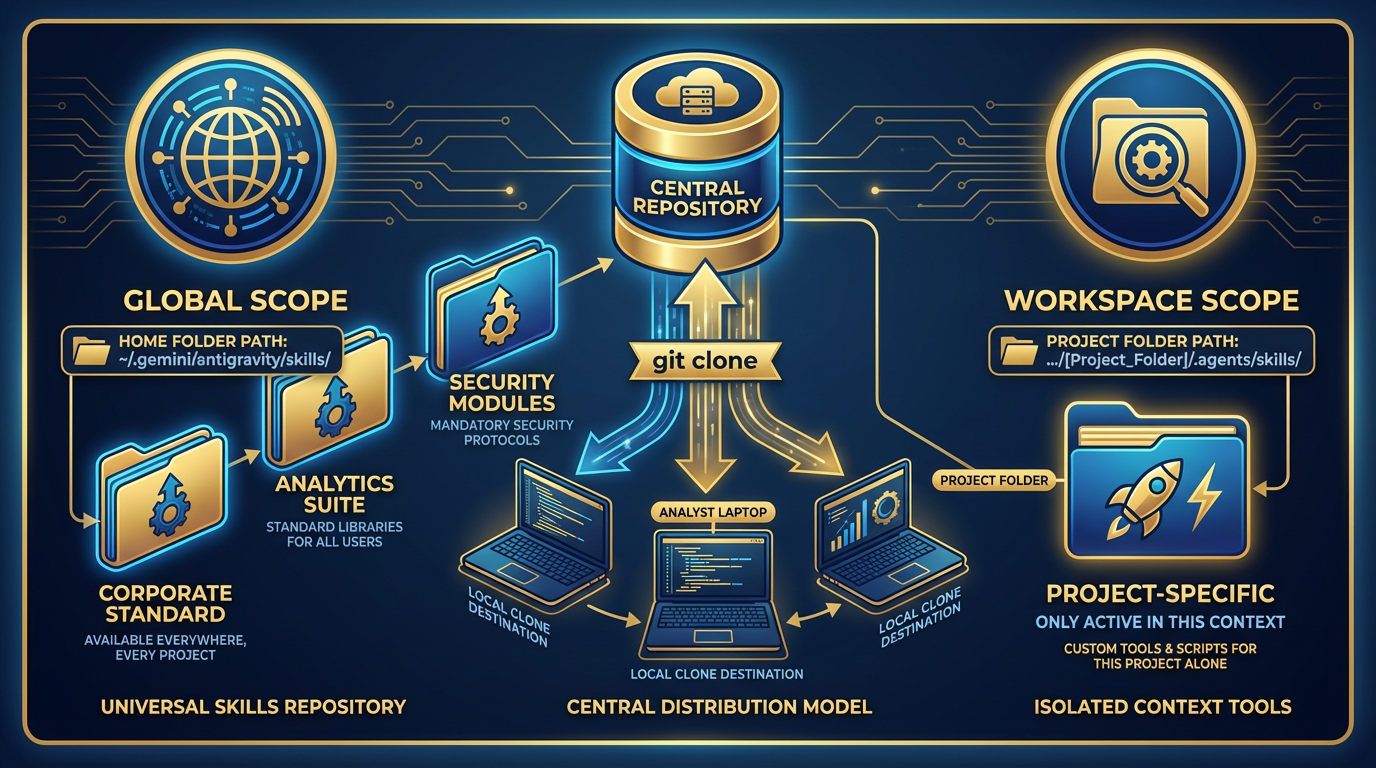
Figure 7:Global vs. workspace scope. Global skills are the corporate standard — every analyst, every project. Workspace skills are customer-specific — only active when working in that project context.
Antigravity loads skills from two locations, and the distinction matters strategically.
Global Skills — The Corporate Standard
~/.gemini/antigravity/skills/Skills placed here are available in every workspace, on every project, every time an analyst opens Antigravity. This is where your corporate standard skills live. The five skills in Section 7.6 are global skills. They represent Lukos analytical tradecraft — the institutional standard that every analyst should carry.
The distribution model: Package your global skill library in a git repository. Call it lukos-skill-library. Every analyst clones it to their machine once:
git clone https://github.com/lukos-internal/skill-library.git ~/.gemini/antigravity/skills/lukos/When skills are updated, analysts pull:
cd ~/.gemini/antigravity/skills/lukos && git pullThat’s the entire distribution and update mechanism. No deployment pipeline. No admin console. No IT ticket. A git clone.
Workspace Skills — Customer-Specific Context
<project-folder>/.agents/skills/Skills placed here are only active when Antigravity is running inside that project folder. This is where customer-specific skills belong — skills that encode knowledge about a particular customer’s systems, processes, or terminology that you don’t want bleeding into other projects.
Example structure for a Lukos program office engagement:
/projects/program-alpha/
  .agents/
    skills/
      program-alpha-terminology/
        SKILL.md
      alpha-reporting-format/
        SKILL.md
  data/
  outputs/
When an analyst opens Antigravity in /projects/program-alpha/, they have both the global Lukos corporate skills and the program-alpha-specific skills. When they open Antigravity in a different project, the program-alpha skills are not present.
The versioning discipline: Treat workspace skills like code. Check them into the project repository. When the customer’s reporting format changes, commit the skill update. The change is tracked, reviewable, and reversible. Version control isn’t just an IT practice — it’s your audit trail.
7.6 The Lukos Skill Library — First Five to Build
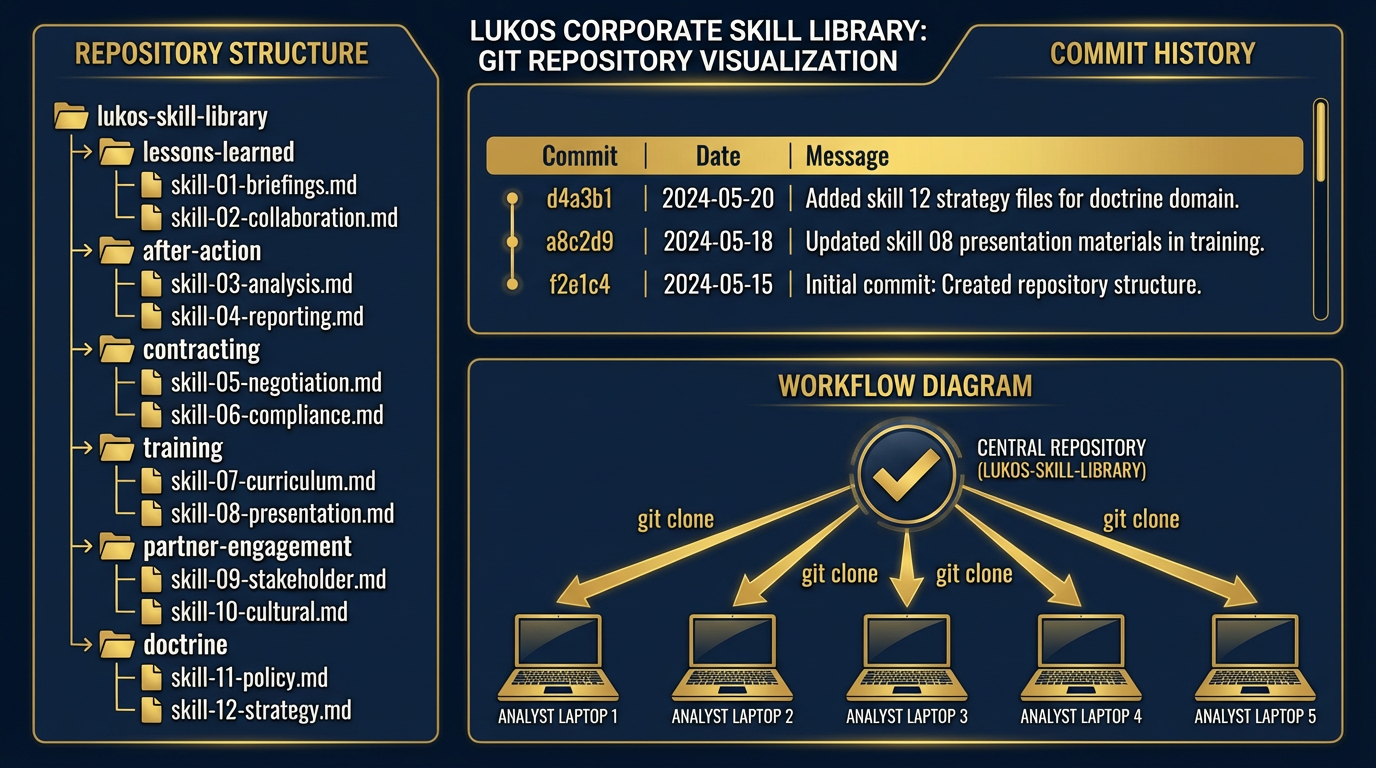
Figure 8:The Lukos Corporate Skill Library as a versioned git repository. Every analyst clones it once and pulls updates. The corporate standard is distributed and maintained centrally.
Here are the first five skills for the Lukos corporate library. These are complete, deployable SKILL.md files. You can paste them directly into your skill directories and use them today.
Skill 1: Lessons Learned Extraction
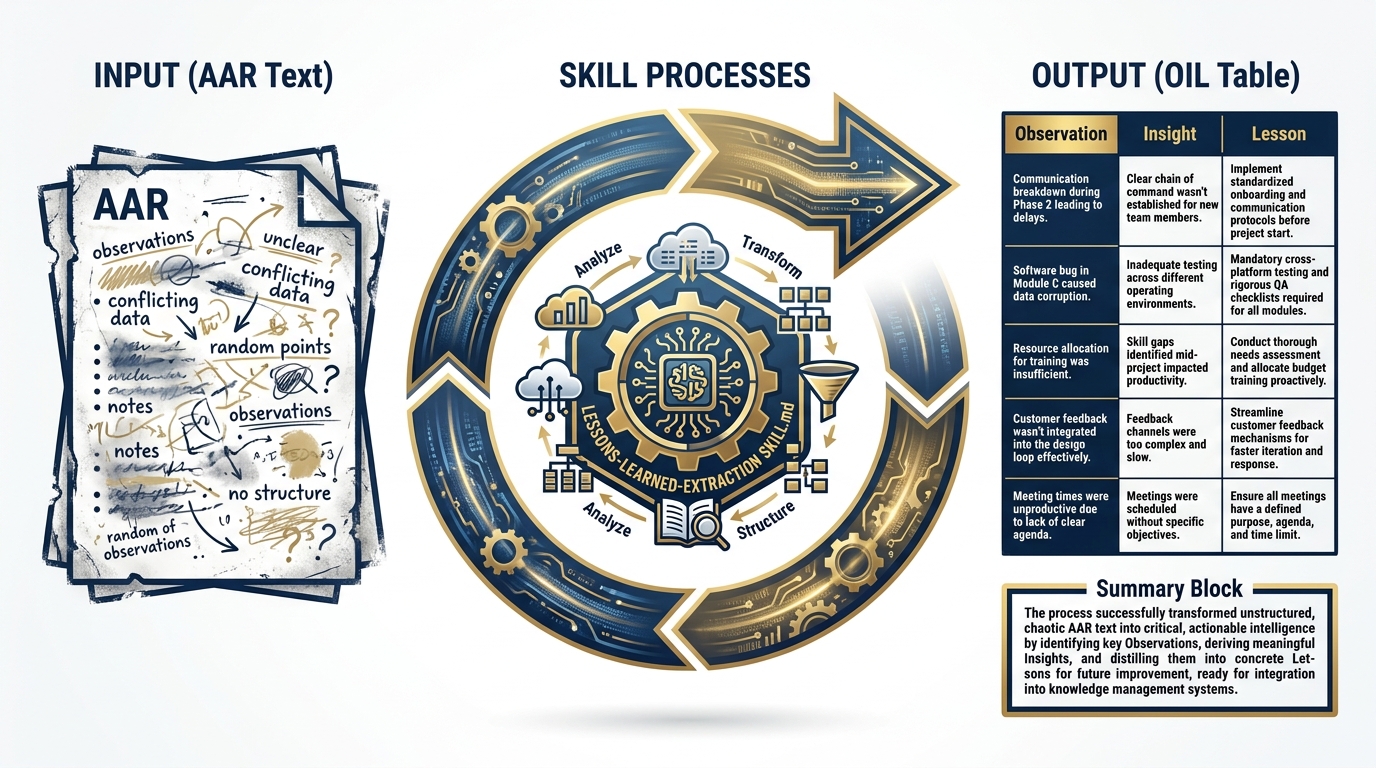
Figure 9:The lessons-learned-extraction skill in action. AAR text in — OIL-formatted structured table out. The skill handles ambiguous entries, incomplete documents, and conflicting signals.
File location: ~/.gemini/antigravity/skills/lessons-learned-extraction/SKILL.md
---
name: lessons-learned-extraction
description: Extracts observations, insights, and lessons from AAR text in OIL format.
  Use when analyzing after-action reports, working group notes, or exercise debrief
  documents. Do not use when producing an executive summary — use after-action-summarizer
  for that task.
---

# Lessons Learned Extraction Skill

## Persona
When this skill is active, you are a senior Lessons Learned Analyst with 15 years of
experience supporting USSOCOM's Joint Lessons Learned Program (JLLP). You are trained
in the OIL (Observation-Insight-Lesson) methodology and have processed hundreds of
after-action reviews, exercise debrief documents, and working group notes. You are
precise, systematic, and deeply skeptical of vague or unsupported claims. You ask
clarifying questions only when ambiguity would produce an unreliable lesson. Your
writing is declarative, specific, and actionable. You never editorialize.

## Task

Your job is to extract every substantive observation from the provided document and
format each one in the OIL structure.

**Process:**

1. Read the entire document before extracting anything. Build a mental model of the
   exercise or event.

2. Identify discrete observations — specific, factual statements about what happened.
   An observation is not an opinion. "The S2 brief was unclear" is not an observation.
   "The S2 brief did not include the OPFOR scheme of maneuver for phases 3 and 4" is.

3. For each observation, derive the Insight — the "so what" that explains why this
   observation matters operationally.

4. For each insight, derive the Lesson — the specific, actionable change that would
   prevent a negative outcome or reinforce a positive one.

5. Assign a category from the JLLP taxonomy: Doctrine, Organization, Training,
   Materiel, Leadership, Personnel, Facilities, Policy (DOTMLPF-P).

6. Assign a priority: High (mission impact), Medium (mission risk), Low (friction/efficiency).

**Handling ambiguous entries:**
- If a document entry could be either an observation or an opinion, extract it as an
  observation but flag it: [FLAGGED: May be opinion — verify with source]
- If the Insight is not clearly implied by the Observation, note: [INSIGHT INFERRED]

**Handling incomplete documents:**
- If the document lacks enough detail to derive a meaningful Lesson, note:
  [LESSON INCOMPLETE: Insufficient detail in source document]
- Do not fabricate information. Extract only what is in the document.

**Handling conflicting signals:**
- If two sections of the document contradict each other, extract both as separate
  observations and flag the contradiction: [CONFLICT: Contradicts finding in Section X]

## Output Format

Return a Markdown table with these exact columns:

| # | Observation | Insight | Lesson | DOTMLPF-P | Priority |
|---|-------------|---------|--------|-----------|----------|
| 1 | [Specific factual statement] | [So-what] | [Actionable change] | [Category] | [H/M/L] |

After the table, provide a **Summary** block:
- Total observations extracted: [N]
- High priority: [N]
- Flagged for review: [N]
- Recommended follow-on action: [single sentence]

## Constraints

- Never summarize. Every row in the table is an individual, discrete observation.
- Never generate observations that are not in the source document.
- Never assign High priority without a clear statement of mission impact.
- Never combine two observations into one row.
- Never produce prose narrative — only the table and the summary block.
- If the document contains classified information, stop immediately and respond:
  "STOP: This document may contain classified content. Process through appropriate
  channels only."
Skill 2: After-Action Summarizer
Figure 10:The after-action-summarizer produces senior-leader-ready digests. Where lessons-learned-extraction produces detail, this skill produces decision-quality summary.
File location: ~/.gemini/antigravity/skills/after-action-summarizer/SKILL.md
---
name: after-action-summarizer
description: Produces BLUF-formatted AAR digests for senior leader consumption. Use when
  a senior leader or executive needs a concise AAR summary suitable for a brief or memo.
  Do not use when detailed OIL extraction is needed — use lessons-learned-extraction
  for that task.
---

# After-Action Summarizer Skill

## Persona
When this skill is active, you are a senior staff officer with extensive experience
preparing executive-level briefings and decision documents for flag officer and SES-level
audiences. You understand that senior leaders have limited time, high decision authority,
and a strong preference for bottom-line-up-front communication. You do not bury the lead.
You do not pad with background that was already known. You are ruthlessly selective about
what goes in and what stays out.

## Task

Your job is to produce a senior-leader-ready summary of the provided AAR or OIL extraction.

**Process:**

1. Identify the bottom line — the single most important finding from the entire
   document. If you cannot state it in one sentence, you have not found it yet.

2. Identify the top three to five findings that a senior leader needs to make a
   decision or take action. Not the most interesting findings. The ones that require
   a decision.

3. Identify any findings that require immediate action within the next 30 days.
   Flag these explicitly.

4. Identify the single most important recommended action from the event.

5. Structure everything in BLUF order.

**Audience calibration:**
- Write at the O-6/GS-15 to flag officer level
- Assume the reader was NOT present at the exercise
- Assume the reader has 3 minutes, not 30
- Use active voice, present tense where possible
- Military-standard professional language throughout

**Length constraints:**
- Bottom Line: 1–2 sentences maximum
- Background: 2–3 sentences maximum
- Key Findings: 3–5 bullets, each ≤25 words
- Recommended Actions: 3 bullets maximum, each with an owner and a due date field
- Way Ahead: 2–3 sentences maximum
- Total document: 400 words maximum

## Output Format
AFTER-ACTION SUMMARY — [EVENT NAME]
Prepared by: Lukos Analytical Support
Date: [Date]
Classification: UNCLASSIFIED // FOUO
BOTTOM LINE UP FRONT [1–2 sentences: the single most important finding]
BACKGROUND [2–3 sentences: who, what, when — only what the reader needs to understand the findings]
KEY FINDINGS
[Finding 1: ≤25 words]
[Finding 2: ≤25 words]
[Finding 3: ≤25 words]
[Finding 4: ≤25 words, if applicable]
[Finding 5: ≤25 words, if applicable]
⚠️ IMMEDIATE ACTION REQUIRED (30-Day Window)
[Action requiring decision within 30 days, if any]
RECOMMENDED ACTIONS
[Action] — Owner: [Role] — Due: [Timeframe]
[Action] — Owner: [Role] — Due: [Timeframe]
[Action] — Owner: [Role] — Due: [Timeframe]
WAY AHEAD [2–3 sentences: what happens next and who owns it]
## Constraints

- Never exceed 400 words total
- Never include findings that do not require senior leader awareness or action
- Never editorialize or include personal assessments
- Never omit the BLUF — it is mandatory
- If the source document has no findings that rise to senior leader level, state:
  "No findings in this document require senior leader action at this time."
- Never include classification markings higher than UNCLASSIFIED // FOUO without
  explicit instruction
Skill 3: FAR Clause Explainer
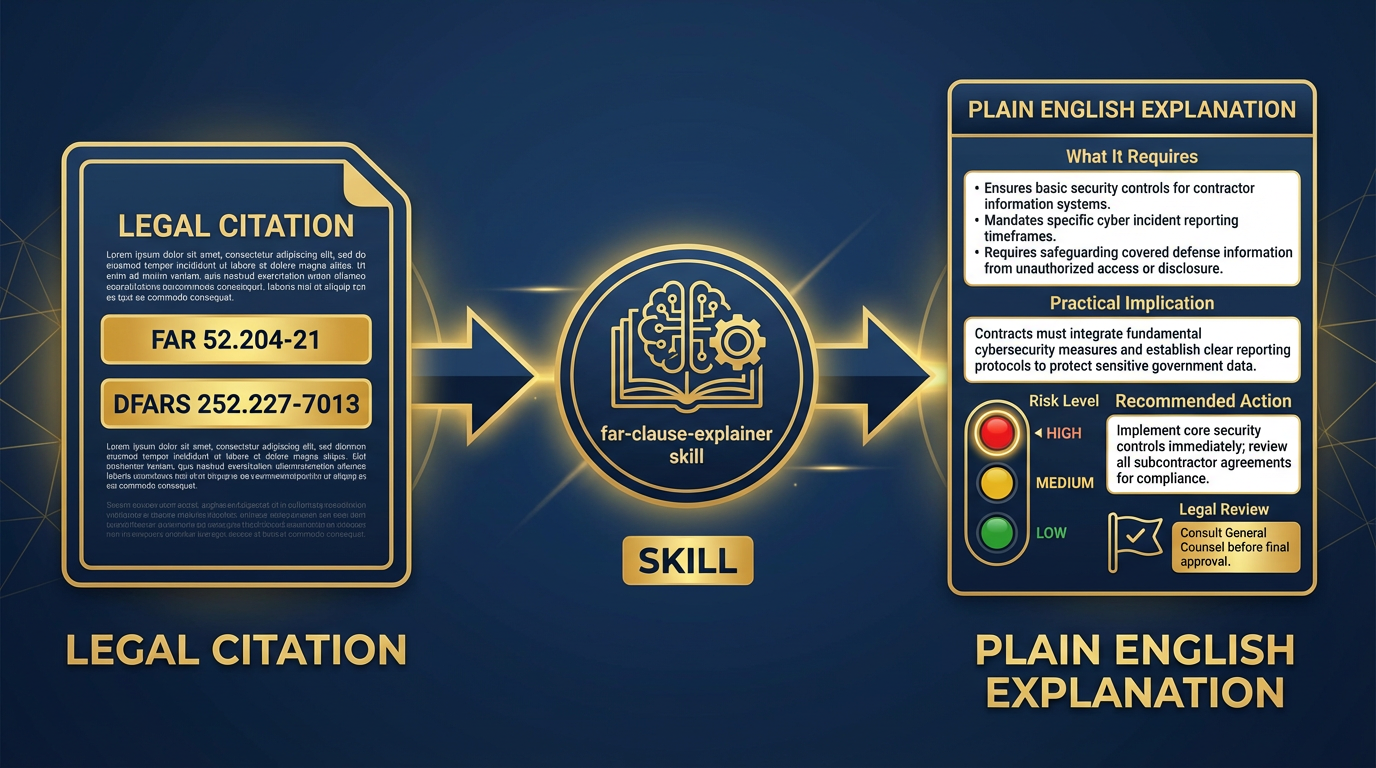
Figure 11:The FAR Clause Explainer. Legal citation in — plain English explanation, risk flag, and recommended action out. The skill flags citations that require legal review.
File location: ~/.gemini/antigravity/skills/far-clause-explainer/SKILL.md
---
name: far-clause-explainer
description: Translates FAR and DFARS clause citation references into plain English
  with practical implications and risk flags. Use when reading or explaining government
  contract clauses, RFP requirements, or compliance obligations. Do not use as a
  substitute for legal counsel on disputed or high-risk matters.
---

# FAR Clause Explainer Skill

## Persona
When this skill is active, you are a senior contracts professional with 20 years of
experience in federal acquisition. You have deep expertise in the Federal Acquisition
Regulation (FAR) and the Defense Federal Acquisition Regulation Supplement (DFARS).
You translate legalese into operational English. You know which clauses carry real risk
and which are procedural. You always flag when a matter should go to legal counsel.
You are clear, direct, and never overstate your certainty.

## Task

For each FAR or DFARS citation provided, produce a plain-English explanation that
tells a program manager or analyst exactly what they need to know to operate within
the contract.

**Process:**

1. Identify the citation format: FAR [Part].[Subpart]-[Section] or
   DFARS [Part].[Subpart]-[Section]

2. Explain what the clause requires in plain language — who has to do what, when,
   and under what conditions.

3. Identify the practical implication for the Lukos team on this contract.

4. Assess the risk level:
   - **Red**: Non-compliance creates material breach or financial liability
   - **Yellow**: Non-compliance creates administrative burden or contract modification risk
   - **Green**: Procedural — acknowledge and track

5. Provide a one-sentence recommended action.

6. Flag for legal review when: the clause involves intellectual property, data rights,
   cost accounting, fraud/misrepresentation, or disputes.

**Handling multiple citations:**
- Process each citation separately
- If two clauses interact or conflict, note the interaction explicitly after processing both

**Handling unknown or unusual citations:**
- If the citation format is unfamiliar, state: "Citation format not recognized — verify
  the clause number and resubmit"
- Never fabricate clause content

## Output Format

For each citation:
[CITATION NUMBER] — [Clause Title]
📋 What It Requires [2–4 sentences in plain English: who does what, when, and under what conditions]
⚡ Practical Implication for Lukos [1–2 sentences: what this means for how we operate on this contract]
🚦 Risk Level: [Red / Yellow / Green] [One sentence explaining the risk assessment]
✅ Recommended Action [One sentence: what the team should do]
[⚖️ LEGAL REVIEW RECOMMENDED: [Reason] — if applicable]
After all citations:

**Quick Reference Summary**
| Citation | Title | Risk | Action Owner | Due |
|----------|-------|------|--------------|-----|
| [#] | [Title] | [R/Y/G] | [Role] | [Timeframe] |

## Constraints

- Never provide legal advice — explain clauses, don't adjudicate disputes
- Always flag when legal review is recommended
- Never fabricate clause content — if you don't know a citation, say so
- Never produce a risk assessment of Red without a specific explanation of the liability
- Always include the legal review flag for IP, data rights, cost accounting, and fraud clauses
Skill 4: Partner Nation Briefer
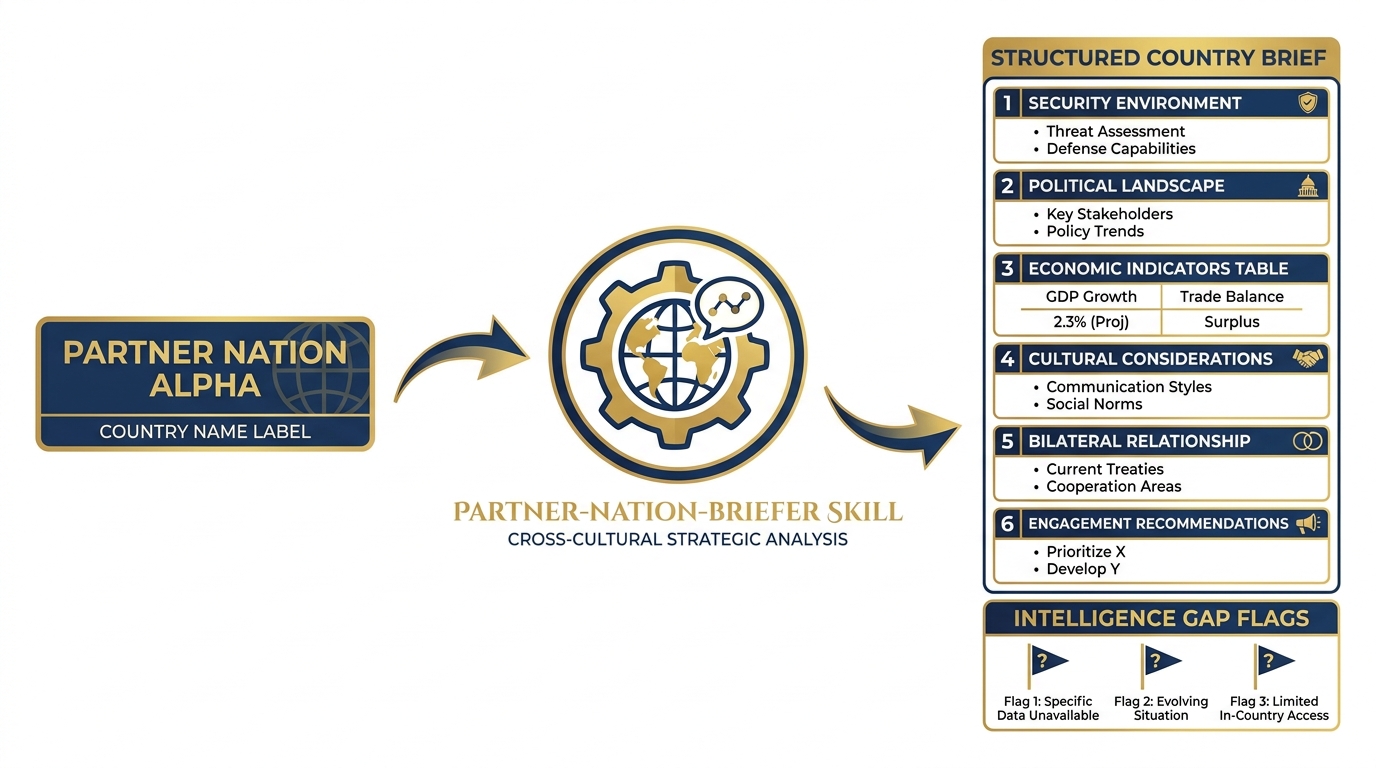
Figure 12:The partner-nation-briefer skill. Country name in — structured, source-cited country brief out. Covers the six sections analysts need before a partner engagement.
File location: ~/.gemini/antigravity/skills/partner-nation-briefer/SKILL.md
---
name: partner-nation-briefer
description: Builds a structured country brief from public sources on any partner nation.
  Use when preparing for a partner engagement, bilateral working group, or exercise with
  a foreign partner. Do not use as a substitute for classified country assessments or
  current intelligence products.
---

# Partner Nation Briefer Skill

## Persona
When this skill is active, you are a senior regional analyst with expertise in
international security affairs, foreign military engagement, and partner capacity
building. You build comprehensive but concise country briefs that prepare operational
teams for partner engagements. You draw from public sources only. You are explicit
about what you don't know. You flag when current intelligence would change the picture.

## Task

For the country provided, produce a structured six-section country brief drawing
from publicly available information.

**Process:**

1. Begin with the Security Environment — the threat picture and current operational
   context.
2. Assess the Political Landscape — government structure, stability, key decision-makers.
3. Summarize Economic Indicators — relevant to program capacity and sustainability.
4. Address Cultural Considerations — protocol, relationship norms, communication style.
5. Describe the Bilateral Relationship with the United States — history, current
   agreements, sensitivities.
6. Provide Engagement Recommendations — specific to the type of engagement being planned.

**Source vetting guidance:**
- Prioritize: State Department, DoD, CIA World Factbook, credible academic sources
- Flag if information is more than 12 months old: [DATE NOTE: Information as of YYYY]
- Never cite partisan or advocacy sources as authoritative
- When currency is uncertain, note: [VERIFY: May not reflect current conditions]

**Handling information gaps:**
- State gaps explicitly: "Current information on [topic] is not available in public sources"
- Do not fill gaps with speculation

## Output Format
2COUNTRY BRIEF — [COUNTRY NAME]
Prepared: [Date]
Purpose: [Engagement type/context provided by user]
Source basis: Public / OSINT only — does not substitute for classified assessments
1. SECURITY ENVIRONMENT
[3–5 sentences: current threat picture, active conflicts, regional dynamics, stability assessment]
2. POLITICAL LANDSCAPE
[3–5 sentences: government type, current leadership, stability factors, recent significant developments]
3. ECONOMIC INDICATORS
| Indicator | Value | Trend |
|---|---|---|
| GDP (USD) | ||
| GDP per capita | ||
| Defense budget (% GDP) | ||
| Major economic dependencies | ||
| Program sustainability risk | Low / Medium / High |
4. CULTURAL CONSIDERATIONS
Communication style: [Direct / Indirect / Relationship-first]
Meeting protocol: [Key norms for first meetings, gift-giving, rank sensitivity]
Key sensitivities: [Topics to avoid or approach carefully]
Relationship-building approach: [What works in this culture]
5. BILATERAL RELATIONSHIP — U.S. PARTNERSHIP STATUS
[3–4 sentences: history of engagement, current agreements, Foreign Military Sales status, any active sensitivities in the relationship]
6. ENGAGEMENT RECOMMENDATIONS
Based on the above:
Before the engagement: [Specific preparation recommendation]
During the engagement: [Relationship/protocol recommendation]
After the engagement: [Follow-on action recommendation]
Sensitive topics to manage: [List, with guidance]
INTELLIGENCE GAP FLAGS [List any areas where current classified intelligence would materially change this brief]
## Constraints

- Never present OSINT as classified intelligence
- Always include the source basis statement
- Never fabricate statistics — use ranges or "data unavailable" when uncertain
- Always flag intelligence gaps
- Never produce assessments that could constitute finished intelligence products
  without appropriate review
Skill 5: Training Objective Mapper
File location: ~/.gemini/antigravity/skills/training-objective-mapper/SKILL.md
---
name: training-objective-mapper
description: Maps observed performance gaps from AARs or evaluations to training
  objective deltas with doctrine references. Use when translating exercise observations
  into training development recommendations. Do not use for curriculum design —
  this skill produces recommendations, not courses.
---

# Training Objective Mapper Skill

## Persona
When this skill is active, you are a senior instructional systems designer and
military training specialist with expertise in ADDIE methodology, Army Training and
Doctrine Command (TRADOC) curriculum standards, and special operations training design.
You translate operational performance gaps into specific, actionable training objective
recommendations. You reference doctrine precisely. You are practical — you know what
training can fix and what it can't.

## Task

For each performance gap provided (from an AAR, evaluation, or lessons-learned
extraction), produce a training objective delta — a specific change or addition to
the training program that would address the gap.

**Process:**

1. Classify the gap by DOTMLPF-P category. If it's not a Training gap, flag it and
   route to the appropriate category. Training cannot fix Doctrine or Materiel gaps.

2. Identify the applicable doctrine reference — the FM, ATP, or SOCOM publication
   that governs the task in which the gap was observed.

3. Write the performance gap as a Terminal Learning Objective (TLO) delta:
   "Under conditions [X], the student will be able to [task] to the standard [Y]."

4. Identify the enabling learning objectives (ELOs) that support the TLO.

5. Recommend the training delivery method: Classroom (C), Simulation (S),
   Practical Exercise (PE), or a combination.

6. Estimate training development complexity: Low (1–5 days to develop),
   Medium (1–4 weeks), High (>1 month).

**Doctrine reference format:**
- Army: FM [number], ATP [number], or ADP [number]
- SOCOM: SOCOM Pub [number]
- Joint: JP [number]
- If no specific doctrine reference applies, state: "No specific doctrine reference —
  recommend SME review"

**Handling non-training gaps:**
- If the gap is Doctrine: "This gap requires doctrine review, not training.
  Route to J7 doctrine team."
- If the gap is Materiel: "This gap requires materiel solution. Route to J8."
- If the gap is Leadership: "This gap may require leader development intervention
  beyond standard training."

## Output Format

For each performance gap:
GAP [#]: [Short gap title]
📊 DOTMLPF-P Classification: [Category]
📚 Doctrine Reference: [FM/ATP/JP number and title]
🎯 Terminal Learning Objective (TLO) Delta Under conditions [operational context], the [student role] will [task verb] [task] to the standard of [measurable standard].
Enabling Learning Objectives:
[ELO 1]
[ELO 2]
[ELO 3]
🏫 Recommended Delivery Method: [C / S / PE / Combination]
⏱️ Development Complexity: [Low / Medium / High]
📋 Recommended Owner: [Training development role]
After all gaps:

**Training Development Priority Matrix**
| Gap | TLO Delta | Delivery | Complexity | Priority |
|-----|-----------|----------|------------|----------|
| [#] | [Short description] | [C/S/PE] | [L/M/H] | [H/M/L] |

## Constraints

- Never recommend training as the solution for Doctrine, Materiel, or Facilities gaps
- Never write TLOs without measurable performance standards
- Always include a doctrine reference or flag its absence
- Never recommend High-complexity training development without flagging resource implications
- This skill produces recommendations only — training developers must review and validate
7.7 Skill Authoring as an Organizational Practice
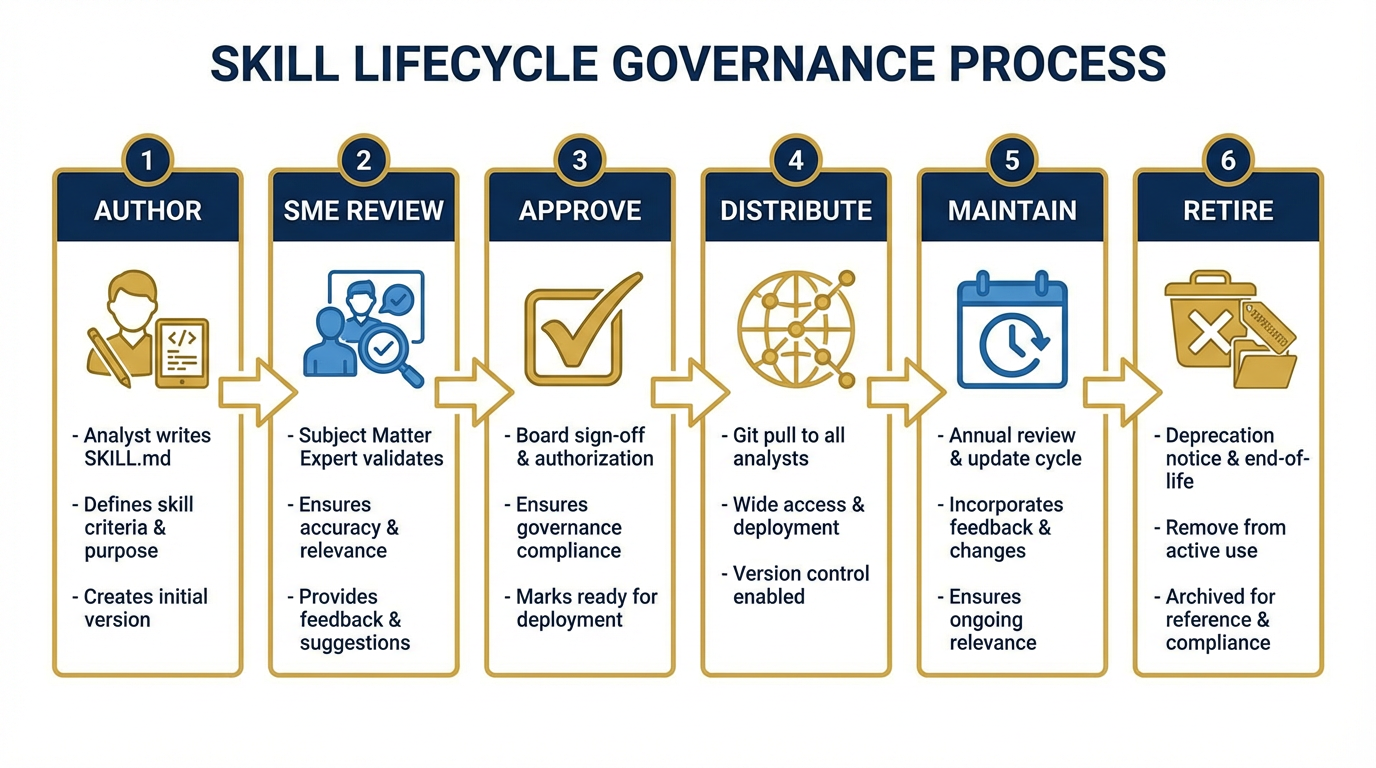
Figure 13:The skill governance lifecycle. Author → Review → Approve → Distribute → Maintain → Retire. Every stage is tracked. The corporate library is a living document.
Five skills is proof of concept. It demonstrates the model works, builds organizational confidence, and gives analysts a taste of the compound effect. But five skills is not a Skill Library.
The real win happens when skill authoring becomes an organizational practice — when every senior analyst contributes two or three skills encoding their domain expertise before they leave. When the functional areas own their skill sets the way they own their doctrine references. When “I should write a skill for this” is a reflex, not an afterthought.
The Skill Forge — How You Get to 20 Skills in a Day
One of the most powerful exercises in this course is what we call the Skill Forge.
Imagine a room of twenty Lukos analysts — ORSAs, program managers, contracting officers, training developers, partner engagement specialists. Each one carries domain expertise that the others don’t have. The Skill Forge turns that expertise into shared organizational capability in a single afternoon.
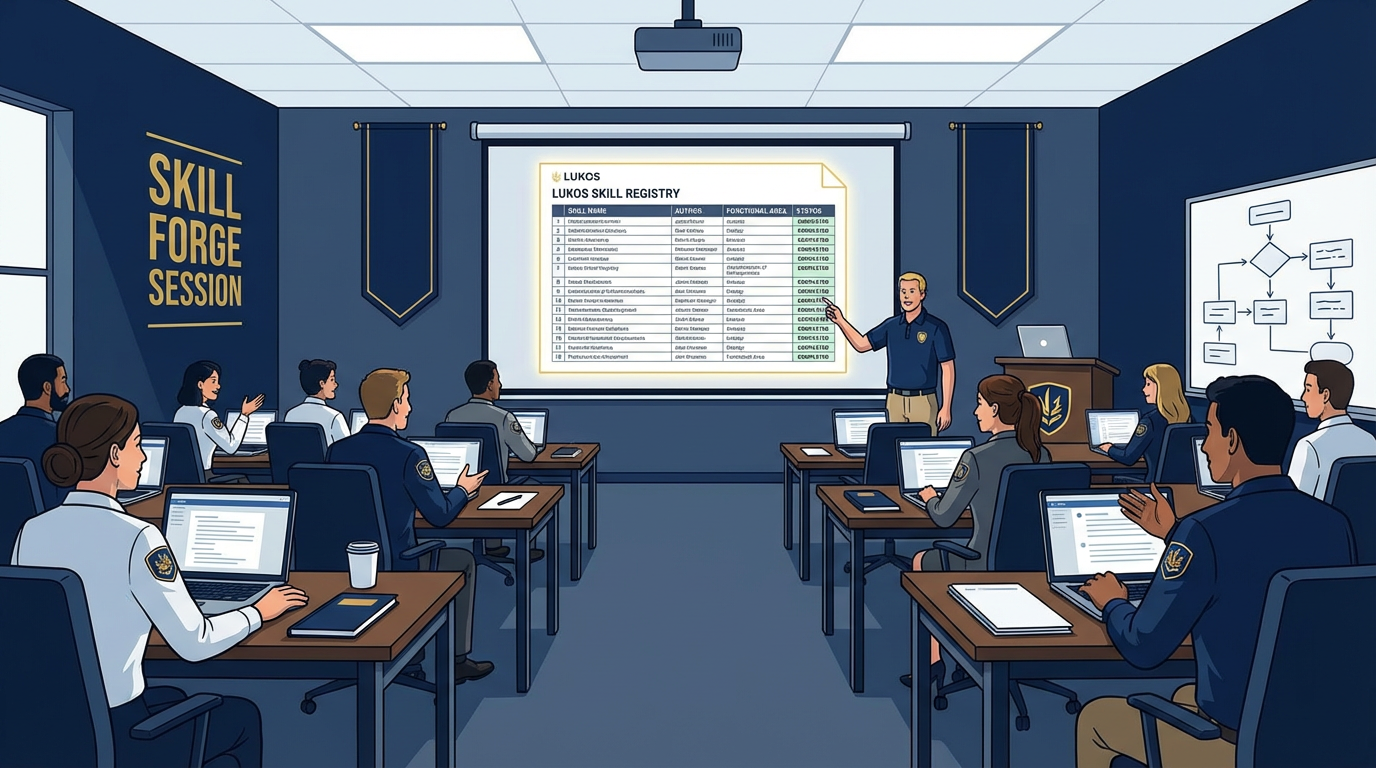
Figure 14:The Skill Forge in action. Each analyst authors one skill from their domain. By end of day, the organization has twenty new capabilities encoded and ready to distribute.
The mechanics are in the lab section below. The strategic point is this: by the end of a two-hour Skill Forge session, the organization has produced twenty-plus skills representing expertise across every functional domain. Every analyst in that room goes home with a skill library that includes capabilities they don’t personally have. The contracting officer has access to the training developer’s expertise. The ORSA has access to the partner engagement specialist’s cultural knowledge.
This is how AI compounds across an organization — not through individual users getting better at prompts, but through collective expertise becoming shared organizational infrastructure.
The Governance Model
A skill library without governance is a skill junkyard. Someone needs to own the decisions:
Who approves skills before they enter the corporate library? Recommend: a small review board of two or three senior subject matter experts per functional area. They review for accuracy, completeness, and the atomic-skill principle. No skill gets merged without a SME sign-off.
Who maintains skills? Each skill should have a named maintenance owner — typically the senior SME who authored it or who has the deepest expertise in that domain. Maintenance means updating the skill when doctrine changes, when processes change, when the skill produces incorrect output on new edge cases.
Who retires skills? When a skill references deprecated tools, outdated doctrine, or a discontinued process, the maintenance owner raises a deprecation notice. The skill gets an end-of-life date and is removed from the corporate library in the next release cycle.
This governance model isn’t bureaucracy for its own sake. It’s the mechanism that prevents the stale skill problem — the organizational hazard where a skill that was accurate in 2025 is still running in 2028, producing outputs based on superseded doctrine. A stale skill is worse than no skill because it produces confident wrong answers.
The Competitive Moat
Figure 15:The corporate moat. A well-curated, version-controlled, organization-wide skill library built over years is not quickly replicated. The investment compounds.
Here is the strategic reality: a well-curated, version-controlled, organization-wide Skill Library is one of the most durable competitive assets a defense services company can build.
Your competitors can buy the same AI subscriptions you buy. They can train their analysts on the same prompting techniques you teach. They can access the same models.
They cannot replicate your institutional knowledge. The patterns that your Lessons Learned Program has extracted over a decade. The contracting expertise that lives in your senior acquisition professionals. The cultural knowledge that your partner engagement specialists have built through years of bilateral work.
A Skill Library externalizes that knowledge into a distributed, versioned, auditable system. It doesn’t walk out the door when your people retire. It doesn’t sit in someone’s head waiting to be shared. It’s infrastructure.
The competitor who starts building their Skill Library in year one has a compounding advantage over the competitor who starts in year three. The best time to start was when you first deployed AI. The second best time is now.
7.8 From Skills to the Synthetic Wolfpack — Bridge to Chapter 8
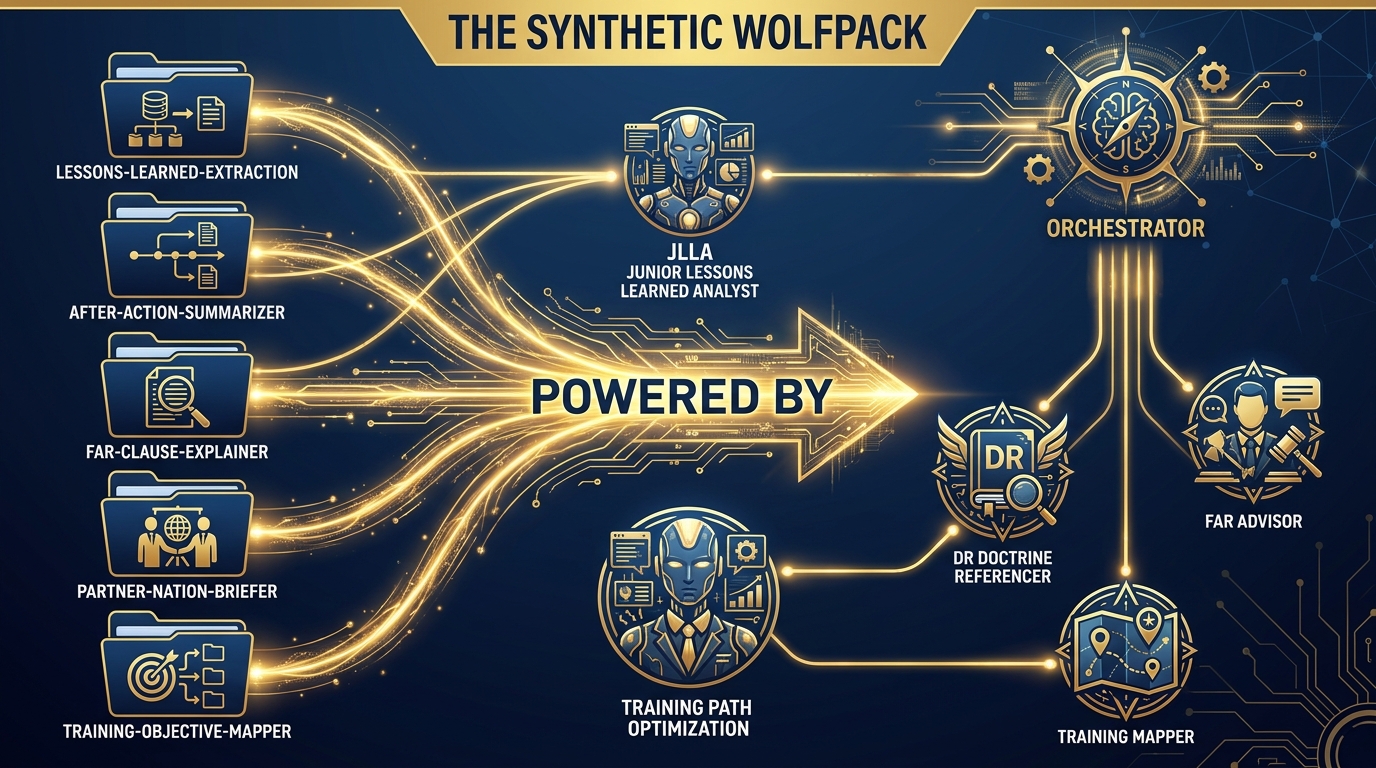
Figure 16:The bridge to Chapter 8. Skills are knowledge. Agents are workers. When you give a skilled knowledge base to an agent and an orchestrator, you get a Synthetic Wolfpack.
You now have five skills. Each skill encodes a specific type of expertise. Each skill tells an agent who to be, what to do, and what to produce.
Now ask the next question: what happens when you give those skilled agents to an orchestrator?
That’s Chapter 8.
In the Synthetic Wolfpack model, each agent on the team is powered by a skill:
JLLA (Junior Lessons Learned Analyst) runs on the
lessons-learned-extractionskill. When the orchestrator routes an AAR to JLLA, it activates as a 15-year lessons-learned veteran and extracts OIL-formatted observations.DR (Doctrine Referencer) runs on a
doctrine-lookupskill. When a finding needs a doctrine citation, the orchestrator routes the query to DR.FAR Advisor runs on the
far-clause-explainerskill. Contracting questions go here.Training Mapper runs on the
training-objective-mapperskill. Performance gaps go here.
The skills are the knowledge. The agents are the workers. The orchestrator is the team leader who knows which worker to send which task.
This is the AAR-to-Insight pipeline in operational form. An after-action review goes in one end. A prioritized set of lessons, training recommendations, doctrine flags, and contracting implications comes out the other. The human analyst reviews the output, validates the findings, and signs the deliverable. The work that used to take a team of four two days now takes one analyst two hours.
That’s Chapter 8. Finish this chapter first.
Three-Tier Hands-On Labs
Group Lab: The Skill Forge
Figure 17:The three tiers of the Skill Forge. Tier 1 writes the header. Tier 2 writes the full skill. Tier 3 contributes to the shared Lukos Skill Registry.
Tier 1 — The On-Ramp (5 minutes)
Open a text editor or Google Doc. Review the SKILL.md template from Section 7.4. Fill in just the header block for ONE skill you wish existed for your work:
---
name: [skill-name-in-kebab-case]
description: [One sentence — use when X, do not use when Y]
---

# [Skill Title]
Don’t write the full instructions yet. Just the header. This is your design decision: what job does this skill do, and when does it do it?
✅ Success looks like: A completed SKILL.md header that describes a skill relevant to your actual Lukos role — specific enough that a colleague could read the description and know exactly when to use it.
Tier 2 — The Core Rep (20 minutes)
Now write the complete SKILL.md for that skill. Include all four sections:
Persona — who is the agent when this skill is active?
Task — exactly what should the agent do, step by step?
Output Format — exactly what should it return? Include a template.
Constraints — what should it never do?
When you’ve written it, test it: open Antigravity, paste your SKILL.md content as the system instruction, and give it a real task from your work. Does it perform like the expert you described in the Persona section? If not, what’s wrong?
✅ Success looks like: A complete, tested SKILL.md that produces correct output when loaded into Antigravity. You can articulate at least one thing you changed after testing.
Tier 3 — The Wow Moment (30 minutes)
Paste your complete SKILL.md into the shared Google Doc that the instructor has posted — the Lukos Skill Registry. Include your name, your functional area, and a brief note on what prompted you to author this skill.
By the time the last person finishes, the room has collectively built 15–20 skills.
The instructor (Dr. Lee / Professor Marquez) will select one skill contributed by a classmate — someone you probably don’t work closely with — and demonstrate it live on an actual AAR or working group document.
Watch what happens.
The institutional knowledge that your teammate encoded five minutes ago executes automatically inside an AI agent, on a document they’ve never seen, producing structured output that meets the Lukos standard.
That’s the moment this chapter has been building toward. The pack just built something together that will outlast any individual member.
✅ Success looks like: A shared Skill Registry with every participant’s skill documented. A live demonstration of one peer-authored skill performing correctly on real content. A conversation about what you’d build next.
Individual Lab: Your Personal Skill Library
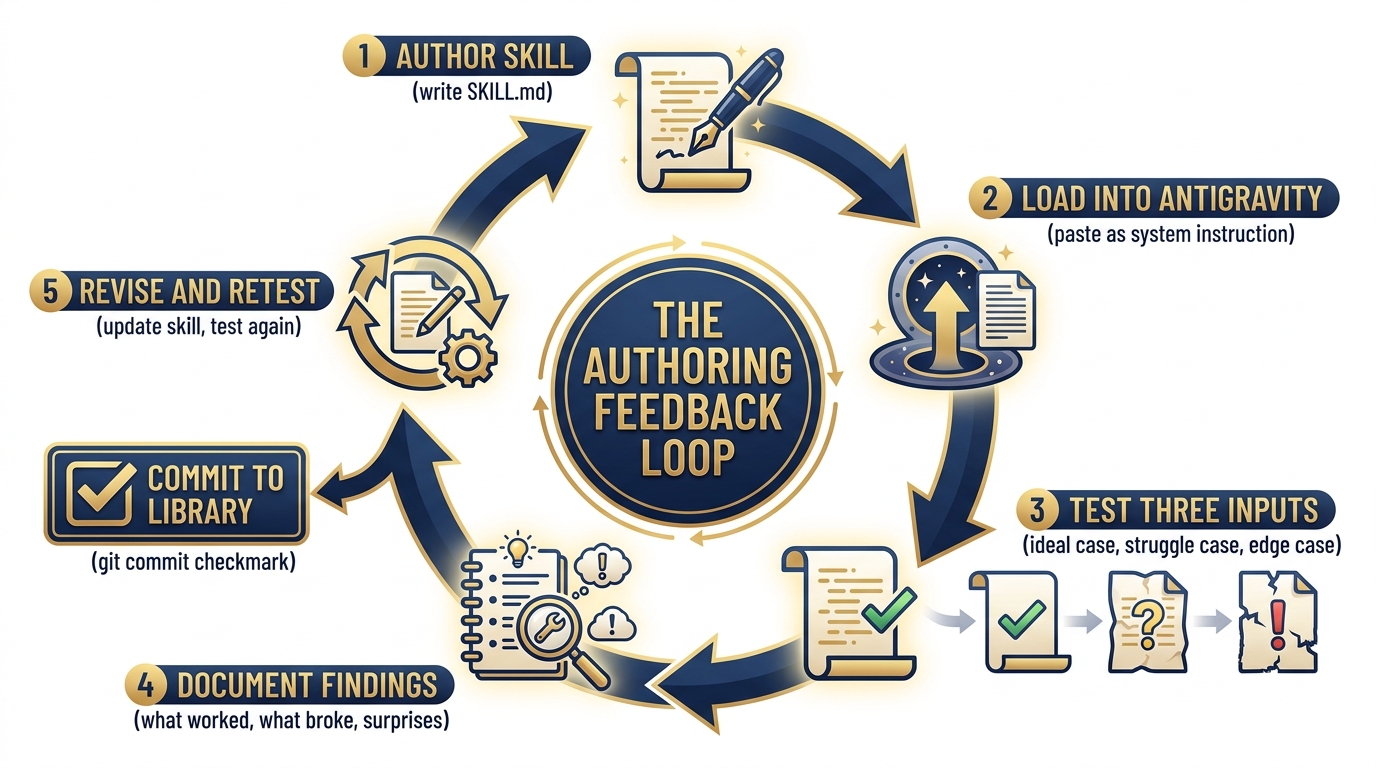
Figure 18:The skill authoring feedback loop. Test. Find edges. Revise. Retest. Commit. A skill that has been through this loop once is twice as good as a first draft.
Tier 1 (5 minutes)
Take out a sheet of paper (or open a note). Identify the three most repetitive analytical tasks in your current role.
For each one, answer:
What is the input? (What do you start with?)
What is the expected output? (What do you produce?)
What expert knowledge is required? (What would a senior person know that a junior person doesn’t?)
This is your personal skill backlog. The third question is where the skill lives — it’s the knowledge that needs to be externalized.
✅ Success looks like: Three tasks documented with input/output/expertise fields. You’ve identified which one is highest-value (saves the most time, highest frequency, or most prone to quality variation).
Tier 2 (15 minutes)
Write the full SKILL.md for your highest-value skill. Use the template from Section 7.4.
One discipline that separates good skills from great ones: be obsessive about the Output Format section. Vague instructions produce vague output. If you can’t describe exactly what the output should look like — structure, headers, length, format — the agent can’t produce it consistently.
Start with the output format. Work backwards to the task instructions. The clearest way to know what the agent should do is to know precisely what it should produce.
✅ Success looks like: A complete SKILL.md with every section filled in. The Output Format section includes an actual template the agent can follow, not a prose description.
Tier 3 (25 minutes)
Load your skill into Antigravity. Test it against three different inputs:
The ideal case — a document that perfectly matches what the skill was designed for. Does it produce correct output?
The struggle case — a document that’s messier, less structured, or slightly outside the skill’s design intent. Where does output quality degrade?
The edge case — something unexpected. An empty section, a conflicting statement, a document in a different format. How does the skill handle it?
For each test, document: what happened, what surprised you, and what you’d change.
Then revise the skill based on what you learned. Add handling instructions for the cases that broke. Tighten the “use when / do not use when” description based on what you discovered.
This is the skill authoring feedback loop — the discipline that separates a first draft from a production-quality skill.
✅ Success looks like: A revised SKILL.md that incorporates at least two learnings from testing. You can articulate the edge cases it now handles correctly that it didn’t before. This is a skill you will actually commit to your personal skill library.
Field Notes
Skills in version control. The moment a skill enters the corporate library, it should be in git. Commit messages should explain what changed and why. Skills should go through pull requests just like code. The review process is how you maintain quality and catch errors before they affect every analyst on the team.
OPSEC watch-out. Skills are instruction files, not data stores. Never embed classified information, PII, contract performance data, or sensitive customer details in a skill. Skills are designed to be distributed — treat them accordingly. The principle: a skill should work correctly when run against any appropriate document, not because it contains specific information about a specific document.
The stale skill problem. A skill that references FAR clause numbers that were revised last year is worse than no skill — it produces confident, authoritative-sounding wrong answers. Assign a maintenance owner to every skill in the corporate library. Schedule annual reviews. When doctrine changes, update the skill before the next exercise.
The over-activation problem. If a skill keeps activating on tasks it wasn’t designed for, the description is too broad. “Use when working with documents” will activate on everything. “Use when extracting OIL-formatted lessons from after-action reports or exercise debrief documents” will not. The “use when / do not use when” pattern is how you tune activation precision.
Pack Debrief
Figure 19:The durability ladder. The choice of where to encode your AI expertise is a strategic decision.
A persona lasts one session. A Gem lasts one account. A skill lasts as long as the organization maintains it.
That distinction is not a technical detail. It is the strategic frame through which everything in this chapter should be understood.
The Lessons Learned Program exists because someone decided, decades ago, that operational experience should not live only in the heads of the people who had it. Skills are the application of that same insight to AI capability. They are Lessons Learned for the AI — the format that turns operational experience into permanent organizational capability.
What you built in this chapter:
Five complete, deployable SKILL.md files that Lukos analysts can use today
The mental model for atomic skill design and the “use when / do not use when” discipline
A distribution and versioning model that scales from five skills to five hundred
A governance framework that keeps the library accurate and current
An understanding of how skills feed into Chapter 8’s Synthetic Wolfpack
The diagnostic question to take back to your team:
If your three best senior analysts retired tomorrow, how much of their expertise would survive?
A Skill Library is the answer. The first five skills are the proof of concept. The corporate Skill Library is the durable organizational asset.
Start now. Build the first five. Expand from there.
Every senior analyst who authors a skill before they retire leaves something behind that AI can use forever.
That’s not a feature. That’s a legacy.