1Chapter 6: The Forge — Google Antigravity, Plugins, and Tools
By Dr. Ernesto Lee and Professor Carlos Marquez, Miami Dade College
BLUF: Google Antigravity is the agent-first IDE where Lukos analysts stop using AI and start directing it. Through plugins that extend what agents can see and tools (MCP servers) that let agents act in the world, every analyst on the bench becomes a potential tool builder — no development background required.
Imagine you’re a Special Operations Forces planner, and you’ve just received tasking for a new exercise involving a partner nation you’ve covered before. In the old world, you’d spend two hours Googling, reading PDFs, and manually assembling a situation brief. You’d copy-paste snippets, reformat them, check your facts, write the BLUF — all before the substantive analytical work even begins.
Now imagine instead you open a single environment, describe what you need in plain English, and watch a synthetic teammate go to the web, read the relevant sources, structure the brief in your preferred format, and hand it back — cited, formatted, ready for your site lead’s review. In under three minutes.
That’s not science fiction. That’s what this chapter is about.
By the time you reach Chapter 6, you’ve used Gemini as a field operative, explored AI Studio as your gunsmith’s bench, leveraged NotebookLM as your research partner, and begun building your synthetic bench on Vertex. Each of those surfaces made you more capable. Now it’s time for something categorically different.
Now it’s time for The Forge.
6.1 What Google Antigravity Is — And Why It’s Different
Let’s start with what Antigravity is not.
It is not a code editor with an AI chatbot bolted onto the side. That’s what most people think when they hear “AI-powered IDE.” They picture VS Code with a Copilot panel — useful, but fundamentally still a human doing the coding with AI suggestions. The human remains in the loop for every line.
Antigravity inverts that model entirely.
Antigravity is an agent-first IDE — an environment designed from the ground up around the premise that agents do the planning, the executing, the validating, and the learning. The human describes the mission. The agents carry it out. The human reviews. The agents refine.
When Gemini 3.1 Pro launched on February 19, 2026, Google explicitly named Antigravity as one of the primary developer platforms receiving the upgrade. That context matters. Antigravity isn’t running a legacy model — it’s running Google’s most capable reasoning engine, a system that scored 77.1% on ARC-AGI-2 (more than double its predecessor) and 94.3% on GPQA. It has a one-million-token context window. When you drop a 300-page acquisition strategy into Antigravity, the agent doesn’t lose track. It holds the whole document.
Here’s the metaphor Dr. Lee and Professor Marquez want you to lock in:
Gemini is your field operative: smart, capable, responsive to your prompts.
AI Studio is your gunsmith’s bench: you configure, tune, and test the operative’s capabilities.
Antigravity is your Mission Control: the place where you orchestrate an entire synthetic team.
At Mission Control, you don’t fly the shuttle. You supervise the people who fly the shuttle. You set objectives. You monitor execution. You intervene when something goes off-course. You approve the outputs before they leave the building.
That’s the mental model. Hold it.
Getting started is free and simple. Visit antigravity.google, sign in with your Google account, and you’re in. Antigravity is currently in public preview — no waitlist, no cost. It’s cross-platform, running in your browser without local installation. Your Google account is your badge.
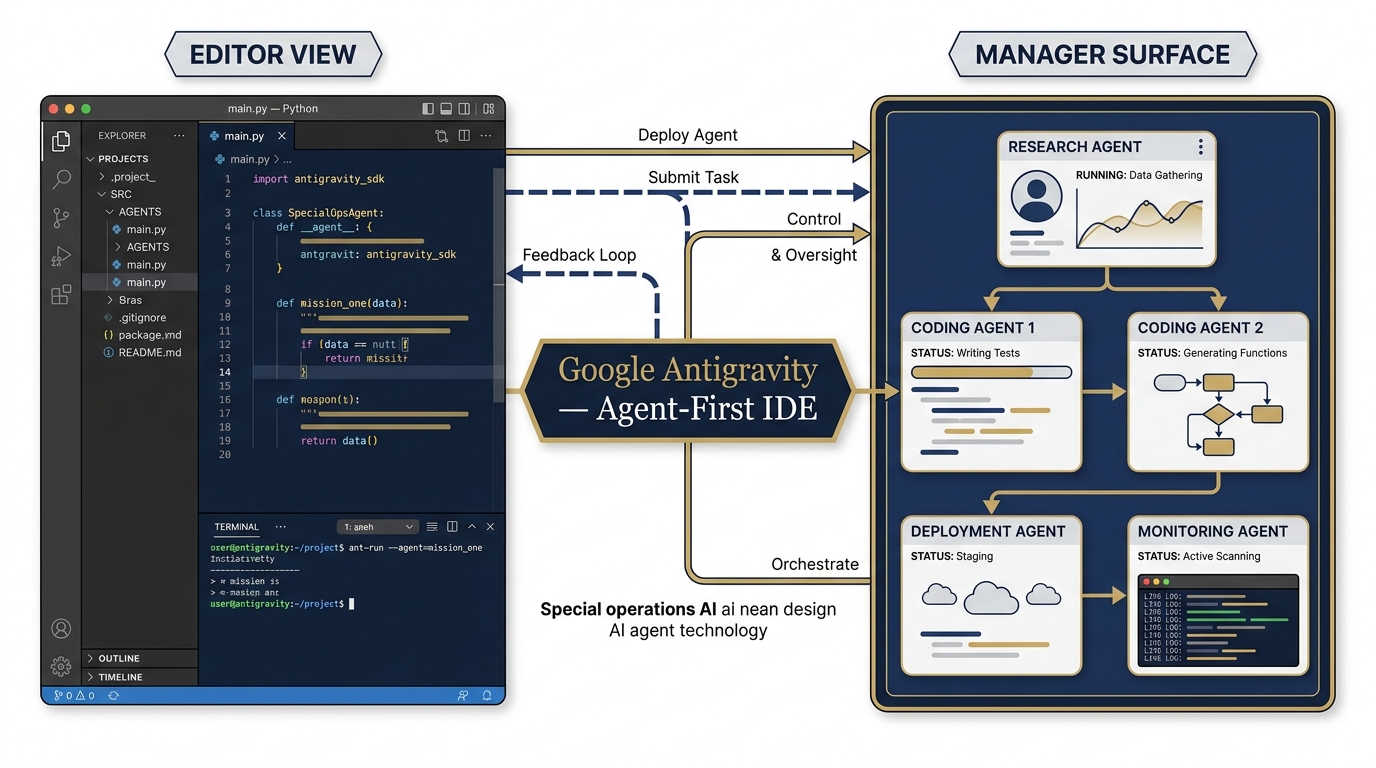
Figure 1:Figure 6.1: Google Antigravity as Mission Control — the Editor View and Manager Surface working in concert. Agents execute across both surfaces while the analyst supervises.
6.2 The Two Surfaces — Choosing Your Mode of Command
When you open Antigravity, you’ll encounter two distinct surfaces. Most analysts will recognize the first one immediately. The second one is where the real power lives for your use case.
The Editor View: Hands-On Synchronous Work
The Editor View looks like VS Code. It feels like Cursor. There’s a file tree on the left, a main editing area, an AI chat panel, and a terminal below. If you’ve worked in any modern development environment, you’ll feel immediately at home.
In the Editor View, you and the agent work synchronously — you prompt, the agent responds, you review, you iterate. This is the right surface when you want to stay close to the work: when you’re building something specific, debugging something that went sideways, or when you need to inspect exactly what the agent produced before moving on.
For most Lukos analysts who aren’t developers, think of the Editor View as the workbench mode. It’s where you do craft. One task at a time. Close supervision. High fidelity.
The Manager Surface: Mission Control for Your Synthetic Team
Here’s where Antigravity separates itself from every other AI tool in this book.
The Manager Surface is where you orchestrate multiple agents working asynchronously across different workspaces. Think of it as your Operations Center (OPCEN) display — you can see Agent A working on the partner-nation brief while Agent B is extracting OIL observations from the AAR while Agent C is pulling the QuickBooks contract burn-down data. Each running independently. Each reporting back when complete.
Why does this matter for a non-developer Lukos analyst?
Because you don’t need to write code to direct agents. You describe the mission. You set the objectives. You define the output format. The agents execute. You review. That’s the whole job on the Manager Surface.
This is the surface where an analyst with no development background becomes genuinely capable of running a synthetic team. Your value-add isn’t technical — it’s analytical. Your job is to know what needs to be done and to evaluate whether it was done well. The agents handle the how.
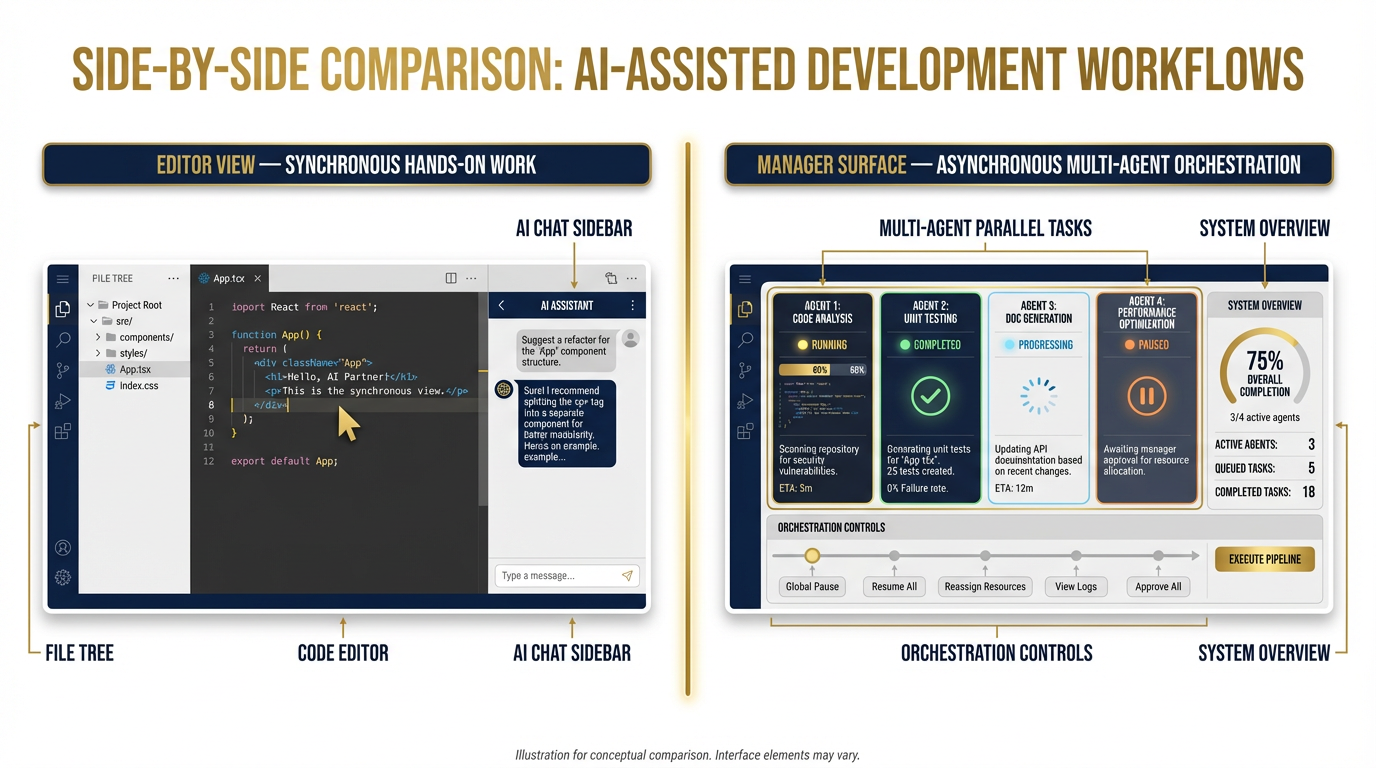
Figure 2:Figure 6.2: Editor View (left) for synchronous hands-on work versus Manager Surface (right) for asynchronous multi-agent orchestration. Both surfaces run on Gemini 3.1 Pro by default.
6.3 The Four Tenets — Antigravity’s Design Philosophy, Operationalized
Every piece of technology reflects a design philosophy. Understanding the philosophy behind Antigravity will make you dramatically more effective with it — because you’ll know why it behaves the way it does and how to take advantage of what it was built to do.
Antigravity is built on four tenets. Dr. Lee and Professor Marquez will translate each one directly into what it means for a Lukos analyst in operational context.
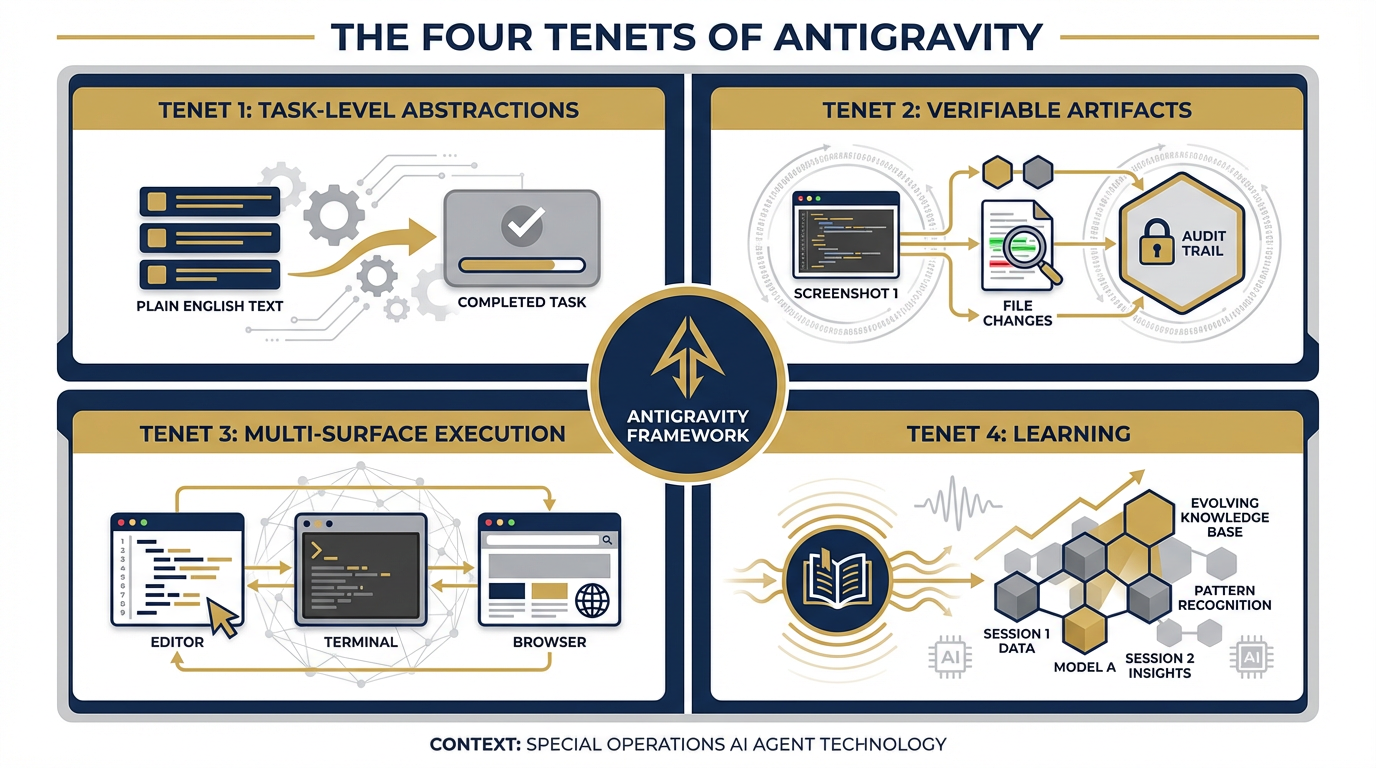
Figure 3:Figure 6.3: The Four Tenets of Antigravity — task-level abstractions, verifiable artifacts, multi-surface execution, and learning — translated into operational value for the Lukos analyst.
Tenet 1: Task-Level Abstractions
The first tenet is that you interact with Antigravity at the task level, not the tool level.
In conventional AI tools, you’re often working at the tool level: “Use the search API to find X, then use the summarizer to condense it, then format it using this template.” You’re directing the tool calls. You’re the workflow manager.
With Antigravity, you describe what you want to achieve, and the agent figures out which tools to invoke, in what order, with what parameters. The abstraction is at the task level.
What this means operationally: You write: “Give me a weekly OSINT summary on [partner nation] covering defense, political, and economic developments. BLUF format. Cite all sources.” You don’t tell it to search. You don’t tell it to summarize. You don’t tell it to format. You describe the output you need. The agent handles the execution path.
This is not a small thing. This is the difference between managing a tool and managing a teammate.
Tenet 2: Verifiable Artifacts
The second tenet addresses a legitimate concern that every serious analyst has about AI-generated work: How do I know the agent actually did what it said it did?
Antigravity’s answer is verifiable artifacts. When an agent completes work, it doesn’t just hand you the output — it hands you the receipts. Screenshots of the browser sessions it ran. File changelogs showing exactly what was created or modified. Recordings of the browser interactions it performed. An audit trail, not a magic box.
What this means operationally: As a Lukos analyst, you can verify every claim in a brief that an agent produced. You can trace every data point back to its source. You can show your site lead not just what the agent found, but where it went to find it. That’s the difference between “the AI said so” (insufficient) and “here is the documented trail of how this conclusion was reached” (defensible).
For any organization that takes information quality seriously — and Lukos does — this tenet is not optional. It’s essential.
Tenet 3: Multi-Surface Execution
The third tenet is that Antigravity agents don’t just generate text. They act in the digital world.
An Antigravity agent can simultaneously operate the code editor, run commands in the terminal, and navigate a real web browser — all in service of a single task. It’s not a text generator. It’s a digital actor.
What this means operationally: When you ask an agent to pull the three most recent GAO reports on special operations training, it doesn’t just recall from training data (which has a knowledge cutoff). It goes to the GAO website, navigates to the reports section, retrieves the actual documents, and returns you the current, live information with citations. Real web. Real data. Not memory.
This is the capability that makes Antigravity qualitatively different from a standard language model prompt. The agent has hands, not just a voice.
Tenet 4: Learning
The fourth tenet is that agents get smarter about your workflow over time.
As you work in Antigravity, the agent captures useful context — your preferred output formats, your standard analytical frameworks, the terminology and abbreviations of your operational context, the specific sources you trust — into a reusable knowledge base. Each session makes the agent more calibrated to the way you work.
What this means operationally: The first time you ask for a BLUF brief, you might need to specify the format. The third time, the agent knows your format preferences. The tenth time, it’s anticipating the structure before you finish describing it. The agent is learning your doctrine.
Over the course of an exercise, a deployment, or a project, that accumulated context becomes a genuine force multiplier. The agent isn’t starting fresh every session — it’s building a model of how the Lukos team operates.
6.4 Why a Non-Developer Lukos Analyst Should Care — The “Vibe Coding” Shift
Here’s a term you’re going to hear a lot in 2026: vibe coding.
The concept is simple. You describe what you want in plain English. You watch a working application get built. You didn’t write a line of code. You didn’t know the syntax. You knew the requirement, and the agent knew the implementation.
This is not a metaphor. This is happening right now, at scale, with real users building real tools. And it matters enormously for every analyst on the Lukos bench.
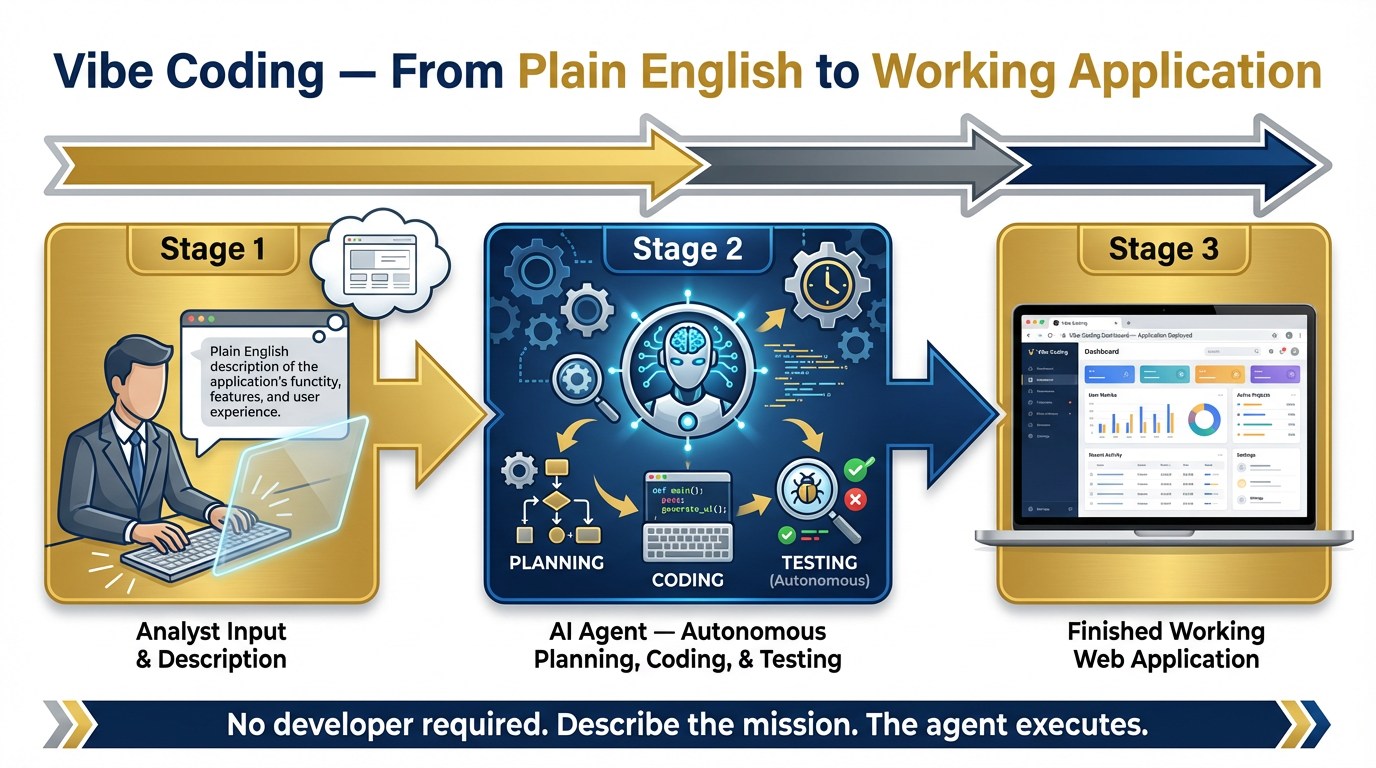
Figure 4:Figure 6.4: Vibe coding workflow — the analyst describes the requirement in plain English, the agent builds the tool, the analyst tests and approves. No development background required.
Think about the tools you’ve wished existed in your workflow. The form that would automatically extract key data from an AAR. The dashboard that would show contract burn-down against milestones without requiring a manual update each week. The brief template that pulls from live sources instead of requiring you to go gather them manually.
In the old world, getting those tools built required going to IT, writing a requirements document, waiting for prioritization, waiting for development, and discovering six months later that what got built wasn’t quite what you needed.
In the Antigravity world, you describe it, the agent builds it in 20 minutes, you test it, you iterate. The iteration cycle is measured in minutes, not months.
The shift is this: Every analyst on the Lukos bench is potentially a tool builder for their own workflow. The constraint used to be technical — you couldn’t build unless you could code. The new constraint is analytical — you need to know clearly what you need. That’s a constraint analysts are already trained to navigate.
The question changes from “Can I get IT to build this?” to “Can I describe this clearly enough for the agent to build it?” For a Lukos analyst, that’s a favorable shift.
6.5 Plugins — Extending What the Agent Can See
An agent can only reason about what it can perceive. Out of the box, an Antigravity agent can read the files in its workspace, execute code, browse the web, and interact with connected MCP servers. But there are important data formats that a base agent can’t access without help.
That’s what plugins are for. Plugins extend the agent’s perceptual capabilities — they expand what the agent can see and work with.
Antigravity currently has two critical plugins for the Lukos use case.
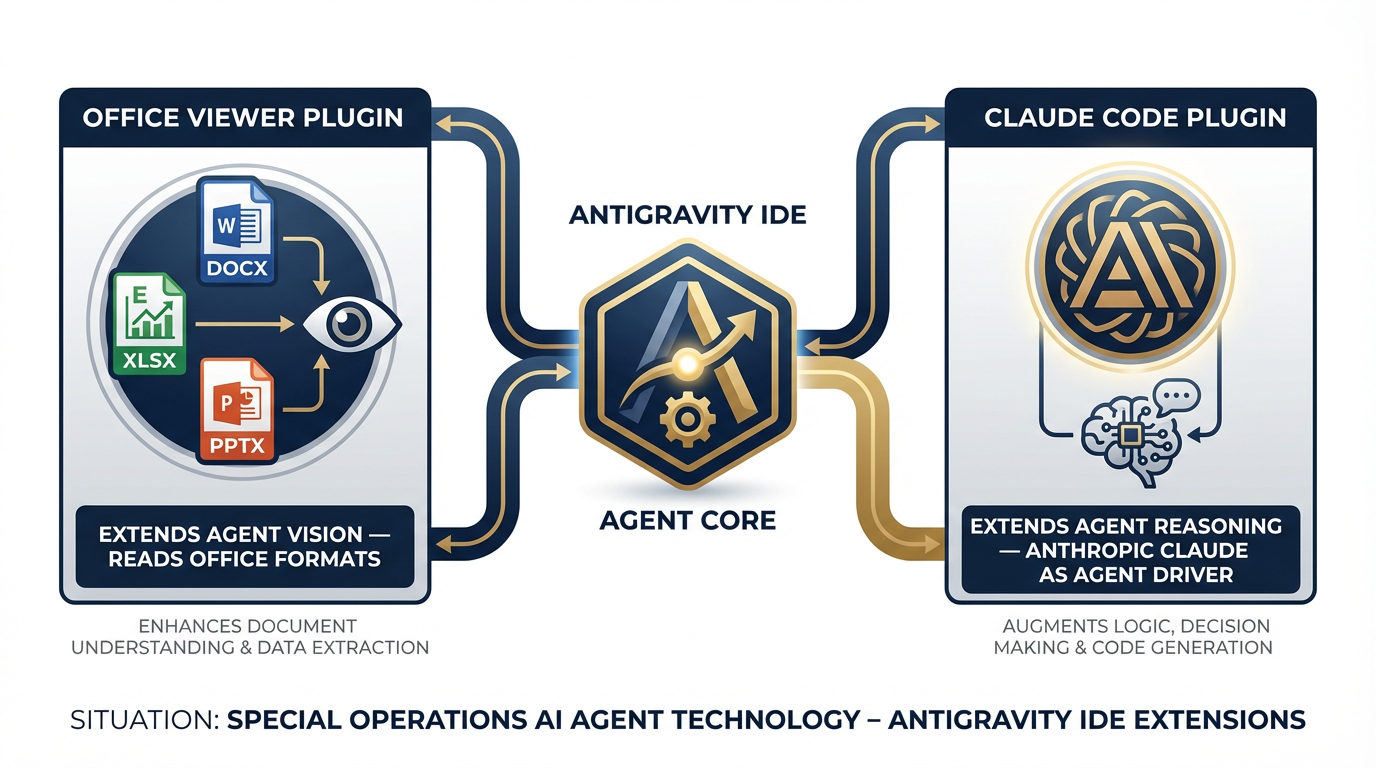
Figure 5:Figure 6.5: The two Antigravity plugins critical for Lukos workflows — Office Viewer extends the agent’s document perception, Claude Code extends the agent’s reasoning model options.
The Office Viewer Plugin
Here’s the problem it solves: virtually every important document in the Lukos workflow lives in a Microsoft Office format. AARs are .docx files. Briefings are .pptx files. Rosters and data are .xlsx files. Without intervention, an AI agent would see these as binary blobs — it could acknowledge they exist, but it couldn’t read them.
The Office Viewer plugin changes that. Install it, and the Antigravity agent can now open, read, and reason over .docx, .pptx, and .xlsx files directly inside the workspace. The agent treats an AAR like it would treat a text file — fully legible, fully searchable, fully addressable in your prompt.
Why this matters enormously for Lukos: The moment an agent can read an AAR directly, the lessons extraction workflow that previously required hours of manual processing becomes a prompt. You drop the .docx in, you ask the agent to extract every observation and insight in OIL format, and you get a structured table back in minutes. We’ll walk through exactly that workflow in the lab section.
How to install the Office Viewer plugin in Antigravity:
Open Antigravity at antigravity.google and sign in.
In the left sidebar, locate the Extensions or Plugins panel (the puzzle-piece icon).
Search for “Office Viewer” in the plugin marketplace.
Click Install. The plugin installs into your current workspace.
To verify: drag a .docx file into your workspace. In the chat panel, type: “Summarize the key points in [filename.docx].” If the agent reads the document and returns a coherent summary, the plugin is active.
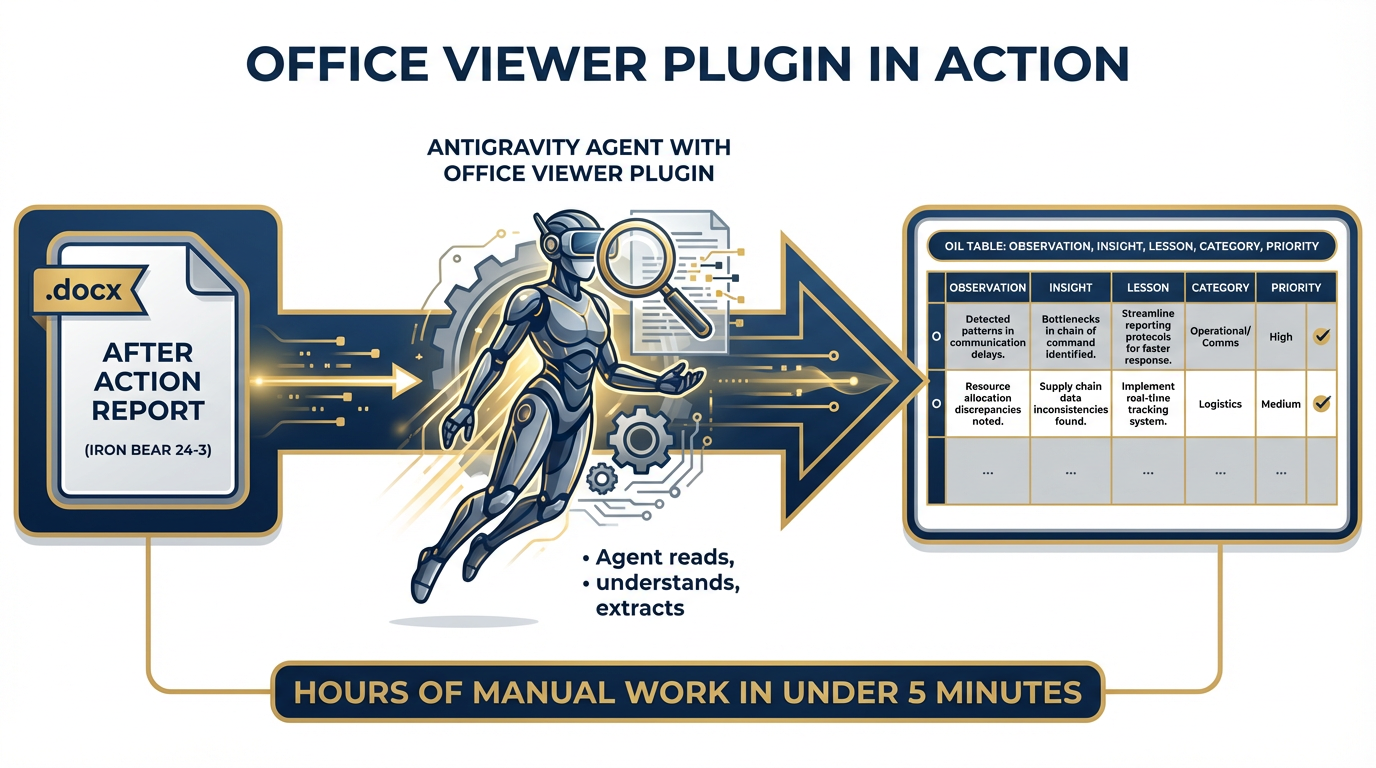
Figure 6:Figure 6.6: Office Viewer plugin in action — the agent reads a .docx AAR file directly, extracting structured OIL observations without manual copy-paste. The manual work of hours, completed in under five minutes.
The Claude Code Plugin
Antigravity’s default agent runs on Gemini 3.1 Pro. That’s the right choice for most tasks — broad context window, strong reasoning, excellent at synthesis and code generation.
But here’s something Dr. Lee and Professor Marquez want you to internalize: every model has a temperament, and the right model for a task depends on what the task demands.
Gemini 3.1 Pro excels at tasks that require holding large amounts of context simultaneously — reading a massive document, synthesizing across multiple sources, generating complex multi-step workflows. Its broad context window is genuinely exceptional.
Claude (from Anthropic) tends toward a different style — meticulous, careful, clause-by-clause reasoning. When you’re doing something that requires very precise, step-by-step logical analysis — auditing a contract for compliance language, reviewing a TTX scenario for edge cases, tracing an argument for logical consistency — Claude’s reasoning style can be a better fit.
The Claude Code plugin lets you swap the agent driver inside Antigravity. You can run Claude Sonnet as your agent for the tasks where its reasoning temperament fits better, then switch back to Gemini for the next task.
The key insight: You don’t have to choose a model and live with it. You choose the model that fits the mission, task by task. In Antigravity, you have that flexibility built in.
When to use Claude vs. Gemini in Antigravity:
| Task Type | Preferred Model |
|---|---|
| Long document synthesis (300+ page reports) | Gemini 3.1 Pro (1M context) |
| Web search + multi-source briefing | Gemini 3.1 Pro |
| Precise logical audit / compliance review | Claude Sonnet |
| Generating and testing code for a workflow tool | Either (test both) |
| Contract language analysis | Claude Sonnet |
| Scenario planning with many variables | Gemini 3.1 Pro |
6.6 Tools — Where Antigravity Becomes a True Synthetic Teammate
If plugins extend what the agent can see, tools extend what the agent can do.
Tools in Antigravity are implemented via the Model Context Protocol (MCP) — an open standard that allows agents to communicate with external systems through a standardized interface. Every tool in this section is, under the hood, an MCP server. We’ll explain what that means at the end of this section.
For now, think of tools as the agent’s specialized equipment. A field operative with no gear can still think and plan. An operative with comms, optics, and transportation can act. Tools are the agent’s gear.
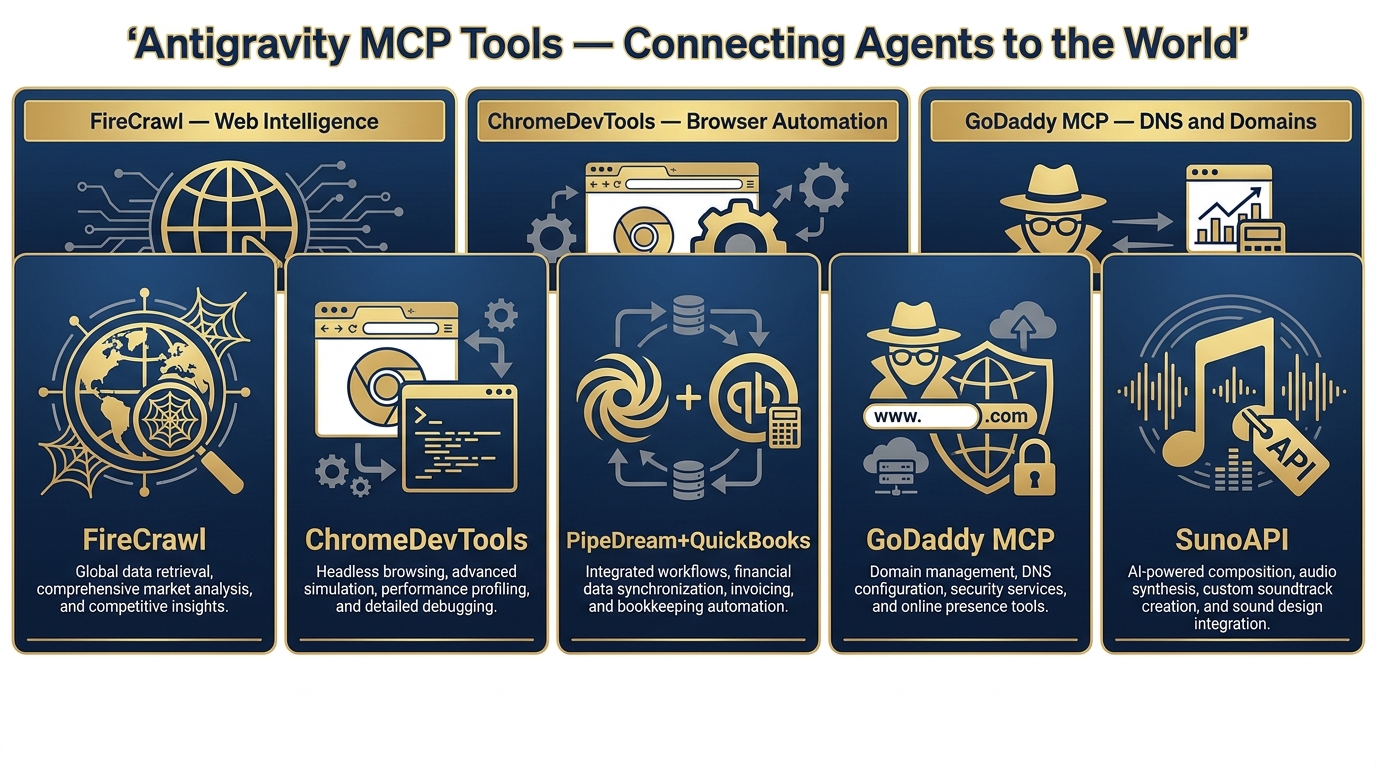
Figure 7:Figure 6.7: The five MCP tools available in Antigravity for Lukos workflows — each extends the agent’s ability to act in a different domain of the digital world.
FireCrawl — The Web as a Live Data Source
What it is: FireCrawl (firecrawl.dev) is a web intelligence API that converts any website into clean, structured data that AI agents can consume directly. It’s Y Combinator-backed, with 108,000+ GitHub stars and adoption by 80,000+ companies including Shopify, Zapier, Canva, Apple, Alibaba, and DoorDash.
The numbers matter as a proxy for reliability: when 80,000+ companies depend on a tool at production scale, it handles the messy realities of the web — JavaScript-heavy pages, rotating proxies, anti-scraping countermeasures, PDF parsing — so your agent doesn’t have to.
How it works — the five capabilities:
FireCrawl has five distinct capabilities, each with a specific use case:
Search: Returns the full content of web pages matching your query — not just links. When your agent searches for “GAO reports on special operations training,” it doesn’t get a list of URLs. It gets the actual text from those pages, ready to reason over.
Scrape: Converts any specific URL into clean markdown. Drop in a doctrine publication URL, a news article, a government report. Get back structured, LLM-ready text.
Crawl: Harvest an entire website — all its subpages, all its linked documents. If you need everything the Rand Corporation has published on SOF modernization, Crawl is your capability.
Interact: Take actions on web pages using natural language prompts. “Click the button labeled ‘Advanced Search.’ Set the date range to the last 30 days. Submit the form.” The agent navigates the page like a human would, without you having to describe the underlying HTML.
Agent: Autonomous web navigation with a goal. You give the agent an objective, and it figures out the navigation path itself. “Find the three most recent Inspector General reports on USSOCOM contract compliance and download the executive summaries.”
Performance benchmarks that matter: 96% web coverage including JavaScript-heavy pages, with no proxy configuration required. P95 latency of 3.4 seconds across millions of pages — built for real-time agent use.
Lukos use cases:
Daily open-source monitor: FireCrawl watches configurable sources (specific news sites, think tanks, government portals) for mentions of partner nations, adversary capabilities, or doctrine developments. The agent summarizes daily. The brief lands in your inbox before morning formation.
Doctrine update tracker: Set FireCrawl to monitor USSOCOM.mil and TRADOC publications pages. When a new publication drops, the agent pulls it, extracts the key changes, and sends you a change brief.
GAO harvest: FireCrawl navigates gao.gov, finds recent reports tagged to your acquisition programs, and returns structured summaries with publication dates and URLs.
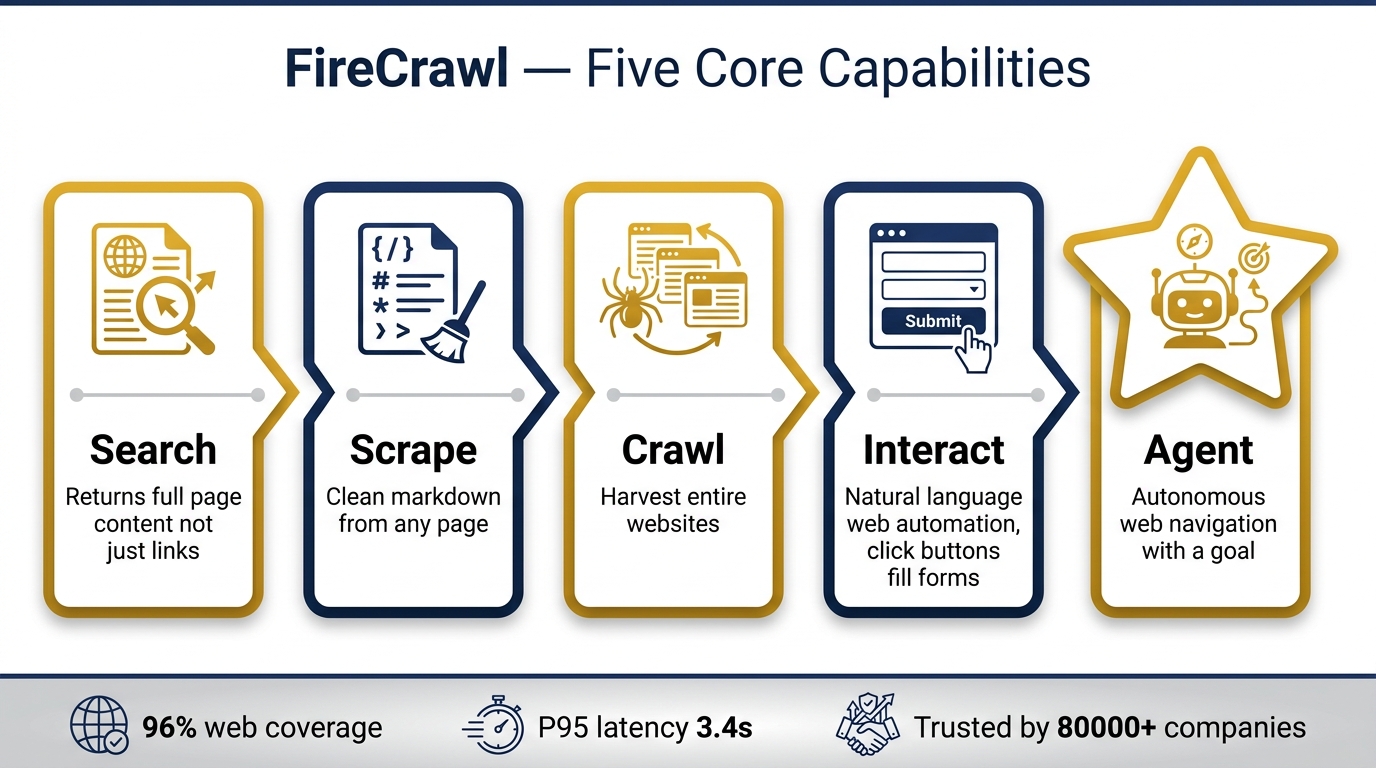
Figure 8:Figure 6.8: FireCrawl’s five core capabilities — Search, Scrape, Crawl, Interact, and Agent — each serving a different intelligence collection pattern for the Lukos analyst.
How to connect FireCrawl in Antigravity:
Visit firecrawl.dev and create a free account.
Generate an API key from your FireCrawl dashboard.
In Antigravity, navigate to Settings → Tools → Add MCP Server.
Select FireCrawl from the marketplace or paste the MCP configuration directly.
Enter your FireCrawl API key when prompted.
Verify: ask the agent to “search for the latest news about USSOCOM.” If it returns current, cited results, FireCrawl is connected.
ChromeDevTools — The Agent with a Real Browser
What it is: The ChromeDevTools MCP gives your Antigravity agent control over a real Chromium browser, including access to the developer console, network traffic, and DOM inspection.
This means the agent isn’t simulating a browser. It’s operating one. Clicking real buttons. Filling real forms. Taking real screenshots. Reading the real state of a web application.
How it works: The agent opens Chrome, navigates to a URL, interacts with the page elements, reads the results, and returns a structured output — with screenshots as verifiable artifacts.
Lukos use cases:
Dashboard validation: After a contractor delivers a reporting dashboard, you need to verify it works end-to-end without manually clicking through every scenario. The agent runs the validation and returns a screenshot-documented report of pass/fail states.
Screenshot evidence for deliverables: When your deliverable requires documented evidence that a system performed as specified, the agent runs the test, captures the screenshots, and hands you the evidence package.
Form automation: If your workflow requires regularly submitting data to a web portal (exercise registration, requisition systems, reporting forms), the agent can automate the data entry using ChromeDevTools.
PipeDream + QuickBooks — The Bridge to Business Systems
What it is: PipeDream is a workflow automation platform that connects thousands of business applications via API. Combined with QuickBooks, it creates a bridge from your AI agent to your back-office financial and operational systems.
How it works: PipeDream acts as the middleware — it handles authentication, data transformation, and rate limiting between your Antigravity agent and QuickBooks. Your agent asks for data; PipeDream fetches it from QuickBooks and returns it in a format the agent can reason over.
Lukos use cases:
Contract burn-down dashboards: The agent queries QuickBooks via PipeDream to pull current spend against period-of-performance milestones. It formats the results as a one-page brief with exception-based highlights (“Contract X is 73% of budget with 41% of PoP remaining — flag for PM review”).
Indirect rate analysis: Pull labor category actuals against proposal rates and have the agent flag variances that fall outside acceptable bands.
Invoice reconciliation: Agent cross-references submitted invoices against deliverable completion records and flags discrepancies before payment approval.
GoDaddy MCP — DNS and Domain Operations from the Agent Layer
What it is: GoDaddy has published an official MCP server at developer
How it works: Connect the GoDaddy MCP to Antigravity with your GoDaddy API credentials. The agent can now query, create, update, and delete DNS records; check domain availability; and manage registrar settings — all through natural language prompts.
Lukos use cases:
Exercise infrastructure setup: When spinning up web infrastructure for a training exercise (participant portals, scenario injects delivery systems), the agent handles DNS configuration autonomously.
Domain monitoring: The agent periodically checks that critical exercise domains are resolving correctly and alerts when something breaks.
The broader lesson from GoDaddy MCP: The fact that GoDaddy — a major enterprise cloud provider — has published an official MCP server tells you something important about where the industry is going. Every major platform with an API will eventually have an MCP interface. Your agent’s capability set will grow automatically as that ecosystem matures.
SunoAPI — Music Generation for Training Content
What it is: SunoAPI (sunoapi.org) provides programmatic access to Suno’s AI music generation capabilities. Through API calls, your agent can create original music tracks, including instrumental backgrounds, thematic scores, and voice-guided content.
How it works: You describe the musical style, tone, and length in natural language. SunoAPI generates the audio file. Your agent can trigger this autonomously as part of a larger content workflow.
Lukos use cases:
Training video scores: Custom background music for exercise overview videos, without licensing concerns.
Briefing intros: A distinctive audio opener for your Lessons Learned podcast pilot — something that establishes the brand identity of the Lukos knowledge products.
Scenario soundscapes: Ambient audio for immersive TTX scenarios.
Workshop API Key — CRITICAL OPSEC NOTICE:
For the Chapter 6 workshop exercises, Dr. Lee and Professor Marquez have provisioned a class API key for SunoAPI:
87f56749c88278478e7a67dcfeaba273This key is FOR WORKSHOP EXERCISES ONLY.
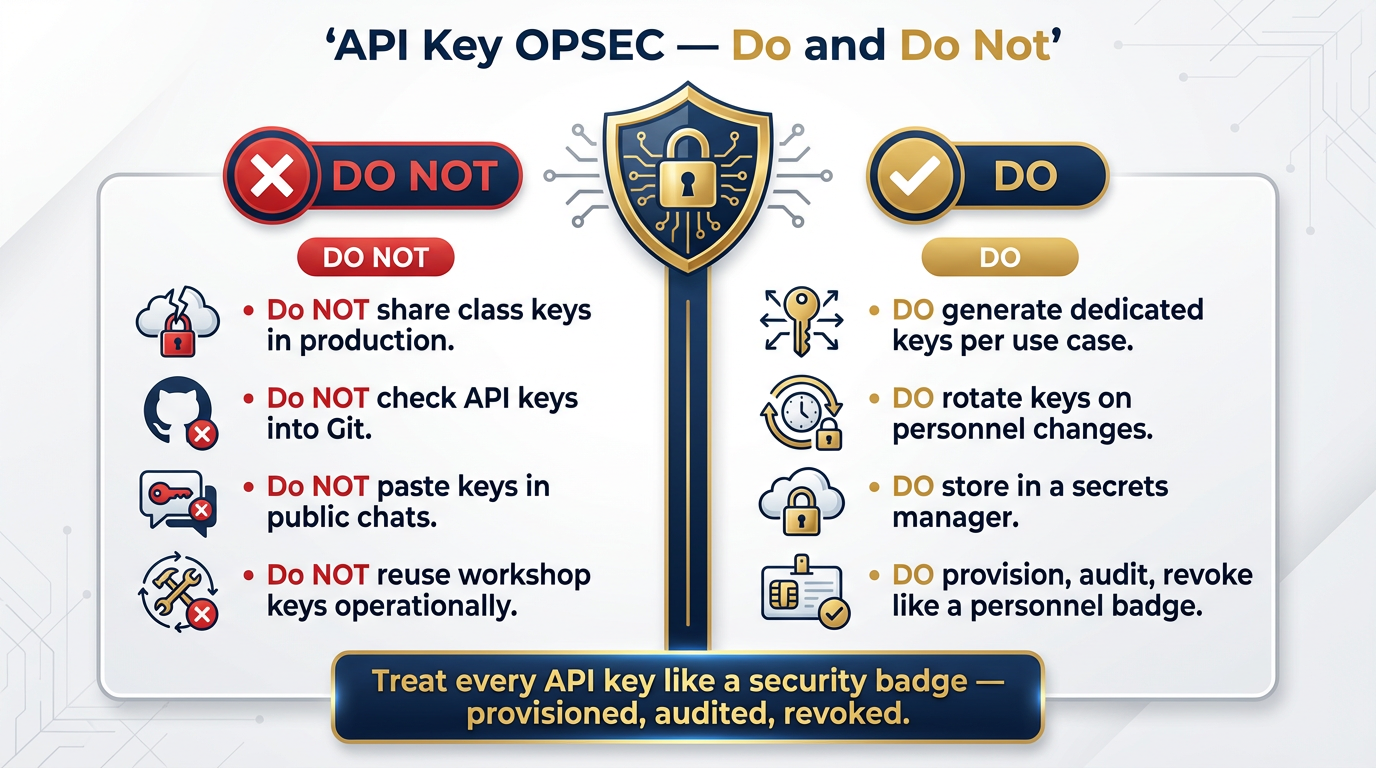
Figure 9:Figure 6.9: API key OPSEC — the rules for handling authentication credentials in agentic workflows. The same discipline you apply to physical access credentials applies here.
The MCP Story — Understanding the Architecture That Makes All of This Possible
You’ve now seen five tools, all connected to Antigravity via a technology called MCP. Before we move on, Dr. Lee and Professor Marquez want you to understand what MCP is — not at a technical level, but at a strategic level — because it will shape how you think about Lukos’s future capabilities.
MCP stands for Model Context Protocol. It is an open standard — published by Anthropic, adopted industry-wide — that defines how AI agents communicate with external systems. Think of it as the NATO STANAG of the agent world: a common standard so that any agent can communicate with any MCP-compatible tool, regardless of who built either one.
Every tool you’ve seen in this section — FireCrawl, ChromeDevTools, PipeDream, GoDaddy, SunoAPI — is, under the hood, an MCP server. Your Antigravity agent is an MCP client. They speak a common language.
The strategic implication is enormous.
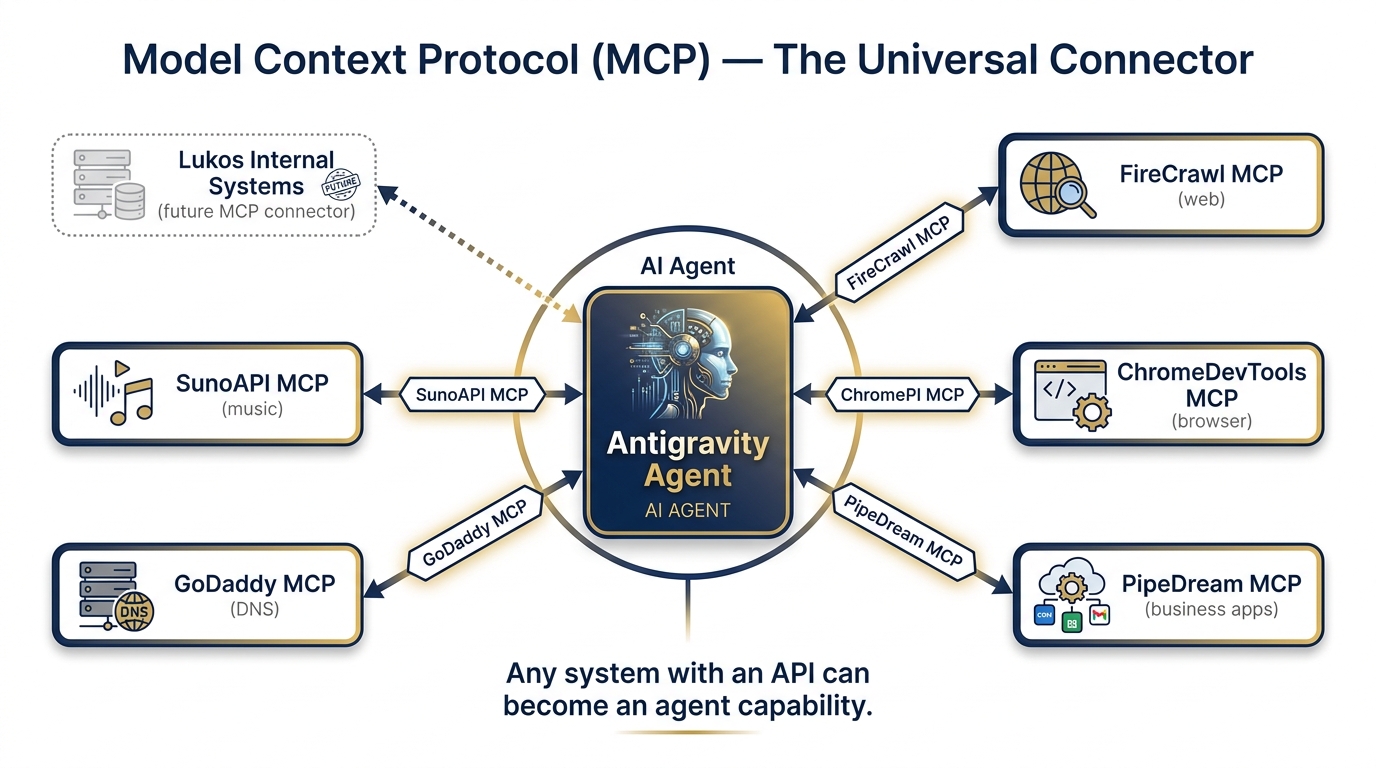
Figure 10:Figure 6.10: The Model Context Protocol as universal connector — any system with an API can become an MCP server, making it a native capability of any connected AI agent.
Here’s what it means for Lukos: Any system that Lukos uses internally — any database, any reporting system, any knowledge management platform, any exercise management tool — can become an agent capability without rebuilding the AI stack. Someone needs to write an MCP server for that system. Once that’s done, the Antigravity agent can query it, update it, and reason over its data as naturally as it searches the web with FireCrawl.
As Lukos’s data systems get MCP connectors, the synthetic team’s reach expands. The agent can query the lessons database directly. It can pull exercise histories from the JELC tracking system. It can read team readiness reports from whatever system holds them.
Today you’re connecting to five public MCP tools. In 12 months, you could be connecting to Lukos’s internal data fabric. The architecture scales.
6.7 The Lukos Build Ideas Worth Prototyping Right Now
Everything in this chapter comes together in three concrete prototypes that any analyst on the bench could build in Antigravity today — without writing a line of code.
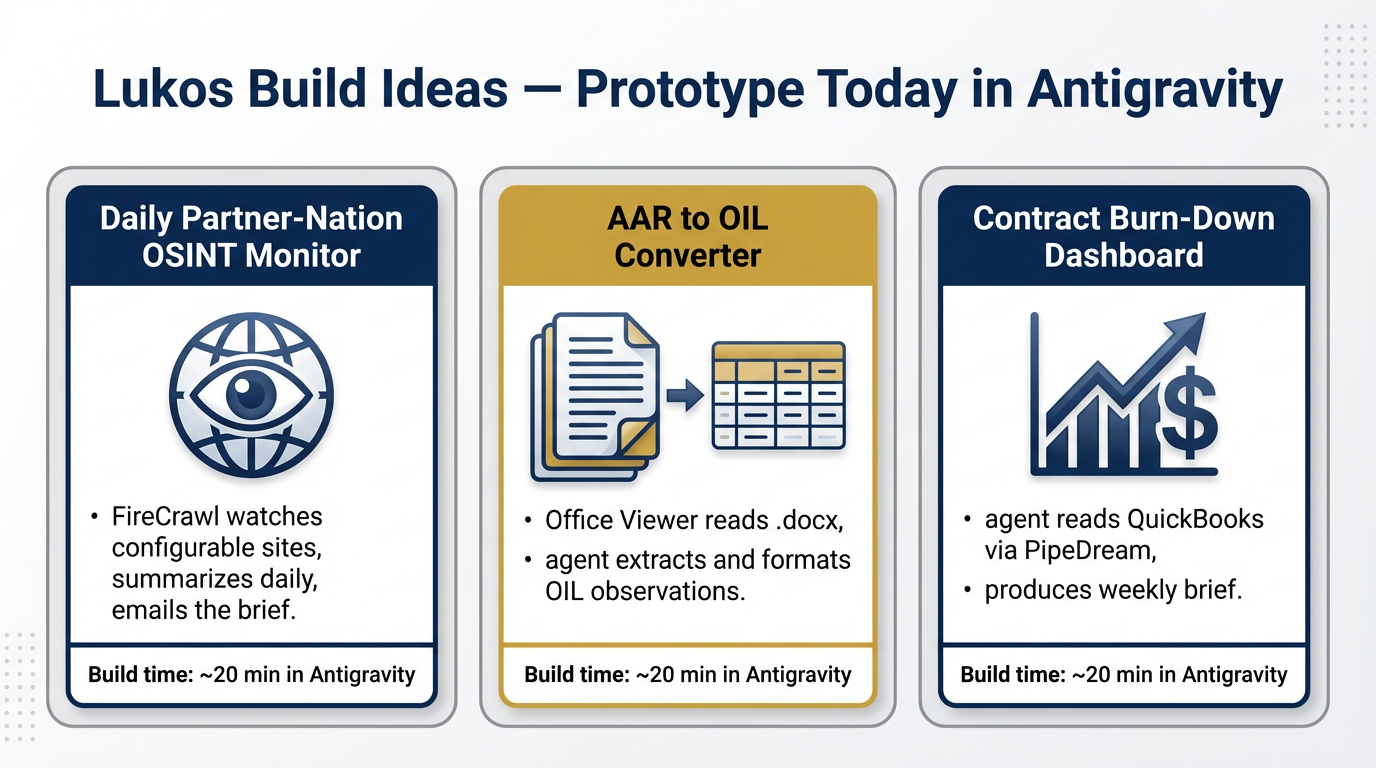
Figure 11:Figure 6.11: Three Lukos prototypes achievable in Antigravity today — each addresses a real workflow pain point and each could be built by a non-developer analyst in under 20 minutes.
Prototype 1: The Daily Partner-Nation OSINT Monitor
The problem it solves: Keeping current on partner-nation developments requires daily attention to multiple sources. Currently, that means individual analysts spending time each morning reading sites, extracting relevant information, and assembling a brief — before any analytical value-add begins.
What the agent builds: A configurable workflow where FireCrawl monitors a defined list of sources (news sites, government portals, think tank publications) for mentions of specific partner nations, threat actors, or key topics. The agent synthesizes the day’s relevant findings into a BLUF-formatted brief and sends it to a designated distribution list.
What “building it” looks like in Antigravity: You open Antigravity, connect FireCrawl, and in the chat panel describe: “Build a daily brief generator. It should search the following sites every morning for articles mentioning [partner nation]. It should organize findings into a BLUF brief with three sections: Security Environment, Political Landscape, Economic Activity. Include source URLs. Email the brief to [distribution list].” The agent writes the workflow. You test it. You deploy it.
Time investment: 20 minutes to describe and validate. Recurring ROI: hours per analyst-week recovered.
Prototype 2: The AAR to OIL Converter
The problem it solves: Converting After Action Reports into structured OIL (Observation-Insight-Lesson) format is one of the highest-value and highest-labor tasks in the Lukos knowledge capture cycle. It currently requires an experienced analyst to read the entire AAR, identify the relevant observations, extract the insights, and format them into the OIL schema.
What the agent builds: A workflow where the analyst drops a .docx AAR into the Antigravity workspace. The agent, using the Office Viewer plugin, reads the document in full, extracts every observation and lesson-worthy insight, and returns a structured table formatted for direct import into the Lukos lessons database.
What “building it” looks like in Antigravity: “Install the Office Viewer plugin. When I upload a .docx file, read it and extract all observations, insights, and lessons in OIL format. Return a table with columns: Observation, Insight, Lesson, Category, Priority. Categories should be: Leadership, Planning, Execution, Sustainment, Training.” The agent writes the workflow. You test it on a sanitized AAR. You validate the output quality. You have a co-pilot.
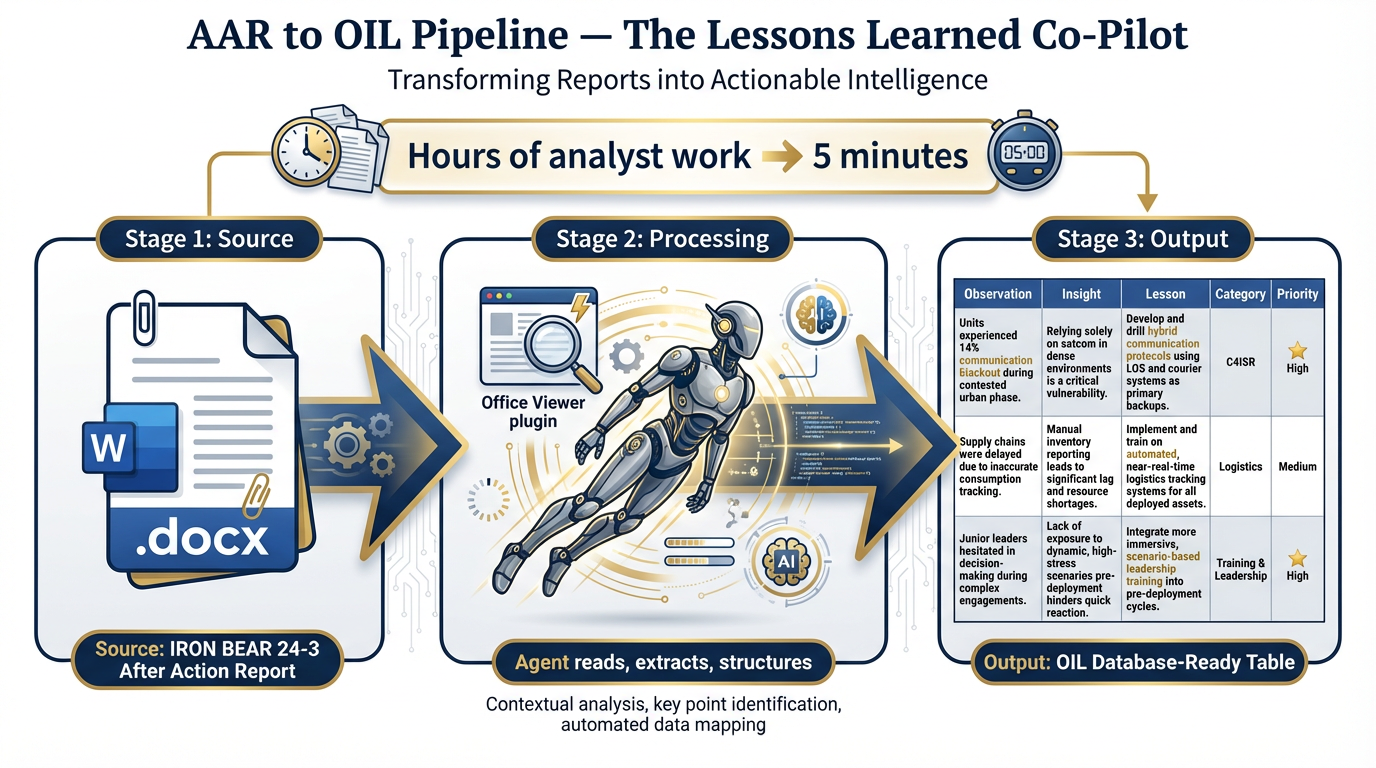
Figure 12:Figure 6.12: The AAR-to-OIL Pipeline — Office Viewer reads the source document, the agent extracts and structures, the output is a database-ready OIL table. Hours of analytical work, completed in minutes.
Time investment: 20 minutes to configure and validate. The hours saved per AAR processed compound across every exercise cycle.
Prototype 3: The Contract Burn-Down Dashboard Reader
The problem it solves: PM staff spend hours each week manually pulling financial data from QuickBooks, formatting it, and producing the burn-down summaries that leadership needs to make resource allocation decisions.
What the agent builds: A workflow that queries QuickBooks via PipeDream on a weekly cadence, pulls spend-to-date against period-of-performance and budget milestones for each active contract, identifies exceptions (contracts over- or under-burning against their pacing models), and produces a one-page brief formatted for PM review.
What “building it” looks like in Antigravity: “Connect to QuickBooks via PipeDream. Each Monday morning, pull the burn-down data for the following contract numbers. Format the results as a PM brief with: a traffic-light status for each contract (green/yellow/red), the key metrics (budget, spend-to-date, PoP elapsed percentage, burn rate), and exception flags for anything that falls outside ±15% of expected pacing. Email to [PM distribution list].”
Time investment: 30 minutes to configure, test, and validate. Recurring ROI: 2–3 hours per week of PM staff time recovered, and a consistent analytical lens applied to every contract weekly instead of whenever time permits.
Three-Tier Hands-On Labs
By Chapter 6, you’ve done significant work with AI tools. These labs are not tutorials — they’re operational drills. They should feel like real work, because they are.
Group Lab: The Open-Source Intelligence Drill
This lab uses FireCrawl + Antigravity to produce a real intelligence product. Every tier produces something a site lead would actually want to read.
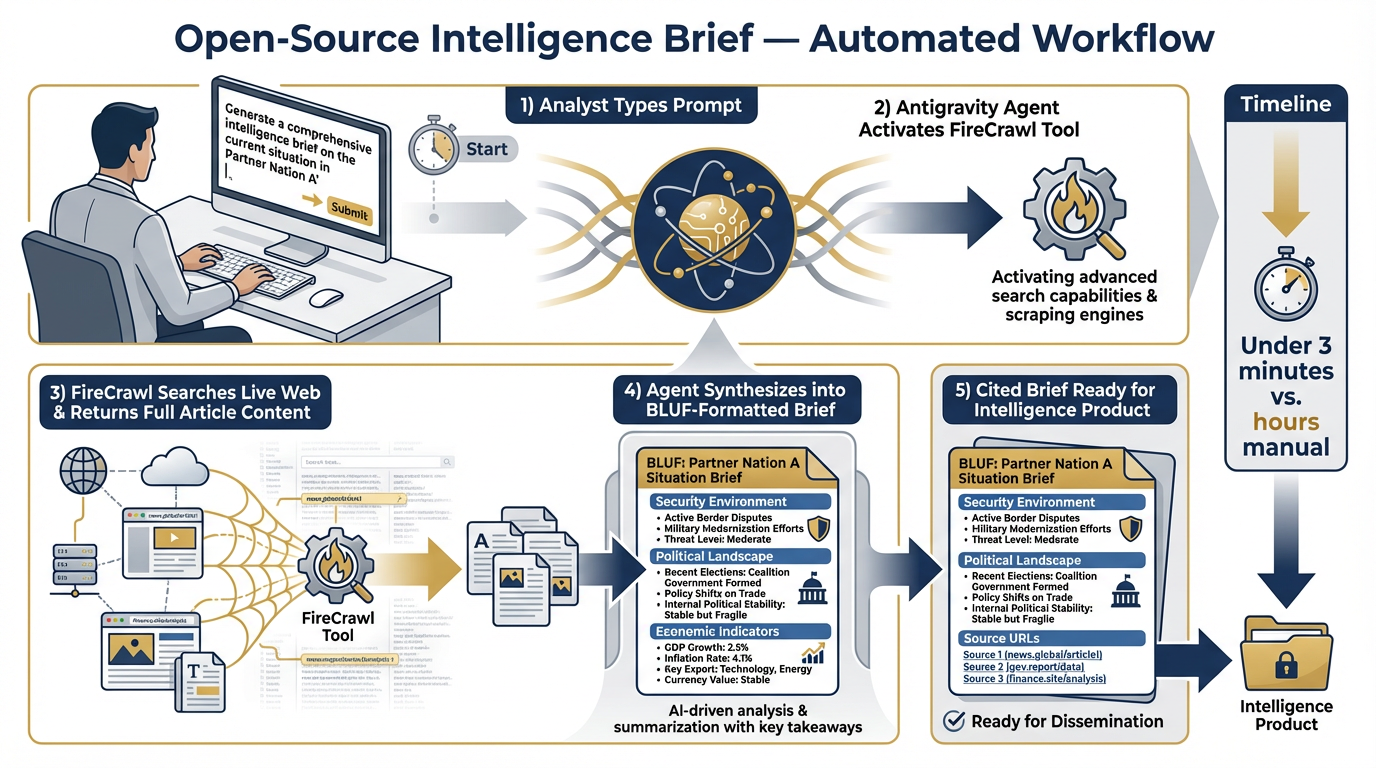
Figure 13:Figure 6.13: The OSINT Brief workflow — Antigravity + FireCrawl turning a plain English prompt into a formatted, cited intelligence product in under three minutes.
Tier 1 — The On-Ramp (5 Minutes)
Objective: Confirm that Antigravity + FireCrawl can access live web content and summarize it.
Instructions:
Open Antigravity at antigravity.google. Sign in with your Google account.
Create a new workspace. Name it “OSINT Drill.”
Verify that FireCrawl is connected (check Tools in Settings).
In the chat panel, type:
“Search the web for the five most recent news articles about [partner nation from the exercise scenario]. For each article, give me: the headline, the publication name, the publication date, and a one-paragraph summary of the key points.”
Review the output. Note the publication dates — are these current? Are the sources credible?
Success criterion: Five summarized articles with publication dates and source URLs, retrieved by an agent that actually went to the web — not recalled from training data. You’ll know because the dates will be recent and the sources will be linkable.
The debrief question: How long would this have taken you manually? How does the agent output compare in quality to what you would have assembled yourself?
Tier 2 — The Core Rep (20 Minutes)
Objective: Build a brief that could go into a real weekly intelligence product.
Instructions:
In the same workspace, type the following prompt:
"You are a Foreign Area Officer writing a weekly open-source intelligence summary for your unit’s J2. Search for the last 7 days of news about [partner nation] across defense, political, and economic topics.
Return a BLUF-formatted brief with exactly three sections: — Security Environment (military movements, exercises, partnerships, incidents) — Political Landscape (leadership, elections, coalition dynamics, international relations) — Economic Indicators (significant economic developments, sanctions, trade, key contracts)
For every factual claim, include the source URL in brackets. Begin with a two-sentence BLUF."
When the brief is returned, review it critically:
Are the source URLs real and accessible?
Are the dates accurate?
Are there claims that seem inconsistent with what you know?
Would you put your name on this product (after verification)?
Iterate: If a section is thin, prompt the agent to “expand the Security Environment section with additional sourcing.”
Success criterion: A formatted, cited BLUF brief that could be inserted directly into a weekly intelligence product. Produced in under 3 minutes of agent execution time, with your analytical review on top.
Tier 3 — The Wow Moment (30 Minutes)
Objective: Use the Office Viewer plugin to automate OIL extraction from a real AAR document. This is the Lessons Learned Co-Pilot in action.
Instructions:
Install the Office Viewer plugin in your Antigravity workspace (Extensions panel → Search “Office Viewer” → Install).
Locate the IRON BEAR 24-3 excerpt from Chapter 3. Save it as a .docx file (or use the .docx version provided by your facilitator).
Drag the .docx file into your Antigravity workspace.
In the chat panel, type:
"Read the file [IRON BEAR 24-3 excerpt.docx]. Extract every observation, insight, and lesson in OIL format.
Return a structured table with the following columns: | Observation | Insight | Lesson | Category | Priority |
Categories: Leadership, Planning, Execution, Sustainment, Training, Integration Priority: High / Medium / Low
Every row must be grounded in specific text from the document. If you cannot find a clear lesson in an observation, flag it for human review rather than inferring one."
Review the output table. Check:
Are the observations grounded in the source document?
Are the insights reasonable derivations?
Are the lessons actionable?
Are there observations the agent missed that you can identify?
Export the table. Consider: could this go directly into the Lukos lessons database?
Success criterion: A structured OIL table extracted from a .docx AAR by an agent, produced in under 5 minutes. The table should reflect the actual content of the source document — not generic lessons — and should be at or near production quality.
The debrief question: A thorough manual OIL extraction of a 20-page AAR typically takes an experienced analyst 2–4 hours. You’ve just done it in under 5 minutes. What is the right role for the human analyst now? (Hint: quality control, insight validation, and the judgment calls the agent flagged.)
Figure 14:Figure 6.14: The Office Viewer plugin reading a .docx AAR file during the Tier 3 lab — extracting structured OIL observations with source grounding. This is the Lessons Learned Co-Pilot in its simplest operational form.
Individual Lab: Build Your First Antigravity Workflow
This lab is personal. It should connect to something in your actual work this week.
Tier 1 (5 Minutes)
Open Antigravity. Ask the agent one question about your actual work this week — something you’d normally Google, ask a colleague, or spend 20 minutes finding yourself.
It could be: “What are the current USSOCOM experimentation priorities for FY26?” Or: “What’s the current GPQA benchmark for Gemini 3.1 Pro?” Or: “What does a typical JELC design phase look like for a 3-week field exercise?”
After the agent responds: evaluate. Did it go further than a Google search would? Did it synthesize across sources rather than returning a list of links? Did it cite its sources?
This is your calibration point. You now have a reference for what “agent response” looks like versus “search engine response.”
Tier 2 (15 Minutes)
Identify one repetitive task from your actual workflow — something you do regularly that follows a predictable pattern. Describe it in plain English to the agent and ask it to build a simple tool for that task.
Examples:
“Build me a simple web form where I paste an AAR paragraph and it returns a BLUF-style summary of that paragraph, plus a list of the key entities (people, units, events) mentioned.”
“Build me a tool where I input a contract number, obligated amount, and current spend, and it returns a color-coded burn rate status with a projected end-date for the period of performance.”
“Build me a checklist generator where I describe a TTX scenario and it returns the standard planning checklist for that scenario type.”
Watch the agent build it. Test it. What works? What needs refinement? Iterate once.
The key insight: You didn’t write code. You described a requirement, watched it get built, and tested the result. That’s the workflow.
Tier 3 (25 Minutes)
This tier uses the FireCrawl tool directly. No document upload needed — just a prompt and a connected tool.
Type the following in your Antigravity chat panel:
"Search the GAO website (gao.gov) for the three most recent reports related to special operations forces training or USSOCOM programs. For each report, return: — Title — Publication date — A 2-sentence summary of the key findings — The direct URL to the report
Return results in a formatted table. Prioritize reports published in the last 12 months."
Review the results. Note the dates, the URLs (test one or two to confirm they’re real), and the summary quality.
Now save that prompt as a template. In Antigravity, you can pin prompts or save them to a workspace note. This prompt is now a reusable GAO monitoring capability — run it weekly, run it before any acquisition review, run it before briefing leadership on program health.
Success criterion: A formatted table of real GAO reports with verified URLs and accurate summaries. Something your site lead would actually want to read. Something you could deliver every week with a 30-second effort after today.
Field Notes — What You Should Know Before You Deploy This
Before you take any of the capabilities in this chapter into operational use, Dr. Lee and Professor Marquez want to be direct about three things.
Antigravity is the most aggressive surface in this book. Unlike NotebookLM, which retrieves and synthesizes within a closed corpus, or AI Studio, which generates responses in an isolated environment, Antigravity agents act in the world. They can browse real websites, execute real code, send real emails, and call real APIs. That power comes with responsibility.
Every agent should run with explicit allow/deny lists. In Antigravity, you can and should configure which tools an agent is permitted to use for any given workflow. An OSINT brief agent doesn’t need access to QuickBooks. A contract analysis agent doesn’t need to send emails. Constrain the agent’s permissions to what the task actually requires.
Every workflow should have a cost ceiling. When agents are making API calls — to FireCrawl, to SunoAPI, to QuickBooks via PipeDream — each call has a cost. Set budget limits in your Antigravity workspace so that a runaway agent doesn’t run up unexpected bills.
Every output gets human review before it leaves the building. This is the non-negotiable. No agent output should go to a site lead, a customer, or a distribution list without an analyst reviewing it first. The agent produces the draft. The human validates it. That review is not bureaucratic overhead — it’s the entire quality assurance model. The agent can produce faster than any human. The human can validate better than any agent. The combination is the capability.
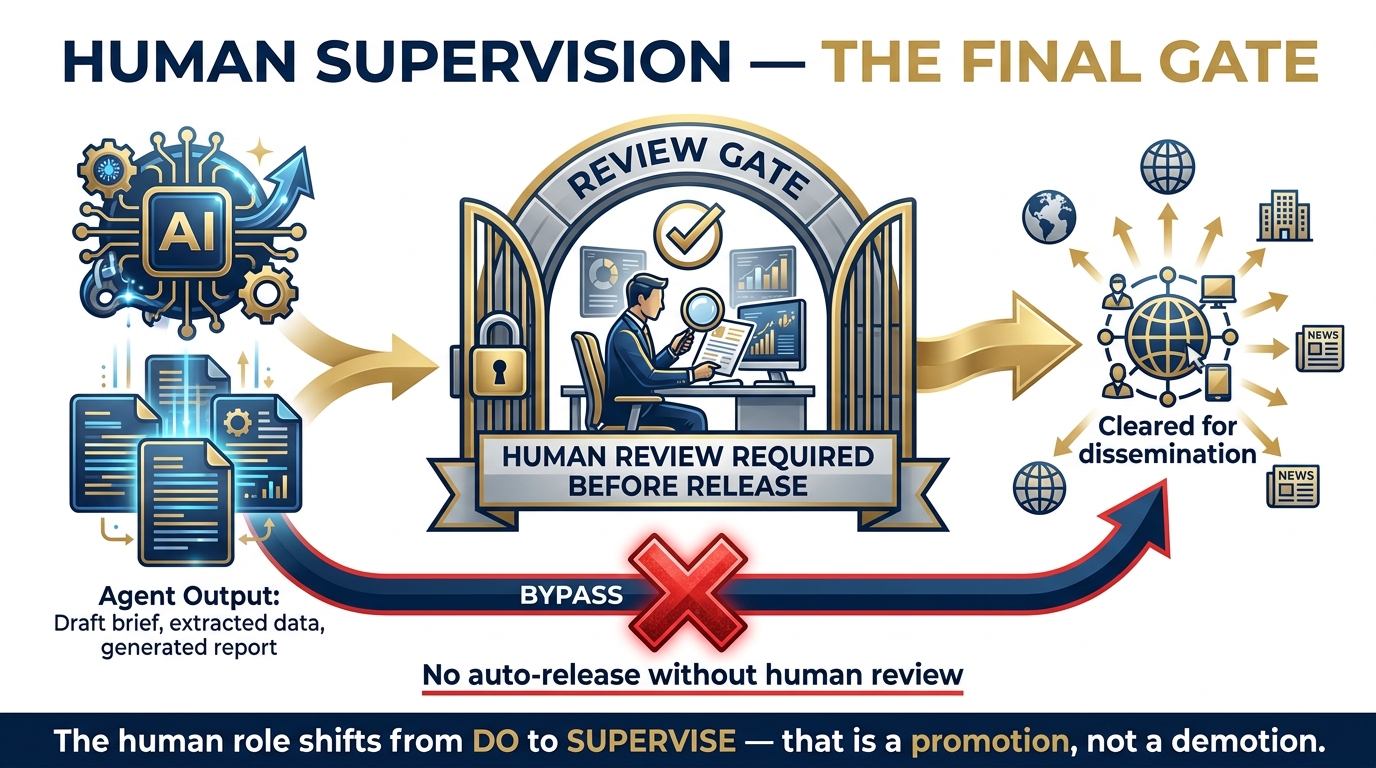
Figure 15:Figure 6.15: The human supervision gate — every agent output passes through human review before leaving the building. The analyst’s role shifts from production to quality assurance. That’s a promotion, not a demotion.
Pack Debrief
BLUF: Antigravity turns one analyst into a pack leader. Plugins extend what the agent can see. Tools let agents act in the world. Your job changes from “do” to “supervise” — and that shift is a promotion.
What you learned in this chapter:
On Antigravity: It’s not a code editor with AI bolted on. It’s an agent-first IDE built from scratch around the premise that agents plan, execute, validate, and learn — while humans supervise, direct, and validate outputs. It runs on Gemini 3.1 Pro (ARC-AGI-2: 77.1%, GPQA: 94.3%, 1M context). It’s free. It’s available now at antigravity.google.
On the two surfaces: Editor View is your workbench — synchronous, close supervision, one task at a time. Manager Surface is your OPCEN — asynchronous, multi-agent orchestration, you direct the pack rather than doing the work yourself.
On the four tenets: Task-level abstractions mean you describe what, not how. Verifiable artifacts mean you can audit every step. Multi-surface execution means the agent acts in the world, not just in text. Learning means the agent gets smarter about your workflow every session.
On plugins: Office Viewer extends what the agent can see — .docx, .pptx, .xlsx files are now readable. Claude Code extends the agent’s reasoning model — you pick the model that fits the temperament of the task.
On tools: FireCrawl makes the web a live data source. ChromeDevTools gives the agent a real browser. PipeDream + QuickBooks bridges to business systems. GoDaddy MCP handles DNS and domain operations. SunoAPI generates music for training content. Every one of these tools is an MCP server — and the MCP ecosystem will keep growing.
On the three prototypes: Daily OSINT Monitor. AAR-to-OIL Converter. Contract Burn-Down Dashboard Reader. Any of these could be built by a Lukos analyst today, in under 30 minutes, in plain English.
The shift to internalize: The question is no longer “Can I get IT to build this?” It’s “Can I describe this clearly enough for the agent to build it?” For a Lukos analyst, that’s a favorable shift. You were already trained to define requirements. Now the build cycle is measured in minutes.
Looking Ahead
In Chapter 7, we turn to the Skill Library — the modular, reusable intelligence workflows that Lukos builds and maintains as organizational assets. If Chapter 6 showed you how to build tools, Chapter 7 shows you how to organize, version, and institutionalize them so that the capabilities you build today are available to every analyst on the bench tomorrow.
The forge shapes the raw material. The library is where the shaped pieces are stored, sharpened, and drawn from when the mission requires.
Chapter 6 | The Wolfpack’s Edge | Dr. Ernesto Lee and Professor Carlos Marquez, Miami Dade College