The Phone System: A Call Center in Your Pocket
Every missed call is a missed mortgage payment for someone.
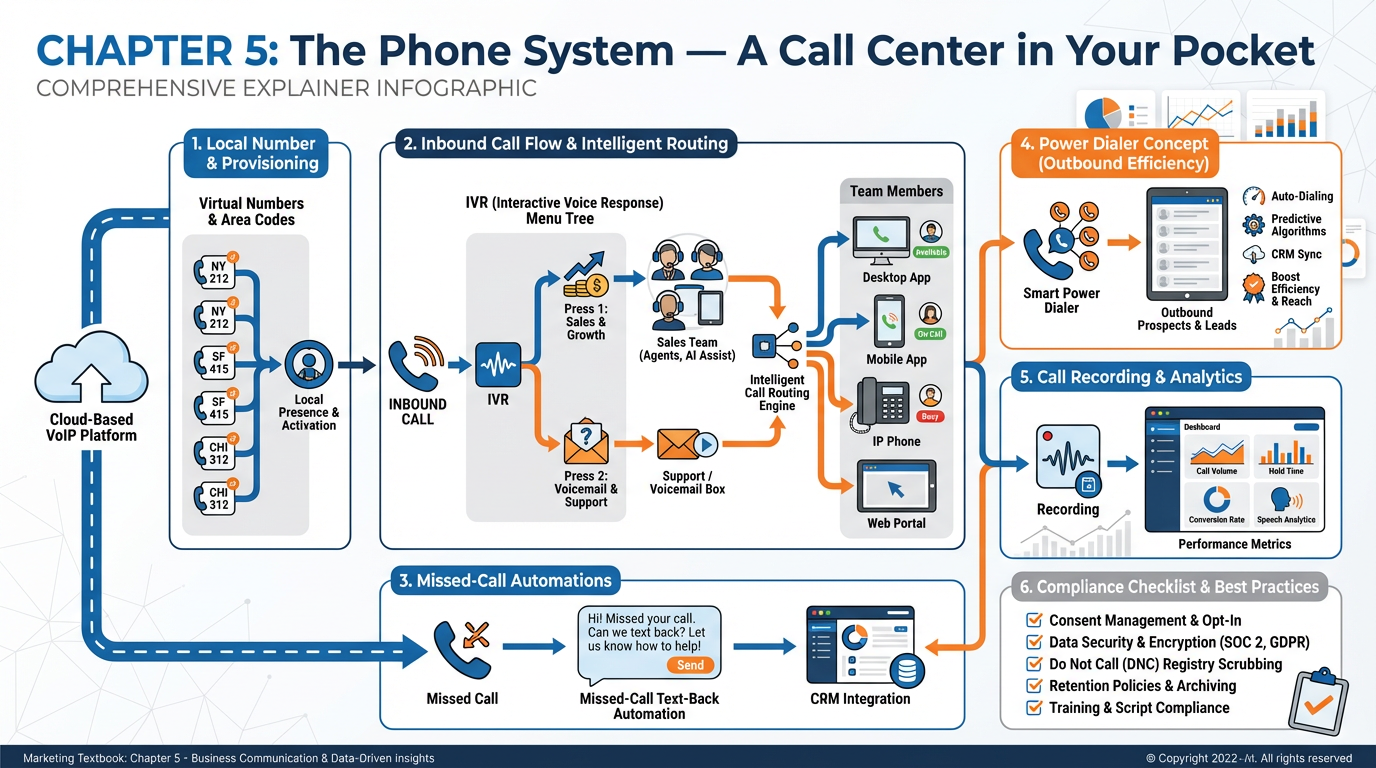
Figure 1:Chapter 5 at a Glance. A modern cloud phone system replaces an entire hardware call center — provisioning local numbers, routing calls intelligently, recording conversations, and automatically following up with every missed caller.
Here is a data point that the technology industry would rather you not dwell on: phone calls close more deals than any other marketing channel. Not email with its click-through dashboards. Not social media with its engagement metrics. Not even the most beautifully designed landing page. When a real human voice reaches another real human voice, the conversion rate jumps to somewhere between 30 and 50 percent, depending on the vertical — ten to fifteen times higher than the industry average for digital forms. The Harvard Business Review found that companies responding to inbound leads within five minutes were nearly 100 times more likely to connect than those who waited 30 minutes. When that response is a phone call rather than an email, the odds stack even higher.
This is the dirty secret of modern martech: the oldest communication technology we have is still the most powerful one.
Alexander Graham Bell would find the irony delicious. His original invention — the telephone — was the first killer app in the history of commerce. Banks used it. Insurance companies built empires on it. The entire real estate, mortgage, and financial services industries were built on the assumption that a phone conversation was the most reliable path from prospect to client. Then the internet arrived, email arrived, social media arrived, and the technology industry declared the phone dead. They were wrong. The phone did not die. It moved to the cloud, got smarter, got cheaper by orders of magnitude, and is now sitting inside the same platform where you manage your CRM, your funnels, and your email automation.
What changed is not whether phone works. What changed is who can afford to run a phone operation. In 2005, a call center required a physical room, a PBX hardware system that cost tens of thousands of dollars, a team of dedicated agents, and an IT department to keep it running. Today, a two-person team with a laptop and a VibeReach.io subscription can provision local phone numbers in any market in the country, build a professional IVR menu system, run a power dialer through a list of 500 prospects, drop pre-recorded voicemails with a single click, coach live agents in real time without the caller hearing a word, and automatically text back every missed call — all before lunch.
This chapter is about how to build that system, understand the technology underneath it, and use every feature without getting sued.
15.1 Why Phone Still Wins — The Data Nobody in Tech Wants to Hear
The academic literature on multi-channel lead response is unambiguous. A landmark study by James Oldroyd and colleagues at Kellogg School of Management demonstrated that the odds of qualifying a lead drop by over 80 percent if you wait longer than five minutes after initial contact. Follow-up by phone outperforms email at every stage of that window. A 2023 analysis by BrightLocal found that 60 percent of consumers preferred to contact a local business by phone for service inquiries, even when other channels were available.
The intuition is not complicated. A phone call communicates tone, urgency, and personality in ways that text simply cannot replicate. It establishes presence. It creates reciprocity — when someone picks up a ringing phone, the social contract of the conversation compels them to engage. Email can sit unread for days. A voice message sits in a more psychologically immediate space.
For high-ticket transactions — mortgage applications, commercial insurance, business funding, real estate acquisitions — the phone is not just useful. It is often legally and practically required. Certain disclosures must be made verbally. Certain trust thresholds can only be crossed through conversation. The industries that generate the highest revenue per lead have always known this, which is why they built entire call center infrastructures around it.
The insight that modern martech delivers is not that phone is important — everyone in those industries already knew that. The insight is that you no longer need to build a hardware call center to compete. The cloud phone stack in VibeReach.io delivers enterprise-grade telephony capability to any business at a fraction of the former cost. This levels the playing field in a way that the technology industry has been slower to celebrate, because it does not fit neatly into the narrative that everything digital is superior to everything analog.
So what does this mean for humans in the room? It means that if you are not systematically capturing, routing, recording, and following up every inbound and outbound call in your business, you are leaving the highest-converting channel in your arsenal running on autopilot. This chapter gives you the map to fix that.
25.2 How Internet Calling Actually Works: A Gentle Tour Under the Hood
Before building a phone system, it helps to understand what is actually happening when a VoIP call travels from one endpoint to another. You do not need to become a network engineer. But understanding the basic architecture helps you troubleshoot problems, explain the system to clients, and make better configuration decisions.
Traditional telephony — the Public Switched Telephone Network (PSTN) — works by establishing a dedicated circuit between two phones for the duration of a call. Every call reserves a physical pathway. This is why traditional infrastructure was expensive: it required enormous physical networks of copper wire, switching stations, and dedicated hardware.
VoIP works differently. When you speak, your voice is sampled thousands of times per second, converted into binary data, compressed using an audio codec, and broken into small packets. Those packets travel across the internet — potentially through dozens of different routers and data centers — and reassemble at the destination in real time. The codec decompresses the audio, converts it back to an analog signal, and the person on the other end hears your voice. All of this happens in milliseconds.
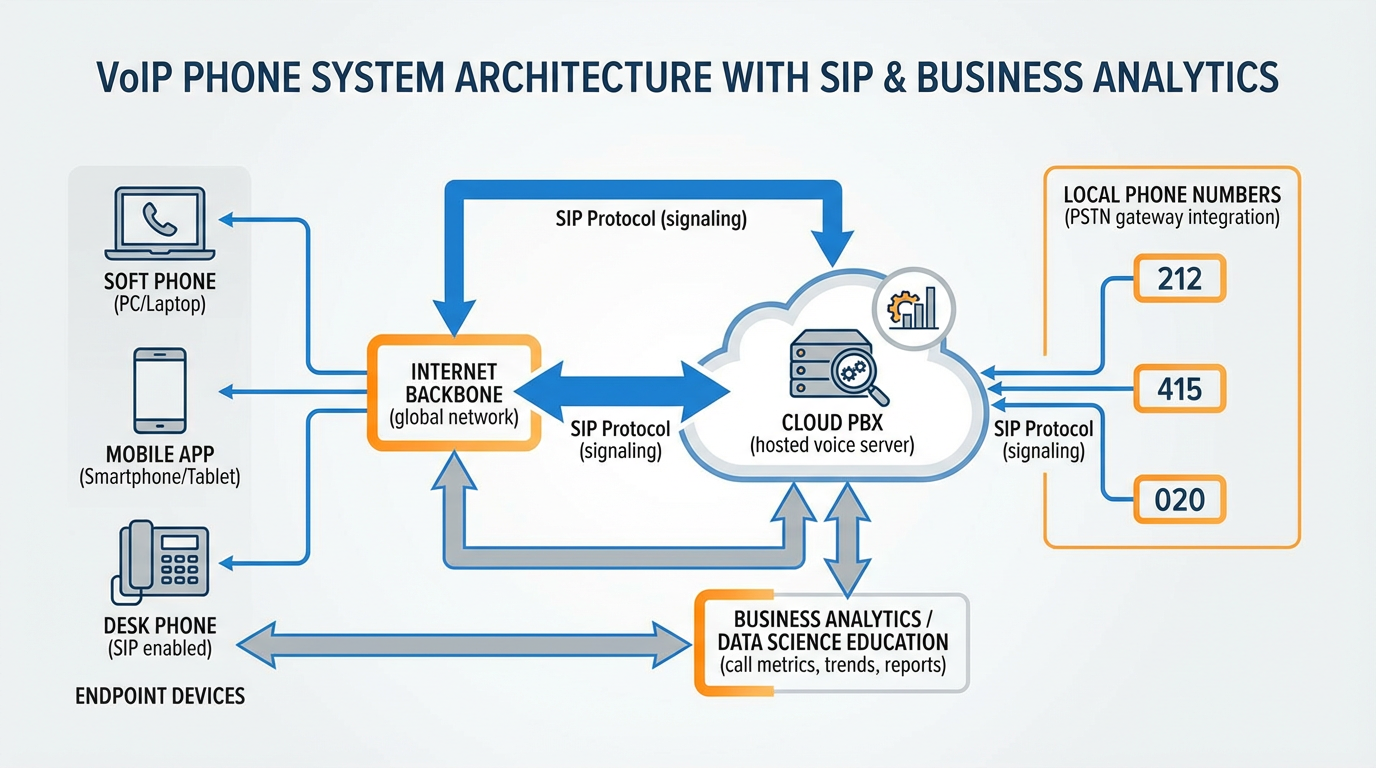
Figure 2:VoIP Architecture. Voice data travels as compressed packets across the internet backbone, through a cloud PBX, and arrives at any endpoint device — softphone, mobile app, or desk phone — regardless of physical location.
The protocol that manages most VoIP calls is SIP — the Session Initiation Protocol. SIP handles the signaling: it is the digital handshake that says “I want to call this number,” negotiates connection parameters, and tears down the call when it ends. The actual audio travels over a separate protocol called RTP (Real-time Transport Protocol). When you see references to “SIP trunking” in telecommunications, it means connecting your cloud phone system to the traditional telephone network through a SIP gateway, allowing calls to flow between VoIP systems and regular phone numbers.
VibeReach.io manages all of this infrastructure through its built-in telephony layer, powered by enterprise-grade carrier networks. You do not configure SIP servers or manage codecs. You click a button and provision a phone number. But the architecture underneath is doing all of the above automatically.
The practical implication of VoIP architecture is that call quality depends on internet connection quality. A stable, low-latency connection with sufficient bandwidth produces crystal-clear audio. A congested or high-latency connection produces the choppy, robotic sound that most people associate with “bad VoIP.” Modern cloud platforms mitigate this through intelligent packet routing and redundant carrier connections, but the principle remains: your phone system is only as good as your internet.
35.3 Provisioning Numbers: Local Presence, Toll-Free, and Market Strategy
When you provision a phone number in VibeReach.io, you face a strategic choice that most small businesses make without thinking about it: local numbers versus toll-free numbers, and how many numbers to maintain.
Local numbers carry implicit trust signals. When a prospect in Tampa sees a 813 area code calling, there is a fraction-of-a-second recognition that the caller might be local — a neighbor, a business in their community. Answer rates for local numbers run 30 to 50 percent higher than answer rates for toll-free numbers in most B2C contexts. For businesses doing outbound prospecting, maintaining local numbers in each market you work is not a nicety — it is a measurable revenue variable.
Toll-free numbers (800, 888, 877, 866, 855, 844, 833) serve a different purpose. They signal national scale and professionalism. For inbound marketing — putting a number on a billboard, a TV spot, or a national website — toll-free numbers communicate that the business has sufficient infrastructure to receive calls from anywhere. They eliminate any perception that calling the number will cost the caller money (though that has been a non-issue for consumers since mobile became ubiquitous). Toll-free numbers also port easily between carriers if you ever switch platforms.
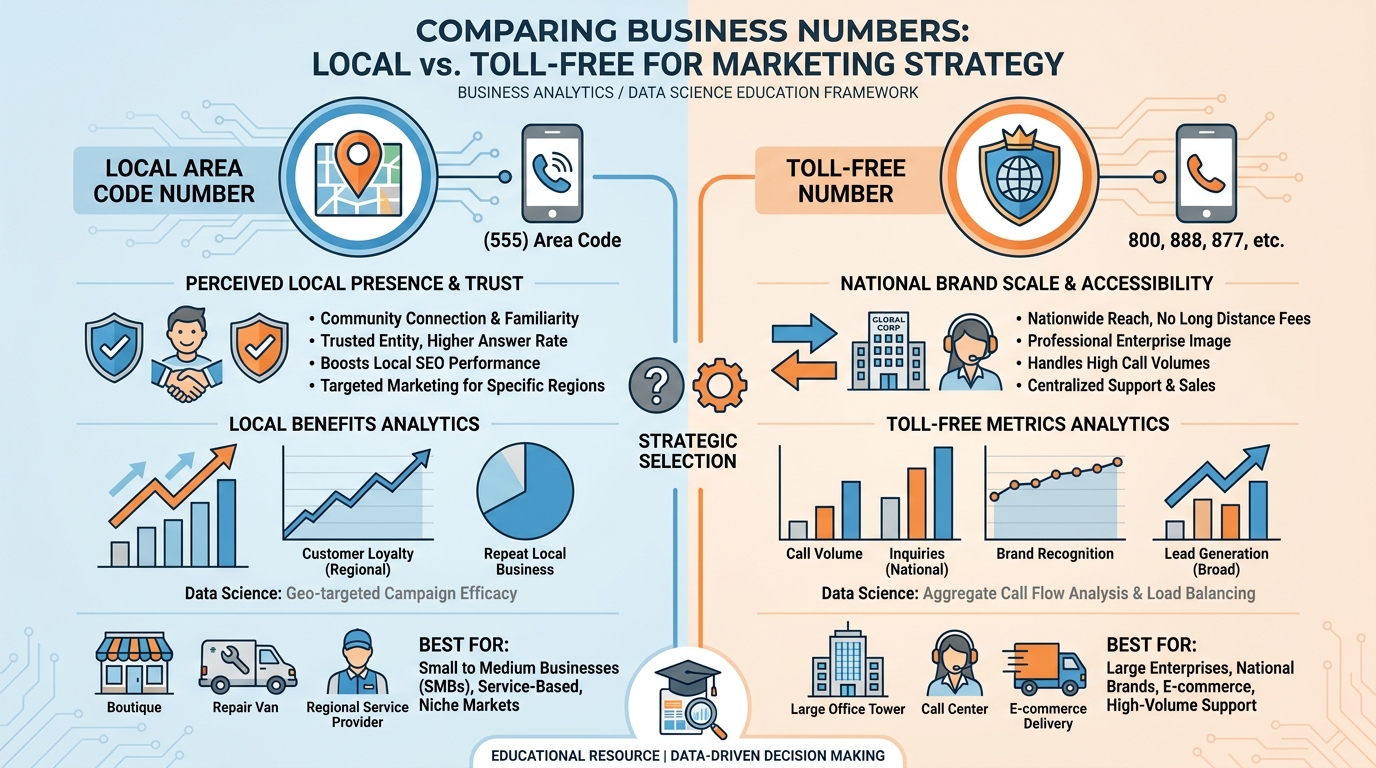
Figure 3:Local vs. Toll-Free Numbers. Local numbers maximize answer rates for outbound prospecting. Toll-free numbers signal national scale for inbound marketing campaigns. A sophisticated operation uses both strategically.
In VibeReach.io, provisioning a number takes under two minutes. Navigate to Settings → Phone System → Phone Numbers, click Add Number, and choose between local or toll-free. For local numbers, enter the area code for your target market and the system will display available numbers. For toll-free, select your preferred prefix. Numbers cost a small monthly fee and include a bundle of minutes and messaging.
Strategic number architecture for a growth-stage business might look like:
One primary inbound number (toll-free or local flagship market) used in all marketing materials
One number per geographic market being actively prospected outbound
One dedicated number per major campaign (allows you to track which marketing channel generated each call)
One internal number per team member if routing needs to be granular
The ability to spin up and spin down numbers on demand — paying only for what you use — is one of the most underappreciated capabilities of the cloud phone system. Traditional telephony made number provisioning a bureaucratic process that took days or weeks. In VibeReach.io, you provision in minutes.
45.4 Inbound Flows, IVR Menus, and Business Hours
When a call arrives at your VibeReach.io number, the first question the system asks is: what should happen next? The answer is defined by your inbound call flow — a configurable sequence of actions that handles the call based on time, caller identity, available agents, and menu selections.
The building block of most professional inbound setups is the IVR menu. A caller dials your number, hears a professional greeting (“Thank you for calling Apex Capital. For our sales team, press 1. To leave a voicemail, press 2.”), presses a key, and gets routed to the appropriate destination. This single piece of automation replaces a live receptionist for the initial routing function and ensures that every caller reaches the right team without human intervention.
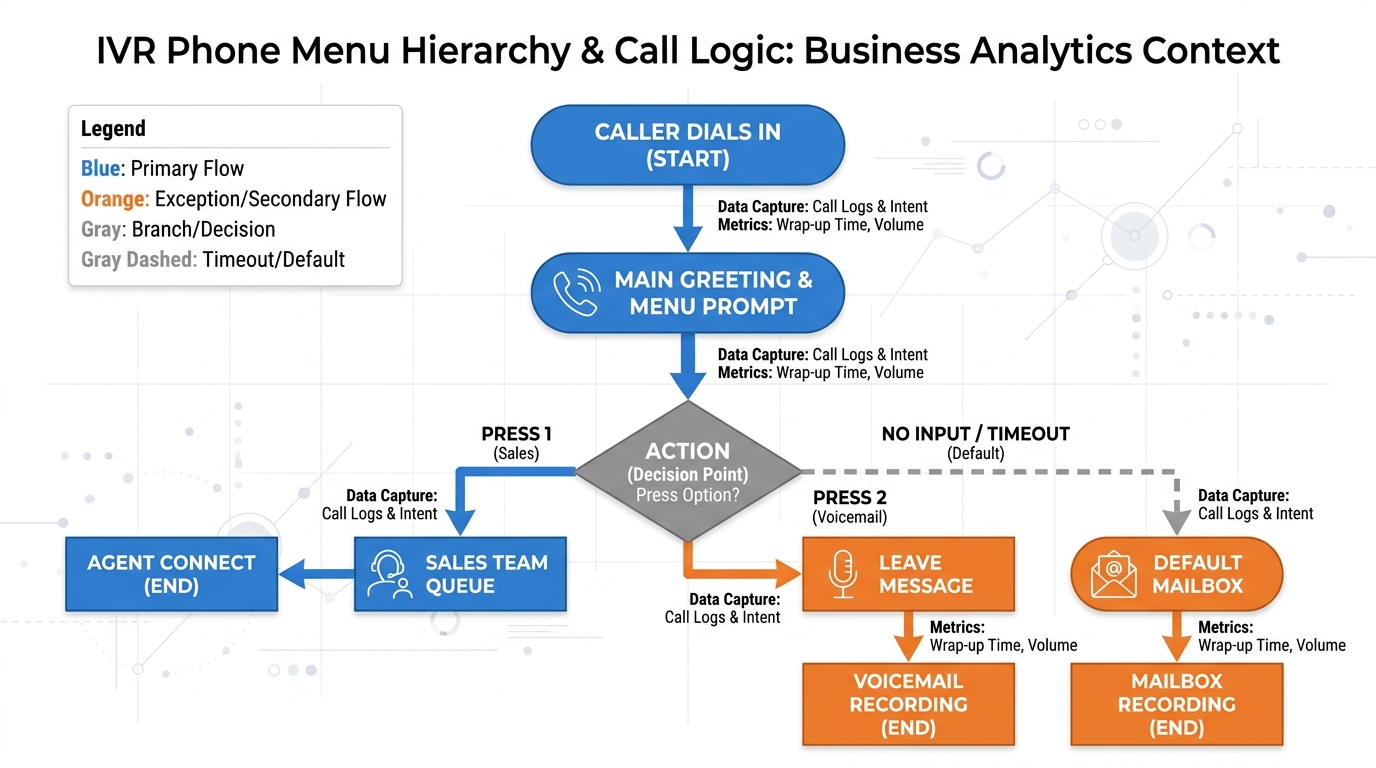
Figure 4:IVR Menu Tree. A simple two-option IVR routes callers to the appropriate destination within seconds, eliminating hold-time frustration and ensuring no call is mishandled.
Business hours configuration sits alongside the IVR and governs when different routing rules apply. During business hours, calls might flow to live agents. After hours, the system plays a different greeting and routes to voicemail or triggers an automated follow-up. This is configured in Settings → Business Hours in VibeReach.io, where you define open and close times for each day of the week and specify holiday closures.
The interaction between business hours and IVR routing is where sophisticated setups live. Consider:
During hours: IVR menu → Sales team ring group → Individual agent → Voicemail fallback
After hours: After-hours greeting → Voicemail with callback promise → Automated missed-call follow-up triggered
Building this requires no coding. The VibeReach.io call flow builder uses a visual interface where you drag and drop components — Gather Input (for IVR key presses), Say/Play (for audio), Forward (to route to agents), Voicemail (to capture messages), and Conditions (to branch based on time or caller data).
55.5 Call Routing, Forwarding, and the Right Number Ringing the Right Person
Routing is the intelligence layer of your phone system — the set of rules that determine which person or team receives a call based on any number of conditions. Simple routing rings one number. Sophisticated routing considers agent availability, caller history, geographic origin, time of day, and pipeline stage.
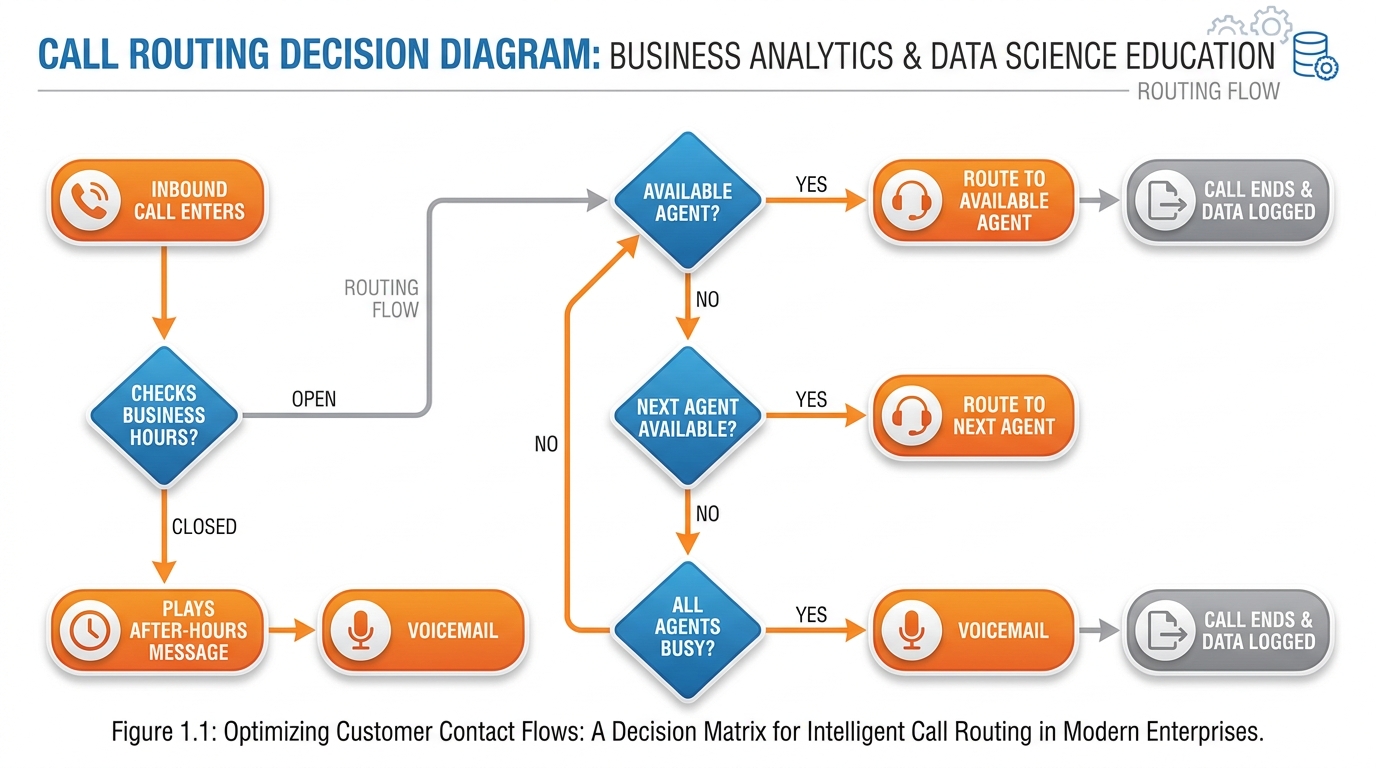
Figure 5:Call Routing Decision Flow. Smart routing ensures every caller reaches the best available resource — reducing abandonment and maximizing the probability of a live conversation.
VibeReach.io supports several routing strategies:
Simultaneous (blast) routing rings all agents in a group at the same time. The first agent to answer gets the call. This minimizes wait time but requires agents to be available and ready to respond quickly. Best for small teams where every call is high priority.
Sequential (round-robin) routing rings agents one at a time in a set order. If Agent 1 does not answer within a timeout period, the call moves to Agent 2, then Agent 3. This distributes call volume more evenly. Best for teams where some agents have primary responsibility and others serve as backup.
Sticky routing routes returning callers back to the same agent they previously spoke with, using the CRM’s contact history to identify them. This is powerful for relationship-based sales cycles where continuity matters. A mortgage broker knows their clients prefer to deal with the same loan officer every time.
Conditional routing uses data from the CRM to make routing decisions. A caller tagged as an existing client routes differently from a new lead. A caller from a specific geographic region routes to the agent covering that territory. This requires integration between the call flow and the contact record — something VibeReach.io handles natively because the phone system and CRM share the same database.
Call forwarding is the simplest form of routing: a VibeReach.io number forwards to a personal cell phone number. This is how a solo operator maintains a professional business number while receiving calls on their personal device without the caller ever knowing. The business number appears in caller ID on outbound calls, and the forwarded calls feel exactly like a direct call.
Best for: Small teams, high-priority inbound, maximum speed to answer.
All phones ring at once. First agent to pick up wins the call. Callers experience minimal wait time. Agents experience unpredictable volume bursts. Works well when every lead is worth fighting for immediately.
Best for: Tiered teams, primary/backup structures, even distribution.
Calls cascade through agents in order. Agent 1 has first right of refusal. If unavailable, Agent 2 picks up. Fair distribution over time. Slightly longer potential wait. Common in insurance agencies and mortgage shops.
Best for: Equal-opportunity distribution across same-skill agents.
Each new call goes to the next agent in rotation. No agent gets cherry-picked leads. Builds fair commission distribution. Common in real estate teams and multi-rep call centers.
Best for: Relationship-based sales, existing client service, long sales cycles.
Returning callers route to their assigned agent automatically. Builds rapport. Reduces friction for clients who hate repeating themselves. Requires CRM integration to function.
65.6 Recording, Transcription, and the Gold Inside Every Conversation
Every conversation your team has with a prospect or client contains information that your business currently loses the moment the call ends. What objections did the prospect raise? What emotional signals appeared in their voice? What did your agent promise? What follow-up was agreed upon?
Call recording captures this information. Transcription makes it searchable. Together, they turn your phone system from a communication tool into a training and intelligence asset.
In VibeReach.io, call recording is configured per phone number under Settings → Phone System → [Number] → Call Recording. You can toggle recording on or off, choose whether to record inbound calls, outbound calls, or both, and configure whether a disclosure beep plays to notify callers (required in many jurisdictions — more on compliance in Section 5.11).
Once recordings exist, transcription converts the audio to text using speech-to-text processing. The resulting transcript is attached to the contact record in the CRM, making every conversation searchable by keyword. Want to find every conversation where a prospect mentioned “interest rates”? Search the transcripts. Want to review every call where your agent said “I’ll get back to you” and never did? The transcript audit makes that visible.
The training value of recordings is enormous. New agents can listen to the top performers’ calls and hear exactly how objections are handled, how rapport is built, and how deals are closed. Sales managers can review calls to identify specific coaching moments. Pattern recognition across hundreds of transcripts reveals what language correlates with closed deals versus lost deals — intelligence that was previously available only to large enterprises with dedicated quality assurance teams.
75.7 The Power Dialer: Turning Cold Lists Into Warm Conversations
The math of manual outbound calling is brutal. A human agent manually dials a number, waits four to six rings, reaches a voicemail, leaves a message, hangs up, finds the next number, dials again. In an hour of aggressive manual dialing, a skilled rep might complete 20 to 30 dials and have 4 to 8 live conversations. The rest of the hour is dead time — ringing, voicemail navigation, dialing.
A power dialer eliminates the dead time. The agent connects a headset, clicks “Start Session,” and the system begins dialing automatically. When a number does not answer, the system skips to the next. When a live human answers, the call connects to the agent instantly. The agent has a live conversation, disposes the call (answered, interested, callback, not interested), and the system dials the next number in the queue before the agent finishes updating the contact record.
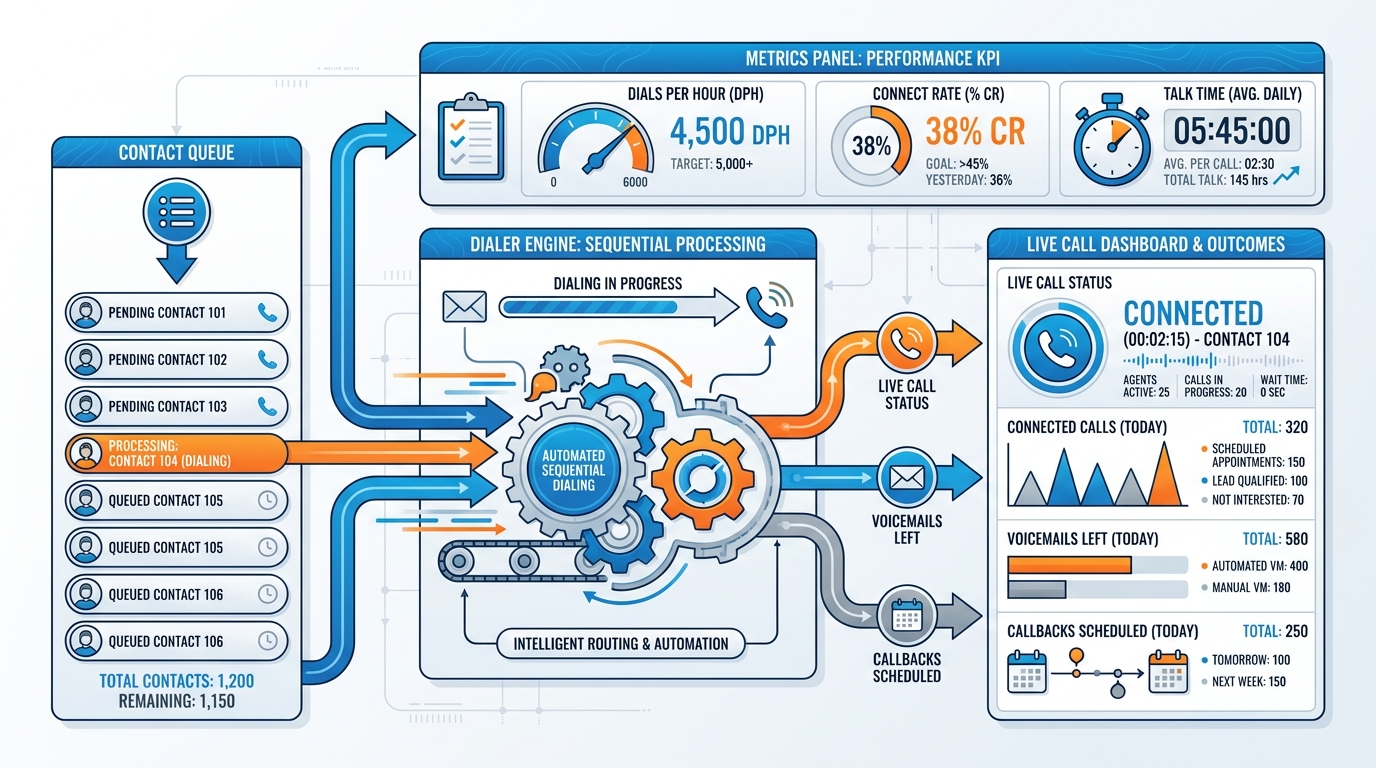
Figure 6:Power Dialer Architecture. The dialer engine processes a contact queue automatically, connecting the agent only to answered calls and tracking all outcomes — transforming 20 manual dials per hour into 60 to 80 automated dials with more live conversations.
In practice, power dialers increase live conversation rates by three to four times compared to manual dialing. A rep who would have 5 live conversations per hour manually might have 15 to 20 with a power dialer running through a well-qualified list. Over a six-hour dialing session, that difference compounds into a material change in pipeline velocity.
VibeReach.io’s power dialer integrates directly with the CRM, which means:
Caller history appears on screen when a live connection is made
The agent can see previous notes, pipeline stage, and contact details before saying a word
Call outcomes automatically update the contact record and can trigger workflow automations (a “Voicemail Left” disposition triggers a voicemail drop; a “Callback Scheduled” disposition creates a calendar event)
Local area code matching automatically selects the number that most closely matches the prospect’s area code for the outbound call
The last point deserves emphasis. Power dialers with local presence rotation use whichever provisioned number matches the prospect’s area code, automatically, without the agent making any selection. The prospect sees a local number calling and answers at higher rates. The agent gets more conversations per session. The pipeline fills faster.
85.8 Voicemail Drop: The Ninety-Second Secret Weapon
When the power dialer reaches a voicemail, two things can happen: the agent can manually record a message in real time, or they can drop a pre-recorded message with a single click and immediately move to the next dial.
Voicemail drop is the second option. The agent records a professional, personalized-sounding voicemail message once (“Hey, this is Marcus from Apex Capital, I’m reaching out because...”), saves it to their library, and during a dialing session, one click deposits that exact recording into any voicemail box. The agent is already dialing the next number before the message finishes playing.
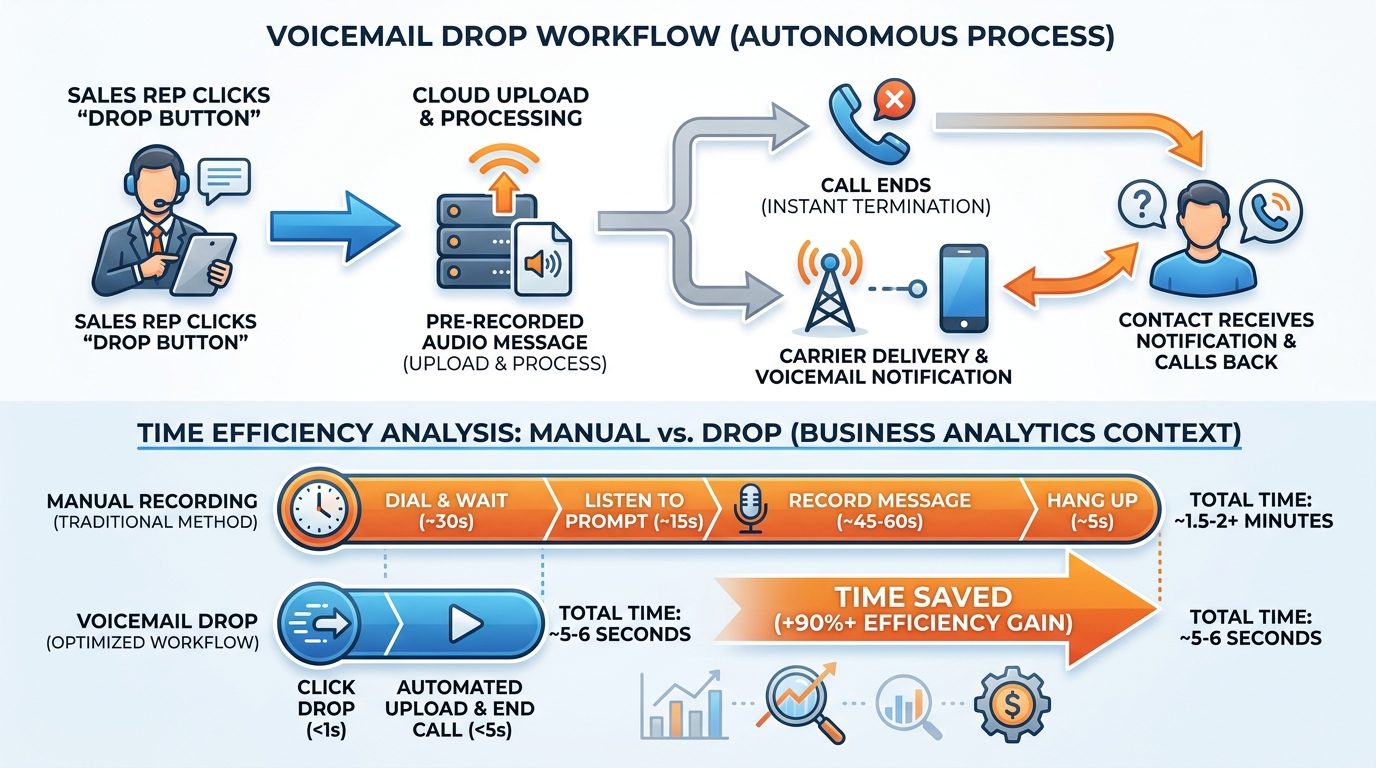
Figure 7:Voicemail Drop Workflow. One click deposits a professional pre-recorded message and immediately queues the next dial — turning voicemail from dead time into a systematic touchpoint.
The strategic value goes beyond time savings. Voicemail drop ensures message consistency. Every prospect in a campaign hears the exact same well-crafted message with the same energy and the same call to action. The agent does not get tired and start leaving rambling voicemails at 4 PM. The message does not degrade across 200 dials.
Best practices for voicemail drop messages:
Keep them under 30 seconds. Longer voicemails are deleted before they finish.
State the first name of the prospect if you are using personalized campaigns (though this requires individual recordings rather than a single universal drop)
Name one specific, credible reason for calling — not a generic pitch
End with a clear, low-friction call to action: “Give me a call back at [number] or just reply to the text I’m sending”
Sound like you are leaving one message, not reading a script to hundreds of people
Multiple drop messages allow A/B testing. Record two versions of the same message with different value propositions, alternate them across a campaign, and compare callback rates. The message that generates more callbacks wins and becomes the control for the next test.
95.9 Whisper and Barge: Training Closers in Real Time
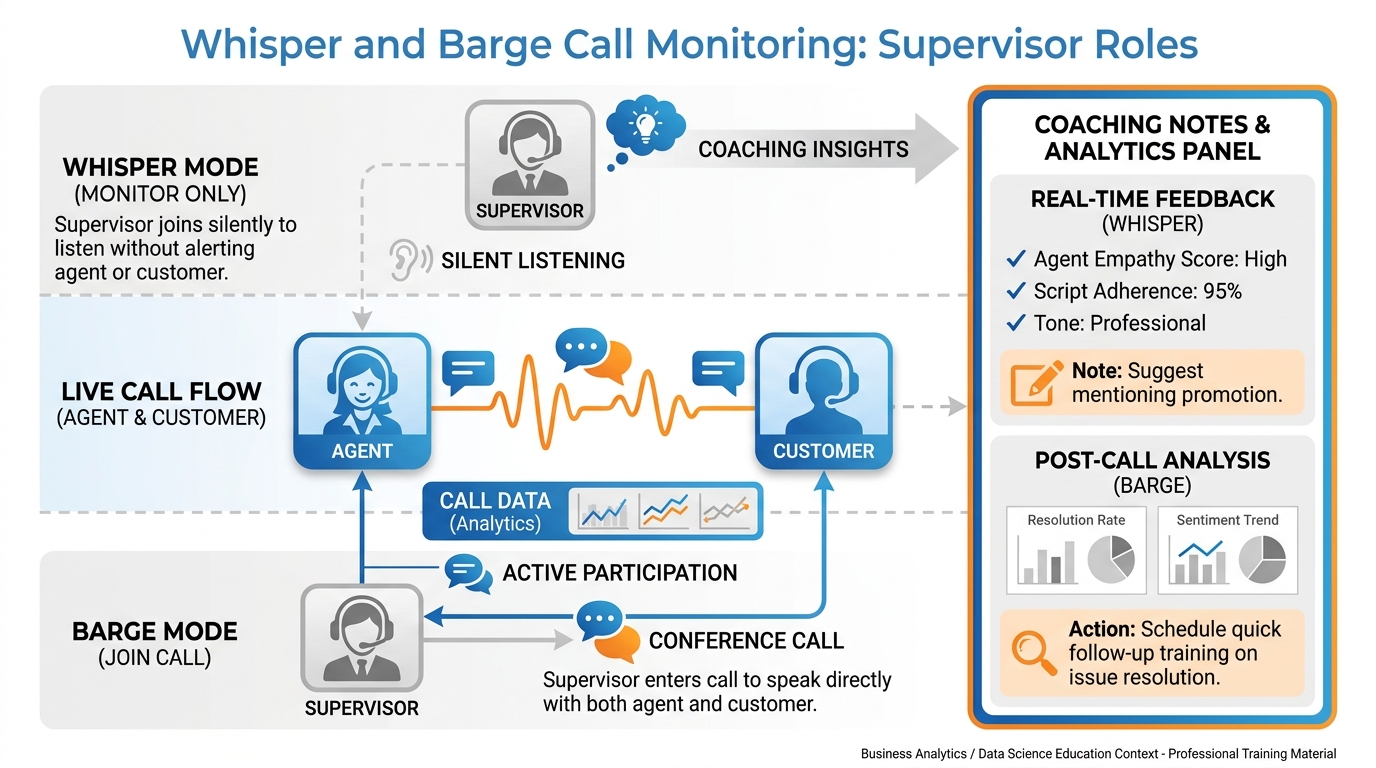
Figure 8:Whisper and Barge Call Monitoring. Sales managers can silently coach agents mid-call (whisper) or join the conversation directly (barge) — compressing months of coaching into live, high-stakes moments.
The traditional sales training model is painfully slow. A new rep joins the team, attends orientation, listens to recorded calls, does some role-play practice, and then goes live — often without a manager within earshot. The feedback loop is long: the rep has a bad call, the manager reviews the recording later, they discuss it in a weekly one-on-one, the rep tries to apply the feedback on the next call. By the time any coaching has measurable effect, weeks have passed and dozens of deals may have been lost.
Whisper and barge compress that feedback loop to milliseconds.
Whisper allows a supervisor to speak directly to the agent during a live call without the caller hearing a word. The supervisor is essentially coaching in the agent’s ear in real time. When the agent is fumbling an objection, the supervisor can say “Acknowledge the concern first, then bridge to the case study” and the agent can pivot immediately. The caller experiences a smooth, confident response. The agent gets coached in the exact moment it matters.
Barge goes one step further: the supervisor joins the call as a full participant. All three parties can now hear each other. This is appropriate when a call is at risk of falling apart and supervisor intervention can save it, or when a senior closer needs to take over from a junior rep mid-conversation. Done well, the supervisor can be introduced naturally (“I’m going to bring in our senior advisor on this one”) and the transition actually strengthens the client’s confidence rather than disrupting it.
In VibeReach.io, managers access the live call monitoring dashboard through the Reporting or Conversations section, where active calls appear in real time. Clicking on an active call provides the options to listen, whisper, or barge. The agent’s interface shows a visual indicator that monitoring is active, so they know coaching is available.
The training implication is transformative. Instead of waiting for post-call review, managers can ride along on every junior rep’s calls — especially in the first 30 days — and provide live corrections. The learning curve that traditionally takes six months compresses to six weeks. The deals that would have been lost to inexperience get saved in real time.
105.10 Missed-Call Text-Back: The Highest-ROI Automation Ever Invented
The premise is simple: a prospect calls your number, you miss the call, and within 60 seconds an automated message goes out that says “Hey, sorry I missed your call — this is Marcus from Apex Capital. What can I help you with today?”
The prospect, who was already motivated enough to call, sees the response and replies. You are now in a text conversation with a warm lead who initiated contact. The cost of the automation: approximately zero. The value: potentially enormous.
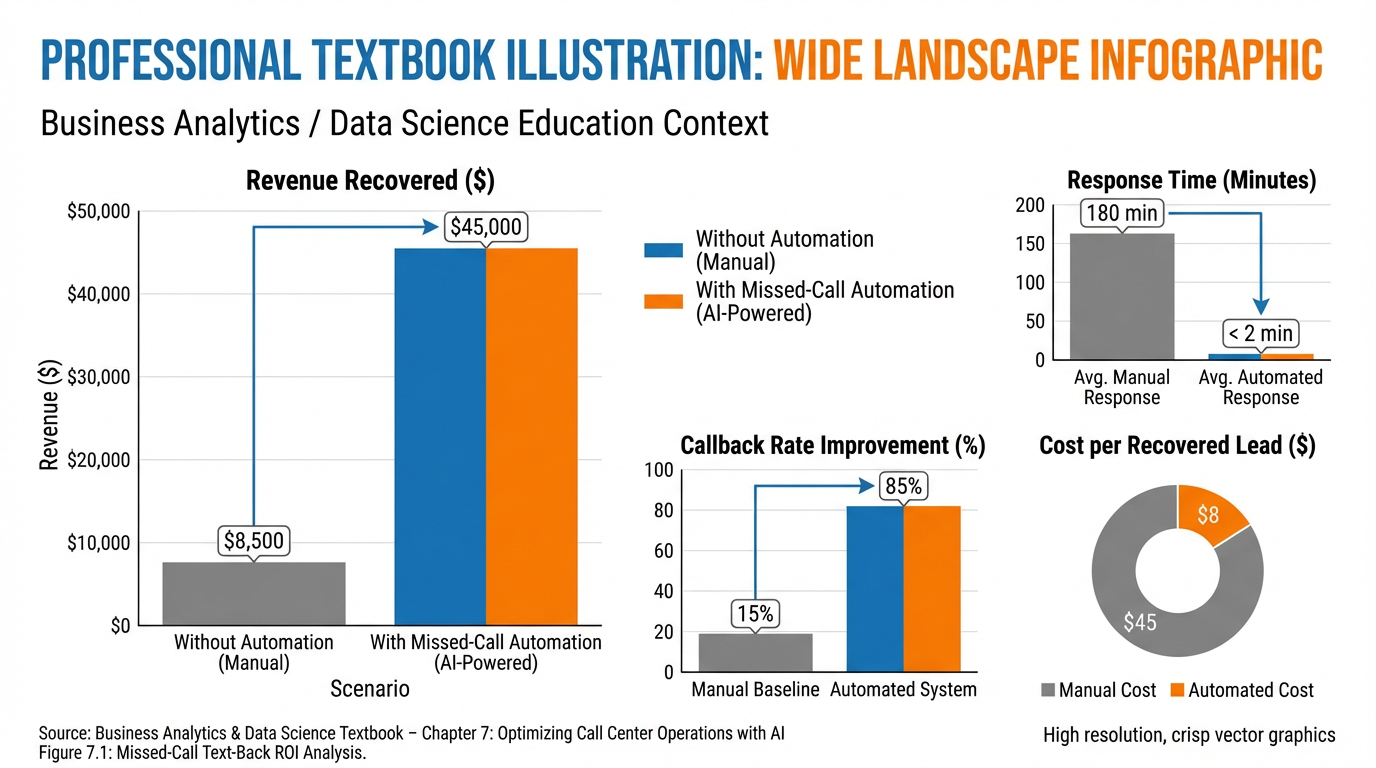
Figure 9:Missed-Call Text-Back ROI. Businesses that activate missed-call text-back consistently recover 20 to 35 percent of leads that would otherwise be lost — at near-zero marginal cost.
The response rate on missed-call text-back messages is dramatically higher than any cold outreach message because the context is established: the prospect just called you. They were already in action. The text arrives while they are still thinking about the call, still holding their phone, still in the mental mode of seeking a solution. This is the narrowest conversion window in marketing — and the automation catches it automatically, even at 11 PM on a Sunday.
Research consistently shows that 78 percent of consumers will do business with the first company that responds to their inquiry. Missed-call text-back is, in the vast majority of cases, the fastest possible response to an inbound missed call.
In VibeReach.io, the feature is configured under Settings → Missed Call Text Back. Toggle the feature on, configure the message template, and set a delivery delay (immediate, or a brief pause to seem more human). The message goes out automatically for every missed call that does not connect to a live agent.
115.11 Compliance, Consent, TCPA, and the Rules That Keep You Out of Court
The phone system is the most powerful tool in the marketing stack — and also the one with the most regulatory teeth. Understanding TCPA compliance is not optional. It is a foundational business requirement that every person building a phone-based marketing operation must internalize.
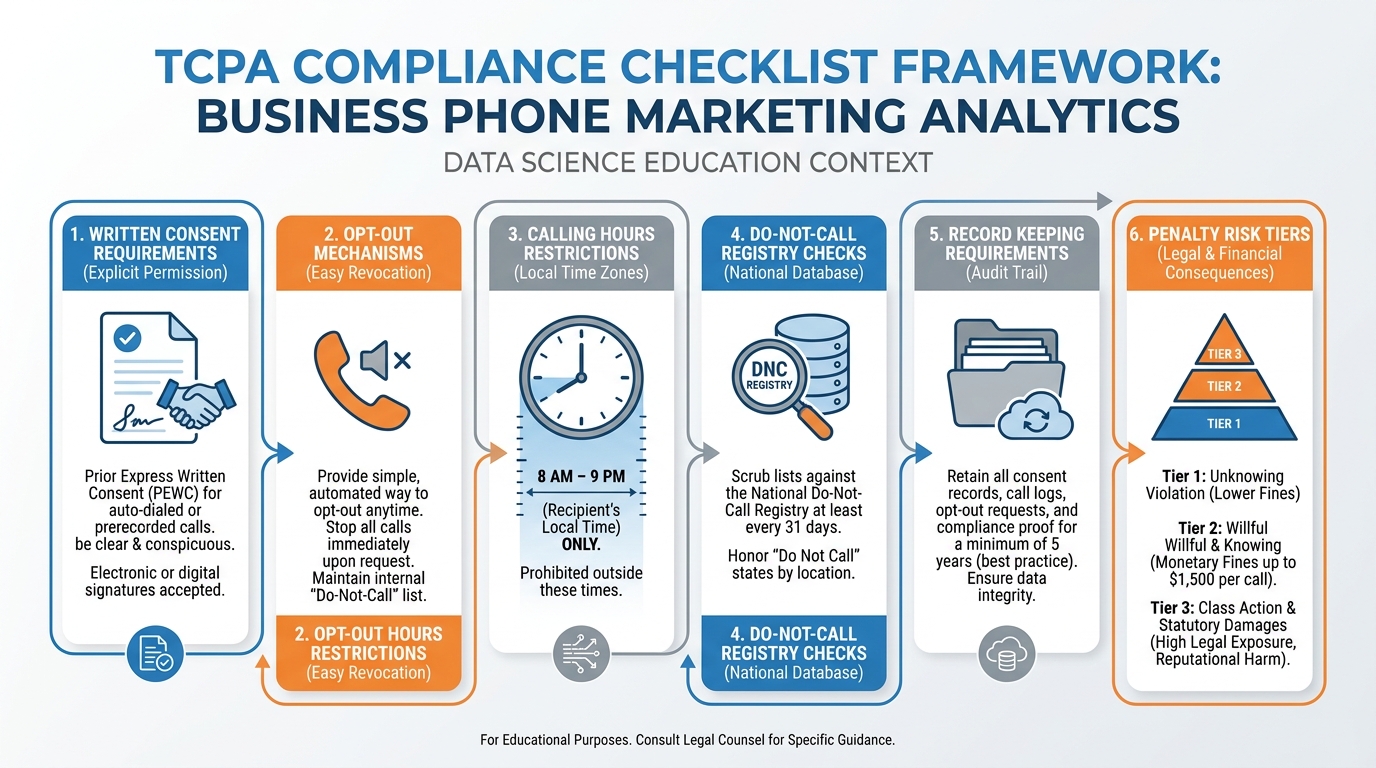
Figure 10:TCPA Compliance Checklist. Every outbound calling and texting program requires systematic compliance practices — written consent, calling hour restrictions, DNC registry scrubbing, and documented opt-out handling.
The key TCPA rules every marketer must know:
Written consent for autodialed calls and texts. If you are using an autodialer (which includes many power dialers) to call or text someone’s cell phone for marketing purposes, you must have their prior express written consent. This consent must be clear, unambiguous, and not buried in fine print. Best practice: include explicit consent language in every web form (“By submitting this form, you consent to receive automated phone calls and text messages from [Business Name] at the number provided”).
Calling hours. The TCPA restricts outbound marketing calls to between 8:00 AM and 9:00 PM in the recipient’s local time zone. This is the recipient’s time zone, not yours. A call made at 8:30 AM Eastern time to a prospect in California is a 5:30 AM call — a potential TCPA violation. VibeReach.io’s power dialer can be configured to respect local time zones automatically.
Do Not Call Registry. The FTC’s National Do Not Call Registry must be scrubbed before any outbound marketing calling campaign. Numbers registered on the DNC list cannot be called for marketing purposes without an established business relationship. VibeReach.io integrates with DNC scrubbing services, but the responsibility for maintaining compliance rests with the business.
Opt-out honoring. Any person who asks to be removed from your calling or texting list must be immediately honored and never contacted for marketing purposes again. Automated opt-out handling — capturing “STOP” replies from texts and removing the contact from active campaigns — is essential at scale.
One-to-one consent (2024 FCC rule). As of January 2025, FCC rules require that consumer consent for marketing calls and texts be obtained on a one-to-one basis — meaning a single consent form cannot authorize contacts from multiple, unrelated businesses. Lead generation forms that bundle consent for dozens of different companies no longer satisfy TCPA requirements.
125.12 Case Study: How a Two-Person Merchant-Cash-Advance Shop Outbooked a 40-Seat Call Center
Marcus and Diana ran a merchant cash advance brokerage out of a shared office in Fort Lauderdale. Their competition: a 40-seat call center in Dallas with a dedicated dialing team, a dedicated closer team, and a full-time compliance officer. Marcus and Diana had no employees — just two laptops, a VibeReach.io subscription, and a workflow they had spent three weeks building.
The Dallas operation was dialing manually, logging call outcomes in a spreadsheet, and following up with email. Their agents spent roughly 40 percent of their time on dead tasks: dialing rings, navigating voicemail, updating spreadsheets, finding the next number. Their connect rate was approximately 6 percent of dials.
Marcus and Diana’s operation worked like this:
Inbound: A local phone number in every area code where they were running Facebook lead ads. Every ad used the local number for that market. Inbound calls hit an IVR: “Press 1 to speak with a funding advisor. Press 2 to leave a message for a callback.” The IVR routed Press 1 calls to both of their cells simultaneously (blast routing). Whoever answered first took the call.
Missed inbound: Every missed call triggered an immediate automated text-back (once their A2P registration was approved): “Hey, this is Diana from Apex Capital. Sorry I missed you — what’s the best time to chat about your funding options?” Over 60 percent of prospects replied within 15 minutes.
Outbound: Each morning, Marcus loaded a VibeReach.io power dialer session with 200 fresh leads from their list. The dialer called each number using the area-code-matched local number. Marcus’s connect rate: 11 percent — nearly double the Dallas operation. When he hit a voicemail, one click dropped a pre-recorded message and the dialer moved to the next number. In four hours, Marcus completed 200 dials, had 22 live conversations, and left 60 pre-recorded voicemails.
Follow-up: Every “callback requested” disposition automatically enrolled the contact in a follow-up sequence: a text one hour later, an email the same evening, a call the next morning. The sequence ran automatically without Marcus touching a keyboard.
Coaching: Diana, who was the stronger closer, occasionally monitored Marcus’s calls using the whisper feature. When he struggled with the “I need to talk to my accountant” objection, Diana whispered the reframe in real time. Marcus pivoted. The deal closed.
At the end of their first quarter with the full system running, Marcus and Diana had funded 31 deals. The Dallas call center — with 40 agents, a physical office, and a payroll roughly 80 times larger — funded 47. The productivity-per-dollar comparison was not close. Marcus and Diana were not trying to be a call center. They were two people with a phone system that thought for them.
The principle behind this case study is not that technology replaces people. It is that technology eliminates the work that does not require a person — the dialing, the logging, the waiting, the scheduling — so that the people can spend their time doing the one thing that still requires a human being: having a conversation with another human being and helping them solve a problem.
135.13 Lab 5: Provision a Number, Build an IVR Tree, and Activate Missed-Call Text-Back
13.1Step 1: Provision a Local Phone Number
Log in to your VibeReach.io sub-account.
Navigate to Settings (gear icon in the left sidebar) → Phone System → Phone Numbers.
Click the + Add Number button in the upper right.
Select Buy Number.
In the Number Type dropdown, select Local.
In the Area Code field, enter the area code for your primary market. If you serve the Miami area, enter 305 or 786. If you serve the Fort Lauderdale area, enter 954. Choose the area code where most of your target clients are located.
The system will display available numbers. Browse the options and select one that is easy to remember or has a pattern you prefer.
Click Buy and confirm the purchase.
Your new local number now appears in the Phone Numbers list. This number is immediately active for receiving calls. Note it down — you will call it in Step 5.
13.2Step 2: Configure Business Hours
In the left sidebar, navigate to Settings → Business Hours.
You will see a weekly schedule with toggle switches for each day.
For Monday through Friday, toggle the day On and set:
Open: 9:00 AM
Close: 6:00 PM
For Saturday and Sunday, leave the toggles Off (closed).
Set your Time Zone to match your market (e.g., Eastern Time for South Florida).
Click Save.
These business hours will be used by call routing and IVR configurations to determine whether inbound calls should reach live agents or go to your after-hours handling.
13.3Step 3: Build a Simple 2-Option IVR
Navigate to Settings → Phone System → Phone Numbers.
Click on the number you just provisioned to open its configuration.
Look for the Call Flow or Incoming Call configuration section. Click Edit Call Flow or Configure.
You will enter the visual call flow builder. This displays a canvas with connected action blocks.
Set the first action to Say/Play. Click the block and configure:
Message: Type your greeting text: “Thank you for calling. For our sales team, press 1. To leave a voicemail, press 2.”
Voice: Choose your preferred text-to-speech voice.
Repeat: Set to 2 (repeats the message twice if the caller does not press a key).
Connect the Say/Play block to a Gather Input block. Configure:
Number of Digits: 1
Timeout: 5 seconds
From the Gather Input block, create two branches:
Key “1” branch: Add a Forward / Ring action. Enter your (or your sales agent’s) phone number. Set the timeout to 20 seconds. Add a Voicemail fallback action after the Forward block for when no one answers.
Key “2” branch: Add a Voicemail action directly. Configure the voicemail mailbox and set the recording prompt: “Please leave your name, number, and a brief message. We will return your call within one business hour.”
From the Gather Input block, configure the No Input / Timeout branch: connect to the same Voicemail block as the Key 2 branch.
Click Save to publish the call flow.
13.4Step 4: Enable Missed-Call Text-Back (Email Fallback)
Navigate to Settings → Missed Call Text Back.
Toggle the feature On.
In the Message field, enter your automated response. Example: “Hi there! Sorry we missed your call. This is [Your Name] from [Business Name]. We’ll follow up with you shortly — or you can reach us directly at [phone number].”
Response Channel: Since SMS requires A2P 10DLC registration, set the response channel to Email for now. Enter a monitored email address that your team checks promptly. When A2P registration is complete, return here and add SMS as a response channel.
Set Send Delay to Immediately (or 1–2 minutes for a more natural feel).
Click Save.
13.5Step 5: Test Your System
From your personal cell phone, call the number you provisioned in Step 1.
Listen for your IVR greeting to play.
Press 1 and verify the call forwards to the number you configured (it should ring your or your agent’s phone).
Hang up and call again. This time, press 2 and record a test voicemail. Verify the voicemail appears in VibeReach.io under Conversations or the missed calls section.
Call a third time and do not press anything. After 5 seconds (the timeout you configured), the call should route to voicemail automatically.
To test missed-call text-back: call from your cell and hang up before it connects. Check whether the email notification was delivered to the address you configured.
Troubleshooting Common Issues
“The IVR does not play — callers hear ringing then silence.”
→ Verify the Call Flow is saved and published. Look for a “Published” status indicator in the call flow builder. Unpublished flows do not activate.
“Press 1 rings but nobody’s phone rings.”
→ Check the phone number entered in the Forward block. Make sure it includes the country code (+1 for US numbers). Test by entering your own cell number.
“The voicemail option works but I cannot find the recording.”
→ Voicemails appear in Conversations → Voicemails in the main navigation. You may also receive an email notification if voicemail notifications are configured.
“I called but did not receive the missed-call email.”
→ Verify the email address is correct in the Missed Call Text Back settings. Check your spam folder. Allow 2–3 minutes before assuming the automation did not fire — email delivery is not always instantaneous.
“The test call went straight to voicemail without playing the IVR.”
→ The Call Flow may not be assigned to your number. Return to Settings → Phone Numbers → [Your Number] and confirm the Call Flow is selected in the Incoming Call configuration.
145.14 Chapter Takeaways & Reflection Questions
14.1Key Takeaways
Phone calls close more deals than any other channel — the data is consistent across industries and decades. VoIP technology has made enterprise-grade telephony accessible to any business at minimal cost.
VoIP works by converting voice to data packets transmitted over the internet. SIP handles signaling; RTP carries the audio. Cloud platforms like VibeReach.io manage all of this infrastructure automatically.
Local presence dramatically increases answer rates. Provisioning local numbers in every market you serve is a simple change with measurable impact on outbound call connect rates.
IVR menus route callers professionally without a live receptionist. Combined with business hours configuration, they ensure every caller reaches the appropriate destination regardless of when they call.
Smart routing strategies — simultaneous, sequential, round-robin, sticky — match the right agent to the right call based on team structure and relationship history.
Call recording and transcription turn conversations into searchable intelligence — training asset, quality assurance tool, and compliance documentation simultaneously.
Power dialers multiply outbound productivity by eliminating dead time between dials, increasing live conversations per hour by three to four times compared to manual dialing.
Voicemail drop ensures consistent, professional messaging at scale — one pre-recorded message, one click, move to the next dial.
Whisper and barge compress sales training timelines from months to weeks by enabling real-time coaching on live calls.
Missed-call text-back is the highest-ROI automation available — it automatically follows up every missed call while the prospect is still engaged, recovering leads that would otherwise be lost.
TCPA compliance is non-negotiable. Written consent, calling hours, DNC scrubbing, and opt-out honoring are foundational requirements. Violations carry significant financial liability.
A2P 10DLC registration takes several weeks and must be initiated before SMS-based automations can go live. Submit early.
14.2Reflection Questions
Think about the last time you called a business and did not reach a live person. What happened next — did the business follow up with you? How did that experience affect your perception of the business and your likelihood of becoming a customer?
The case study in this chapter shows a two-person team competing effectively with a 40-seat call center. What do you think the competitive ceiling is for automation-leveraged small teams? Are there business contexts where the advantage disappears or reverses?
Whisper and barge technology allow real-time supervision of live conversations. How might this capability affect the culture of a sales team — positively and negatively? What norms would you establish if you were building a team that used these features?
The TCPA was enacted in 1991 — before smartphones, before SMS marketing, before AI-generated voice calls. Do you think the current regulatory framework is adequate for the technology that exists today? What additional protections or allowances would you propose?
15Discussion
Prompt: Phone calls have the highest close rates of any marketing channel, yet most modern marketing investment flows into digital advertising, content marketing, and social media. Why do you think this allocation gap exists — and is it rational?
Consider the following in your response: the measurability challenges of phone-based marketing, the preferences of marketing professionals relative to the preferences of customers, the scale economics of digital versus phone, and the opportunity this gap represents for businesses willing to prioritize the phone.
Discussion Guidelines: Write a substantive response of at least 200 words addressing the prompt above. Include at least one scholarly or credible citation (journal article, textbook, or authoritative industry report) to support your argument. Then respond to at least TWO peers with substantive feedback — go beyond “I agree” and explain why their perspective adds to or challenges your thinking.
16Exercises
17Glossary
A2P 10DLC Application-to-Person 10-Digit Long Code — the carrier registration framework for business SMS in the United States. Required before high-volume business texting can occur from local numbers.
A2P Registration The formal process of registering a business brand and messaging campaign with carriers to enable commercial SMS messaging at scale.
Barge A call monitoring feature that allows a supervisor to join a live call as an audible participant, heard by both the agent and the caller.
Call Flow A configurable sequence of actions that defines how an inbound call is handled — including greetings, IVR menus, routing decisions, and fallback behaviors.
Codec A software algorithm that compresses and decompresses audio data for transmission over IP networks. Common VoIP codecs include G.711 and G.729.
DTMF (Dual-Tone Multi-Frequency) The technical term for the tones produced when a caller presses keys on a phone keypad. IVR systems detect DTMF tones to interpret caller menu selections.
IVR (Interactive Voice Response) An automated system that plays recorded prompts and collects caller input via keypad presses, routing calls without a live operator.
Local Presence The practice of using phone numbers with area codes matching a target geographic market to increase answer rates.
PBX (Private Branch Exchange) A telephone switching system that manages internal and external calls for a business. Cloud PBX performs this function without on-premises hardware.
Power Dialer An outbound calling system that automatically dials the next contact when the previous call ends, maximizing agent talk time.
RTP (Real-time Transport Protocol) The protocol that carries actual audio data during a VoIP call, separate from the signaling protocol (SIP).
SIP (Session Initiation Protocol) The signaling protocol used to initiate, maintain, and terminate VoIP calls.
Sticky Routing A routing strategy that connects returning callers to the same agent they previously spoke with, using CRM contact history for identification.
TCPA (Telephone Consumer Protection Act) The U.S. federal law governing telephone marketing, including rules on consent, calling hours, automated dialing, and the Do Not Call registry.
Voicemail Drop A feature allowing sales reps to deposit a pre-recorded voicemail message with a single click, without waiting for the full voicemail recording process.
VoIP (Voice over Internet Protocol) Technology that transmits voice calls as digital data over the internet rather than through traditional telephone network circuits.
Whisper A call monitoring feature that allows a supervisor to speak to the agent during a live call without the caller hearing the supervisor.
18🎯 Your Turn: Apply It to Your Business
The phone system chapter is the one where people nod along, then do nothing. Don’t be that person. Every day your GHL number isn’t provisioned is another day your best leads are hitting voicemail and calling someone else.
1. Provision your GHL phone number today. Log into GHL → Settings → Phone Numbers → + Add Number. Choose a local area code that matches your primary market (or a toll-free number if you serve nationally). Select the number, complete the purchase, and verify it appears in your account. This takes under five minutes and costs a few dollars per month. If you’re on a trial or agency account, provision a number in the sub-account you’re working in for this course.
2. Complete your A2P 10DLC brand registration. In GHL → Settings → Phone Numbers → A2P Registration, fill out your Brand Registration form: legal business name, EIN/tax ID, business type, website, and business contact info. Submit it. This is not optional if you want to send automated SMS — carriers will throttle or block unregistered numbers. The process takes 1–3 business days for brand approval. Start it now so it doesn’t block your Chapter 5 labs.
3. Build your first IVR menu. In GHL → Settings → Phone Numbers, click on your provisioned number → Call Flow → IVR (Phone Tree). Create a simple two-option menu: “Press 1 for sales. Press 2 for support.” Route Option 1 to your personal number (or the sales team). Route Option 2 to a voicemail. Record a short, professional greeting (under 20 seconds). Save. Call your GHL number from your mobile phone and test it. Does the IVR answer? Do the options route correctly?
4. Activate missed-call text-back. If you built the workflow in Chapter 4’s “Your Turn” section, activate it now that your number is provisioned. If you skipped it, go to Automation → Workflows → + New Workflow: Trigger = Call Status → Missed → Action = Send SMS with a warm response message. Publish it. Then miss-call your own GHL number from another phone and wait. Did the SMS arrive within 60 seconds? If not, check that the trigger filter matches your phone number.
5. Set up your business hours and Do Not Disturb rules. In GHL → Settings → Business Info, set your business hours. In your workflows that send SMS, add a Wait step configured to “Send only during business hours.” This prevents automated texts from arriving at 2 AM, which generates complaints and hurt your sender reputation. Check every active workflow that sends SMS and verify this setting is in place.