The Vibe Revolution: Why Everything You Knew About Marketing Just Changed
From Fragmented Stacks to Unified Intelligence
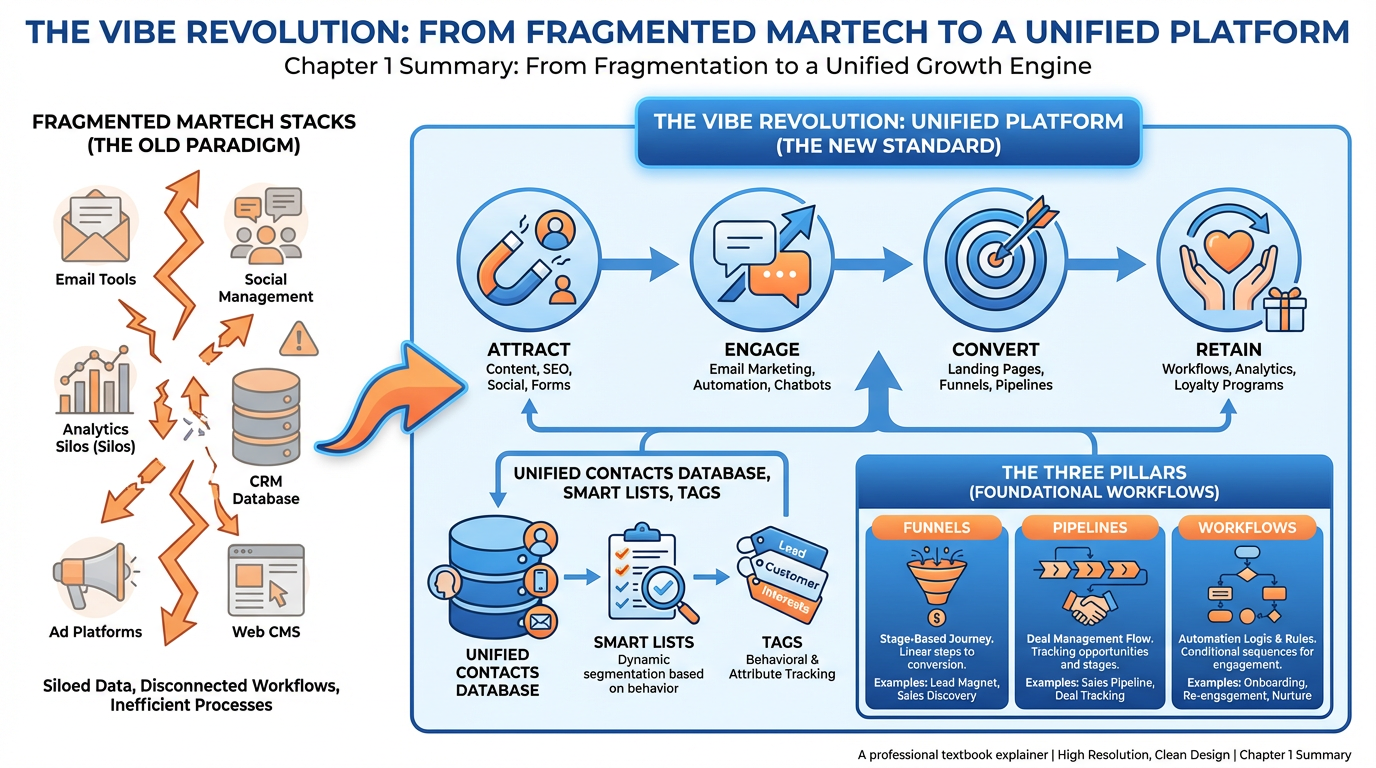
Figure 1:Figure 1.1 — The Vibe Marketing ecosystem at a glance: from fragmented tools to a unified platform. The four heartbeats (Attract, Engage, Convert, Retain), the Three Pillars (Funnels, Pipelines, Workflows), and the intelligence layer of Smart Lists, Tags, and Contacts work in concert.
11.1 What if Marketing Could Feel Right and Actually Work?
Imagine cooking dinner for twenty people — but instead of one kitchen, you have seventeen separate rooms, one for each task, and the food cannot travel between them without you personally carrying each dish. No shared counter. No shared refrigerator. No single recipe. Every room runs its own clock, its own temperature, its own definition of “done.”
That is not a kitchen. That is chaos with a catering license.
And yet, for the better part of two decades, that is precisely how marketing technology worked.
The average marketing team uses between eight and twelve separate software platforms to run a single customer journey. An ad platform captures the lead. A landing page builder collects the email. A CRM logs the contact. An email provider sends the welcome sequence. A scheduling tool books the call. An analytics dashboard tries to make sense of it all — usually failing, because none of these systems speak to each other natively. The marketer sits in the middle, manually copying data and wondering why open rates are falling.
This is not a tools problem. It is an architecture problem. The answer is not more tools — it is a fundamentally different way of thinking about how data, communication, and automation relate to each other.
That different way of thinking is called Vibe Marketing. In physics, a vibration is synchronized oscillation — every part of a system moving in harmony, amplifying the signal rather than canceling it. In marketing, a vibe is what happens when message, timing, channel, and audience align so precisely that the response feels almost inevitable. Prospects reply. Customers buy again. Referrals arrive without being asked.
This chapter introduces the philosophical foundation and structural grammar of Vibe Marketing. By the end, you will understand why the Contacts database is the center of the universe, why Smart Lists are more powerful than any spreadsheet, and why Funnels, Pipelines, and Workflows form the load-bearing architecture of a modern marketing operation.
21.2 A Short, Honest History of Martech — From Mailchimp to the Frankenstein Stack
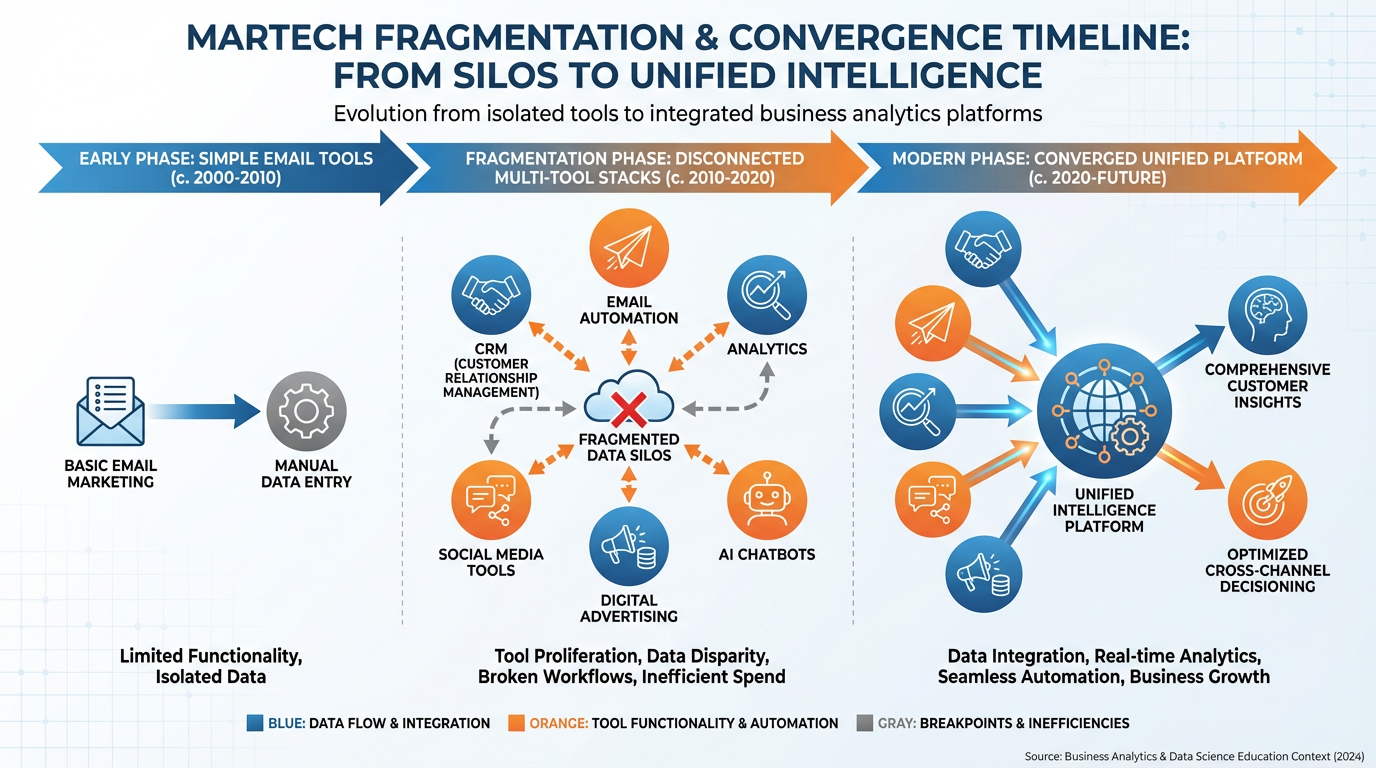
Figure 2:Figure 1.2 — The martech explosion: from a handful of tools in the early web era to thousands of disconnected platforms, each solving one problem while creating three more. The “Frankenstein Stack” is not hyperbole — it is the default state of most marketing organizations.
The story of marketing technology begins with a humble premise: send better emails. In the early years of the commercial internet, email service providers offered something genuinely revolutionary — the ability to reach ten thousand people without typing ten thousand addresses. Lists were managed. Templates were built. Open rates were tracked.
Then something predictable happened. Each new problem spawned a new tool. You needed to capture leads, so a landing page builder appeared. You needed to track attribution, so an analytics platform appeared. You needed to manage sales conversations, so a CRM appeared. Each tool was excellent in isolation.
The problem was what happened when you tried to use all of them together. Data definitions diverged: what one platform called a “lead,” another called a “prospect,” and a third called a “subscriber.” Integration projects cost months and tens of thousands of dollars. The marketing technology landscape grew to thousands of distinct products — a phenomenon researchers began calling “martech sprawl.”
The result was what practitioners call the Frankenstein Stack: a collection of stitched-together tools that technically functioned but moved with the lurching gait of a creature that was never meant to exist. The head wanted to send a personalized email. The right arm was firing a retargeting ad to someone who had already purchased. The automation sequences ran completely independently of anything the sales team was doing.
The Frankenstein Stack produced three predictable pathologies:
Data fragmentation: Customer information lived in multiple systems, none of which agreed. A sales rep’s CRM contact and the marketing team’s email subscriber were often the same person, but the systems did not know that.
Attribution blindness: When a customer converted after seeing an ad, clicking an email, attending a webinar, and booking a demo, which touchpoint gets credit? Without a unified data model, the question could not be answered with confidence.
Automation fragmentation: Workflows existed inside every tool — email sequences here, retargeting there, CRM triggers somewhere else — with no awareness of each other. A contact could simultaneously receive a “We miss you” email and a “Thanks for your purchase” confirmation, because the systems were operating in separate universes.
The solution to all three pathologies is the same: consolidate around a single data model, a single automation engine, and a single source of truth for every contact. That is the architectural promise of Vibe Marketing.
31.3 The Four Heartbeats of Vibe Marketing: Attract, Engage, Convert, Retain
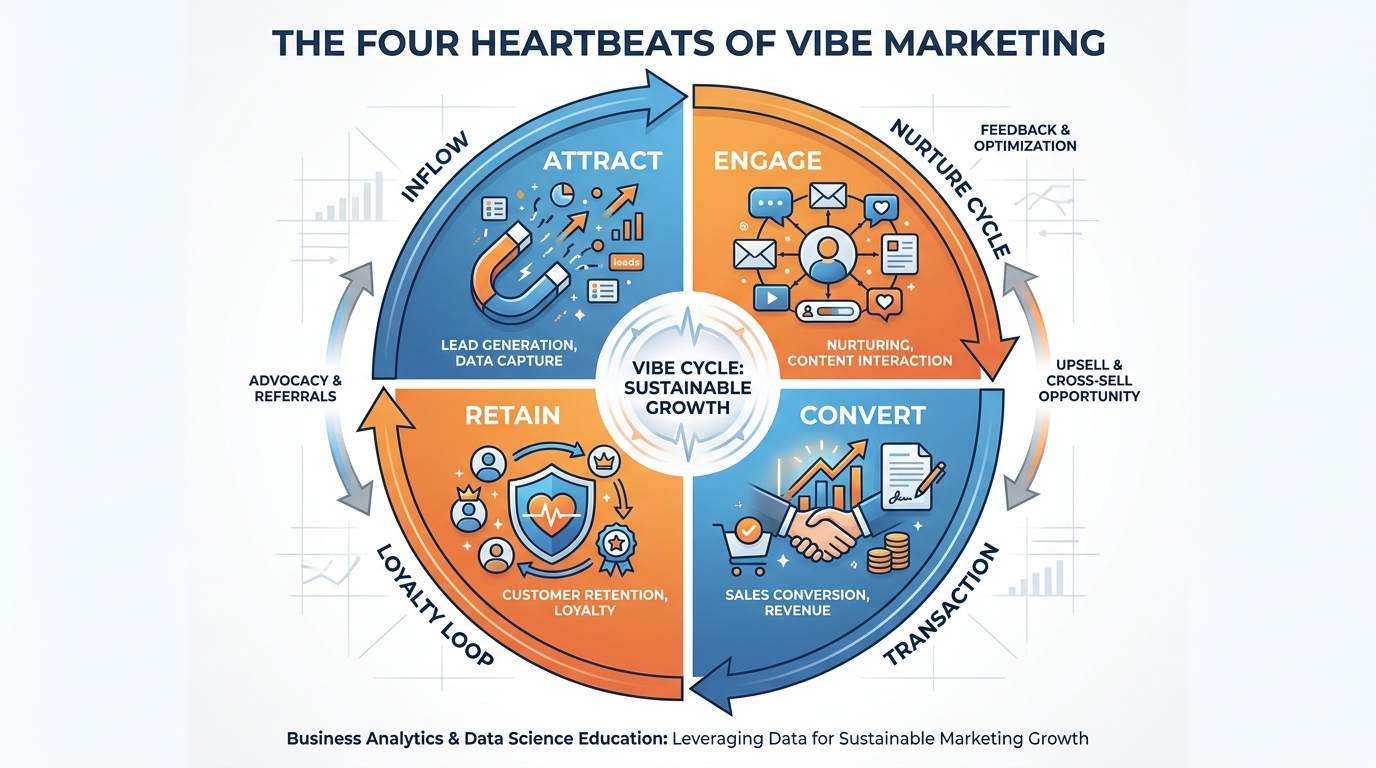
Figure 3:Figure 1.3 — The Four Heartbeats of Vibe Marketing. Unlike a linear funnel, these four phases form a continuous cycle — retained customers become the engine of attraction for new ones, completing the loop.
Every living system has a rhythm. The heart does not beat once and declare victory — it beats continuously, maintaining pressure and flow through a cycle of expansion and contraction. Marketing systems that work are no different.
The Vibe Marketing framework organizes the entire customer relationship into four phases that together form a continuous cycle. These are not stages in a linear funnel that a customer passes through once and exits. They are heartbeats — recurring, rhythmic activities that maintain the health and momentum of the customer relationship.
3.1Attract
The Attract phase encompasses every activity that brings a new person into awareness of your offer. This includes organic content, paid advertising, search engine visibility, referral programs, and partnerships. The goal of Attract is not merely volume — it is qualified volume. Attracting ten thousand unqualified visitors who will never buy is less valuable than attracting one hundred people with a genuine need that your offer can solve.
In a Vibe Marketing system, every Attract activity is designed to terminate in a data-capture event: a form fill, a phone call, a chat conversation, an ad click tracked to a landing page. The moment a person interacts with your Attract assets, they enter the Contacts database and the Engage phase begins automatically.
3.2Engage
Engagement is the process of educating, nurturing, and building trust with contacts who are not yet ready to buy. Most marketing operations break down here — not because they lack content, but because their delivery is untimed and undifferentiated. Sending the same nurture email to every contact, regardless of behavior or stage, is the equivalent of a librarian handing every patron the same book regardless of what they asked for.
In a Vibe Marketing system, Engage activities are triggered by contact behavior and segmented by attributes. A contact who visited the pricing page three times receives a different message than one who has not opened anything in thirty days.
3.3Convert
Convert is the moment a contact makes a commitment — a purchase, a signed agreement, a booked appointment. It gets the most attention in marketing discussions but often has the least sophisticated systems support. A Vibe Marketing system connects conversion events directly to the contact record, updates tags and pipeline stages automatically, and triggers the Retain phase without human intervention.
3.4Retain
The Retain phase is the most financially important and the most systematically neglected. Research consistently demonstrates that selling to an existing customer costs far less than acquiring a new one, and that existing customers tend to buy more and refer others. Yet most marketing automation systems are architected as if the customer journey ends at conversion.
In Vibe Marketing, Retain is not an afterthought — it feeds Attract. A retained customer who refers a friend begins a new cycle. The four heartbeats become self-reinforcing when the system is designed to make retention visible and actionable.
41.4 The Three Pillars of VibeReach.io: Funnels, Pipelines, Workflows
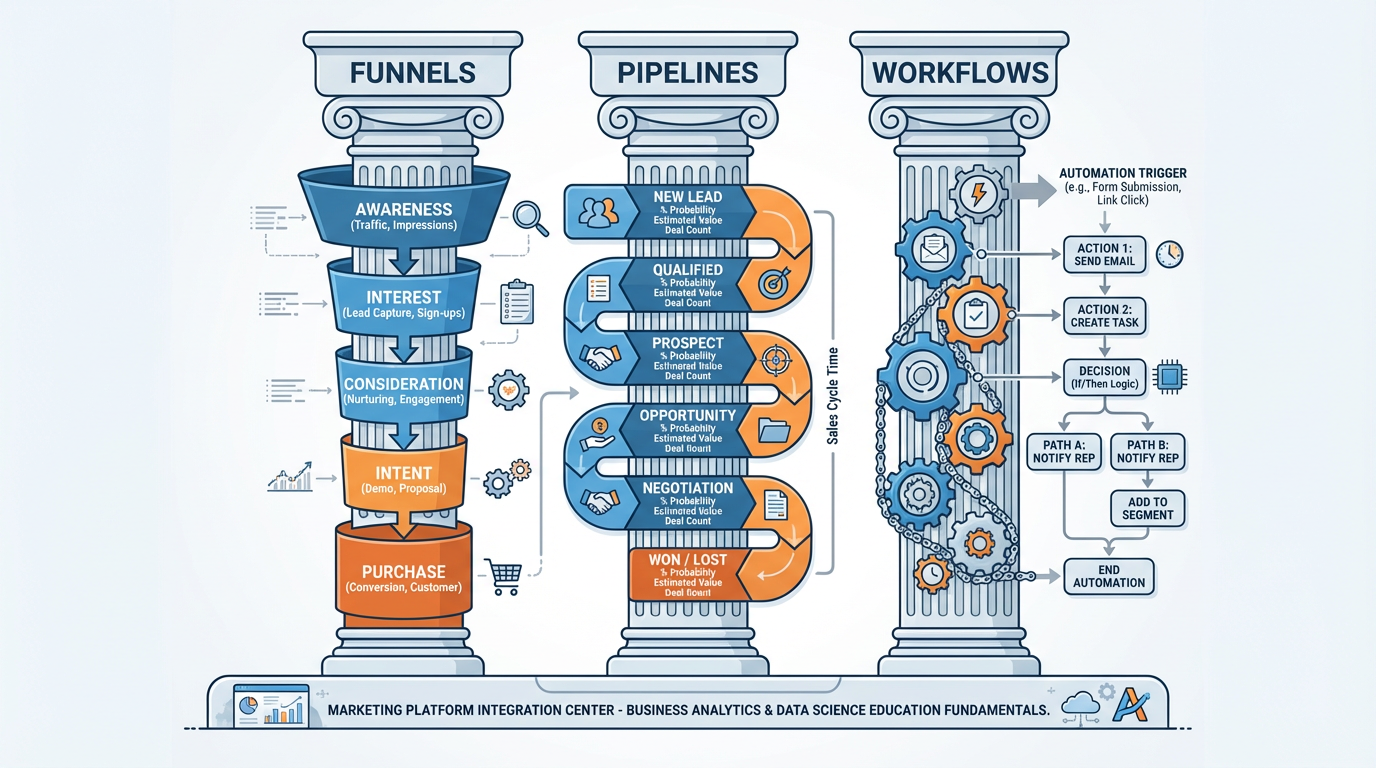
Figure 4:Figure 1.4 — The Three Pillars of VibeReach.io. Funnels handle the prospect’s journey to becoming a contact. Pipelines manage the sales team’s journey to closing a deal. Workflows automate everything that should not require human attention.
If the Four Heartbeats are the philosophy of Vibe Marketing, the Three Pillars are its engineering. Every meaningful marketing activity in VibeReach.io occurs within or between these three structural components.
4.1Pillar 1: Funnels
A funnel, in the Vibe Marketing context, is the designed pathway a prospect travels from first awareness to becoming a contact in your database. This encompasses landing pages, opt-in forms, appointment booking pages, survey flows, and lead magnets. Funnels are the front door of your marketing system.
The critical distinction between a Vibe Marketing funnel and a traditional landing page is data integration. When a prospect submits a form in a traditional system, their data goes to an email service provider. In VibeReach.io, that same form submission simultaneously creates or updates a Contact record, applies tags, triggers a workflow, and potentially advances a pipeline — all without any human action.
4.2Pillar 2: Pipelines
A pipeline is the structured representation of your sales process — the sequence of stages a deal moves through from initial qualification to closed revenue. Where funnels are oriented toward the prospect’s experience, pipelines are oriented toward the sales team’s process.
Pipelines in VibeReach.io are deeply connected to the Contacts database. Every deal in a pipeline is associated with one or more contacts, and every pipeline stage change is recorded in the contact’s activity timeline. This bidirectional connection means that when a contact is tagged as “High Priority” by the marketing team, the sales rep’s pipeline immediately reflects that context.
4.3Pillar 3: Workflows
Workflows are the automation engine — the sequences of triggers and actions that allow the system to respond to contact behavior without human intervention. A workflow might be: When a contact fills out a form AND their lead score exceeds 50, send an immediate SMS, wait two hours, send a follow-up email, and create a task in the pipeline for the account manager.
The power of workflows lies in their composability. A simple trigger can initiate a cascade of actions across every channel and data layer in the system — the kitchen finally has a shared conveyor belt.
Primary Purpose: Convert strangers into contacts
Key Components:
Landing pages with embedded opt-in forms
Lead magnet delivery pages
Webinar registration flows
Appointment booking pages
Survey and quiz funnels
Connects to: Contacts database (creates/updates), Workflows (triggers on form submit), Pipelines (can create new deal on entry)
Primary Purpose: Track and advance sales opportunities
Key Components:
Deal stages (customizable per business model)
Deal value and close date tracking
Contact and company associations
Stage-based automation triggers
Revenue forecasting views
Connects to: Contacts database (every deal links to contacts), Workflows (stage changes trigger actions), Funnels (new leads auto-enter pipeline)
Primary Purpose: Automate every repeatable action
Key Components:
Event triggers (form submit, tag added, date-based, pipeline change)
Condition branches (if/else logic)
Action steps (email, SMS, tag, pipeline update, task, webhook)
Time delays and wait conditions
Goal events that exit contacts from the workflow
Connects to: Everything — Workflows are the nervous system of the entire platform
51.5 Meet Your New Database: Contacts as the Single Source of Truth
The most important sentence in this textbook is this: the Contact record is the center of the marketing universe.
Every funnel submission, email open, pipeline stage change, tag applied, SMS sent, and appointment booked is recorded on, or derived from, the Contact record. Everything else is a view of, or an action upon, that database.
In a traditional Frankenstein Stack, contacts are “subscribers” in the email tool, “leads” in the CRM, “users” in analytics, and “customers” in the payment processor — four records for the same human being, with no system aware of the others.
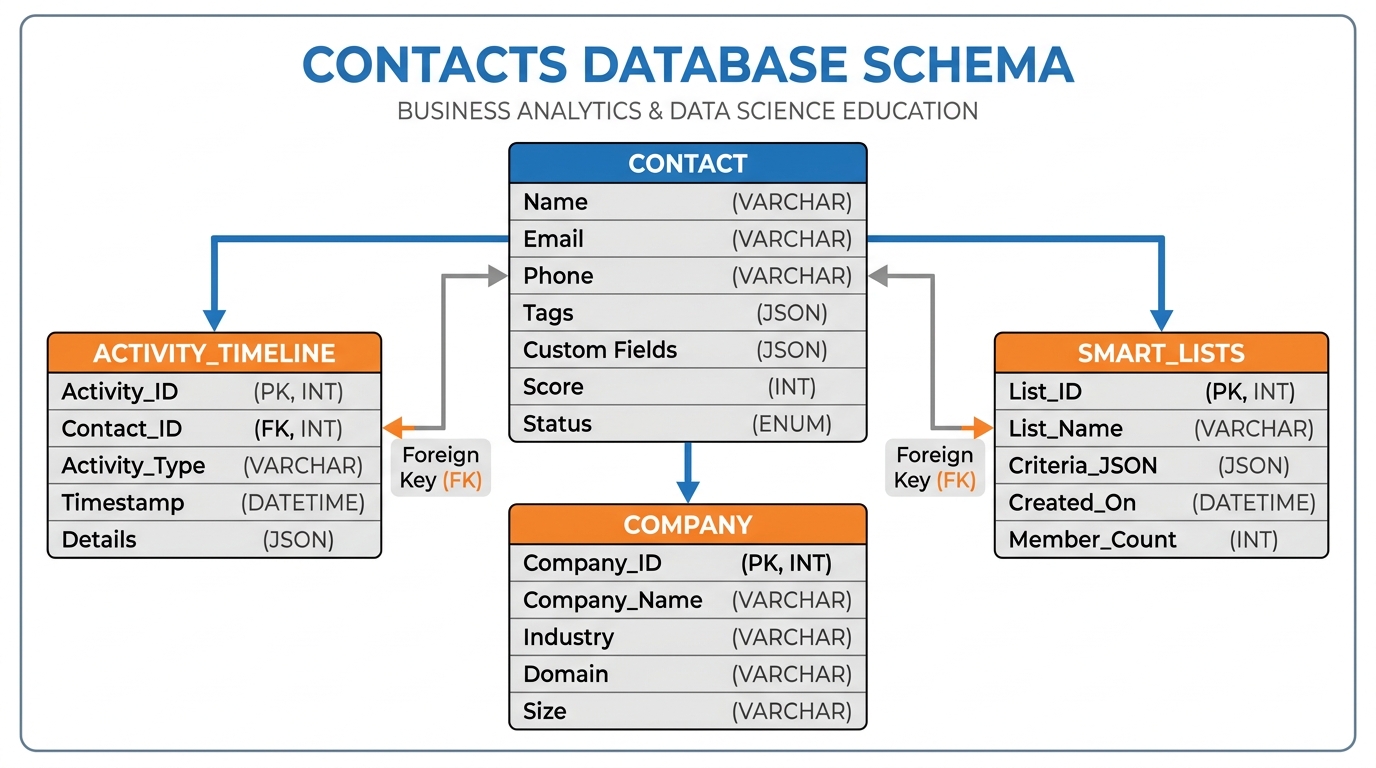
Figure 5:Figure 1.5 — The Contact record as the single source of truth. Every interaction — email opens, form submissions, pipeline movements, call logs — is appended to the Activity Timeline and remains permanently accessible on the contact record.
In VibeReach.io, a Contact record contains:
Identity fields: Name, email, phone, address
System fields: Date added, last activity date, source, lead score
Status fields: Contact status, deliverability, SMS consent
Association fields: Linked company, pipeline deals, appointments
Custom fields: Business-specific data you define
Tags: Categorical labels driving segmentation and automation
Activity Timeline: Every email, page visit, form submit, call, and note — automatically logged
The Activity Timeline deserves emphasis. In most CRM systems, it is a secondary feature — a nice-to-have that sales reps fill in manually. In VibeReach.io, it is automatically populated by every interaction the system mediates. Before a rep dials, they can see that this person opened the last four emails, visited the pricing page twice, and clicked “Book a Call” without completing it. That context changes every conversation.
61.6 Custom Fields, Tags, and the Art of Structured Data
If the Contact record is the universe, then custom fields and tags are the coordinate system that makes navigation possible. Without them, you have a database of names and email addresses. With them, you have a precision instrument for segmentation and personalization.
6.1Custom Fields
Custom fields extend the Contact record with data points that are specific to your business. Out of the box, the system knows a contact’s name, email, and phone. Custom fields tell the system that this particular contact is a restaurant owner with twelve employees who is interested in payroll software and has a budget of under two thousand dollars per month.
Custom fields come in several data types:
| Field Type | Example Use | Notes |
|---|---|---|
| Text | Company name, job title | Free-form entry |
| Number | Annual revenue, employee count | Enables range filtering |
| Date | Last purchase, contract renewal date | Enables date-based automation |
| Dropdown | Industry, lead status | Constrained options prevent typos |
| Checkbox | Newsletter opted in, demo attended | Boolean yes/no |
| Multi-select | Products interested in | Multiple values per field |
6.2Tags
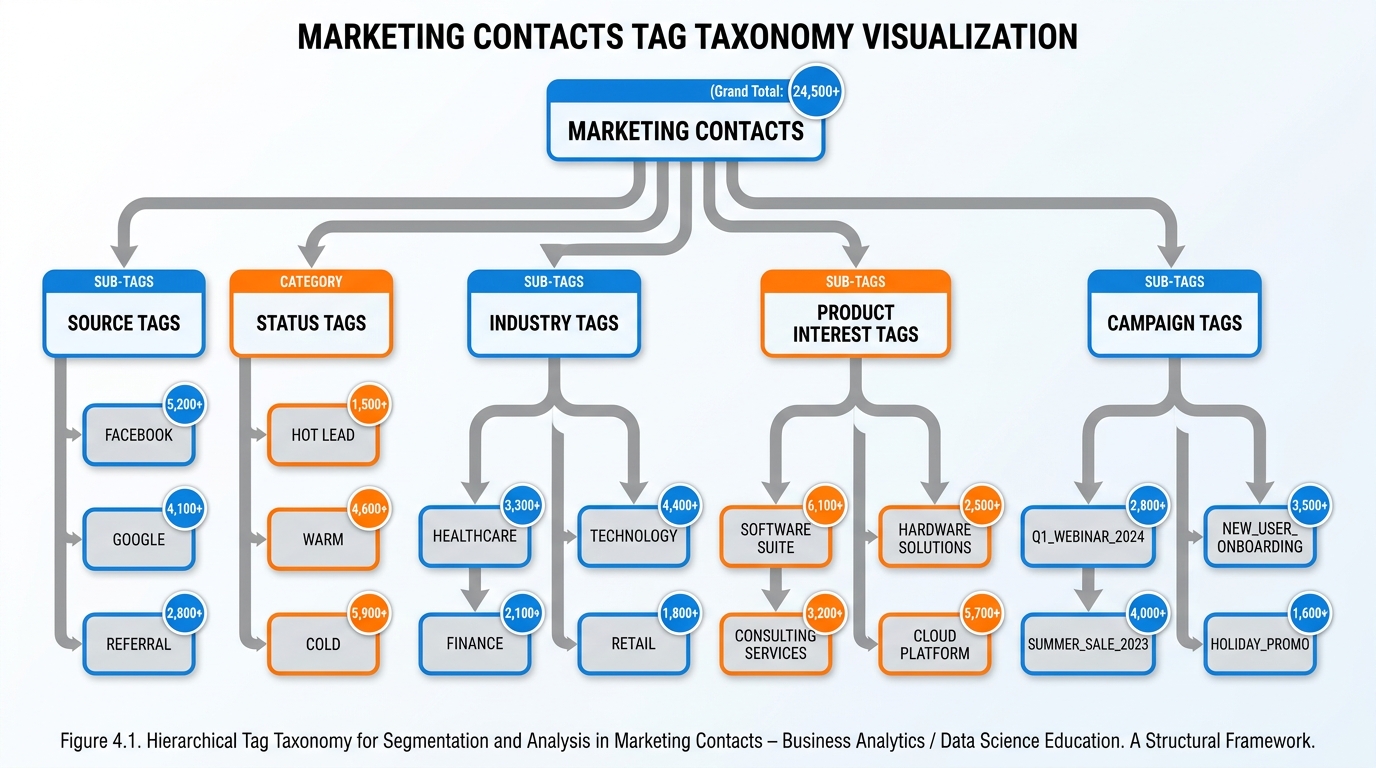
Figure 6:Figure 1.6 — A well-designed tag taxonomy. Tags fall into distinct categories, each serving a different segmentation purpose. Without a taxonomy, tag lists grow into unmanageable chaos within months.
Tags are flexible labels applied to contacts to indicate behavioral states, campaign membership, or categorical attributes. A contact might carry: source:facebook-ad, status:hot-lead, industry:restaurant, campaign:q4-promo, attended:webinar-jan.
The power of tags comes from their composability. Any combination of tags can define a Smart List segment (which we will explore in depth in sections 1.7 and 1.8). Tags are also the primary mechanism by which workflows communicate state. When a workflow marks a contact as having completed a particular sequence, it applies a tag — and that tag can then serve as a trigger, a filter condition, or an exclusion criterion for other workflows.
Best practice follows a taxonomy approach: tags organized into named categories with a colon prefix. All source tags begin source:, campaign tags begin campaign:, status tags begin status:. This keeps tag lists readable as the database scales.
71.7 Smart Lists: The Living, Breathing Segment
What if every segment you ever built updated itself the moment the underlying data changed? What if the “Hot Leads from Last Week” list you built on Friday was automatically current on Monday — no export, no maintenance, no manual filtering required?
That is a Smart List.
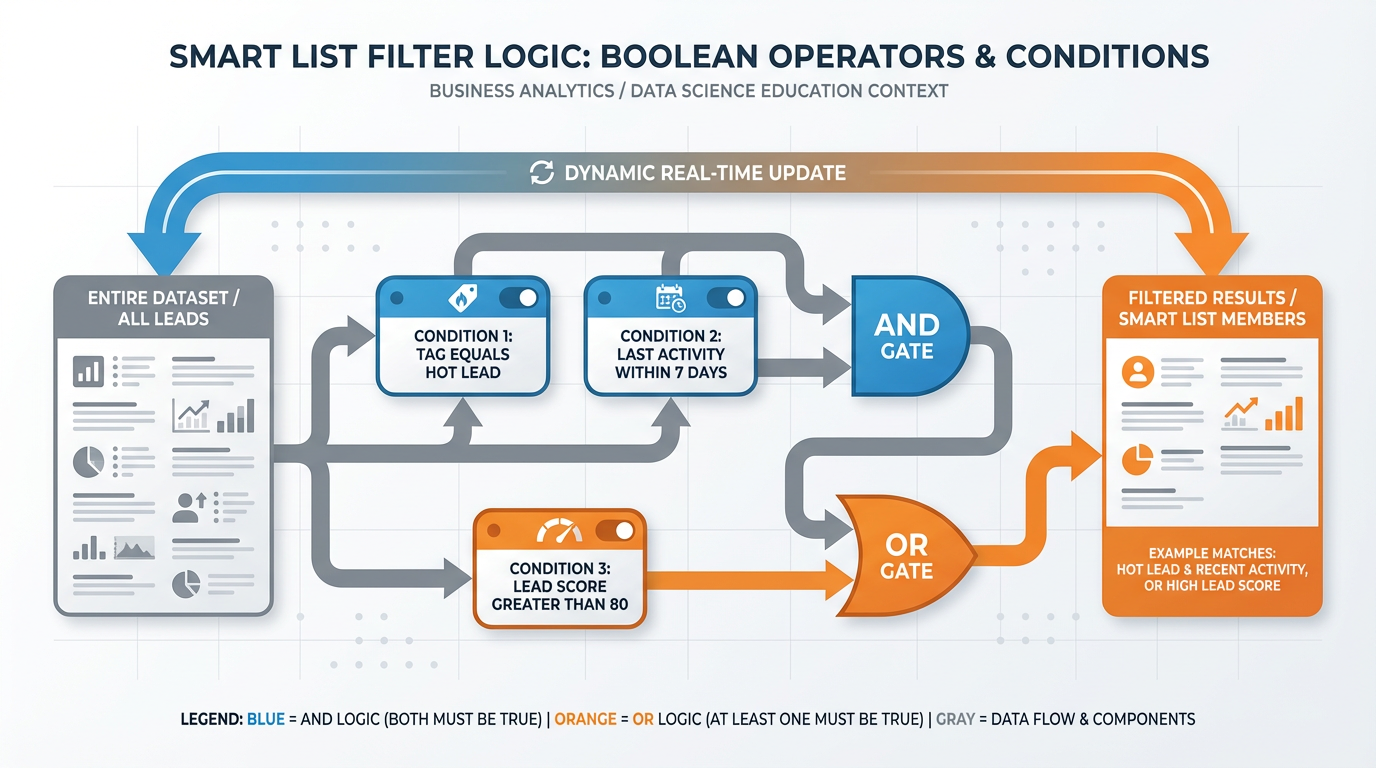
Figure 7:Figure 1.7 — Smart List filter logic. Contacts enter and exit the list automatically as their data changes. The AND/OR operator structure allows arbitrarily complex segmentation criteria without any code.
A Smart List is a saved filter — or combination of filters — applied to the Contacts database that returns every contact currently matching the criteria. The crucial word is “currently.” A Smart List is not a snapshot. It is a live query. Every time you view the list, it re-evaluates every contact in the database against the filter criteria and returns whoever qualifies at that moment.
The filter conditions available for Smart Lists span the entire Contact record:
Field conditions:
Annual Revenue is greater than $500,000Tag conditions:
Contact has tag status:hot-leadActivity conditions:
Opened email in last 7 daysDate conditions:
Date Added is within last 30 daysPipeline conditions:
Has an active deal in Stage: ProposalEngagement conditions:
Lead Score is greater than 75
The AND/OR logic between conditions is where Smart Lists become genuinely powerful. Consider:
Tag = status:hot-leadANDLast Activity within 7 daysreturns only hot leads who are currently engagedTag = status:hot-leadORLead Score > 80returns any contact who is either manually tagged as hot OR has demonstrated high engagement through scoringTag = status:hot-leadAND(Last Activity within 7 days OR Lead Score > 80)— nested logic that requires hot-lead status AND at least one of two engagement conditions
This composability makes Smart Lists capable of replacing the elaborate, manual spreadsheet processes that marketing teams typically build to manage segmentation. Every “quarterly review” spreadsheet, every “leads to follow up” export, every “customers due for renewal” filter — all of these become permanent, self-maintaining Smart Lists.
81.8 Smart Lists in Practice: Building a “Hot Leads Last 7 Days” List in 90 Seconds
Step-by-Step: Build Your First Smart List
Goal: Create a Smart List that shows every contact tagged as a hot lead who has had any activity in the last seven days.
Step 1: Navigate to Contacts → Smart Lists → Create New List
Step 2: Name the list: Hot Leads — Active Last 7 Days
Step 3: Add Filter Condition 1:
Field: Tags
Operator: contains
Value:
status:hot-lead
Step 4: Set the connector to AND
Step 5: Add Filter Condition 2:
Field: Last Activity Date
Operator: is within
Value: 7 days
Step 6: Click Save and Preview
The list populates instantly with every contact meeting both conditions. It will update automatically as contacts gain or lose the tag, and as their activity timestamps change.
Total time: under 90 seconds
Building the equivalent in a traditional spreadsheet workflow requires exporting your contact list, filtering by status, filtering by date, sorting, removing duplicates — and repeating the entire process every time you want a current view.
In a Vibe Marketing system, the Smart List exists permanently. View it anytime, trust it is current. Send a campaign directly to it. Assign a workflow to trigger when a contact enters it. Alert the sales team when it grows by more than ten percent in a day.
A Smart List is a standing command to the database: always show me the people who matter most right now.
91.9 The Company Object and Contact Associations: Why B2B Teams Need a Relational Model
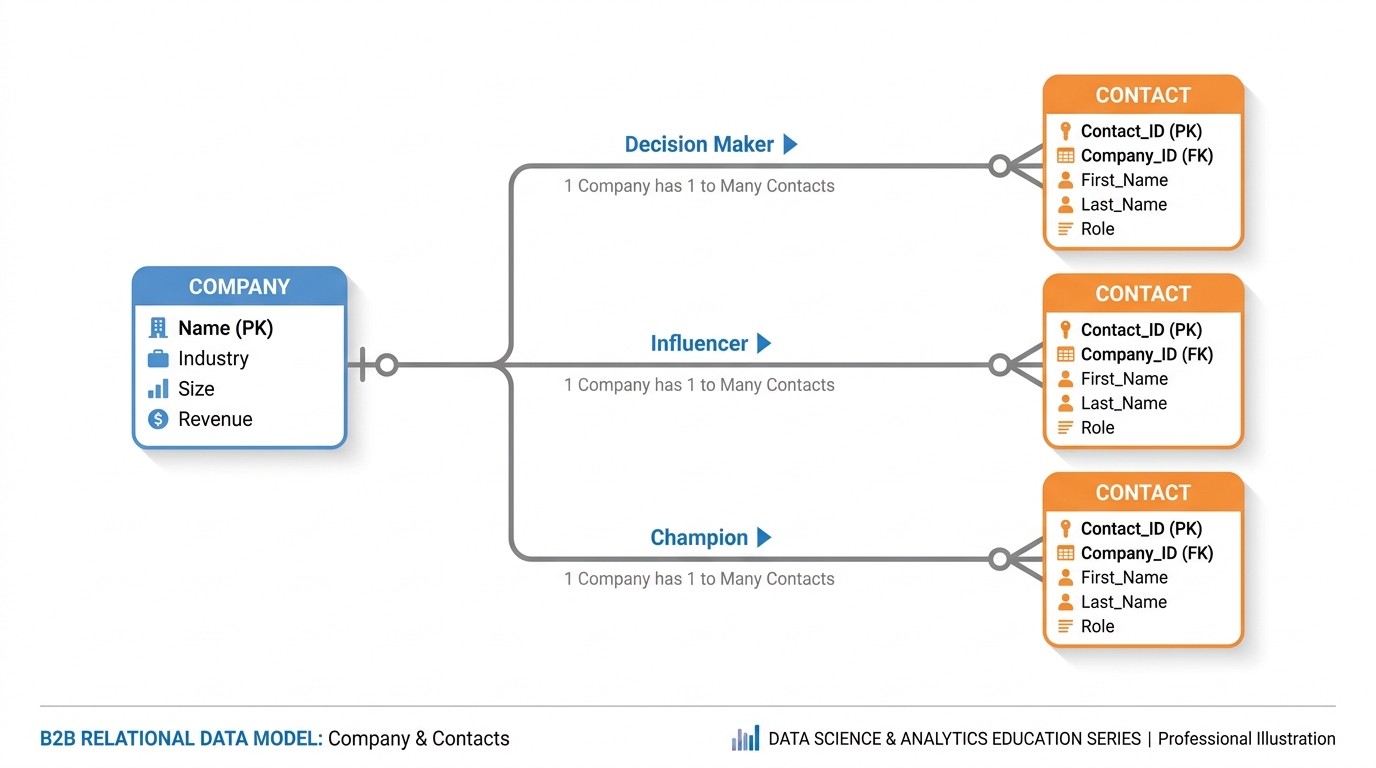
Figure 8:Figure 1.8 — The Company-Contact relational model. In B2B marketing, the buying decision involves multiple stakeholders within a single organization. The relational model allows the system to understand the organizational context of every individual contact.
Marketing to a single consumer is a one-to-one relationship. Marketing to a business is fundamentally different: businesses are organizations with multiple individuals — the SDR who takes your first call, the manager who champions your product, the CFO who signs the check, the IT director who may block the deal. A sophisticated B2B system must track all of them in relationship to each other.
This is why VibeReach.io includes a Company Object alongside the Contact record.
The Company Object stores firmographic data: name, website, industry, employee count, revenue range, physical location, and account status. Custom fields can add B2B-specific context like fiscal year end or technology stack.
Each contact associates with one or more companies, and associations carry role labels — Decision Maker, Technical Evaluator, Financial Approver, End User. This role context flows into workflows, allowing different messages for different stakeholders within the same account.
Structure: Contact → System
One contact record per customer. All marketing is directed at the individual. Personalization is based on individual behavior and preferences.
Example use case: An e-commerce brand markets directly to individual consumers. Smart Lists segment by purchase history, browse behavior, and demographics.
Structure: Company → Multiple Contacts → System
One Company object linked to multiple Contact records. Marketing strategies can target the entire buying committee or specific roles within it.
Example use case: A software company markets to procurement teams. The system tracks all stakeholders at a target account and ensures coordinated outreach across roles.
101.10 Do Not Disturb, Consent, and the New Rules of Respectful Marketing
A Vibe Marketing system can send messages with extraordinary efficiency. That efficiency creates a moral and legal obligation that earlier marketing generations did not face: the obligation to send only to people who have agreed to receive your messages, through channels they have consented to, at times that respect their preferences.
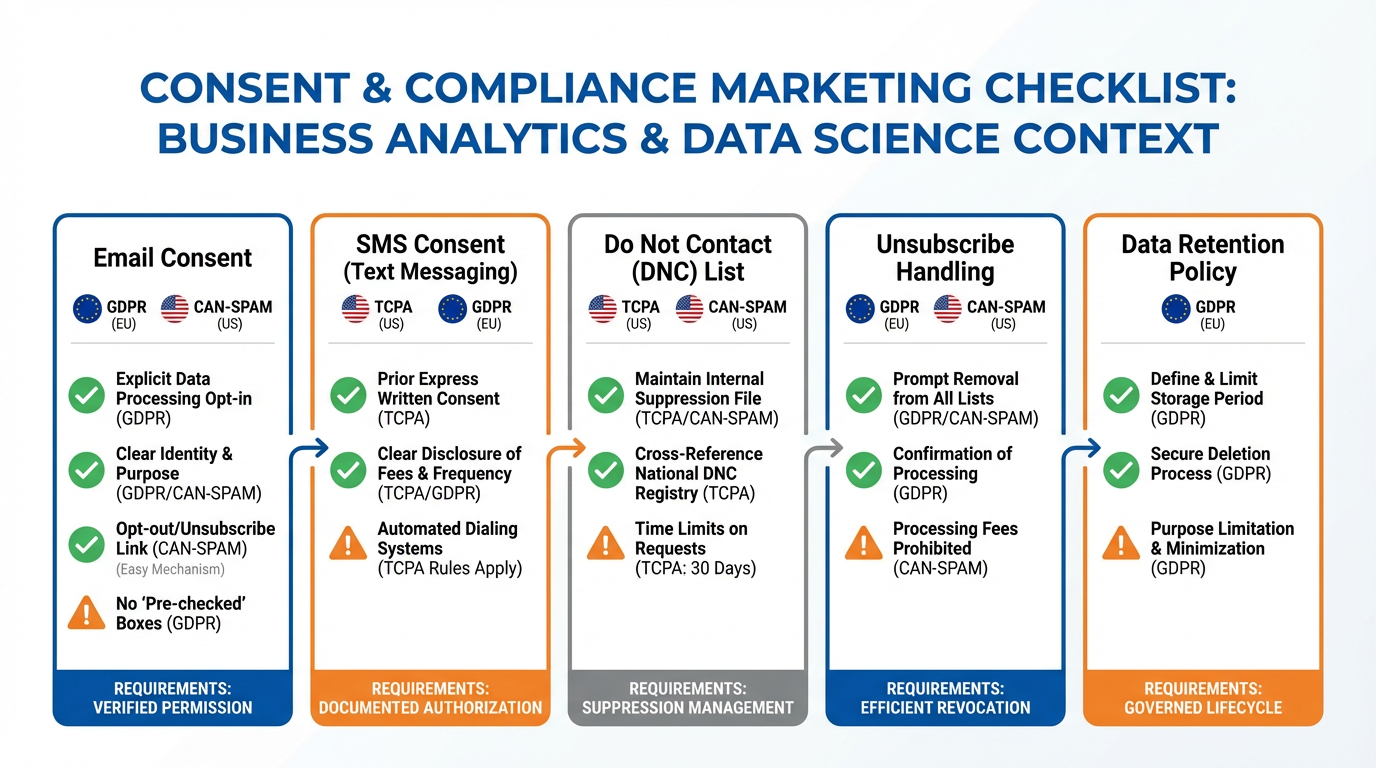
Figure 9:Figure 1.9 — The consent and compliance framework. Each communication channel carries distinct legal requirements. A well-configured Vibe Marketing system enforces these requirements automatically, protecting both the marketer and the contact.
Three regulatory frameworks govern modern marketing communication:
CAN-SPAM (United States): Governs commercial email. Requires a functioning unsubscribe mechanism, honest sender identification, and a physical address. Marketers may email contacts without prior consent, but must honor opt-out requests promptly.
TCPA (United States): Governs SMS and phone marketing. Requires explicit prior written consent before sending marketing texts. Penalties reach $1,500 per unsolicited message.
GDPR (European Union): Governs all personal data processing. Requires a lawful basis for data use, typically explicit consent for EU contacts, and the ability to request data deletion.
Beyond legal compliance, VibeReach.io includes a Do Not Disturb feature that prevents automated messages from being delivered during specified quiet hours. This is not just a courtesy — it is a deliverability strategy. Messages delivered at 3 AM generate complaints and spam reports, damaging the sender reputation that determines inbox placement.
The principle is straightforward: respectful marketing is more effective marketing. Contacting people only through consented channels, with relevant content, during reasonable hours will outperform spray-and-pray on every metric — reply rates, conversion, retention, and lifetime value.
111.11 Case Study: How One Broker Segmented 12,000 Cold Contacts into 14 Smart Lists and 10x’d Reply Rates
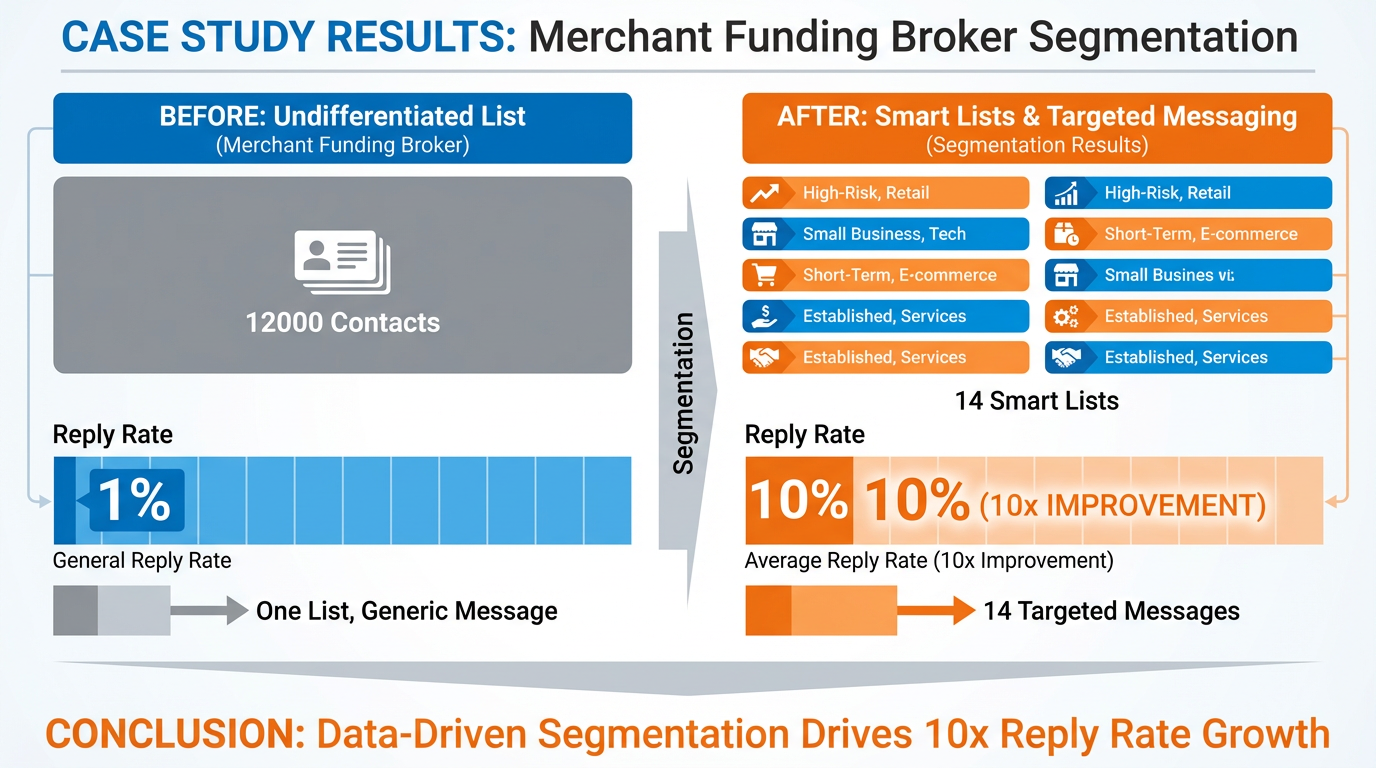
Figure 10:Figure 1.10 — The segmentation transformation. Moving from a single undifferentiated contact list to 14 precisely defined Smart Lists produced a tenfold improvement in reply rates — not by sending more messages, but by sending better-targeted ones.
Theory crystallizes quickly when it meets a real business problem. Consider a merchant funding broker — a business that offers short-term working capital loans to small and medium businesses — who had accumulated 12,000 contacts over several years of trade show attendance, cold outreach, referral networks, and purchased lists.
The problem was characteristic of the Frankenstein Stack era: all 12,000 contacts lived in a single undifferentiated list in an email service provider. Every email campaign went to all 12,000 people. The email was generic — “Are you looking for business funding?” — because no one had the time or data infrastructure to send something more specific. Reply rates hovered around one percent.
Here is what changed.
Phase 1: Data audit. The broker’s team imported all 12,000 contacts into VibeReach.io and audited available data: business type, geographic region, funding range, and engagement history. Missing data was flagged for enrichment via custom fields.
Phase 2: Tag taxonomy. Working from the audit, they designed a taxonomy covering industry, funding range, region, and engagement tier — applying tags via bulk import and automated workflows over two weeks.
Phase 3: Smart List construction. With tags in place, the team built 14 Smart Lists, each representing a meaningfully distinct segment:
Restaurants — Under $50K funding interest
Restaurants — 150K funding interest
Retail — Under $50K funding interest
Construction — Any funding tier
Healthcare businesses — Any funding tier
Contacts who engaged in last 30 days (all industries)
Contacts who engaged in last 90 days (all industries)
Re-engagement candidates — No activity in 180+ days
Previous funded customers — Renewal candidates
High-value prospects — Funding interest over $150K
Southeast region — Any industry
Northeast region — Any industry
Referred contacts — From partner network
Webinar attendees — Any campaign
Phase 4: Message differentiation. The team wrote 14 distinct email and SMS sequences tailored to each segment. Restaurant owners received messages addressing food-service cash flow cycles. Construction contacts received messages about invoice gaps and project timing. Previous customers received outreach referencing their funding history.
The result: Reply rates rose from approximately one percent to an average of ten to twelve percent across all segments — a tenfold improvement — with the highest-personalization segments exceeding twenty percent. The broker did not send fewer emails. He sent smarter ones.
121.12 Lab 1: Import Contacts, Apply Tags, and Build Your First Three Smart Lists
Your CRM is only as useful as the data inside it and the organization applied to that data. In this lab, you import 30 real-looking South Florida business contacts, tag them by lead source, and build three dynamic Smart Lists that will power targeting decisions throughout the rest of this course. By the end, you will have a live, organized contact database — not a flat spreadsheet, but a structured, filterable marketing asset.
12.1Step 1: Create Custom Fields Before Importing
Some of the CSV fields do not have default GHL mappings — you must create them first.
In the left sidebar, click ⚙️ Settings → Custom Fields.
Click the Contacts tab.
Click + Add Field in the upper right.
Create three custom fields:
Field Name:
Industry· Field Type: TextField Name:
Annual Revenue· Field Type: NumberField Name:
Employees· Field Type: Number
Click Save after creating each field.
You’ll know you did this right when: All three custom fields (Industry, Annual Revenue, Employees) appear in the Contacts section of Settings → Custom Fields.
12.2Step 2: Import the CSV
In the left sidebar, click Contacts.
In the Contacts view, click the Smart Lists tab at the top.
Click the Import (downward arrow) icon in the upper right of the page.
Select Contacts → click Next.
Click Upload File → select
lab01-contacts.csvfrom your desktop → click Open.In the “Import Type” dropdown, select Create new contacts → click Next.
You’ll know you did this right when: The file upload completes and you see the field mapping screen with your CSV column headers on the left.
12.3Step 3: Map Your Fields
On the mapping screen, match each CSV column to the correct GHL field:
| CSV Column | Map To |
|---|---|
| first_name | First Name (standard) |
| last_name | Last Name (standard) |
| Email (standard) | |
| phone | Phone (standard) |
| business_name | Company Name (standard) |
| city | City (standard) |
| state | State (standard) |
| notes | Notes (standard) |
| industry | Industry (custom field you created) |
| lead_source | Lead Source (standard — select from dropdown) |
| annual_revenue | Annual Revenue (custom field) |
| employees | Employees (custom field) |
| last_contact_date | Last Contact Date (use Date type custom field if needed) |
For any column you cannot map, check “Don’t import data for unmapped columns.”
Click Next → Import.
You’ll know you did this right when: The import completes and your All Contacts count increases to reflect the 30 new records. Check that a contact record shows the Industry and Annual Revenue values populated.
12.4Step 4: Apply Tags by Lead Source
You will now tag each contact group based on their lead source. Tags let you build behavioral segments and trigger automations.
For each lead source value in the CSV (Referral, Paid Ads, Website Form, Inbound Call, Cold Outreach):
In Contacts → All Contacts, click Advanced Filters.
Add filter: Lead Source | is |
[value](e.g., Referral) → click Apply.Check the header checkbox to select all filtered contacts.
Click Actions → Add Tag → type the tag name → Confirm.
Apply these tags:
Lead Source = Referral → tag:
referralLead Source = Paid Ads → tag:
paid-adsLead Source = Website Form → tag:
website-formLead Source = Inbound Call → tag:
inbound-callLead Source = Cold Outreach → tag:
cold-outreach
You’ll know you did this right when: Open any contact from the imported list and confirm their lead-source tag appears under the Tags section of their contact record.
12.5Step 5: Build Smart List #1 — Hot Leads (Contacted Last 7 Days)
In Contacts, click the Smart Lists tab.
Click + Smart List (or + New Smart List).
Name:
Lab — Hot Leads: Contacted Last 7 DaysClick Advanced Filters:
Filter: Last Contact Date | is | Last 7 days
Click Apply → Save Smart List.
The list updates automatically every time a contact’s Last Contact Date falls within the trailing 7-day window.
You’ll know you did this right when: The Smart List saves and shows a live contact count. If the count is zero, that’s correct — the sample data’s Last Contact Dates may be outside the last 7 days. The list will populate as you use the system.
12.6Step 6: Build Smart List #2 — High Revenue Prospects
+ New Smart List → Name:
Lab — High Revenue ProspectsAdvanced Filters → Filter: Annual Revenue | is greater than |
1000000Apply → Save Smart List.
Expect approximately 8–12 contacts from the sample data to qualify (businesses with annual revenue over $1M).
You’ll know you did this right when: The Smart List shows a non-zero count and the contact records in the list all have Annual Revenue values exceeding $1,000,000.
12.7Step 7: Build Smart List #3 — Uncontacted Referrals
+ New Smart List → Name:
Lab — Uncontacted ReferralsAdvanced Filters:
Filter 1: Tags | contains |
referralClick + Add Nested Filter (AND)
Filter 2: Last Contact Date | is empty
Apply → Save Smart List.
This list finds referral contacts who have never been contacted — your highest-priority outreach targets, since referral leads close at the highest rate and you haven’t even reached out yet.
You’ll know you did this right when: The Smart List shows contacts who have the referral tag AND no Last Contact Date populated.
Troubleshooting Common Issues
0 contacts imported — the count didn’t change: Verify the CSV is properly formatted (comma-separated, UTF-8 encoding, header row present). Confirm at least one of Email or Phone is mapped — GHL requires a unique identifier. Try opening the CSV in a plain text editor to check for hidden characters or formatting issues.
Custom field mapping not appearing during import: Custom fields must be created before starting the import. If you created them after beginning the import flow, cancel, return to Settings → Custom Fields → Contacts, confirm they saved, then restart the import.
Smart List returns 0 contacts after saving: For the “Last 7 Days” filter: check whether the sample CSV’s Last Contact Date values fall outside the trailing 7 days (the sample data uses realistic dates that may be older). The filter is correct — the list will populate as you use the system with real contacts.
For the “Annual Revenue” filter: verify the field was mapped as a Number type (not Text) during import. If it was mapped as Text, the “greater than” numeric comparison will not work. Re-import or manually update a few records to test.
Actions menu doesn’t appear after selecting contacts: You must check the header checkbox to select all visible contacts before the bulk Actions button appears. Clicking individual checkboxes on each row also works, but the header checkbox selects all at once.
Tags not sticking — contacts lose their tags: This happens if you apply a tag and then immediately start a new filtered view before the save is confirmed. Apply tags for one lead source group, confirm the tag appears on at least one contact, then move to the next group.
131.13 Chapter Takeaways & Reflection Questions
13.1Chapter Takeaways
The following core principles emerged in this chapter. They form the foundation upon which every subsequent topic in this textbook is built.
The Frankenstein Stack is a structural problem, not a tool problem. Adding more tools to a fragmented architecture makes the problem worse. The solution is consolidation around a unified data model.
The Contact record is the single source of truth. Every marketing activity is either derived from or recorded on a Contact record. Disconnected records of the same person always produce fragmented outcomes.
The Four Heartbeats — Attract, Engage, Convert, Retain — form a continuous cycle. Treating marketing as a linear funnel that ends at conversion misses retention, the most financially important phase.
The Three Pillars — Funnels, Pipelines, Workflows — are the engineering layer. Funnels bring contacts in. Pipelines track deal progress. Workflows automate every repeatable action.
Tags and Custom Fields serve different purposes. Custom fields describe what a contact is. Tags describe what a contact has done or currently represents in the system.
Smart Lists replace static segmentation permanently. A well-designed Smart List library eliminates spreadsheet exports and enables sophisticated personalization at scale.
Consent is a performance advantage, not just a legal obligation. Marketing to consented, interested audiences outperforms spray-and-pray on every metric that matters.
Segmentation multiplies message effectiveness. The case study demonstrated that the same 12,000 contacts, properly segmented, produced a tenfold improvement in reply rates without any increase in send volume.
13.2Reflection Questions
Think of a marketing organization you are familiar with — a company you have worked for, interacted with as a customer, or studied. How many separate software tools do they use for marketing and sales? What problems does that fragmentation create? How would a unified platform architecture change their operations?
The chapter argues that Retain is the most financially important of the four heartbeats, yet it receives the least systematic attention. Why do you think this imbalance persists? What organizational or cultural factors might explain why acquisition consistently receives more investment than retention?
Consider the distinction between a Tag and a Custom Field. Design a tag taxonomy and a set of custom fields for one of the following businesses: (a) a dental practice, (b) a real estate agency, or (c) a nonprofit seeking donors. Justify each design decision.
The case study broker achieved a tenfold improvement in reply rates through segmentation. What ethical obligations does this kind of effectiveness create? If a marketer can reach the right people with precisely calibrated messages at the right time, what responsibilities does that capability entail?
14Discussion
Discussion Prompt:
The opening of this chapter describes the “Frankenstein Stack” — the accumulation of disconnected marketing tools that characterizes most modern marketing organizations. Research suggests that tool fragmentation is not merely an inconvenience but a source of measurable competitive disadvantage: teams spend more time on integration and data reconciliation than on strategy and creativity.
Drawing on the concepts introduced in this chapter — the unified Contact record, the Four Heartbeats, Smart Lists, and the Three Pillars — construct an argument for or against the following claim: A single unified marketing platform, even if less specialized than best-in-class point solutions, produces better marketing outcomes than a best-of-breed stack of specialized tools.
Support your position with reference to at least one scholarly or industry source. Consider the counterarguments. What does your position mean for how organizations should evaluate and procure marketing technology?
Discussion Guidelines: Write a substantive response of at least 200 words addressing the prompt above. Include at least one scholarly or credible citation (journal article, textbook, or authoritative industry report) to support your argument. Then respond to at least TWO peers with substantive feedback — go beyond “I agree” and explain why their perspective adds to or challenges your thinking.
15Exercises
---

## Glossary

:::{glossary}
Activity Timeline
  A chronological log attached to each Contact record, automatically populated with every interaction the system mediates — emails sent and received, pages visited, forms submitted, calls logged, and notes added.

Attract
  The first of the four heartbeats of Vibe Marketing; encompasses all activities that bring new individuals into awareness of an offer and draw them toward the database.

CAN-SPAM
  The primary U.S. federal law governing commercial email. Requires functional unsubscribe mechanisms, honest sender identification, and a physical address; allows email without prior consent but mandates prompt opt-out processing.

Company Object
  A data record representing an organizational entity, connected to one or more Contact records via association links and role labels; essential for B2B account-level marketing.

Contact Record
  The canonical, unified representation of a single individual in a marketing platform, serving as the single source of truth for all data, communications, and behavioral history.

Convert
  The third of the four heartbeats of Vibe Marketing; the phase in which a contact makes a purchasing commitment, completing the transition from prospect to customer.

Custom Field
  A user-defined data field added to a Contact or Company record to capture business-specific information not covered by system defaults.

Do Not Disturb
  A setting that prevents automated messages from being delivered during specified time windows, protecting deliverability and contact satisfaction.

Engage
  The second of the four heartbeats of Vibe Marketing; the process of educating, nurturing, and building trust with contacts who are not yet ready to buy.

Frankenstein Stack
  A marketing technology architecture composed of multiple disconnected point-solution tools, generating data fragmentation, attribution blindness, and automation fragmentation.

Funnel
  One of the Three Pillars; the designed pathway a prospect travels from first awareness to becoming a captured contact, including landing pages, opt-in forms, and lead magnets.

GDPR (General Data Protection Regulation)
  The European Union's comprehensive data protection law requiring a lawful basis for data processing and granting individuals rights to access, correct, and delete their data.

Pipeline
  One of the Three Pillars; the structured representation of a sales process consisting of named stages through which deals progress from qualification to closed revenue.

Retain
  The fourth of the four heartbeats of Vibe Marketing; the phase focused on maximizing customer lifetime value through proactive engagement, satisfaction monitoring, and referral generation.

Smart List
  A dynamically evaluated contact segment defined by filter conditions connected by AND/OR Boolean logic; automatically includes contacts who qualify and removes those who do not.

Tag
  A categorical label applied to a Contact record to indicate group membership, behavioral history, or campaign association; tags are dynamic and form the primary vocabulary for segmentation.

TCPA (Telephone Consumer Protection Act)
  The primary U.S. federal law governing telephone and SMS marketing; requires explicit prior written consent before sending marketing text messages.

Workflow
One of the Three Pillars; a configured sequence of triggers, conditions, and actions that automates the system's response to contact behavior without human intervention.16🎯 Your Turn: Apply It to Your Business
You just got the full philosophical foundation — Contacts as universe, Smart Lists as living segments, the Four Heartbeats, the Three Pillars. Now make it real. The difference between someone who reads this and someone who uses it is what happens in the next 30 minutes.
1. Map your own Four Heartbeats. Open a blank doc or grab a napkin. For your actual business (or one you know well), write down two specific activities for each heartbeat: Attract, Engage, Convert, Retain. Don’t use generic examples — name the actual channels, tools, or actions you use today. Now honestly score each heartbeat 1–10: How systematized is it? Where’s the biggest gap? That gap is your highest-leverage automation target for this course.
2. Audit your Frankenstein Stack. List every software tool your business (or your client’s business) uses to manage the customer journey from first touch to retained customer. Count them. For each tool, ask: Does it share data automatically with the others, or does someone have to manually move information? Circle every manual data transfer — each circle is a revenue leak.
3. Design your tag taxonomy.
Before you apply a single tag in GHL, design the categories. Open GHL → Contacts → pick any contact → click into the Tags field. Look at existing tags if any exist. Now design a taxonomy with at least four categories using the colon prefix convention: source:, status:, industry:, and one category specific to your business. Write it out. This becomes your team’s tagging standard.
4. Build three Smart Lists that would actually run your morning. Think about what three contact segments you check manually every day or week. Maybe it’s “new leads from this week,” “customers up for renewal,” or “prospects who went cold.” In GHL → Contacts → Smart Lists → + New Smart List, build those three lists right now using filters that match your real criteria. Name them clearly. Bookmark them. If they’re accurate, you’ve just automated your Monday morning report.
5. Identify your single biggest Contact record gap. Open five random contact records in your GHL account. What data is missing that would change how you’d communicate with them? Is it industry? Budget? Last purchase date? Design one custom field that would fill the most important gap. Go to Settings → Custom Fields → Contacts → + Add Field and create it.