How the Wolf Sees
“You don’t need to understand how the engine works to drive a car — but if you want to drive it fast, over bad terrain, without breaking down, it helps to know what’s under the hood.”
Let’s build the mental model that makes everything else in this book work.
Not a computer science lecture. Not a history of neural networks. An operational briefing on how large language models actually work, what they need from you, where they’ll fail you, and how to think about them as instruments in a professional environment. By the end of this chapter, you’ll have a framework that makes every subsequent tool — Gemini, NotebookLM, AI Studio, Antigravity — immediately more intuitive.
11.1 The Core Mental Model: IQ With a Memory Problem
Here’s the analogy that unlocks everything.
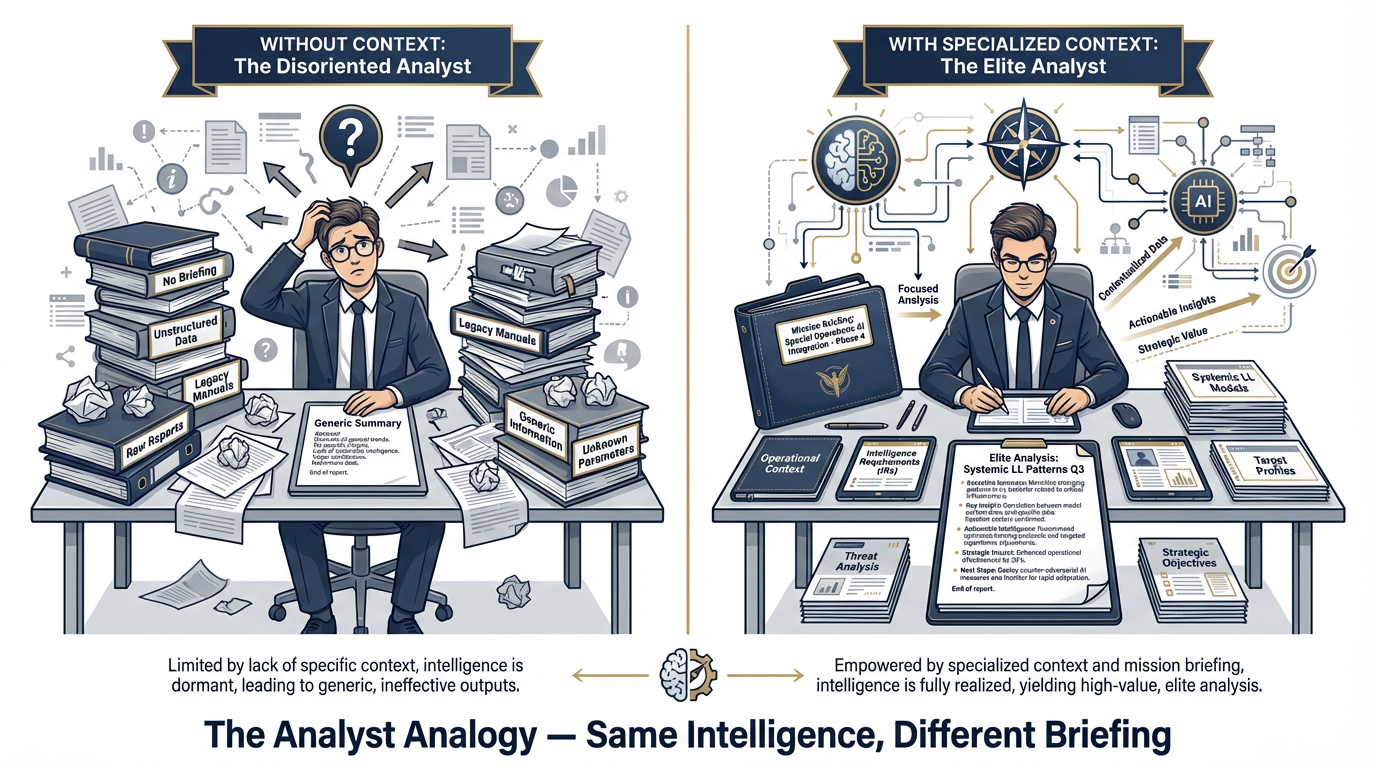
Figure 1:The Analyst Analogy. A large language model is like a brilliant analyst who has read everything ever written — but walked in on their first day knowing nothing about your mission. The prompt is the briefing. Better briefing equals elite output.
Imagine you’re about to receive a brilliant new analyst. This person has read more than any human alive — millions of documents, books, articles, reports, manuals, transcripts, research papers, doctrine publications, contract vehicles, after-action reviews. Their general intelligence is off the charts. They can reason, synthesize, compare, summarize, draft, and structure information with remarkable speed and coherence.
But here’s the thing.
On their first day, they walk into your office knowing nothing about your mission. They’ve never heard of the GRASP Model. They don’t know your program’s history, your client relationships, your current friction points, or the specific format your J7 counterpart expects in a briefing package. They don’t know whether you’re doing JLLIS entries or running a contractor-led experimentation program. They don’t know which six programs just had their Lessons Learned data ingested and which ones are still in collection.
You could ask this analyst a general question — “What are best practices for after-action reviews?” — and get an excellent, well-structured response. But ask them “What patterns are emerging across our last three exercises compared to the previous cycle?” and you’d get a blank stare. Because you haven’t briefed them yet.
That is exactly what a large language model is.
Extraordinary general intelligence. Zero situational awareness about your specific mission until you provide it.
What happens when you put a brilliant analyst in a room without a briefing? They’re frustrating to work with. They’re generic. Their outputs could have come from anyone with a library card.
What happens when you brief them properly — give them context, assign a role, define the task, provide the relevant documents? They’re elite. The same intelligence, now focused on your actual problem, in your actual operational environment, using your actual terminology.
The entire discipline of prompting — which we’ll build across this chapter and the next — is about learning to brief your AI the same way you’d brief a high-value analyst who just joined the team.
What Is the “Knowledge Base”?
The analyst analogy helps explain another question people ask: “How does the model know all this stuff?”
It doesn’t “know” anything the way a human does. What happened is this: engineers took an enormous corpus of text — we’re talking a significant fraction of the human-produced written record — and trained a neural network to predict what comes next in any given sequence of words. Over billions of training examples, the model developed internal representations of language, concepts, relationships, and patterns. When you ask it a question, it’s not consulting a database. It’s generating a response based on the statistical patterns learned from that training data.
That process produced something remarkable — a system that can reason, generalize, and produce coherent, contextually appropriate text across an almost unlimited range of topics.
But it also produced something with real limitations. The model’s knowledge is frozen at a training cutoff date. It can “hallucinate” — generate confident-sounding text that is simply wrong. It has no direct access to current events or real-time information unless you give it tools that provide that access. And it has no memory of your previous conversations unless you explicitly include that context.
More on all of these. But first, the landscape.
21.2 The Landscape of Models: Three Tiers, Three Jobs
Not all AI models are created equal, and the right tool depends entirely on the task. Here’s the framework you need.
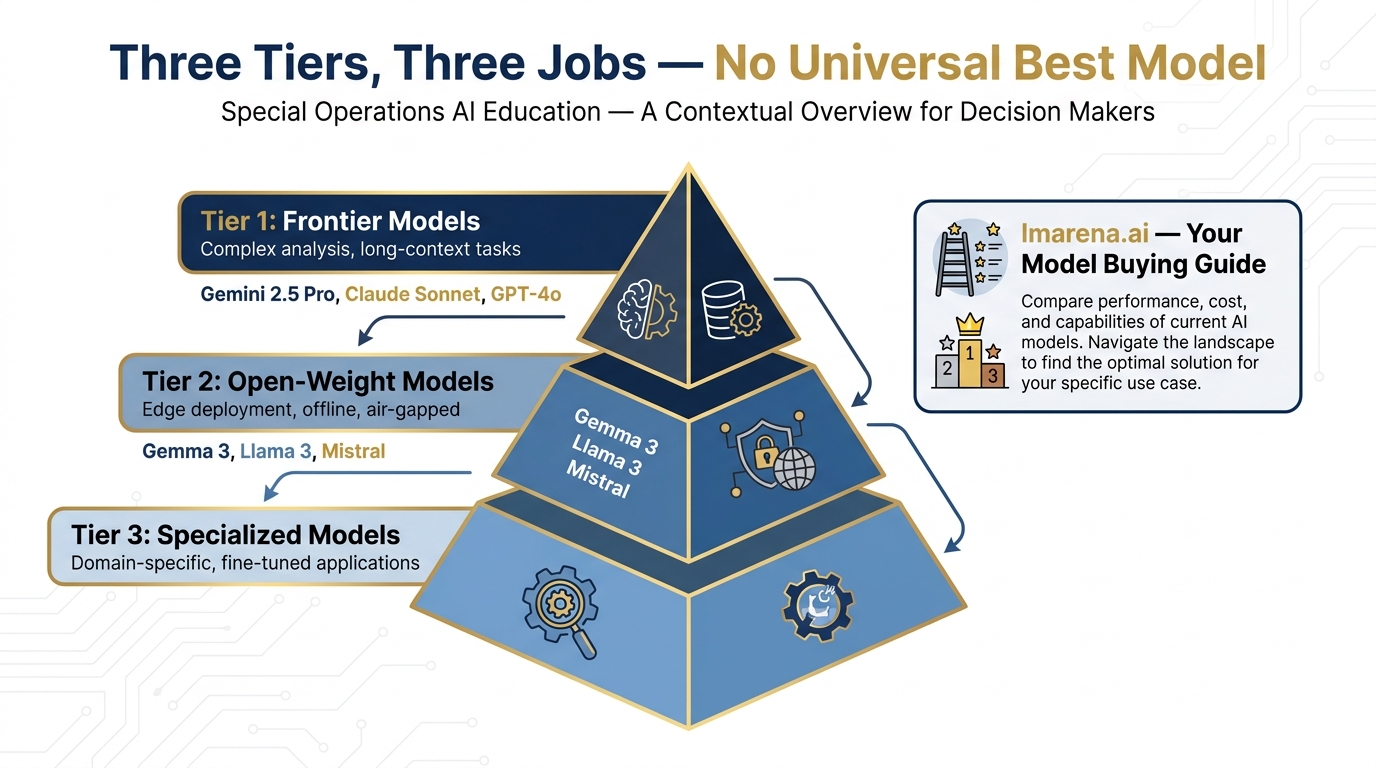
Figure 2:The Three-Tier Model Framework. Match the model to the mission: Frontier models for complex analysis, open-weight models for edge deployment, specialized models for domain-specific tasks.
Tier 1: Frontier Models
These are the heavy hitters — the models that sit at the top of every benchmark, trained on the most data with the most compute. As of April 2026, the top tier includes:
Google Gemini 3.1 Pro — Released February 19, 2026. Google’s most advanced model. 1M context window. ARC-AGI-2: 77.1%. GPQA Diamond: 94.3%. Available in AI Studio, Antigravity, and NotebookLM Pro/Ultra.
Google Gemini 3 Pro — GA since November 2025. The production workhorse. 1M context. GPQA 91.9%. The safe choice for sustained professional workflows.
Google Gemini 3 Flash — GA since December 2025. $0.50/1M tokens. 3× faster than Gemini 2.5 Pro. GPQA 90.4% — remarkably beats its predecessor at a fraction of the cost.
Anthropic Claude Sonnet / Opus — Exceptional reasoning and writing; a preferred choice for many professional document workflows.
OpenAI GPT-4o — Widely deployed; strong all-around performance.
Frontier models are what you reach for when the task is complex, the stakes are high, or you need the best possible output quality. Consumer-facing products (gemini.google.com, claude.ai, ChatGPT) are available at flat monthly subscription rates that make cost largely irrelevant for individual use.
For Lukos work, your primary frontier model is Gemini 3.1 Pro (preview) or Gemini 3 Pro (GA) via gemini.google.com. Everything in Day 1 builds around these.
Tier 2: Open-Weight Models
These models are released with their weights publicly available — meaning they can be downloaded, run locally, and customized. They’re typically smaller and less capable than frontier models, but they have a critical advantage: they can run on-premises, offline, or on air-gapped networks.
The most relevant for Lukos:
Gemma 4 (Google’s open-weight family, released April 2, 2026) — Available in two variants:
gemma-4-26b-a4b-it(MoE architecture, efficient) andgemma-4-31b-it(dense, maximum quality). Apache 2.0 license. Available in AI Studio. Strong performance for its size; covered in Chapter 10.Llama 3.x (Meta’s open-weight family) — Widely used; good for general tasks at the edge.
Mistral — Efficient; particularly strong at instruction-following.
Open-weight models are your edge capability. When the network isn’t available, when classification levels prohibit cloud tools, or when you need to run a model inside a controlled environment, Tier 2 is where you go.
Tier 3: Specialized/Tuned Models
These are models that have been further trained (fine-tuned) for specific domains or tasks — medical, legal, code generation, embeddings for search. You’ll encounter these as you build more sophisticated pipelines, but they’re outside the scope of this introductory course.
The “Best Model” Fallacy
There is no universally best model. There’s only the right model for your specific task, constraints, and environment. A 7-billion parameter Gemma model running locally on a laptop is “better” than Gemini 3.1 Pro when you’re on a classified network with no cloud access. Claude Opus might be “better” than Gemini for a specific type of document analysis — and worse for another.
The tool that helps you make this call:
How to Use the Model Arena
arena.ai is the independent public benchmark for AI models — “The Official AI Ranking & LLM Leaderboard.” It works like this: real users submit prompts, and the models compete blind — the user sees two responses without knowing which model produced which, votes for the better one, and the results aggregate into an Elo-style leaderboard.
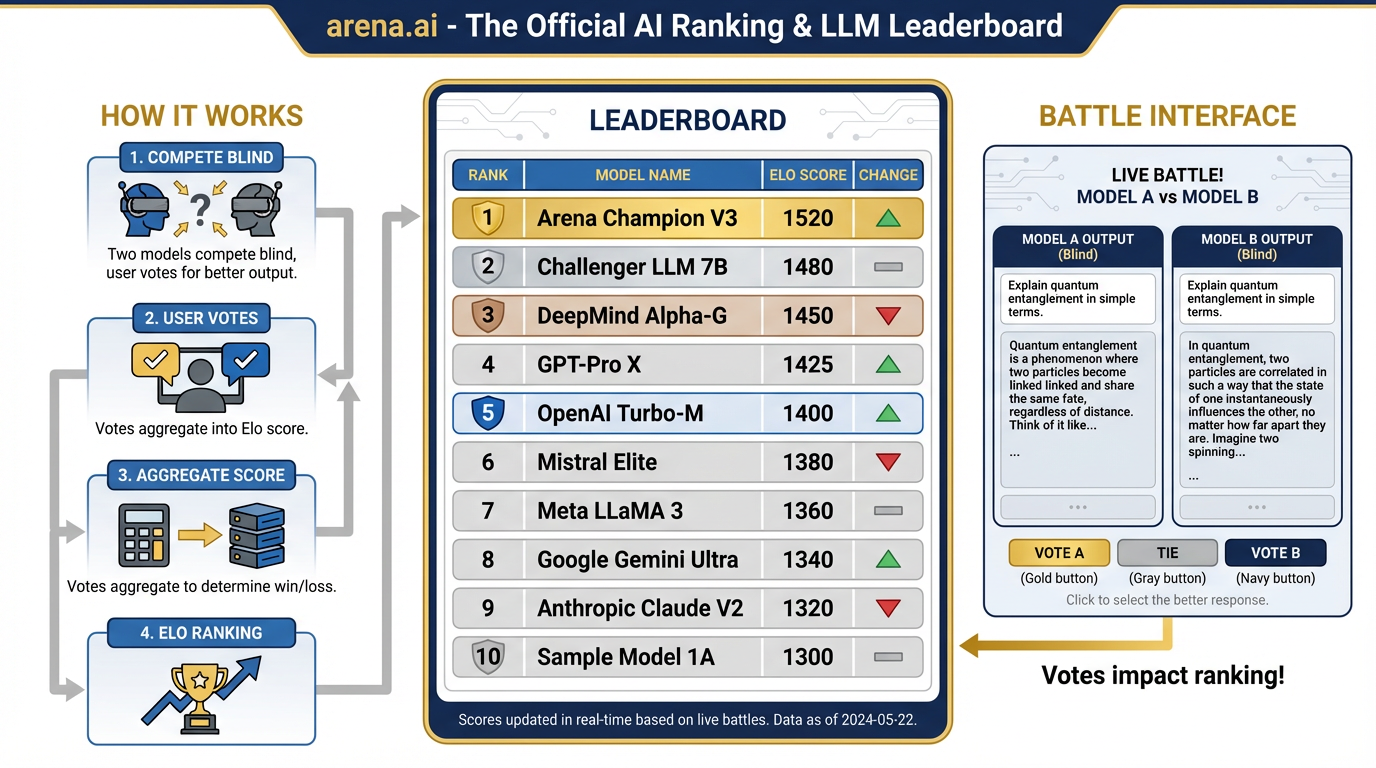
Figure 3:arena.ai: The AI Model Leaderboard. Real users submit prompts, models compete blind, votes aggregate into Elo rankings. The closest thing to an objective buying guide for AI tools.
This is the closest thing to an objective “buying guide” for AI models.
31.3 Hands-On Lab: The Pack Briefing — Model Arena Comparison
41.4 What LLMs Are Good At — And Bad At
Where AI Earns Its Keep
For Lukos work specifically, AI is well-suited for:
Summarization — Condensing a 50-page AAR into a 2-page executive brief. Extracting key themes from a working group transcript. Producing a BLUF paragraph from a dense program evaluation. These are tasks AI performs with remarkable quality at remarkable speed.
Classification and tagging — Looking at 200 Lessons Learned entries and categorizing them by theme, severity, function, or recurrence rate. This is one of the highest-ROI applications for the Lukos LL program specifically. A task that might take an analyst three days runs in minutes.
Drafting — First-draft briefing memos, talking points, congressional reports, training materials, program summaries. AI produces a credible first draft that a human then reviews, sharpens, and approves. The analyst doesn’t disappear. The blank-page problem does.
Restructuring — Taking rough working group notes and converting them to formatted OPORD-style documentation. Taking a wall of bullet points and building them into a structured narrative. Taking an informal report and rendering it into a specific template.
Pattern detection — Across a large document corpus, AI can surface recurring themes, emerging trends, and anomalous entries that would take human analysts days to find manually. This is the capability that directly amplifies the GRASP Model.
Comparison — “Here are four vendor proposals. What are the key differences in approach, risk, and cost?” AI can hold multiple documents in context simultaneously and produce a structured comparative analysis.
Where AI Gets You Into Trouble
Mathematics — Base LLMs are notoriously unreliable at arithmetic and quantitative reasoning. They can appear confident and be wrong. When your analysis requires precise numerical computation, use a calculator. When working in AI Studio, you can give the model a code interpreter tool — that helps. But unassisted arithmetic in a chat window? Verify everything.
Citation without grounding — If you ask a model to cite its sources and it doesn’t have access to a document set, it will sometimes generate plausible-sounding citations that don’t exist. This is a hallucination risk we’ll address directly. The solution is grounding: always provide the actual documents and instruct the model to cite only from what you’ve given it.
Knowing what it doesn’t know — This is the subtle one. LLMs do not have a reliable sense of their own knowledge boundaries. They will answer a question confidently even when they should say “I don’t know.” The USSOCOM J7 standard applies: close enough is not close enough. Build verification into your workflow.
Current events and real-time data — The model’s knowledge has a training cutoff. Anything that happened after that date is unknown to the model unless you provide it. For tasks that require current information, use tools that provide web access (covered in Chapter 9) or provide the relevant documents yourself.
Hallucination: What It Is and How to Catch It
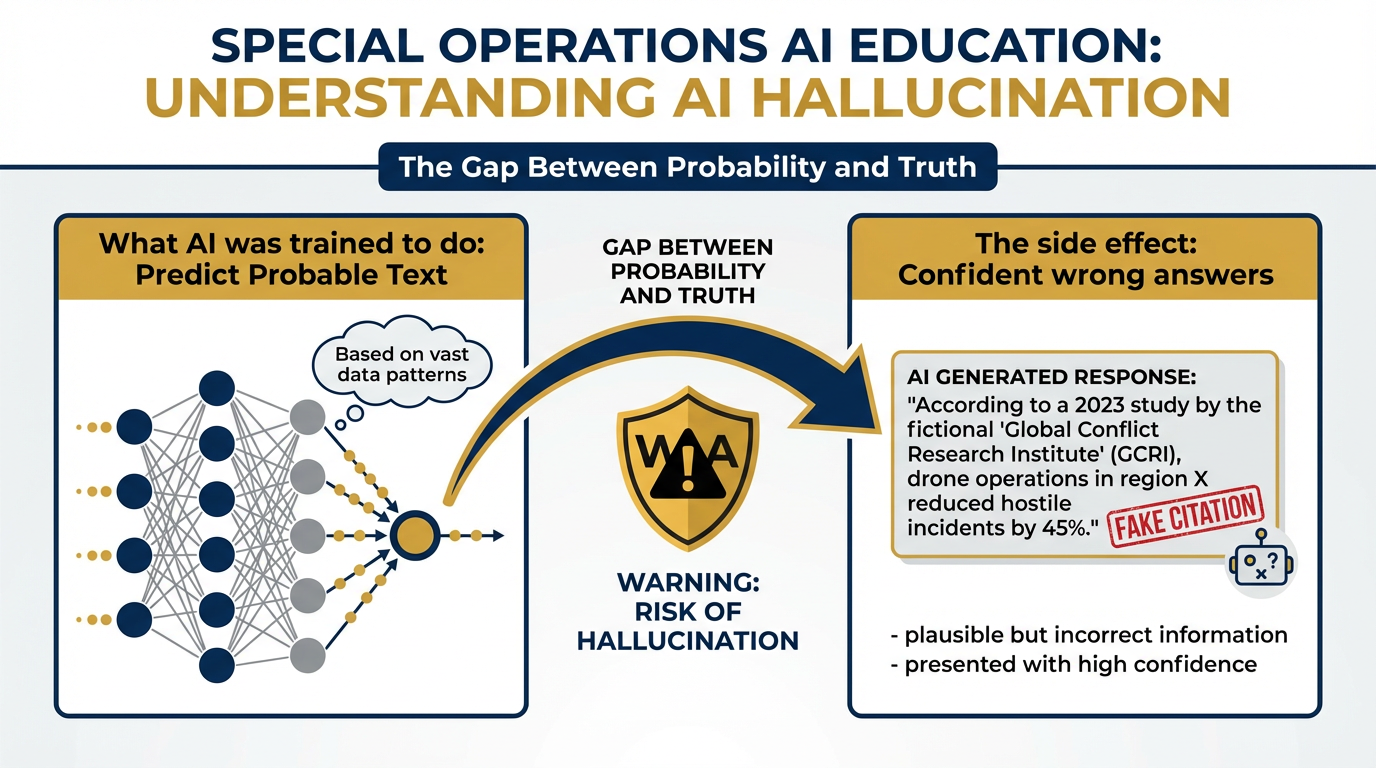
Figure 4:Why AI Hallucinates. LLMs are trained to produce probable text, not true text. Sometimes the most probable next sequence drifts from accuracy while remaining fluent. The model has no internal alarm bell that fires when it’s wrong.
Here’s the blunt version: hallucination is when the model generates text that sounds completely authoritative and is simply not true. It might be a statistic that doesn’t exist. A citation to a paper that was never written. A policy detail that’s been slightly — or substantially — wrong.
Why does it happen? Because the model was trained to produce probable text, not true text. Sometimes the most probable next token sequence is one that drifts from accuracy while remaining fluent. The model has no alarm bell that fires when it’s wrong.
The Lukos response to hallucination is the same as the Lukos response to any analytical product that hasn’t been verified: you don’t publish it until it’s been reviewed.
Practical countermeasures:
Provide documents, then ask questions about those documents. When the model is grounded in a provided corpus, hallucination rates drop substantially.
Ask the model to explain its reasoning. Gaps in the chain of reasoning often surface errors.
Instruct the model to say “I don’t know” when uncertain. It won’t always comply, but it helps.
Cross-reference any specific claim — statistics, dates, names, policy references — before including them in a deliverable.
The wire brush applies here too. Brutal candor with AI outputs before they leave your hands.
51.5 Tokens: The Atom of AI
Before we can talk about the two most important concepts in this book, we need to establish a unit of measurement.
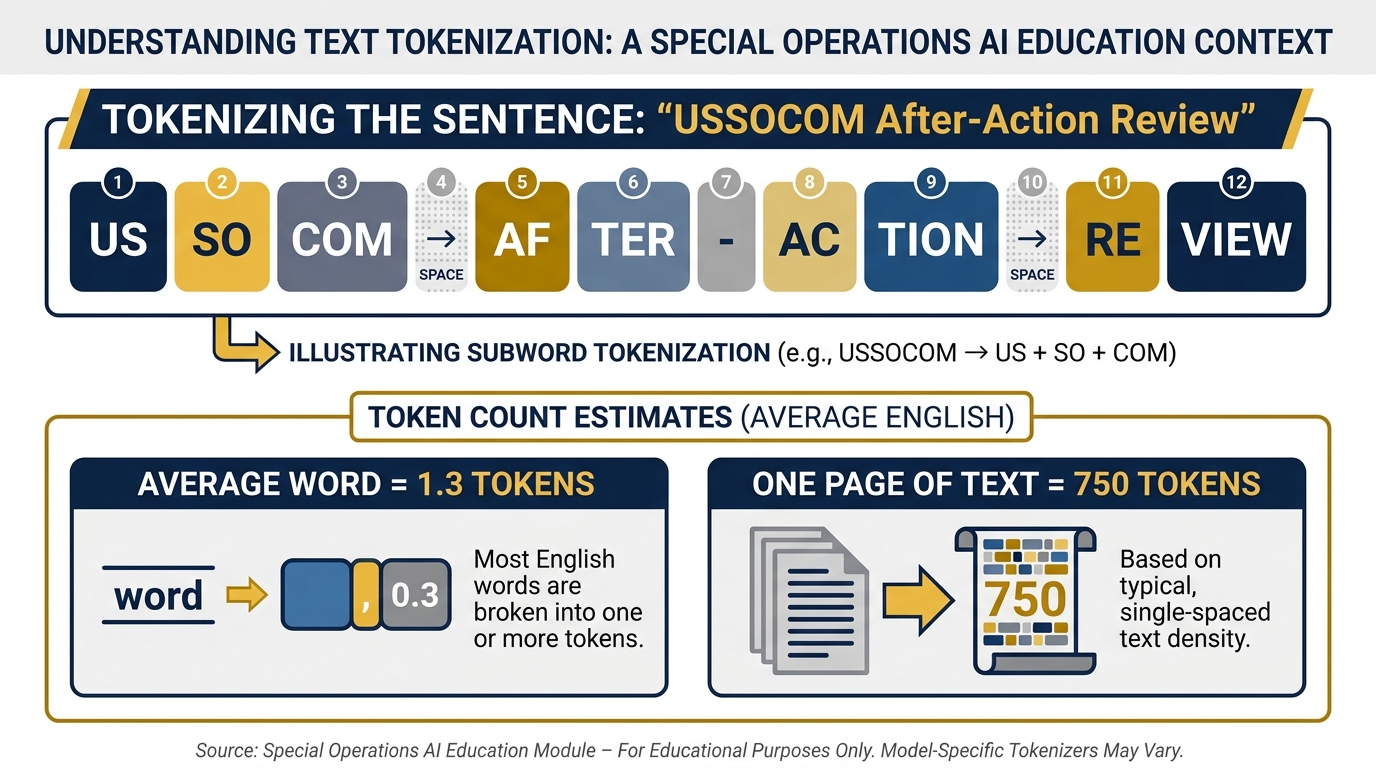
Figure 5:Token Anatomy. A token is not a word, not a character — it’s roughly 3–4 characters of English text, or about ¾ of a word. Everything the model reads and writes is measured in tokens.
A token is the basic unit that AI models process. Not a word. Not a character. Something in between — roughly 3-4 characters of English text, or about ¾ of a word. The word “USSOCOM” might be one token, or it might be split into two or three depending on how the model’s tokenizer handles it. The word “a” is one token. A period is one token.
Why does this matter? Because AI models operate within a token budget. Everything that goes into the model — your instructions, the documents you provide, the conversation history — is measured in tokens. Everything that comes out is measured in tokens. The model’s entire operating environment is bounded by this unit.
A Practical Token Reference
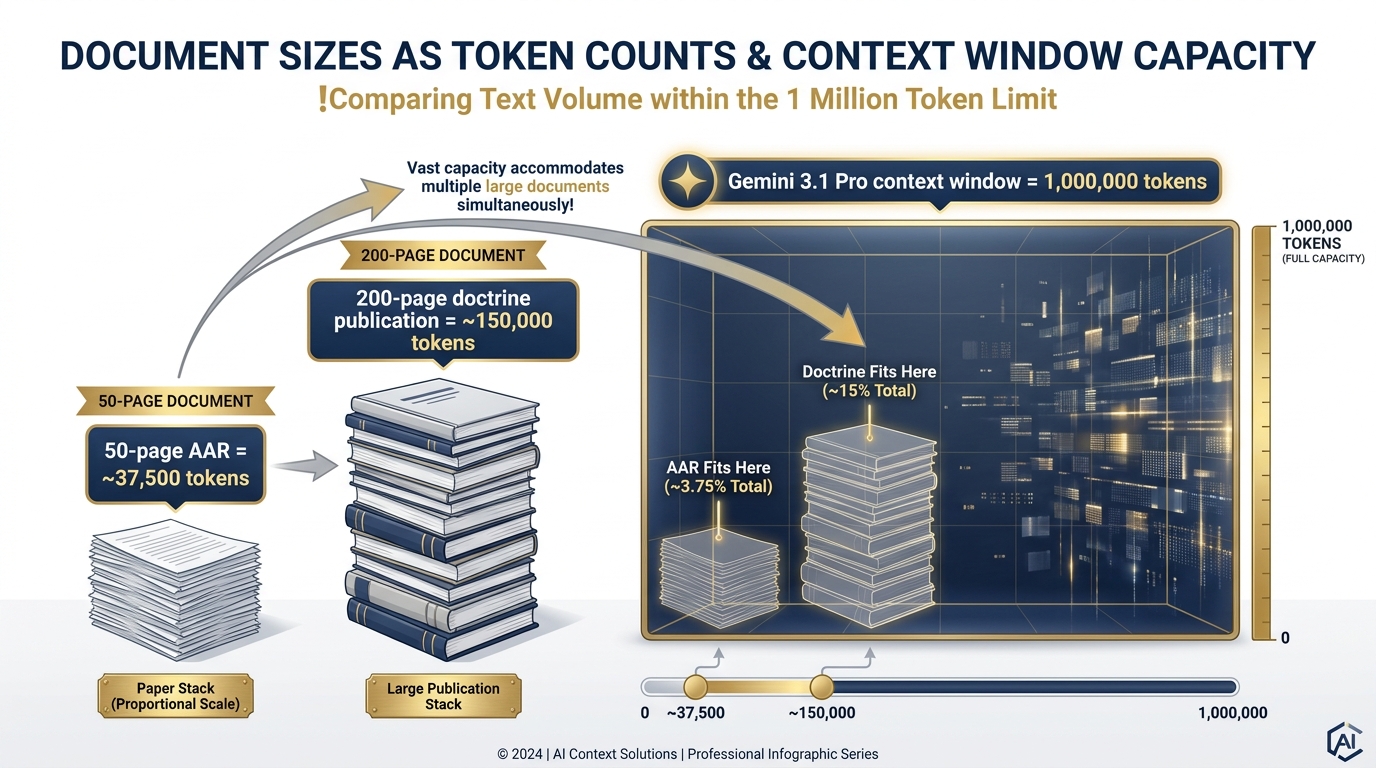
Figure 6:Documents vs. the Context Window. A 50-page AAR is ~37,500 tokens. Gemini 3.1 Pro’s 1-million-token window can hold an entire program’s worth of after-action reviews simultaneously.
| Content | Approximate Tokens |
|---|---|
| One page of standard text | ~750 tokens |
| A 10-page AAR | ~7,500 tokens |
| A 50-page program evaluation | ~37,500 tokens |
| A 200-page doctrine publication | ~150,000 tokens |
| An entire year’s Lessons Learned corpus (est.) | ~500,000–1,500,000 tokens |
The Lukos implication: You now have a unit to think in when you’re deciding what to load into an AI session. A 50-page AAR at ~37,500 tokens is manageable. A 500-document corpus at 15 million tokens is not going into a single session — it requires a retrieval strategy (Chapter 4 covers this).
Token Pricing: The Basic Framework
When you use AI through a consumer app (gemini.google.com, claude.ai), you pay a flat subscription and token costs are abstracted. When you build workflows through an API (AI Studio, Vertex), you pay per token.
The rule: input tokens are cheap; output tokens cost more. Reading a 50-page AAR costs a fraction of a cent. Generating a 10-page synthesis document costs more. For Lukos work at the volumes you’re operating, the costs are negligible at API rates — but understanding the structure matters when you’re building automated workflows that might process thousands of documents.
61.6 The Token Window — The First Pillar of Prompting
Here’s the question: if you have a brilliant analyst, how much can they hold in their head at once?
In the real world, the answer is bounded by human working memory — roughly 7±2 chunks of information at any given time, with degradation as that working memory fills up. You brief an analyst on the entire program history, and by the time you get to the current problem, the earliest details have started to fade.
LLMs have an analogous limitation. It’s called the context window — the maximum amount of text the model can “see” and reason over in a single interaction. Everything outside the window is invisible to the model. Everything inside it is available for reasoning.
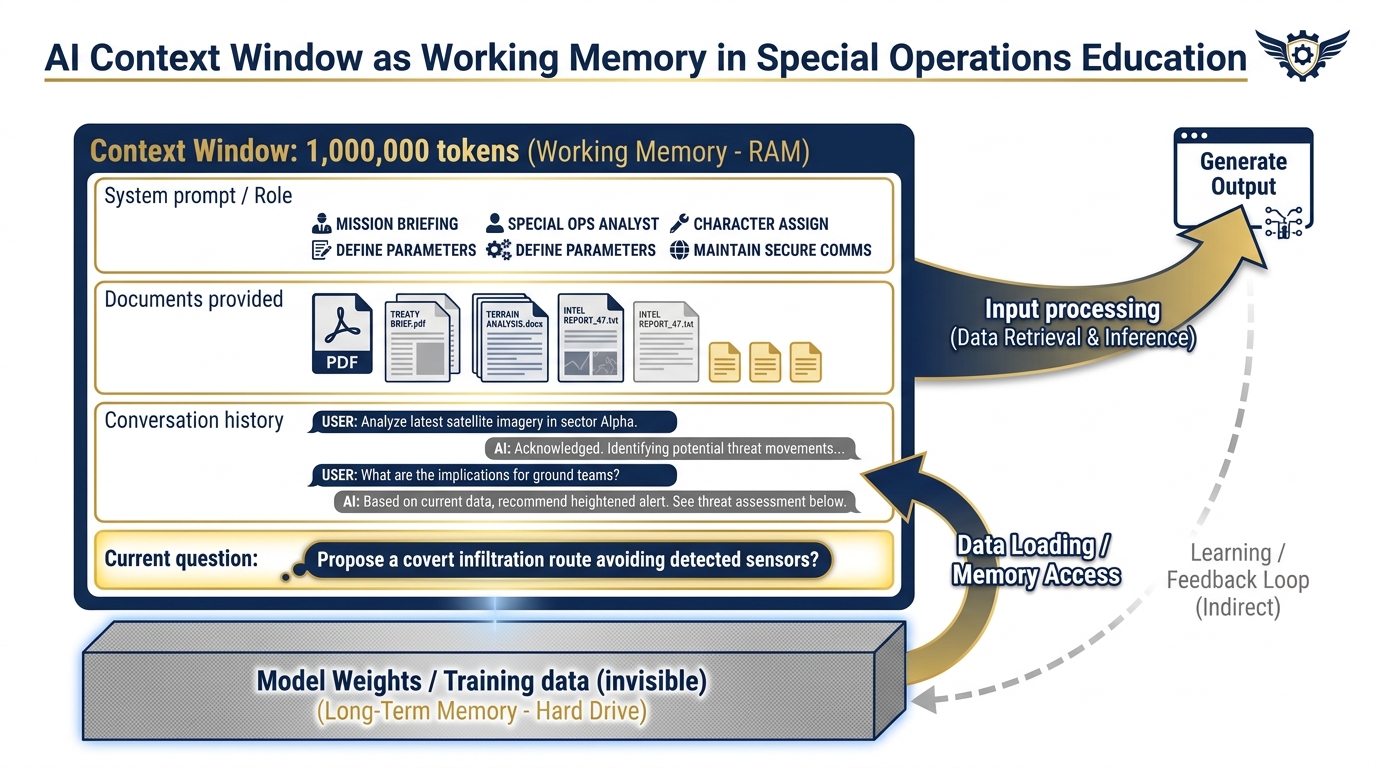
Figure 7:The Context Window as Working Memory. Everything inside the window — your instructions, documents, conversation — the model can use. Everything outside (training weights, prior conversations) is invisible until you explicitly include it.
Why the Window Size Changes Everything
For most of AI’s history, context windows were small — a few thousand tokens. That meant you could have a conversation, or you could analyze a document, but not both at scale. You couldn’t load a 50-page program evaluation and have a sophisticated discussion about it. You couldn’t compare three documents simultaneously. You couldn’t ask the model to cross-reference patterns across a year’s worth of AARs.
Then Gemini happened.
Gemini 3.1 Pro has a context window of one million tokens. That’s not a typo. One million.
One million tokens is roughly:
40 full-length books
An entire program’s worth of after-action reviews
Several years of working group transcripts
Your entire Lessons Learned corpus for a single TSOC component
This is the single biggest differentiator most people aren’t talking about. The million-token context window doesn’t just let you work with bigger documents. It changes the category of questions you can ask. You’re no longer limited to “analyze this document.” You’re now able to ask: “Across every AAR from this program over the last three years, what recurring friction points appear more than twice, and how have they evolved over time?”
That question was not practically answerable with AI twelve months ago. It is now.
The Two Failure Modes of the Context Window
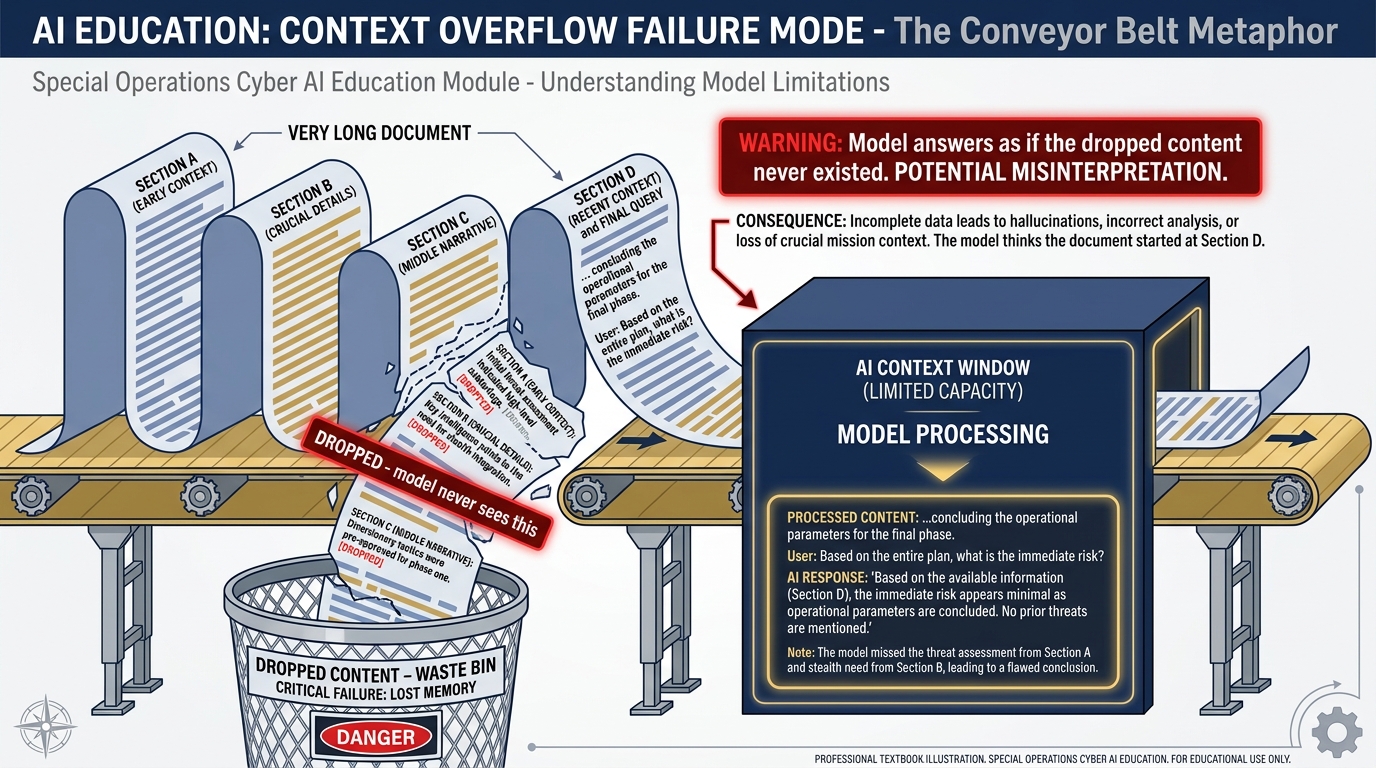
Figure 8:Failure Mode 1: Context Overflow. When you load more content than the window can hold, the oldest content falls off the front. The model answers as if that content never existed.
Understanding the window also means understanding how it fails. There are two:
Failure Mode 1: The Cliff Edge (Context Overflow)
When you give the model more text than fits in its window, the oldest content falls off the front. Imagine loading a 100-page document into a model with a 50-page window. The model processes the last 50 pages and has no awareness that the first 50 ever existed. You ask a question that depends on information from page 15 — and the model confidently answers based only on what’s in its window.
The fix: be deliberate about what you load and how much. The token reference table above is your planning tool.
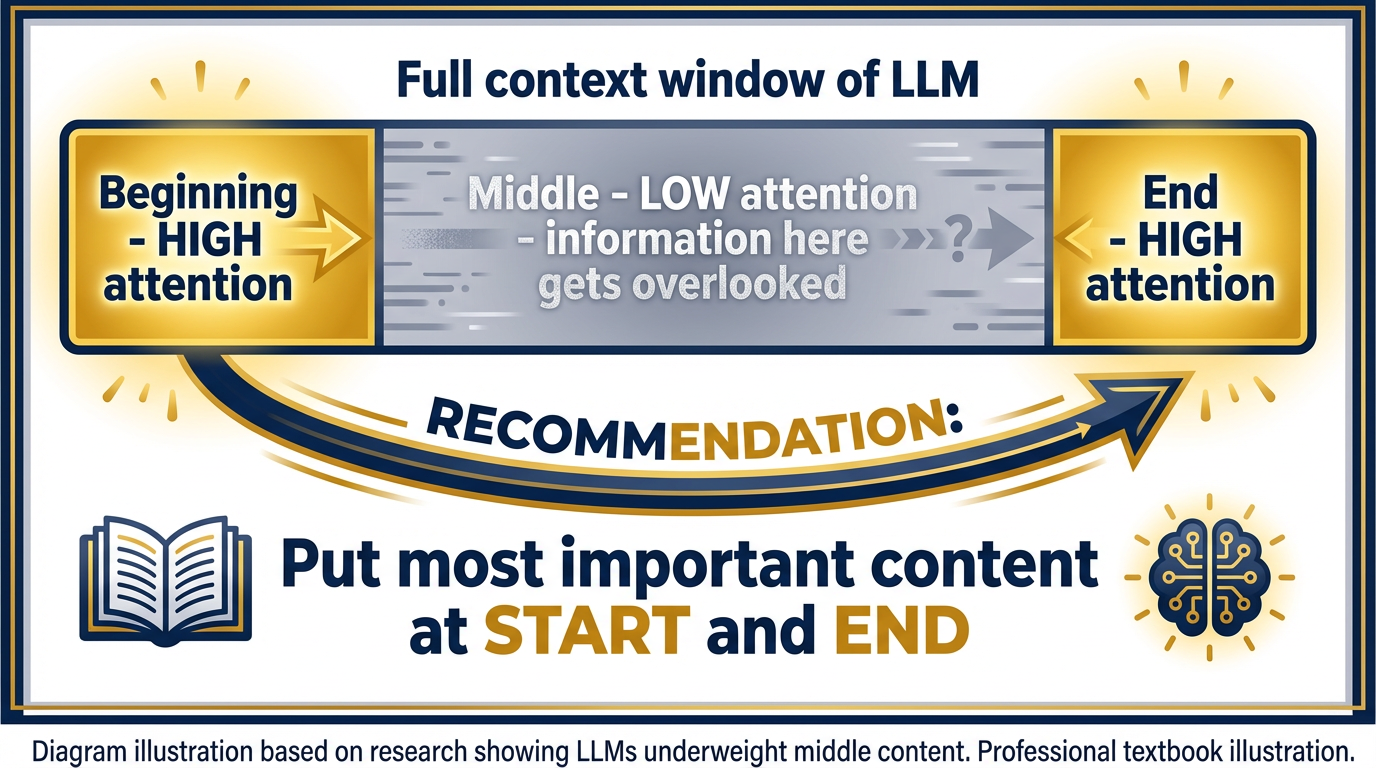
Figure 9:Failure Mode 2: Lost in the Middle. Research shows LLMs perform better when key information appears at the beginning or end of the context. Content buried in the middle is disproportionately likely to be missed — even within the window.
Failure Mode 2: Lost in the Middle
This is subtler, and more dangerous. Research has demonstrated that LLMs perform better at tasks when the relevant information appears at the beginning or end of the context window. Information buried in the middle of a very long context is disproportionately likely to be underweighted or missed — even if it’s technically within the window.
Imagine you’re doing a military land navigation exercise. You can see the start point clearly. You can see the end point clearly. But something in the middle of the terrain gets obscured by trees.
The practical implication for Lukos: when you’re asking a model to analyze a large document set, put your most important context first and your specific question last. If there’s a particular section you need the model to focus on, quote it directly in the prompt rather than relying on the model to find it in a 200-page document.
The Lukos shorthand: Where in the prompt the documents sit changes the answer.
71.7 Token Economics: Reading the Pricing Sheet
You don’t need to memorize this, but you should know how to read it.
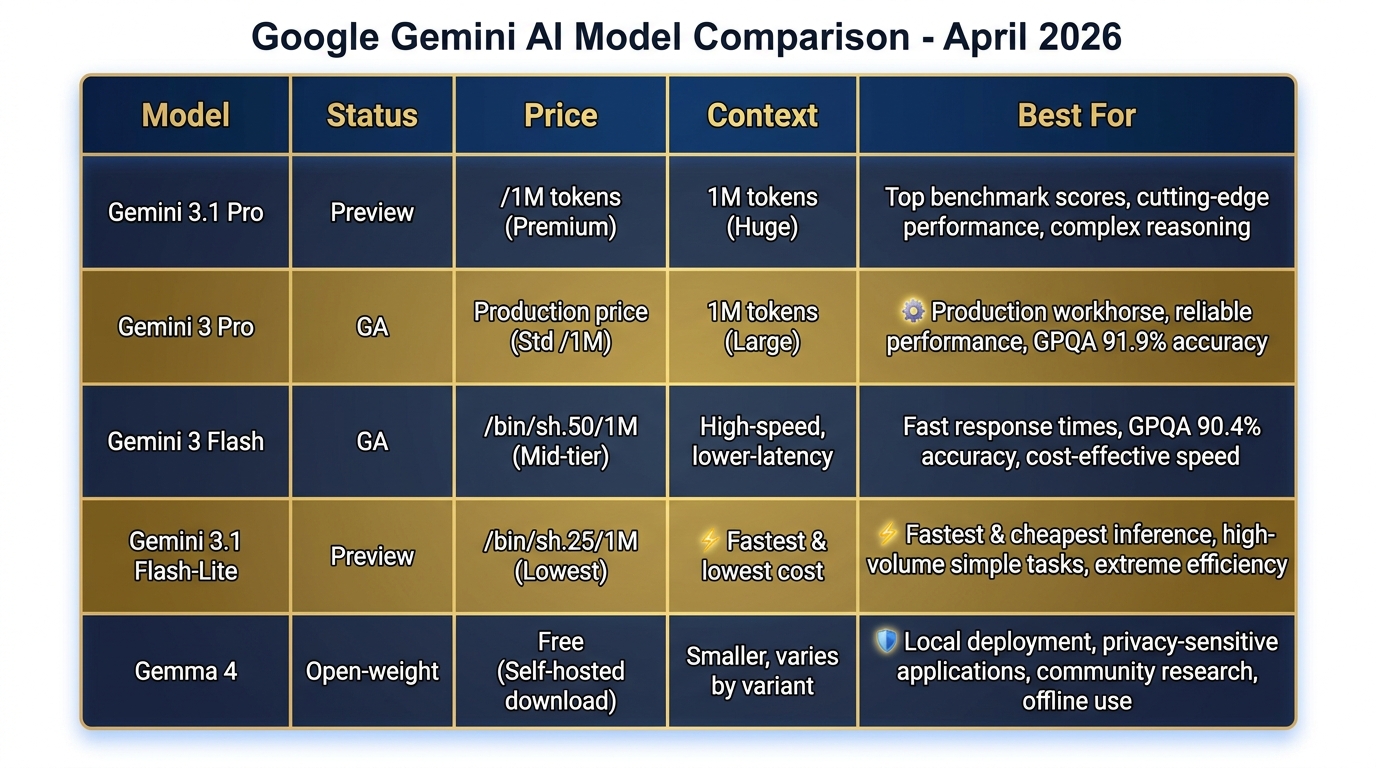
Figure 10:Current Gemini Model Lineup (April 2026). From Gemini 3.1 Pro at the frontier to Gemma 4 for local deployment — match the model to the mission, the budget, and the security requirements.
| Model | Input (per 1M tokens) | Output (per 1M tokens) | Context Window | Best For |
|---|---|---|---|---|
| Gemini 3.1 Pro (Preview) | ~$2.00 | ~$8.00 | 1M tokens | Complex analysis, top benchmarks |
| Gemini 3 Pro (GA) | ~$1.25 | ~$5.00 | 1M tokens | Production workflows, sustained use |
| Gemini 3 Flash (GA) | ~$0.50 | ~$1.50 | 1M tokens | Fast drafting, classification |
| Gemini 3.1 Flash-Lite (Preview) | ~$0.25 | ~$0.75 | 1M tokens | High-volume automation, cheapest |
| Gemma 4 (local) | $0 | $0 | 128K tokens | Edge/offline/air-gapped deployment |
Prices as of writing; always verify at aistudio.google.com and anthropic
The Federal-Contracting Angle
For Lukos program managers supporting acquisition: when you’re making the case for AI tooling to a client, the ROI calculation is straightforward. If a model costs 85-$150, the break-even on first-pass AI synthesis is reached after a handful of documents. At 45,000+ records, the economic argument doesn’t require sophisticated analysis.
The indirect rate implication: tools that reduce direct labor hours while maintaining output quality affect both the direct cost and the overhead structure. That’s an acquisition conversation worth having with your program’s contracting officer.
81.8 Context Engineering — The Second Pillar of Prompting
You now have a model with a million-token context window. The question is: what do you put in it?
This is context engineering — and it’s the difference between using AI as a search engine and using it as an analyst.
The Role-Context-Task Framework
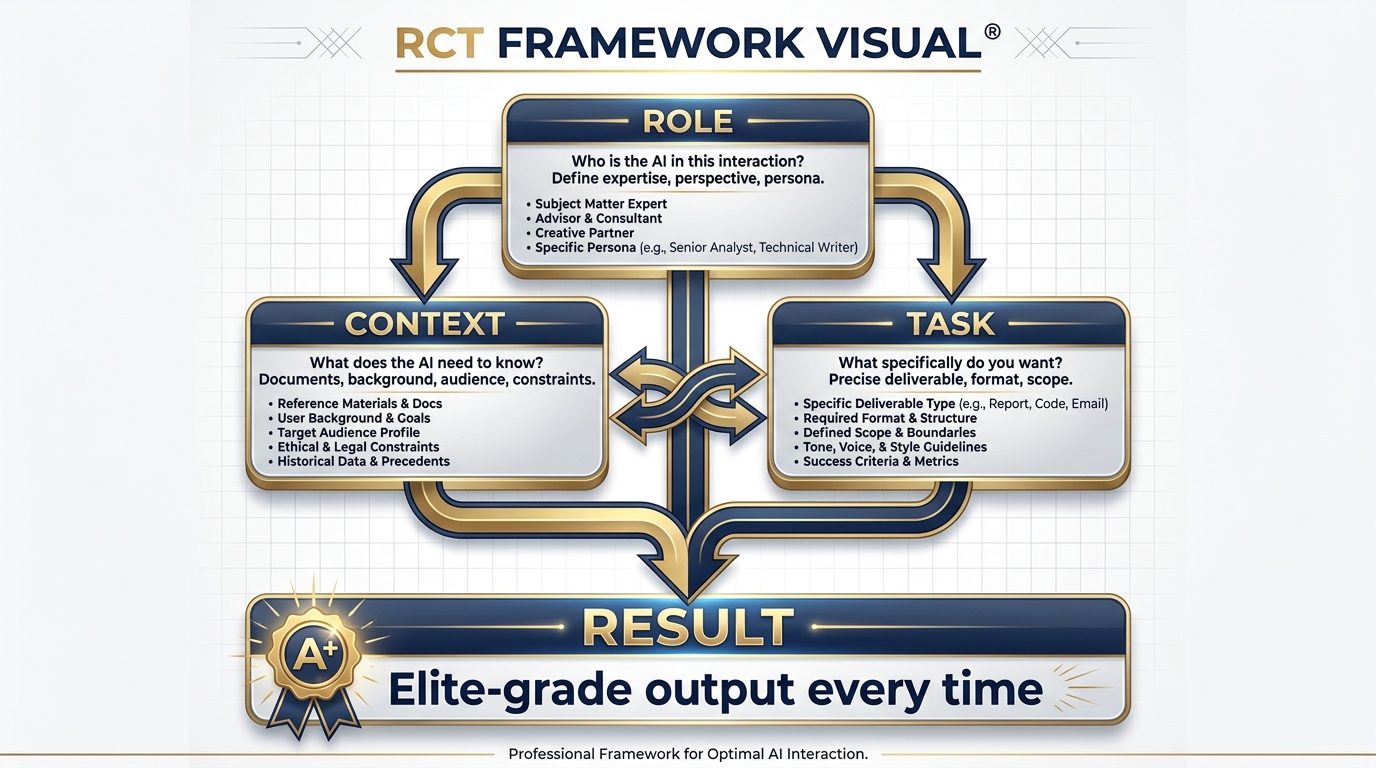
Figure 11:The Role-Context-Task Framework. Every effective prompt has three elements. Role primes who the model is. Context provides what it needs to know. Task specifies exactly what you want. All three together produce elite output.
Think of the model’s attention as a flashlight. The prompt you write determines where the flashlight is pointed. A vague prompt — “summarize this” — is like turning on a flashlight in a dark room and pointing it randomly. You’ll illuminate something, but probably not the most important thing.
Context engineering is about taking that flashlight and pointing it precisely at what matters.
Here’s the structure every effective prompt needs:
Role — Who is the model in this interaction? A generic assistant? A retired SF officer with 25 years in unconventional warfare? A USSOCOM J7 analyst specializing in lessons learned synthesis? The role primes the model’s entire approach. We’ll build full persona libraries in Chapter 2.
Context — What does the model need to know to do this task well? The relevant documents. The program background. The audience for the output. The constraints. The format. Context is not overhead — it’s the briefing that turns a generic response into a Lukos-quality one.
Task — What specifically do you want? Not “analyze this.” “Identify all recurring friction points related to interoperability, and for each one: describe the issue, cite the specific AAR or document where it appears, and suggest a follow-on action consistent with USSOCOM J7 guidance.”
The BEFORE and AFTER
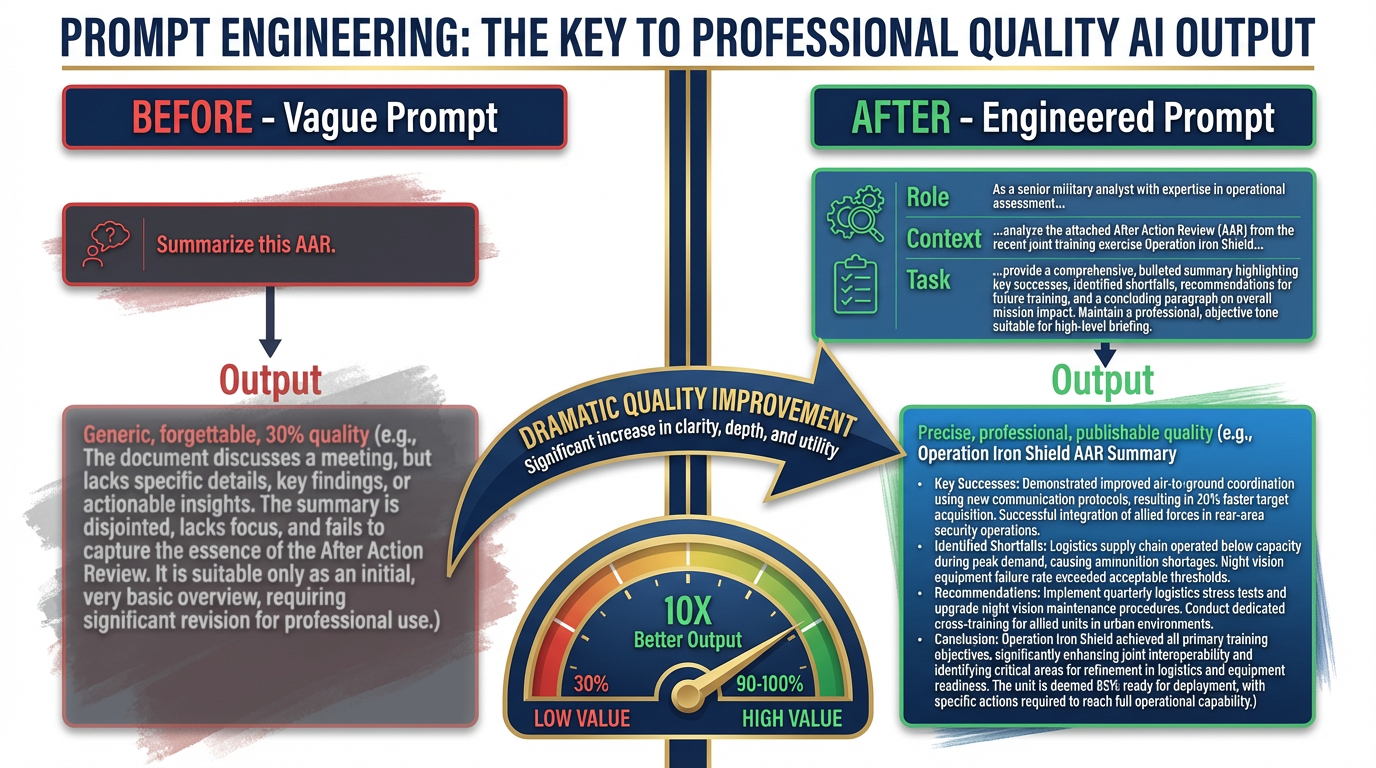
Figure 12:The Prompt Gap. The difference between “Summarize this AAR” and a fully engineered Role-Context-Task prompt is the difference between 30% and 100% of what the model can do. Same model. Completely different output.
Here is the most common Lukos failure mode with AI:
BEFORE (what most people actually type):
Summarize this AAR.
What you get: a generic executive summary that could have been written by anyone. Competent. Forgettable. Delivers about 30% of what the model is capable of.
AFTER (what you’ll write by the end of this chapter):
You are a senior Lessons Learned analyst with 15 years of experience supporting USSOCOM components. Your specialty is identifying systemic organizational patterns across exercise AARs.
The following document is an after-action review from [Exercise Name], conducted by [Unit], [Date]. The primary audience for your analysis is the J7 program manager and the component LL coordinator.
Your task: 1. Identify the top three recurring friction points described in this AAR. 2. For each friction point: state the issue in one sentence, cite the specific page or section of the AAR where it appears, assess whether this appears to be a first-time or recurring issue (note if it aligns with any commonly documented SOF LL themes), and recommend a specific follow-on action. 3. Close with a one-paragraph assessment of this unit’s overall learning posture based on the candor and specificity of the AAR content.
[Document text follows]
What you get: an output that reads like it was written by a subject-matter expert. One that a J7 program manager can share directly. One that took the model 30 seconds to produce and the analyst 3 minutes to review.
That’s the gap. Not the tool — the briefing.
Why Context Engineering Compounds
Here’s the strategic implication. Every prompt you write is an opportunity to build a template. Once you’ve written the perfect LL synthesis prompt — one that produces exactly the output your J7 counterpart wants — you don’t write it again. You save it. You turn it into a Gem (Chapter 2). You give it to your team. You build a library.
Context engineering is the compound interest of AI work. The effort you put in today — writing a precise, reusable prompt — pays dividends every time anyone on the Lukos team uses it.
This is why the appendices in this book exist. We’ve done a lot of that work for you. Appendix A is the Persona Library. Appendix B is the Gem Library. Appendix C is the Skill Library. They’re your starting templates. You refine them based on what works for your specific program.
Context Rot — The Hidden Performance Decay
Here is something almost no one tells you in an AI overview course, and it matters operationally: the model that answers your first question is not the same model that answers your twentieth.
Not literally — but functionally, yes.
As a conversation grows, the context window fills. Every exchange — your prompt, the model’s response, your follow-up, its next response — consumes tokens. By the time you’re 40 messages deep in a working session, the window is crowded. The model is now reasoning over a thick stack of prior conversation, trying to find what’s relevant to your current question while simultaneously tracking the thread of everything you’ve discussed.
This is context rot: the gradual degradation of output quality as the context window fills with accumulated conversation history.
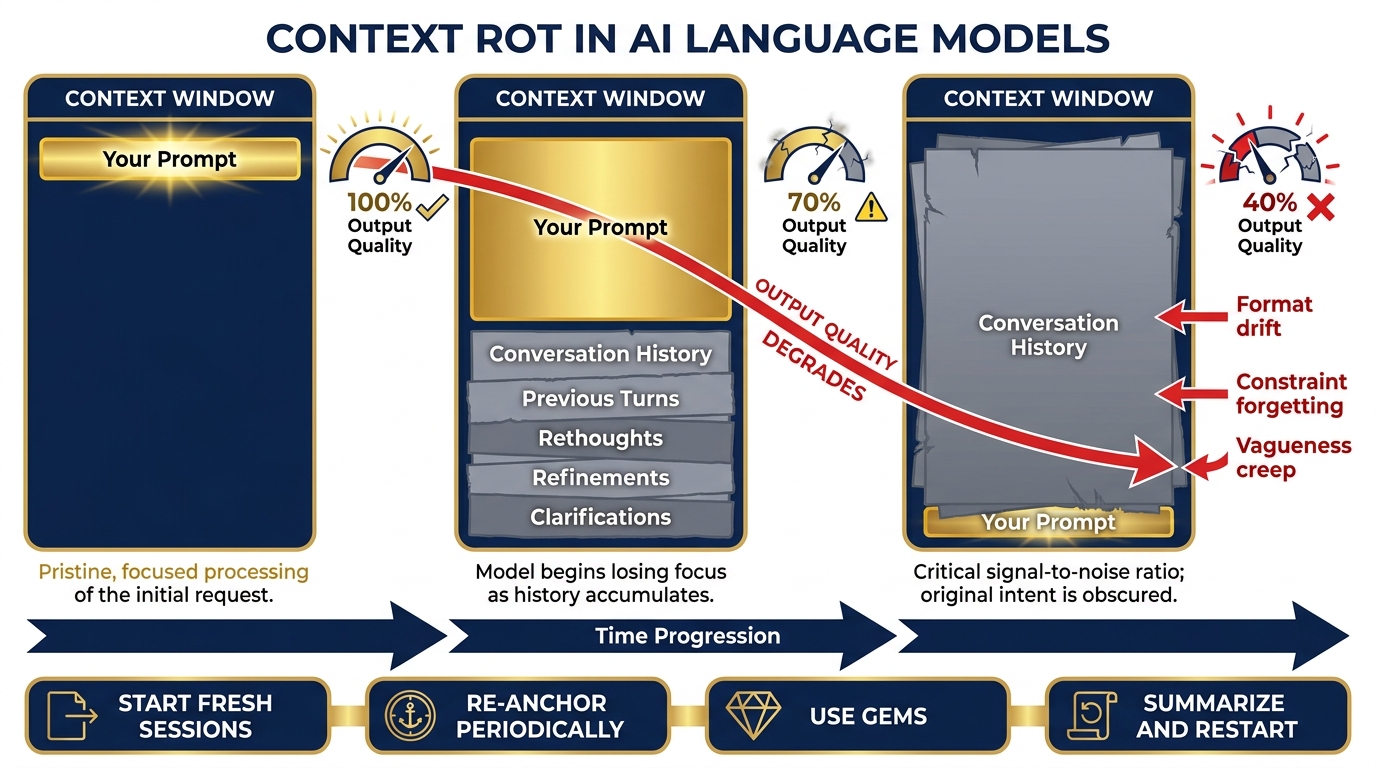
Figure 13:Context Rot. Early in a session, the model has clean signal: your prompt, your documents, clear headroom. As the session grows, accumulated conversation history competes with your current task for attention. Quality, precision, and instruction-following all degrade — not because the model got worse, but because the context got noisier.
The symptoms are subtle and insidious. The model starts giving slightly vaguer answers. It begins mixing up details from earlier in the conversation with your current request. It stops following formatting instructions it was following reliably an hour ago. It “forgets” constraints you set at the beginning of the session.
You might blame the model. The real culprit is the context.
Why it happens: LLMs process the entire context window on every response. As the window fills, the model’s “attention” gets distributed across a larger body of text. The signal-to-noise ratio drops. Your clean prompt at the bottom of the window is now competing with thirty prior exchanges for the model’s attention.
The operational pattern: Research has consistently shown that LLMs perform best at the beginning and end of their context — the “lost in the middle” problem. In a long session, your most recent prompt sits at the end (good), but it must compete with everything in the middle (bad). The system instruction you wrote at the very start — your persona, your constraints, your output format — is now buried at the top, far from the model’s focus.
What to do about it:
Tactic 1 — Start fresh sessions for distinct tasks. Don’t use one conversation to do five different things. The session where you drafted a briefing memo is polluted context for the session where you need to do a fresh OIL extraction. Open a new conversation. Your context window is clean again.
Tactic 2 — Re-anchor at regular intervals. In a long working session, every 10–15 exchanges, paste your core instructions again. “Reminder: you are a J7 Lessons Learned analyst. Output format is OIL. Do not include recommendations unless I ask.” It costs you thirty seconds. It buys back significant precision.
Tactic 3 — Use Gems and saved system instructions. A Gem (Chapter 2) pre-loads your persona and instructions before the conversation starts — as a system-level instruction, not as part of the conversation history. This gives your core context privileged position, separate from the accumulating conversation noise.
Tactic 4 — Summarize before you continue. If you must continue a long session, ask the model to summarize the key conclusions from the past exchange. Paste that summary into a fresh conversation as your starting context. You’ve distilled the signal and discarded the noise.
Tactic 5 — Watch for the symptoms. Format drift. Vagueness creep. Constraint forgetting. These are your early warning signs. When you notice them, don’t keep prompting harder — start fresh.
Context rot is not a flaw to be embarrassed about. It’s a physical characteristic of how language models work — like ammunition count in a weapon system. You don’t get frustrated that the magazine runs dry. You manage it, you plan around it, and you resupply when needed.
The discipline: Know your session’s operational range. Plan accordingly.
91.9 The Two Pillars Together
Here is the complete mental model, rendered as a diagram:
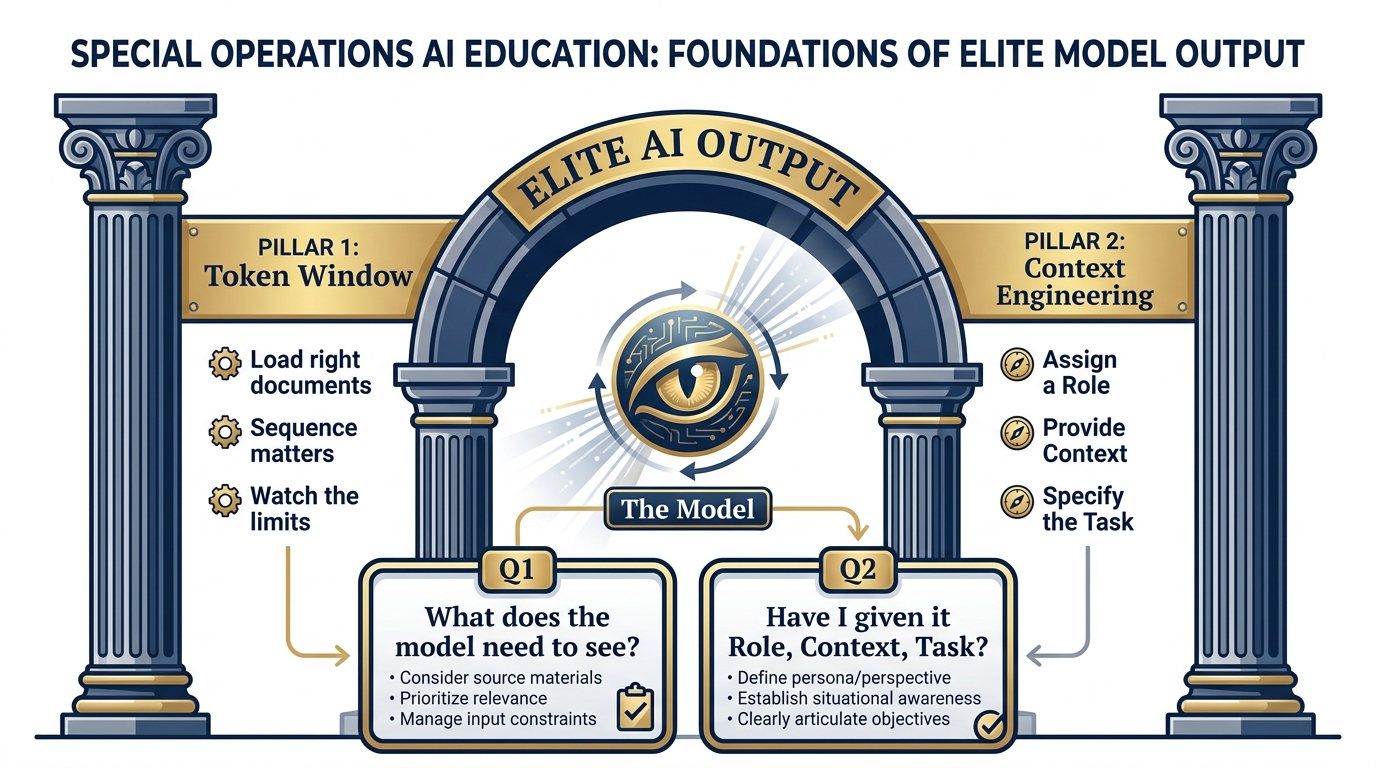
Figure 14:The Two Pillars of Prompting. Token Window determines what the model can see. Context Engineering determines what it’s told to do with what it sees. Master both and you’re prompting at a professional level.
The Two Questions to Ask Before Every AI Interaction
Before you type a single word into a prompt, ask yourself:
Question 1 (Token Window): “What does the model need to see to do this task? Do I have those documents ready? Am I loading them in the right order? Is there too much, or not enough?”
Question 2 (Context Engineering): “Have I given the model a Role, Context, and Task? Would a new analyst understand exactly what I need from this prompt? Or am I asking a vague question and expecting a precise answer?”
If you can answer both questions well before you submit, you’re prompting at a professional level. It becomes second nature within a week of practice.
The Lukos shorthand: See clearly, brief precisely.